
当前最佳位置
#42
跨越3个商店
峰值
#13跟踪天数
12评分
40 图表历史
12 天由我们记录
商店
今天在3中绘制图表
评分
40 在App Store上
价格
在我们的窗口中更改了6次
安装和收入
苹果没有发布 — 我们不猜测
历史
基于 Astrina 自己的每日快照构建 — 每天一个数据点。
图表位置 — 🇬🇧 付费榜单
12.09 17.09 21.09
显示数字
| 天 | 位置 |
|---|---|
| 12.09 | #26 |
| 14.09 | #39 |
| 16.09 | #34 |
| 17.09 | #32 |
| 19.09 | #36 |
| 20.09 | #13 |
| 21.09 | #42 |
评分数量
12.09 17.09 21.09
显示数字
| 天 | 评分 |
|---|---|
| 12.09 | 6 |
| 14.09 | 6 |
| 16.09 | 6 |
| 17.09 | 7 |
| 19.09 | 7 |
| 20.09 | 7 |
| 21.09 | 7 |
截图




关于此应用
Tidy up your photo library. Day by day.
Over 20,000 photos and no idea where to start? Duplicates, blurry shots, screenshots from 2019? Cully turns that into something you can actually do.
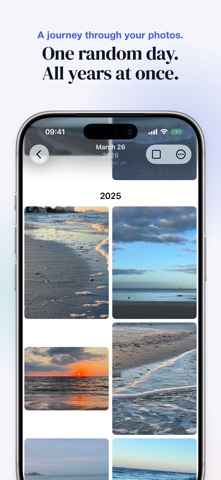
The idea is simple: choose a random date and browse your photos from that day — from all years at once. A different slice of your life, every session. Keep the best, delete the rest. Five minutes a day, and your library feels lighter.
HOW IT WORKS
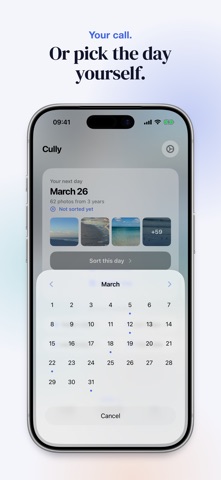
• Cully suggests a day. You instantly see all photos from that day, across all years. Not in the mood? Roll again or pick a date yourself.
• Scroll through your grid. Tap to select, pinch to zoom for a closer look.
• iOS confirms every deletion. Photos go to Recently Deleted and can be restored for 30 days.
FEATURES
• Privacy first: No account, no cloud, no tracking. Your photos never leave your device.
• Smart random: Prefers days you haven't sorted yet.
• Albums: Send a selection straight to an album instead of deleting it.
• Finish a day: You decide when a day is done. Sorted days show up in your stats and calendar.
• Share originals: Long-press any photo to share with full quality.
• Live Photos & videos: Play them right in the grid.
• Date picker: Pick a specific day — sorted days are marked.
• Your stats: See how many photos you've deleted and how much storage you've freed up.
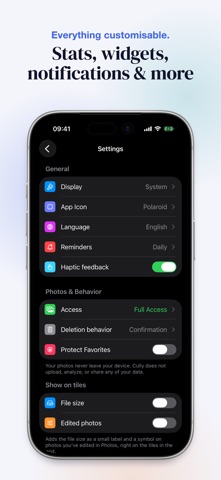
• Gentle reminders: Optional notifications to help you stay on track.
• Lock screen widget: Your deletion stats at a glance.
• iCloud sync: Stats and settings across all your devices.
• iPhone, iPad and Mac: Native apps for every screen, stats and settings in sync via iCloud.
• Quick actions: Launch directly from your home screen.
• Pinch to zoom: Zoom into any photo for a better decision.
WHY CULLY?
In photography, "to cull" means going through your shots and keeping only the best. We built Cully because we had the same problem: a photo library that kept growing, with no good way to clean it up.
No account. No cloud. No AI. No analytics. No subscription. Just open it and get started.
Made in Berlin.
Over 20,000 photos and no idea where to start? Duplicates, blurry shots, screenshots from 2019? Cully turns that into something you can actually do.
The idea is simple: choose a random date and browse your photos from that day — from all years at once. A different slice of your life, every session. Keep the best, delete the rest. Five minutes a day, and your library feels lighter.
HOW IT WORKS
• Cully suggests a day. You instantly see all photos from that day, across all years. Not in the mood? Roll again or pick a date yourself.
• Scroll through your grid. Tap to select, pinch to zoom for a closer look.
• iOS confirms every deletion. Photos go to Recently Deleted and can be restored for 30 days.
FEATURES
• Privacy first: No account, no cloud, no tracking. Your photos never leave your device.
• Smart random: Prefers days you haven't sorted yet.
• Albums: Send a selection straight to an album instead of deleting it.
• Finish a day: You decide when a day is done. Sorted days show up in your stats and calendar.
• Share originals: Long-press any photo to share with full quality.
• Live Photos & videos: Play them right in the grid.
• Date picker: Pick a specific day — sorted days are marked.
• Your stats: See how many photos you've deleted and how much storage you've freed up.
• Gentle reminders: Optional notifications to help you stay on track.
• Lock screen widget: Your deletion stats at a glance.
• iCloud sync: Stats and settings across all your devices.
• iPhone, iPad and Mac: Native apps for every screen, stats and settings in sync via iCloud.
• Quick actions: Launch directly from your home screen.
• Pinch to zoom: Zoom into any photo for a better decision.
WHY CULLY?
In photography, "to cull" means going through your shots and keeping only the best. We built Cully because we had the same problem: a photo library that kept growing, with no good way to clean it up.
No account. No cloud. No AI. No analytics. No subscription. Just open it and get started.
Made in Berlin.
详情
| 开发者 | YOU&VI UG |
|---|---|
| 类别 | 照片与视频 |
| 价格 | $3.99 |
| 年龄评级 | 4+ |
| 版本 | 2.0 |
| 大小 | 19.0 MB |
| 最低 iOS | 17.0 |
| 包 ID | com.cully.app |
| 发布 | 2026-03-18 |
| 最后更新 | 2026-09-13 |
| 语言 | 8 语言 |
此页面回答的问题
- Cully - Photo Cleaner 应用评论
- Cully - Photo Cleaner 应用评级
- Cully - Photo Cleaner 下载
- Cully - Photo Cleaner 应用商店排名
- Cully - Photo Cleaner 评论
- Cully - Photo Cleaner 评论和评分
- Cully - Photo Cleaner 是否合法
- Cully - Photo Cleaner 是否是骗局
- Cully - Photo Cleaner 真实用户评论
- Cully - Photo Cleaner 评分
- Cully - Photo Cleaner 投诉
- 人们对 Cully - Photo Cleaner 的看法
- Cully - Photo Cleaner 应用 评论
- Cully - Photo Cleaner 优缺点
- Cully - Photo Cleaner 经验
- 我应该信任 Cully - Photo Cleaner 吗
- Cully - Photo Cleaner 反馈
- Cully - Photo Cleaner 评论 2026
- Cully - Photo Cleaner 检查
- Cully - Photo Cleaner 安全检查
