
अब सबसे अच्छा स्थान
#42
3 स्टोरफ्रंट में
पीक
#13ट्रैक किए गए दिन
12रेटिंग
40 चार्ट इतिहास
12 दिन हमारे द्वारा रिकॉर्ड किए गए
स्टोरफ्रंट
आज 3 में चार्टिंग
रेटिंग
40 ऐप स्टोर पर
कीमत
हमारे विंडो में 6 बार बदला गया
इंस्टॉल और राजस्व
Apple कुछ भी प्रकाशित नहीं करता — हम अनुमान नहीं लगाते
वर्तमान में चार्टिंग
इतिहास
Astrina के अपने दैनिक स्नैपशॉट से निर्मित — प्रति दिन एक बिंदु।
चार्ट स्थिति — 🇬🇧 शीर्ष भुगतान
12.09 17.09 21.09
संख्याएँ दिखाएँ
| दिन | स्थिति |
|---|---|
| 12.09 | #26 |
| 14.09 | #39 |
| 16.09 | #34 |
| 17.09 | #32 |
| 19.09 | #36 |
| 20.09 | #13 |
| 21.09 | #42 |
रेटिंग की संख्या
12.09 17.09 21.09
संख्याएँ दिखाएँ
| दिन | रेटिंग |
|---|---|
| 12.09 | 6 |
| 14.09 | 6 |
| 16.09 | 6 |
| 17.09 | 7 |
| 19.09 | 7 |
| 20.09 | 7 |
| 21.09 | 7 |
स्क्रीनशॉट




इस ऐप के बारे में
Tidy up your photo library. Day by day.
Over 20,000 photos and no idea where to start? Duplicates, blurry shots, screenshots from 2019? Cully turns that into something you can actually do.
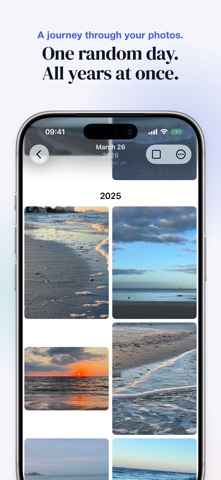
The idea is simple: choose a random date and browse your photos from that day — from all years at once. A different slice of your life, every session. Keep the best, delete the rest. Five minutes a day, and your library feels lighter.
HOW IT WORKS
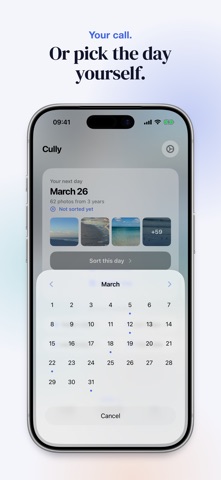
• Cully suggests a day. You instantly see all photos from that day, across all years. Not in the mood? Roll again or pick a date yourself.
• Scroll through your grid. Tap to select, pinch to zoom for a closer look.
• iOS confirms every deletion. Photos go to Recently Deleted and can be restored for 30 days.
FEATURES
• Privacy first: No account, no cloud, no tracking. Your photos never leave your device.
• Smart random: Prefers days you haven't sorted yet.
• Albums: Send a selection straight to an album instead of deleting it.
• Finish a day: You decide when a day is done. Sorted days show up in your stats and calendar.
• Share originals: Long-press any photo to share with full quality.
• Live Photos & videos: Play them right in the grid.
• Date picker: Pick a specific day — sorted days are marked.
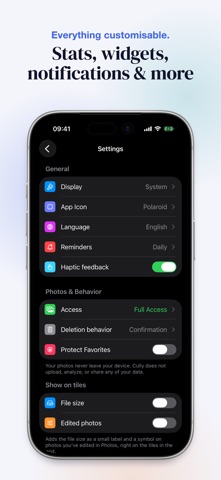
• Your stats: See how many photos you've deleted and how much storage you've freed up.
• Gentle reminders: Optional notifications to help you stay on track.
• Lock screen widget: Your deletion stats at a glance.
• iCloud sync: Stats and settings across all your devices.
• iPhone, iPad and Mac: Native apps for every screen, stats and settings in sync via iCloud.
• Quick actions: Launch directly from your home screen.
• Pinch to zoom: Zoom into any photo for a better decision.
WHY CULLY?
In photography, "to cull" means going through your shots and keeping only the best. We built Cully because we had the same problem: a photo library that kept growing, with no good way to clean it up.
No account. No cloud. No AI. No analytics. No subscription. Just open it and get started.
Made in Berlin.
Over 20,000 photos and no idea where to start? Duplicates, blurry shots, screenshots from 2019? Cully turns that into something you can actually do.
The idea is simple: choose a random date and browse your photos from that day — from all years at once. A different slice of your life, every session. Keep the best, delete the rest. Five minutes a day, and your library feels lighter.
HOW IT WORKS
• Cully suggests a day. You instantly see all photos from that day, across all years. Not in the mood? Roll again or pick a date yourself.
• Scroll through your grid. Tap to select, pinch to zoom for a closer look.
• iOS confirms every deletion. Photos go to Recently Deleted and can be restored for 30 days.
FEATURES
• Privacy first: No account, no cloud, no tracking. Your photos never leave your device.
• Smart random: Prefers days you haven't sorted yet.
• Albums: Send a selection straight to an album instead of deleting it.
• Finish a day: You decide when a day is done. Sorted days show up in your stats and calendar.
• Share originals: Long-press any photo to share with full quality.
• Live Photos & videos: Play them right in the grid.
• Date picker: Pick a specific day — sorted days are marked.
• Your stats: See how many photos you've deleted and how much storage you've freed up.
• Gentle reminders: Optional notifications to help you stay on track.
• Lock screen widget: Your deletion stats at a glance.
• iCloud sync: Stats and settings across all your devices.
• iPhone, iPad and Mac: Native apps for every screen, stats and settings in sync via iCloud.
• Quick actions: Launch directly from your home screen.
• Pinch to zoom: Zoom into any photo for a better decision.
WHY CULLY?
In photography, "to cull" means going through your shots and keeping only the best. We built Cully because we had the same problem: a photo library that kept growing, with no good way to clean it up.
No account. No cloud. No AI. No analytics. No subscription. Just open it and get started.
Made in Berlin.
विवरण
| डेवलपर | YOU&VI UG |
|---|---|
| श्रेणी | फोटो और वीडियो |
| कीमत | $3.99 |
| आयु रेटिंग | 4+ |
| संस्करण | 2.0 |
| आकार | 19.0 MB |
| न्यूनतम iOS | 17.0 |
| बंडल आईडी | com.cully.app |
| रिलीज़ किया गया | 2026-03-18 |
| अंतिम अपडेट | 2026-09-13 |
| भाषाएँ | 8 भाषाएँ |
यह पृष्ठ किसका उत्तर देता है
- Cully - Photo Cleaner ऐप समीक्षाएँ
- Cully - Photo Cleaner ऐप रेटिंग
- Cully - Photo Cleaner डाउनलोड
- Cully - Photo Cleaner ऐप स्टोर रैंक
- Cully - Photo Cleaner समीक्षाएँ
- Cully - Photo Cleaner समीक्षाएँ और रेटिंग्स
- क्या Cully - Photo Cleaner वैध है
- क्या Cully - Photo Cleaner एक धोखा है
- Cully - Photo Cleaner असली उपयोगकर्ता समीक्षाएँ
- Cully - Photo Cleaner रेटिंग
- Cully - Photo Cleaner शिकायतें
- लोगों का क्या कहना है Cully - Photo Cleaner के बारे में
- Cully - Photo Cleaner के फायदे और नुकसान
- Cully - Photo Cleaner अनुभव
- क्या मुझे Cully - Photo Cleaner पर भरोसा करना चाहिए
- Cully - Photo Cleaner फीडबैक
- Cully - Photo Cleaner समीक्षा 2026
- Cully - Photo Cleaner जांच
- Cully - Photo Cleaner सुरक्षा जांच
- Cully - Photo Cleaner के बारे में समीक्षाएँ
