
当前最佳位置
#58
跨越1个商店
峰值
#52跟踪天数
4评分
563 图表历史
4 天由我们记录
商店
今天在1中绘制图表
评分
563 在App Store上
价格
在我们的窗口中更改了3次
安装和收入
苹果没有发布 — 我们不猜测
当前上榜
历史
基于 Astrina 自己的每日快照构建 — 每天一个数据点。
图表位置 — 🇺🇸 免费榜单
20.09 21.09 23.09
显示数字
| 天 | 位置 |
|---|---|
| 20.09 | #56 |
| 21.09 | #56 |
| 22.09 | #52 |
| 23.09 | #58 |
评分数量
20.09 21.09 23.09
显示数字
| 天 | 评分 |
|---|---|
| 20.09 | 555 |
| 21.09 | 556 |
| 22.09 | 558 |
| 23.09 | 563 |
截图

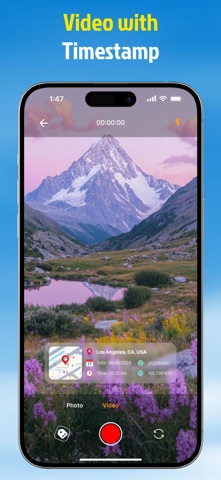


关于此应用
Mapvia helps users capture photos and videos with location details and turn them into visual memories. The app combines GPS camera tools, map based tagging, earth view discovery, and a personal library so every moment can be saved with context and style.
▶ Features That Bring Memories to Life
• Shoot With GPS Details
Take photos and videos with real time location information shown on the screen. Add place name, date, time, and coordinates to make each memory more meaningful.
• See Your Memories on the Map
View your memories on a map and revisit places you have been. Browse saved locations through a visual map experience and explore your personal footprint over time.
• Explore Earth in Multiple Views
Discover the world from a global perspective. Explore places in 2D, 3D, satellite, terrain, and night map styles for a richer location experience.
• Import Photos and Add Places
Import existing photos from your device and add location tags afterward. This makes it easy to organize old memories even if they were not captured in the app.
• Customize Your Location Tags
Create your own location tag with flexible settings. Choose map view, date and time type, date and time format, background color, and text color to match your style.
• Choose Current or Manual Location
Use your current location instantly or add a location manually. This gives you more control when you want to attach a place to a photo or video.
• Keep Photos and Videos in One Library
Manage all saved content in one library. Switch between photo and video collections, review past memories, and quickly create new ones.
▶ Why Use Mapvia:
Mapvia is designed for people who want more than a basic camera. It helps preserve where and when a moment happened, making every photo or video easier to remember, organize, and share.
▶ Perfect for Travel, Family, and Daily Life
• Travel memories
• Daily moments
• Location based storytelling
• Personal memory collection
• Creative photo tagging
Mapvia - Memory Map is built for people who want to keep more than just an image. It helps preserve the full story behind every moment by combining visuals, location, time, and map based context in one simple experience. Whether you are documenting daily life, travel memories, or meaningful places, Memory Map turns ordinary captures into memories you can revisit with greater clarity and emotion.
Terms of Use: https://www.apple.com/legal/internet-services/itunes/dev/stdeula/
▶ Features That Bring Memories to Life
• Shoot With GPS Details
Take photos and videos with real time location information shown on the screen. Add place name, date, time, and coordinates to make each memory more meaningful.
• See Your Memories on the Map
View your memories on a map and revisit places you have been. Browse saved locations through a visual map experience and explore your personal footprint over time.
• Explore Earth in Multiple Views
Discover the world from a global perspective. Explore places in 2D, 3D, satellite, terrain, and night map styles for a richer location experience.
• Import Photos and Add Places
Import existing photos from your device and add location tags afterward. This makes it easy to organize old memories even if they were not captured in the app.
• Customize Your Location Tags
Create your own location tag with flexible settings. Choose map view, date and time type, date and time format, background color, and text color to match your style.
• Choose Current or Manual Location
Use your current location instantly or add a location manually. This gives you more control when you want to attach a place to a photo or video.
• Keep Photos and Videos in One Library
Manage all saved content in one library. Switch between photo and video collections, review past memories, and quickly create new ones.
▶ Why Use Mapvia:
Mapvia is designed for people who want more than a basic camera. It helps preserve where and when a moment happened, making every photo or video easier to remember, organize, and share.
▶ Perfect for Travel, Family, and Daily Life
• Travel memories
• Daily moments
• Location based storytelling
• Personal memory collection
• Creative photo tagging
Mapvia - Memory Map is built for people who want to keep more than just an image. It helps preserve the full story behind every moment by combining visuals, location, time, and map based context in one simple experience. Whether you are documenting daily life, travel memories, or meaningful places, Memory Map turns ordinary captures into memories you can revisit with greater clarity and emotion.
Terms of Use: https://www.apple.com/legal/internet-services/itunes/dev/stdeula/
详情
| 开发者 | nguyen hiep |
|---|---|
| 类别 | 照片与视频 |
| 价格 | 免费 |
| 年龄评级 | 4+ |
| 版本 | 1.2.7 |
| 大小 | 196 MB |
| 最低 iOS | 16.0 |
| 包 ID | com.app.gpscamera.location |
| 发布 | 2025-04-28 |
| 最后更新 | 2026-09-11 |
| 语言 | 1 语言 |
此页面回答的问题
- Mapvia: Auto Timestamp GPS Cam 应用评论
- Mapvia: Auto Timestamp GPS Cam 应用评级
- Mapvia: Auto Timestamp GPS Cam 下载
- Mapvia: Auto Timestamp GPS Cam 应用商店排名
- Mapvia: Auto Timestamp GPS Cam 评论
- Mapvia: Auto Timestamp GPS Cam 评论和评分
- Mapvia: Auto Timestamp GPS Cam 是否合法
- Mapvia: Auto Timestamp GPS Cam 是否是骗局
- Mapvia: Auto Timestamp GPS Cam 真实用户评论
- Mapvia: Auto Timestamp GPS Cam 评分
- Mapvia: Auto Timestamp GPS Cam 投诉
- 人们对 Mapvia: Auto Timestamp GPS Cam 的看法
- Mapvia: Auto Timestamp GPS Cam 应用 评论
- Mapvia: Auto Timestamp GPS Cam 优缺点
- Mapvia: Auto Timestamp GPS Cam 经验
- 我应该信任 Mapvia: Auto Timestamp GPS Cam 吗
- Mapvia: Auto Timestamp GPS Cam 反馈
- Mapvia: Auto Timestamp GPS Cam 评论 2026
- Mapvia: Auto Timestamp GPS Cam 检查
- Mapvia: Auto Timestamp GPS Cam 安全检查
