
Mapvia: Auto Timestamp GPS Cam
nguyen hiep Photo et Vidéo 4+ Gratuit
4.31 · 563 évaluations
Meilleure position maintenant
#58
à travers 1 vitrines
Pic
#52Jours suivis
4Évaluations
563 Historique des graphiques
4 jours enregistrés par nous
Vitrines
graphique en 1 aujourd'hui
Évaluations
563 sur l'App Store
Prix
changé 3 fois dans notre fenêtre
Installations et revenus
Apple ne publie rien — nous ne devinons pas
Actuellement dans le classement
Historique
Construit à partir des propres instantanés quotidiens d'Astrina — un point par jour.
Position dans le graphique — 🇺🇸 Meilleurs gratuits
20.09 21.09 23.09
Afficher les chiffres
| Jour | Position |
|---|---|
| 20.09 | #56 |
| 21.09 | #56 |
| 22.09 | #52 |
| 23.09 | #58 |
Nombre d'évaluations
20.09 21.09 23.09
Afficher les chiffres
| Jour | Évaluations |
|---|---|
| 20.09 | 555 |
| 21.09 | 556 |
| 22.09 | 558 |
| 23.09 | 563 |
Captures d'écran

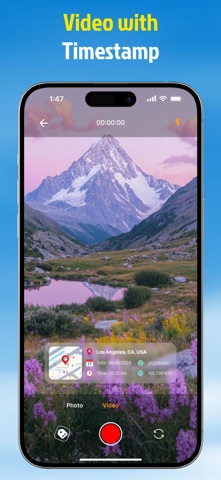


À propos de cette application
Mapvia helps users capture photos and videos with location details and turn them into visual memories. The app combines GPS camera tools, map based tagging, earth view discovery, and a personal library so every moment can be saved with context and style.
▶ Features That Bring Memories to Life
• Shoot With GPS Details
Take photos and videos with real time location information shown on the screen. Add place name, date, time, and coordinates to make each memory more meaningful.
• See Your Memories on the Map
View your memories on a map and revisit places you have been. Browse saved locations through a visual map experience and explore your personal footprint over time.
• Explore Earth in Multiple Views
Discover the world from a global perspective. Explore places in 2D, 3D, satellite, terrain, and night map styles for a richer location experience.
• Import Photos and Add Places
Import existing photos from your device and add location tags afterward. This makes it easy to organize old memories even if they were not captured in the app.
• Customize Your Location Tags
Create your own location tag with flexible settings. Choose map view, date and time type, date and time format, background color, and text color to match your style.
• Choose Current or Manual Location
Use your current location instantly or add a location manually. This gives you more control when you want to attach a place to a photo or video.
• Keep Photos and Videos in One Library
Manage all saved content in one library. Switch between photo and video collections, review past memories, and quickly create new ones.
▶ Why Use Mapvia:
Mapvia is designed for people who want more than a basic camera. It helps preserve where and when a moment happened, making every photo or video easier to remember, organize, and share.
▶ Perfect for Travel, Family, and Daily Life
• Travel memories
• Daily moments
• Location based storytelling
• Personal memory collection
• Creative photo tagging
Mapvia - Memory Map is built for people who want to keep more than just an image. It helps preserve the full story behind every moment by combining visuals, location, time, and map based context in one simple experience. Whether you are documenting daily life, travel memories, or meaningful places, Memory Map turns ordinary captures into memories you can revisit with greater clarity and emotion.
Terms of Use: https://www.apple.com/legal/internet-services/itunes/dev/stdeula/
▶ Features That Bring Memories to Life
• Shoot With GPS Details
Take photos and videos with real time location information shown on the screen. Add place name, date, time, and coordinates to make each memory more meaningful.
• See Your Memories on the Map
View your memories on a map and revisit places you have been. Browse saved locations through a visual map experience and explore your personal footprint over time.
• Explore Earth in Multiple Views
Discover the world from a global perspective. Explore places in 2D, 3D, satellite, terrain, and night map styles for a richer location experience.
• Import Photos and Add Places
Import existing photos from your device and add location tags afterward. This makes it easy to organize old memories even if they were not captured in the app.
• Customize Your Location Tags
Create your own location tag with flexible settings. Choose map view, date and time type, date and time format, background color, and text color to match your style.
• Choose Current or Manual Location
Use your current location instantly or add a location manually. This gives you more control when you want to attach a place to a photo or video.
• Keep Photos and Videos in One Library
Manage all saved content in one library. Switch between photo and video collections, review past memories, and quickly create new ones.
▶ Why Use Mapvia:
Mapvia is designed for people who want more than a basic camera. It helps preserve where and when a moment happened, making every photo or video easier to remember, organize, and share.
▶ Perfect for Travel, Family, and Daily Life
• Travel memories
• Daily moments
• Location based storytelling
• Personal memory collection
• Creative photo tagging
Mapvia - Memory Map is built for people who want to keep more than just an image. It helps preserve the full story behind every moment by combining visuals, location, time, and map based context in one simple experience. Whether you are documenting daily life, travel memories, or meaningful places, Memory Map turns ordinary captures into memories you can revisit with greater clarity and emotion.
Terms of Use: https://www.apple.com/legal/internet-services/itunes/dev/stdeula/
Détails
| Développeur | nguyen hiep |
|---|---|
| Catégorie | Photo et Vidéo |
| Prix | Gratuit |
| Classification par âge | 4+ |
| Version | 1.2.7 |
| Taille | 196 MB |
| iOS minimum | 16.0 |
| ID de bundle | com.app.gpscamera.location |
| Publié | 2025-04-28 |
| Dernière mise à jour | 2026-09-11 |
| Langues | 1 langues |
Ce que cette page répond
- Mapvia: Auto Timestamp GPS Cam critiques d'application
- Mapvia: Auto Timestamp GPS Cam évaluation d'application
- Mapvia: Auto Timestamp GPS Cam téléchargement
- Mapvia: Auto Timestamp GPS Cam classement de l'App Store
- avis sur Mapvia: Auto Timestamp GPS Cam
- avis et évaluations de Mapvia: Auto Timestamp GPS Cam
- est Mapvia: Auto Timestamp GPS Cam légitime
- est Mapvia: Auto Timestamp GPS Cam une arnaque
- avis d'utilisateurs réels de Mapvia: Auto Timestamp GPS Cam
- évaluation de Mapvia: Auto Timestamp GPS Cam
- plaintes concernant Mapvia: Auto Timestamp GPS Cam
- ce que les gens disent de Mapvia: Auto Timestamp GPS Cam
- avis Mapvia: Auto Timestamp GPS Cam application
- avantages et inconvénients de Mapvia: Auto Timestamp GPS Cam
- expérience de Mapvia: Auto Timestamp GPS Cam
- devrais-je faire confiance à Mapvia: Auto Timestamp GPS Cam
- retour d'expérience de Mapvia: Auto Timestamp GPS Cam
- avis sur Mapvia: Auto Timestamp GPS Cam 2026
- vérification de Mapvia: Auto Timestamp GPS Cam
- vérification de sécurité de Mapvia: Auto Timestamp GPS Cam
