
当前最佳位置
#7
跨越8个商店
峰值
#2跟踪天数
58评分
6 图表历史
58 天由我们记录
商店
今天在8中绘制图表
评分
6 在App Store上
价格
在我们的窗口中更改了20次
安装和收入
苹果没有发布 — 我们不猜测
当前上榜
历史
基于 Astrina 自己的每日快照构建 — 每天一个数据点。
图表位置 — 🇫🇷 付费榜单
23.07 28.08 24.09
显示数字
| 天 | 位置 |
|---|---|
| 23.07 | #38 |
| 24.07 | #49 |
| 25.07 | #9 |
| 31.07 | #9 |
| 01.08 | #10 |
| 02.08 | #25 |
| 03.08 | #5 |
| 04.08 | #25 |
| 05.08 | #48 |
| 11.08 | #7 |
| 12.08 | #4 |
| 13.08 | #21 |
| 14.08 | #36 |
| 15.08 | #47 |
| 19.08 | #3 |
| 20.08 | #14 |
| 21.08 | #30 |
| 22.08 | #40 |
| 25.08 | #15 |
| 26.08 | #27 |
| 27.08 | #15 |
| 28.08 | #36 |
| 29.08 | #50 |
| 03.09 | #21 |
| 04.09 | #12 |
| 05.09 | #3 |
| 06.09 | #2 |
| 07.09 | #33 |
| 08.09 | #45 |
| 09.09 | #15 |
| 10.09 | #16 |
| 11.09 | #37 |
| 12.09 | #16 |
| 13.09 | #26 |
| 14.09 | #35 |
| 15.09 | #14 |
| 16.09 | #37 |
| 17.09 | #57 |
| 19.09 | #10 |
| 20.09 | #36 |
| 21.09 | #49 |
| 22.09 | #17 |
| 23.09 | #6 |
| 24.09 | #7 |
评分数量
02.09 13.09 24.09
显示数字
| 天 | 评分 |
|---|---|
| 02.09 | 17 |
| 03.09 | 17 |
| 04.09 | 17 |
| 05.09 | 17 |
| 06.09 | 17 |
| 08.09 | 17 |
| 09.09 | 17 |
| 10.09 | 17 |
| 11.09 | 17 |
| 12.09 | 17 |
| 13.09 | 17 |
| 14.09 | 17 |
| 15.09 | 17 |
| 16.09 | 17 |
| 17.09 | 17 |
| 18.09 | 17 |
| 19.09 | 17 |
| 20.09 | 17 |
| 22.09 | 17 |
| 23.09 | 17 |
| 24.09 | 17 |
截图
关于此应用
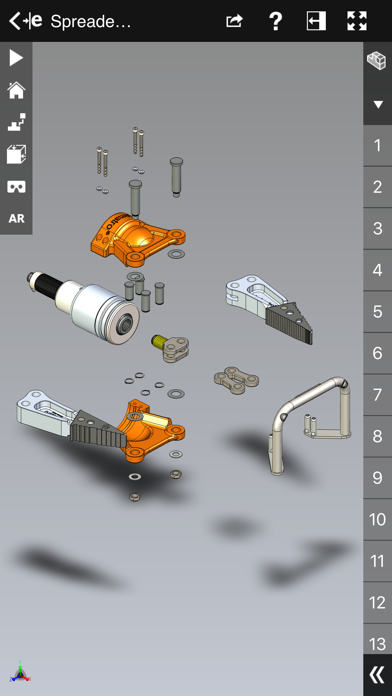
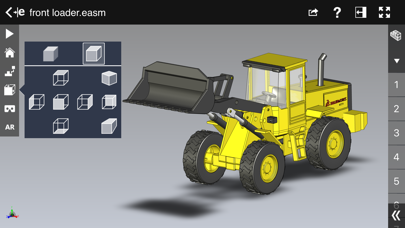
eDrawings® is the only CAD viewer on iPad, iPad mini, iPhone and iPod Touch that allows you to view native eDrawings files as well as native SolidWorks® parts, assemblies and drawings files. In addition, eDrawings allows convenient viewing of DWG and DXF files.
eDrawings includes Augmented Reality (AR). This allows you to view your 3D models in 1:1 scale into the real world. By simply activating the device’s camera, you can bring your virtual 3D designs in a real context and see them in situ, sitting on your desk or on your conference room table or even in the palm of your hand, through your iPad, Pad mini, iPhone or iPod Touch’s screen. Move around the room and see your design from any perspective.
eDrawings is the email-enabled communication tool that dramatically eases sharing of product design information. You can load and send files via email to collaborate more effectively with everyone involved in product development, including people who are not regular CAD software users to interpret and understand 2D and 3D designs.
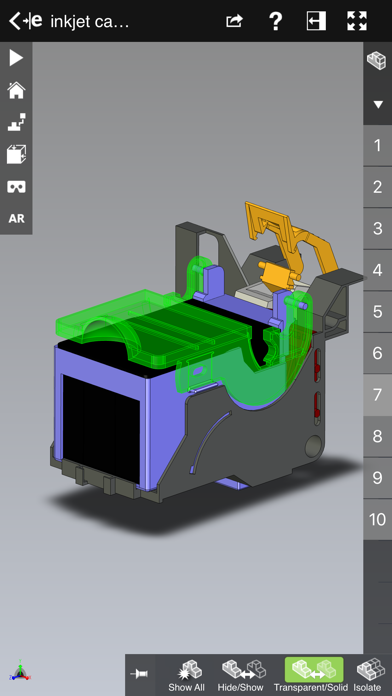
Multi-touch gestures let you pan, zoom, and rotate models easily. eDrawings also supports configurations, drawing sheets, and exploded views for eDrawings files published from SolidWorks® and all other supported CAD software.
Features:
* Intuitive and easy-to-use user interface
* Visualize your 3D models in real context with Augmented Reality (AR)
* Open 3D (EASM, EPRT, SLDASM, SLDPRT, IGES, IGS, JT, STEP, STP, IFC), 2D (EDRW, SLDDRW, DWG, DXF) and associated files from any source: email attachments, cloud storage services (Dropbox™, SkyDrive®, Google Drive, YouSendIt®, and others), web and FTP sites, networks, and iTunes® File Sharing.
* Zoom, pan and rotate your 2D or 3D CAD data using multi-touch
* Animate 3D standard views as well as 2D drawing views.
* Browse your assembly components tree, configurations and drawing sheets
* View your designs in full screen and double tap to fit it on screen
* Adapt the scale of your 3D model in AR mode
* Freeze the background in AR mode with viewpoint lock to prolong AR experience without holding up your device.
* Sample files included
For more information, visit:
http://www.edrawingsviewer.com
eDrawings includes Augmented Reality (AR). This allows you to view your 3D models in 1:1 scale into the real world. By simply activating the device’s camera, you can bring your virtual 3D designs in a real context and see them in situ, sitting on your desk or on your conference room table or even in the palm of your hand, through your iPad, Pad mini, iPhone or iPod Touch’s screen. Move around the room and see your design from any perspective.
eDrawings is the email-enabled communication tool that dramatically eases sharing of product design information. You can load and send files via email to collaborate more effectively with everyone involved in product development, including people who are not regular CAD software users to interpret and understand 2D and 3D designs.
Multi-touch gestures let you pan, zoom, and rotate models easily. eDrawings also supports configurations, drawing sheets, and exploded views for eDrawings files published from SolidWorks® and all other supported CAD software.
Features:
* Intuitive and easy-to-use user interface
* Visualize your 3D models in real context with Augmented Reality (AR)
* Open 3D (EASM, EPRT, SLDASM, SLDPRT, IGES, IGS, JT, STEP, STP, IFC), 2D (EDRW, SLDDRW, DWG, DXF) and associated files from any source: email attachments, cloud storage services (Dropbox™, SkyDrive®, Google Drive, YouSendIt®, and others), web and FTP sites, networks, and iTunes® File Sharing.
* Zoom, pan and rotate your 2D or 3D CAD data using multi-touch
* Animate 3D standard views as well as 2D drawing views.
* Browse your assembly components tree, configurations and drawing sheets
* View your designs in full screen and double tap to fit it on screen
* Adapt the scale of your 3D model in AR mode
* Freeze the background in AR mode with viewpoint lock to prolong AR experience without holding up your device.
* Sample files included
For more information, visit:
http://www.edrawingsviewer.com
详情
| 开发者 | Dassault Systemes SolidWorks Corporation |
|---|---|
| 类别 | 生产力 |
| 价格 | 1,99 € |
| 年龄评级 | 4+ |
| 版本 | 34.2.0057 |
| 大小 | 185 MB |
| 最低 iOS | 16.0 |
| 包 ID | com.solidworks.edrawings |
| 发布 | 2012-05-01 |
| 最后更新 | 2026-04-16 |
| 语言 | 1 语言 |
此页面回答的问题
- eDrawings 应用评论
- eDrawings 应用评级
- eDrawings 下载
- eDrawings 应用商店排名
- eDrawings 评论
- eDrawings 评论和评分
- eDrawings 是否合法
- eDrawings 是否是骗局
- eDrawings 真实用户评论
- eDrawings 评分
- eDrawings 投诉
- 人们对 eDrawings 的看法
- eDrawings 应用 评论
- eDrawings 优缺点
- eDrawings 经验
- 我应该信任 eDrawings 吗
- eDrawings 反馈
- eDrawings 评论 2026
- eDrawings 检查
- eDrawings 安全检查
