
eDrawings
Dassault Systemes SolidWorks Corporation Produktivität 4+ 1,99 €
3.00 · 6 Bewertungen
Beste Position jetzt
#7
über 8 Verkaufsstellen
Höhepunkt
#2Verfolgte Tage
58Bewertungen
6 Diagrammhistorie
58 Tage von uns aufgezeichnet
Läden
Diagramm in 8 heute
Bewertungen
6 im App Store
Preis
hat 20 Mal in unserem Fenster geändert
Installationen und Einnahmen
Apple veröffentlicht keine — wir raten nicht
Aktuell in den Charts
Verlauf
Basierend auf Astrinas eigenen täglichen Momentaufnahmen — ein Punkt pro Tag.
Chartposition — 🇫🇷 Top Bezahlt
23.07 28.08 24.09
Zeige die Zahlen
| Tag | Position |
|---|---|
| 23.07 | #38 |
| 24.07 | #49 |
| 25.07 | #9 |
| 31.07 | #9 |
| 01.08 | #10 |
| 02.08 | #25 |
| 03.08 | #5 |
| 04.08 | #25 |
| 05.08 | #48 |
| 11.08 | #7 |
| 12.08 | #4 |
| 13.08 | #21 |
| 14.08 | #36 |
| 15.08 | #47 |
| 19.08 | #3 |
| 20.08 | #14 |
| 21.08 | #30 |
| 22.08 | #40 |
| 25.08 | #15 |
| 26.08 | #27 |
| 27.08 | #15 |
| 28.08 | #36 |
| 29.08 | #50 |
| 03.09 | #21 |
| 04.09 | #12 |
| 05.09 | #3 |
| 06.09 | #2 |
| 07.09 | #33 |
| 08.09 | #45 |
| 09.09 | #15 |
| 10.09 | #16 |
| 11.09 | #37 |
| 12.09 | #16 |
| 13.09 | #26 |
| 14.09 | #35 |
| 15.09 | #14 |
| 16.09 | #37 |
| 17.09 | #57 |
| 19.09 | #10 |
| 20.09 | #36 |
| 21.09 | #49 |
| 22.09 | #17 |
| 23.09 | #6 |
| 24.09 | #7 |
Anzahl der Bewertungen
02.09 13.09 24.09
Zeige die Zahlen
| Tag | Bewertungen |
|---|---|
| 02.09 | 17 |
| 03.09 | 17 |
| 04.09 | 17 |
| 05.09 | 17 |
| 06.09 | 17 |
| 08.09 | 17 |
| 09.09 | 17 |
| 10.09 | 17 |
| 11.09 | 17 |
| 12.09 | 17 |
| 13.09 | 17 |
| 14.09 | 17 |
| 15.09 | 17 |
| 16.09 | 17 |
| 17.09 | 17 |
| 18.09 | 17 |
| 19.09 | 17 |
| 20.09 | 17 |
| 22.09 | 17 |
| 23.09 | 17 |
| 24.09 | 17 |
Screenshots
Über diese App
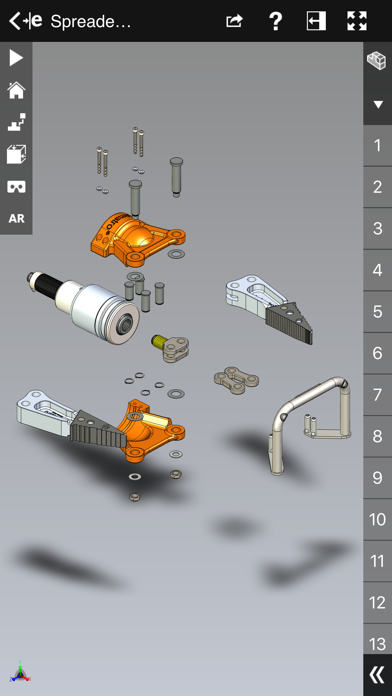
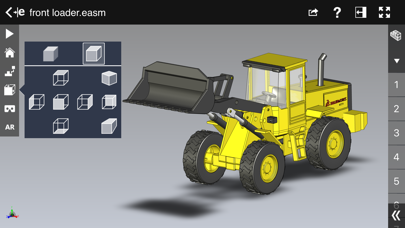
eDrawings® is the only CAD viewer on iPad, iPad mini, iPhone and iPod Touch that allows you to view native eDrawings files as well as native SolidWorks® parts, assemblies and drawings files. In addition, eDrawings allows convenient viewing of DWG and DXF files.
eDrawings includes Augmented Reality (AR). This allows you to view your 3D models in 1:1 scale into the real world. By simply activating the device’s camera, you can bring your virtual 3D designs in a real context and see them in situ, sitting on your desk or on your conference room table or even in the palm of your hand, through your iPad, Pad mini, iPhone or iPod Touch’s screen. Move around the room and see your design from any perspective.
eDrawings is the email-enabled communication tool that dramatically eases sharing of product design information. You can load and send files via email to collaborate more effectively with everyone involved in product development, including people who are not regular CAD software users to interpret and understand 2D and 3D designs.
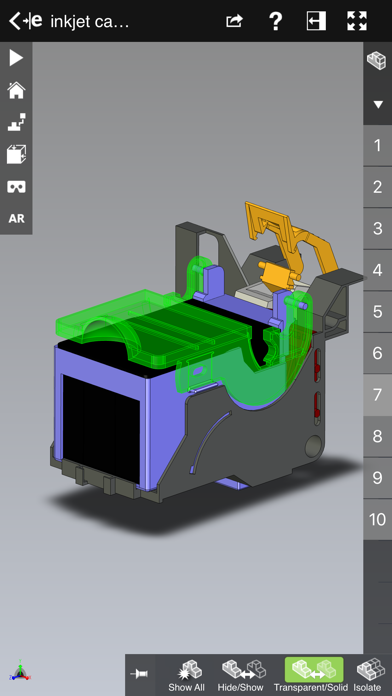
Multi-touch gestures let you pan, zoom, and rotate models easily. eDrawings also supports configurations, drawing sheets, and exploded views for eDrawings files published from SolidWorks® and all other supported CAD software.
Features:
* Intuitive and easy-to-use user interface
* Visualize your 3D models in real context with Augmented Reality (AR)
* Open 3D (EASM, EPRT, SLDASM, SLDPRT, IGES, IGS, JT, STEP, STP, IFC), 2D (EDRW, SLDDRW, DWG, DXF) and associated files from any source: email attachments, cloud storage services (Dropbox™, SkyDrive®, Google Drive, YouSendIt®, and others), web and FTP sites, networks, and iTunes® File Sharing.
* Zoom, pan and rotate your 2D or 3D CAD data using multi-touch
* Animate 3D standard views as well as 2D drawing views.
* Browse your assembly components tree, configurations and drawing sheets
* View your designs in full screen and double tap to fit it on screen
* Adapt the scale of your 3D model in AR mode
* Freeze the background in AR mode with viewpoint lock to prolong AR experience without holding up your device.
* Sample files included
For more information, visit:
http://www.edrawingsviewer.com
eDrawings includes Augmented Reality (AR). This allows you to view your 3D models in 1:1 scale into the real world. By simply activating the device’s camera, you can bring your virtual 3D designs in a real context and see them in situ, sitting on your desk or on your conference room table or even in the palm of your hand, through your iPad, Pad mini, iPhone or iPod Touch’s screen. Move around the room and see your design from any perspective.
eDrawings is the email-enabled communication tool that dramatically eases sharing of product design information. You can load and send files via email to collaborate more effectively with everyone involved in product development, including people who are not regular CAD software users to interpret and understand 2D and 3D designs.
Multi-touch gestures let you pan, zoom, and rotate models easily. eDrawings also supports configurations, drawing sheets, and exploded views for eDrawings files published from SolidWorks® and all other supported CAD software.
Features:
* Intuitive and easy-to-use user interface
* Visualize your 3D models in real context with Augmented Reality (AR)
* Open 3D (EASM, EPRT, SLDASM, SLDPRT, IGES, IGS, JT, STEP, STP, IFC), 2D (EDRW, SLDDRW, DWG, DXF) and associated files from any source: email attachments, cloud storage services (Dropbox™, SkyDrive®, Google Drive, YouSendIt®, and others), web and FTP sites, networks, and iTunes® File Sharing.
* Zoom, pan and rotate your 2D or 3D CAD data using multi-touch
* Animate 3D standard views as well as 2D drawing views.
* Browse your assembly components tree, configurations and drawing sheets
* View your designs in full screen and double tap to fit it on screen
* Adapt the scale of your 3D model in AR mode
* Freeze the background in AR mode with viewpoint lock to prolong AR experience without holding up your device.
* Sample files included
For more information, visit:
http://www.edrawingsviewer.com
Details
| Entwickler | Dassault Systemes SolidWorks Corporation |
|---|---|
| Kategorie | Produktivität |
| Preis | 1,99 € |
| Altersfreigabe | 4+ |
| Version | 34.2.0057 |
| Größe | 185 MB |
| Minimale iOS-Version | 16.0 |
| Bundle-ID | com.solidworks.edrawings |
| Veröffentlicht | 2012-05-01 |
| Zuletzt aktualisiert | 2026-04-16 |
| Sprachen | 1 Sprachen |
Was diese Seite beantwortet
- eDrawings App-Bewertungen
- eDrawings App-Bewertung
- eDrawings Download
- eDrawings App-Store-Rang
- eDrawings Bewertungen
- eDrawings Bewertungen und Bewertungen
- ist eDrawings legitim
- ist eDrawings ein Betrug
- eDrawings echte Nutzerbewertungen
- eDrawings Bewertung
- eDrawings Beschwerden
- was die Leute über eDrawings sagen
- eDrawings app Bewertungen
- eDrawings Vor- und Nachteile
- eDrawings Erfahrung
- sollte ich eDrawings vertrauen
- eDrawings Feedback
- eDrawings Bewertung 2026
- eDrawings Überprüfung
- eDrawings Sicherheitsüberprüfung
