
当前最佳位置
#41
跨越4个商店
峰值
#23跟踪天数
16评分
10 图表历史
16 天由我们记录
商店
今天在4中绘制图表
评分
10 在App Store上
价格
在我们的窗口中更改了9次
安装和收入
苹果没有发布 — 我们不猜测
历史
基于 Astrina 自己的每日快照构建 — 每天一个数据点。
图表位置 — 🇩🇪 付费榜单
22.08 06.09 24.09
显示数字
| 天 | 位置 |
|---|---|
| 22.08 | #46 |
| 06.09 | #43 |
| 15.09 | #47 |
| 24.09 | #41 |
评分数量
10.08 21.08 29.08
显示数字
| 天 | 评分 |
|---|---|
| 10.08 | 5 |
| 18.08 | 3 |
| 19.08 | 3 |
| 20.08 | 3 |
| 21.08 | 3 |
| 22.08 | 3 |
| 23.08 | 5 |
| 27.08 | 3 |
| 28.08 | 3 |
| 29.08 | 3 |
截图
关于此应用
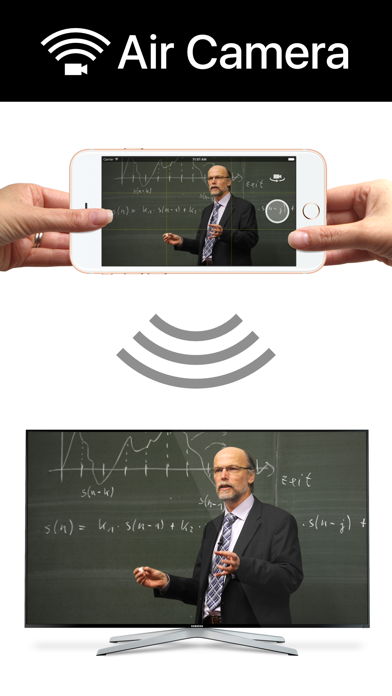
Air Camera is the best way to stream your camera to an airplay receiver. eg. Apple TV, AirParrot or AirServer. Perfect for live events when you need a simple video feed to an external display. The external display only shows the video so elements like notifications, battery status and time don't distract your audience.
Features:
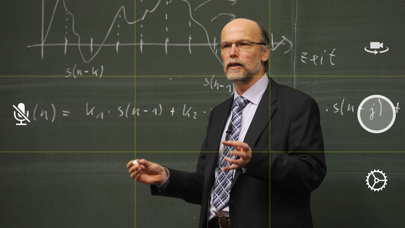
• Rule of Thirds overlay shows on device.
• Double Tap to goggle Rule of Thirds overlay.
• Press and hold to lock focus & exposure on supported devices
• Smooth focus is enabled on supported devices.
• Left & Right Landscape orientation supported.
• Universal App (iPhone & iPad)
• Also supports Apple AV adapter.
• Take full resolution photos (with 3 second preview) during capture. High quality photos are saved to the camera roll.
• Swap between Front, Back, Telephoto and Wide Angle cameras.
• Pinch to zoom in and out
• Video Stabilisation - Standard or Cinematic
• Choose Video Quality - 720p, 1080p or 4k
• Toggle Audio on or off
Instructions for Use:
1. Open Control Center (swipe up from bottom of screen)
2. Tap AirPlay
3. Select the target screen and enable mirroring
4. Close Control Center
Features:
• Rule of Thirds overlay shows on device.
• Double Tap to goggle Rule of Thirds overlay.
• Press and hold to lock focus & exposure on supported devices
• Smooth focus is enabled on supported devices.
• Left & Right Landscape orientation supported.
• Universal App (iPhone & iPad)
• Also supports Apple AV adapter.
• Take full resolution photos (with 3 second preview) during capture. High quality photos are saved to the camera roll.
• Swap between Front, Back, Telephoto and Wide Angle cameras.
• Pinch to zoom in and out
• Video Stabilisation - Standard or Cinematic
• Choose Video Quality - 720p, 1080p or 4k
• Toggle Audio on or off
Instructions for Use:
1. Open Control Center (swipe up from bottom of screen)
2. Tap AirPlay
3. Select the target screen and enable mirroring
4. Close Control Center
详情
| 开发者 | Marc Castles |
|---|---|
| 类别 | 照片与视频 |
| 价格 | 0,99 € |
| 年龄评级 | 4+ |
| 版本 | 1.8 |
| 大小 | 15.3 MB |
| 最低 iOS | 9.3 |
| 包 ID | au.com.launchinteractive.aircamera |
| 发布 | 2016-02-29 |
| 最后更新 | 2021-02-08 |
| 语言 | 1 语言 |
此页面回答的问题
- Air Camera 应用评论
- Air Camera 应用评级
- Air Camera 下载
- Air Camera 应用商店排名
- Air Camera 评论
- Air Camera 评论和评分
- Air Camera 是否合法
- Air Camera 是否是骗局
- Air Camera 真实用户评论
- Air Camera 评分
- Air Camera 投诉
- 人们对 Air Camera 的看法
- Air Camera 应用 评论
- Air Camera 优缺点
- Air Camera 经验
- 我应该信任 Air Camera 吗
- Air Camera 反馈
- Air Camera 评论 2026
- Air Camera 检查
- Air Camera 安全检查
