
Najlepsza pozycja teraz
#41
w 4 sklepach
Szczyt
#23Dni śledzone
16Oceny
10 Historia wykresu
16 dni zarejestrowanych przez nas
Sklepy
wykres w 4 dzisiaj
Oceny
10 w App Store
Cena
zmieniono 9 raz(y) w naszym oknie
Instalacje i przychody
Apple nie publikuje żadnych — nie zgadujemy
Obecnie na wykresie
Historia
Zbudowane na podstawie codziennych zrzutów Astriny — jeden punkt dziennie.
Pozycja na wykresie — 🇩🇪 Najlepsze płatne
22.08 06.09 24.09
Pokaż liczby
| Dzień | Pozycja |
|---|---|
| 22.08 | #46 |
| 06.09 | #43 |
| 15.09 | #47 |
| 24.09 | #41 |
Liczba ocen
10.08 21.08 29.08
Pokaż liczby
| Dzień | Oceny |
|---|---|
| 10.08 | 5 |
| 18.08 | 3 |
| 19.08 | 3 |
| 20.08 | 3 |
| 21.08 | 3 |
| 22.08 | 3 |
| 23.08 | 5 |
| 27.08 | 3 |
| 28.08 | 3 |
| 29.08 | 3 |
Zrzuty ekranu
O tej aplikacji
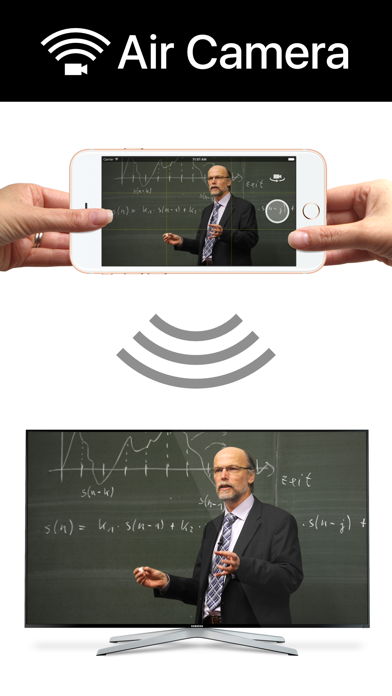
Air Camera is the best way to stream your camera to an airplay receiver. eg. Apple TV, AirParrot or AirServer. Perfect for live events when you need a simple video feed to an external display. The external display only shows the video so elements like notifications, battery status and time don't distract your audience.
Features:
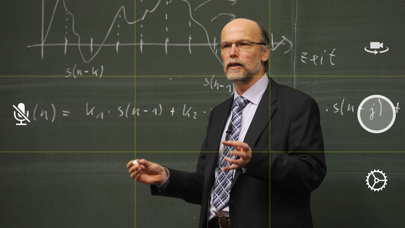
• Rule of Thirds overlay shows on device.
• Double Tap to goggle Rule of Thirds overlay.
• Press and hold to lock focus & exposure on supported devices
• Smooth focus is enabled on supported devices.
• Left & Right Landscape orientation supported.
• Universal App (iPhone & iPad)
• Also supports Apple AV adapter.
• Take full resolution photos (with 3 second preview) during capture. High quality photos are saved to the camera roll.
• Swap between Front, Back, Telephoto and Wide Angle cameras.
• Pinch to zoom in and out
• Video Stabilisation - Standard or Cinematic
• Choose Video Quality - 720p, 1080p or 4k
• Toggle Audio on or off
Instructions for Use:
1. Open Control Center (swipe up from bottom of screen)
2. Tap AirPlay
3. Select the target screen and enable mirroring
4. Close Control Center
Features:
• Rule of Thirds overlay shows on device.
• Double Tap to goggle Rule of Thirds overlay.
• Press and hold to lock focus & exposure on supported devices
• Smooth focus is enabled on supported devices.
• Left & Right Landscape orientation supported.
• Universal App (iPhone & iPad)
• Also supports Apple AV adapter.
• Take full resolution photos (with 3 second preview) during capture. High quality photos are saved to the camera roll.
• Swap between Front, Back, Telephoto and Wide Angle cameras.
• Pinch to zoom in and out
• Video Stabilisation - Standard or Cinematic
• Choose Video Quality - 720p, 1080p or 4k
• Toggle Audio on or off
Instructions for Use:
1. Open Control Center (swipe up from bottom of screen)
2. Tap AirPlay
3. Select the target screen and enable mirroring
4. Close Control Center
Szczegóły
| Deweloper | Marc Castles |
|---|---|
| Kategoria | Zdjęcia i wideo |
| Cena | 0,99 € |
| Ocena wiekowa | 4+ |
| Wersja | 1.8 |
| Rozmiar | 15.3 MB |
| Minimalny iOS | 9.3 |
| ID pakietu | au.com.launchinteractive.aircamera |
| Wydano | 2016-02-29 |
| Ostatnia aktualizacja | 2021-02-08 |
| Języki | 1 języki |
Na co odpowiada ta strona
- Air Camera recenzje aplikacji
- Air Camera ocena aplikacji
- Air Camera pobranie
- Air Camera pozycja w sklepie z aplikacjami
- recenzje Air Camera
- recenzje i oceny Air Camera
- czy Air Camera jest legalny
- czy Air Camera to oszustwo
- prawdziwe recenzje użytkowników Air Camera
- ocena Air Camera
- skargi na Air Camera
- co ludzie mówią o Air Camera
- recenzje Air Camera aplikacja
- zalety i wady Air Camera
- doświadczenie Air Camera
- czy powinienem zaufać Air Camera
- opinie o Air Camera
- recenzja Air Camera 2026
- sprawdzenie Air Camera
- sprawdzenie bezpieczeństwa Air Camera
