
当前最佳位置
#15
跨越6个商店
峰值
#9跟踪天数
59评分
161 图表历史
59 天由我们记录
商店
今天在6中绘制图表
评分
161 在App Store上
价格
在我们的窗口中更改了24次
安装和收入
苹果没有发布 — 我们不猜测
当前上榜
历史
基于 Astrina 自己的每日快照构建 — 每天一个数据点。
图表位置 — 🇩🇪 付费榜单
24.07 29.08 24.09
显示数字
| 天 | 位置 |
|---|---|
| 24.07 | #39 |
| 25.07 | #31 |
| 03.08 | #22 |
| 06.08 | #33 |
| 07.08 | #30 |
| 08.08 | #33 |
| 09.08 | #33 |
| 11.08 | #29 |
| 16.08 | #53 |
| 17.08 | #40 |
| 18.08 | #23 |
| 19.08 | #29 |
| 20.08 | #34 |
| 21.08 | #23 |
| 22.08 | #23 |
| 23.08 | #27 |
| 24.08 | #28 |
| 26.08 | #24 |
| 29.08 | #45 |
| 31.08 | #45 |
| 03.09 | #52 |
| 08.09 | #49 |
| 09.09 | #38 |
| 10.09 | #29 |
| 11.09 | #30 |
| 12.09 | #13 |
| 13.09 | #20 |
| 15.09 | #34 |
| 16.09 | #15 |
| 17.09 | #48 |
| 18.09 | #15 |
| 19.09 | #18 |
| 20.09 | #26 |
| 21.09 | #31 |
| 22.09 | #13 |
| 23.09 | #36 |
| 24.09 | #15 |
评分数量
31.08 12.09 24.09
显示数字
| 天 | 评分 |
|---|---|
| 31.08 | 1,202 |
| 01.09 | 1,203 |
| 02.09 | 1,203 |
| 03.09 | 1,204 |
| 04.09 | 1,204 |
| 05.09 | 1,204 |
| 06.09 | 1,204 |
| 07.09 | 1,204 |
| 08.09 | 1,204 |
| 09.09 | 1,204 |
| 10.09 | 1,204 |
| 11.09 | 1,204 |
| 12.09 | 1,205 |
| 13.09 | 1,205 |
| 14.09 | 1,206 |
| 15.09 | 1,207 |
| 16.09 | 1,207 |
| 17.09 | 1,207 |
| 18.09 | 1,207 |
| 19.09 | 1,207 |
| 20.09 | 1,207 |
| 21.09 | 1,207 |
| 22.09 | 1,208 |
| 23.09 | 1,208 |
| 24.09 | 1,208 |
截图


关于此应用
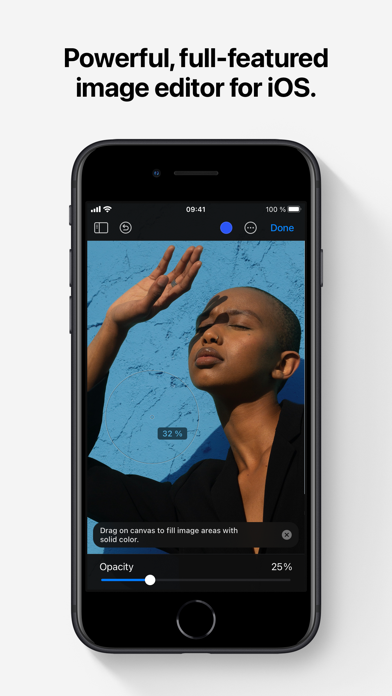
Pixelmator is a powerful, full-featured, layer-based image editor that lets you add shapes, images, and text to create beautiful image compositions, touch up and enhance images, sketch, and paint on iPad and iPhone alike.
Designed exclusively for iOS and iPadOS, Pixelmator takes full advantage of the latest iOS and iPadOS 17 features and technologies, giving you innovative, fast, and powerful tools.
Create Eye-Catching Designs
- Combine words, shapes, and images to create breathtaking artwork right on your iPhone and iPad
- Apply non-destructive layer styles like shadows, outlines, gradient fills, and more
- Insert, group, and blend layers of an image
- Easily add, combine, and customize shapes
- Blend layers, shapes, and text using any of the blending modes
- Use precise selection tools to edit areas of an image
- Automatically select subjects in images with the machine learning-powered Select Subject
- Crop, arrange, and rotate objects and layers with pixel-perfect precision
- Easily remove the background of images or cut and paste objects from one image to another
Add Shapes and Text
- Create flyers, logos, and other compositions using vector shapes and their styling options
- Customize Smart Shapes with easy-to-use controls
- Add text and make it look gorgeous with 24 pre-designed text styles
- Change the font, size, alignment, line spacing, use custom fonts, and more
Paint and Sketch
- Paint stunning images right on your iPhone and iPad
- Choose from over artist-designed brushes and numerous painting techniques
- Paint with near-natural wetness effect of watercolor and crayon brushes
- Create stunning pixel art images with the custom-designed Pixel brush
- Paint with incredible detail thanks to the double texture brush technology
- Vary the speed of your stroke to change the thickness of some of the brushes
- Easily select and fine-tune colors with a full-featured color picker
- Instantly choose colors right from your image with the Eyedropper
- Paint more naturally than ever with the Apple Pencil, featuring palm rejection, pressure, tilt, and acceleration sensitivity
Edit and Enhance Photos
- Get started with dozens of beautifully designed templates
- Instantly improve your photos with single-tap color presets
- Take full control over the tonal range of your image with levels and curves
- Easily remove color casts and set the right white balance
- Wipe away image imperfections, skin blemishes, and unwanted objects with the Repair tool
- Duplicate areas of your image with the easy-to-use Clone tool
- Pinch, bump, twirl, or warp areas of an image with powerful, Metal-based Distort tools
- Blur, sharpen, lighten, or darken areas of an image
- Choose from dozens of breathtaking effects to subtly improve or completely change the look of an image
- Open and edit images of up to 256 megapixels
Export and Share Images
- Optimize images for the web using quality, color depth, and size settings
- Export images to Files, iCloud, or open in other apps using a file format of your choice
- Using the integrated share extension, easily share your artwork with friends and family using Mail, AirDrop, or post it to social platforms like Instagram, Twitter, or Facebook
Compatibility
- Open and save images using HEIF, JPEG, PNG, and TIFF formats
- Work with multilayered Pixelmator Pro and Adobe Photoshop documents
- Save your edited images directly to Photos
- Create, edit, and keep all your images up to date on all your devices thanks to iCloud support
- External keyboard support with over 70 keyboard shortcuts
Built for iPhone and iPad
- Pixelmator is meticulously thought through and created from the ground up for iPhone and iPad devices
- Designed to take full advantage of powerful iOS and iPadOS features and technologies — iCloud Drive, Photos extension, Split View, and more
- Thanks to Apple silicon, Metal, Core Image, and Core Animation, Pixelmator delivers state-of-the-art performance and real-time responsiveness
Designed exclusively for iOS and iPadOS, Pixelmator takes full advantage of the latest iOS and iPadOS 17 features and technologies, giving you innovative, fast, and powerful tools.
Create Eye-Catching Designs
- Combine words, shapes, and images to create breathtaking artwork right on your iPhone and iPad
- Apply non-destructive layer styles like shadows, outlines, gradient fills, and more
- Insert, group, and blend layers of an image
- Easily add, combine, and customize shapes
- Blend layers, shapes, and text using any of the blending modes
- Use precise selection tools to edit areas of an image
- Automatically select subjects in images with the machine learning-powered Select Subject
- Crop, arrange, and rotate objects and layers with pixel-perfect precision
- Easily remove the background of images or cut and paste objects from one image to another
Add Shapes and Text
- Create flyers, logos, and other compositions using vector shapes and their styling options
- Customize Smart Shapes with easy-to-use controls
- Add text and make it look gorgeous with 24 pre-designed text styles
- Change the font, size, alignment, line spacing, use custom fonts, and more
Paint and Sketch
- Paint stunning images right on your iPhone and iPad
- Choose from over artist-designed brushes and numerous painting techniques
- Paint with near-natural wetness effect of watercolor and crayon brushes
- Create stunning pixel art images with the custom-designed Pixel brush
- Paint with incredible detail thanks to the double texture brush technology
- Vary the speed of your stroke to change the thickness of some of the brushes
- Easily select and fine-tune colors with a full-featured color picker
- Instantly choose colors right from your image with the Eyedropper
- Paint more naturally than ever with the Apple Pencil, featuring palm rejection, pressure, tilt, and acceleration sensitivity
Edit and Enhance Photos
- Get started with dozens of beautifully designed templates
- Instantly improve your photos with single-tap color presets
- Take full control over the tonal range of your image with levels and curves
- Easily remove color casts and set the right white balance
- Wipe away image imperfections, skin blemishes, and unwanted objects with the Repair tool
- Duplicate areas of your image with the easy-to-use Clone tool
- Pinch, bump, twirl, or warp areas of an image with powerful, Metal-based Distort tools
- Blur, sharpen, lighten, or darken areas of an image
- Choose from dozens of breathtaking effects to subtly improve or completely change the look of an image
- Open and edit images of up to 256 megapixels
Export and Share Images
- Optimize images for the web using quality, color depth, and size settings
- Export images to Files, iCloud, or open in other apps using a file format of your choice
- Using the integrated share extension, easily share your artwork with friends and family using Mail, AirDrop, or post it to social platforms like Instagram, Twitter, or Facebook
Compatibility
- Open and save images using HEIF, JPEG, PNG, and TIFF formats
- Work with multilayered Pixelmator Pro and Adobe Photoshop documents
- Save your edited images directly to Photos
- Create, edit, and keep all your images up to date on all your devices thanks to iCloud support
- External keyboard support with over 70 keyboard shortcuts
Built for iPhone and iPad
- Pixelmator is meticulously thought through and created from the ground up for iPhone and iPad devices
- Designed to take full advantage of powerful iOS and iPadOS features and technologies — iCloud Drive, Photos extension, Split View, and more
- Thanks to Apple silicon, Metal, Core Image, and Core Animation, Pixelmator delivers state-of-the-art performance and real-time responsiveness
详情
| 开发者 | Apple |
|---|---|
| 类别 | 照片与视频 |
| 价格 | 9,99 € |
| 年龄评级 | 4+ |
| 版本 | 3.1.18 |
| 大小 | 409 MB |
| 最低 iOS | 15.0 |
| 包 ID | com.pixelmatorteam.pixelmator.touch |
| 发布 | 2014-10-24 |
| 最后更新 | 2026-08-25 |
| 语言 | 11 语言 |
此页面回答的问题
- Pixelmator Classic iOS 应用评论
- Pixelmator Classic iOS 应用评级
- Pixelmator Classic iOS 下载
- Pixelmator Classic iOS 应用商店排名
- Pixelmator Classic iOS 评论
- Pixelmator Classic iOS 评论和评分
- Pixelmator Classic iOS 是否合法
- Pixelmator Classic iOS 是否是骗局
- Pixelmator Classic iOS 真实用户评论
- Pixelmator Classic iOS 评分
- Pixelmator Classic iOS 投诉
- 人们对 Pixelmator Classic iOS 的看法
- Pixelmator Classic iOS 应用 评论
- Pixelmator Classic iOS 优缺点
- Pixelmator Classic iOS 经验
- 我应该信任 Pixelmator Classic iOS 吗
- Pixelmator Classic iOS 反馈
- Pixelmator Classic iOS 评论 2026
- Pixelmator Classic iOS 检查
- Pixelmator Classic iOS 安全检查
