
当前最佳位置
#33
跨越5个商店
峰值
#7跟踪天数
43评分
1 图表历史
43 天由我们记录
商店
今天在5中绘制图表
评分
1 在App Store上
价格
在我们的窗口中更改了23次
安装和收入
苹果没有发布 — 我们不猜测
历史
基于 Astrina 自己的每日快照构建 — 每天一个数据点。
图表位置 — 🇬🇧 付费榜单
01.08 03.09 24.09
显示数字
| 天 | 位置 |
|---|---|
| 01.08 | #52 |
| 07.08 | #38 |
| 11.08 | #34 |
| 12.08 | #28 |
| 14.08 | #31 |
| 17.08 | #31 |
| 18.08 | #14 |
| 19.08 | #17 |
| 24.08 | #29 |
| 25.08 | #35 |
| 26.08 | #26 |
| 03.09 | #22 |
| 06.09 | #30 |
| 08.09 | #24 |
| 09.09 | #29 |
| 10.09 | #26 |
| 13.09 | #40 |
| 14.09 | #29 |
| 15.09 | #12 |
| 16.09 | #14 |
| 17.09 | #21 |
| 21.09 | #34 |
| 23.09 | #34 |
| 24.09 | #33 |
评分数量
01.08 16.08 29.08
显示数字
| 天 | 评分 |
|---|---|
| 01.08 | 0 |
| 02.08 | 0 |
| 03.08 | 0 |
| 04.08 | 0 |
| 05.08 | 0 |
| 06.08 | 0 |
| 07.08 | 0 |
| 11.08 | 0 |
| 12.08 | 0 |
| 13.08 | 0 |
| 14.08 | 0 |
| 16.08 | 0 |
| 17.08 | 0 |
| 18.08 | 0 |
| 19.08 | 0 |
| 20.08 | 0 |
| 21.08 | 0 |
| 22.08 | 0 |
| 24.08 | 1 |
| 25.08 | 1 |
| 26.08 | 0 |
| 27.08 | 0 |
| 28.08 | 0 |
| 29.08 | 0 |
截图




关于此应用
Meet the alarm you finish on your feet.
Place a compatible NFC sticker across the room and scan it to complete your alarm in Tagdawn. Bring your own tag: common NFC stickers are inexpensive, and no Tagdawn-branded accessory is required.
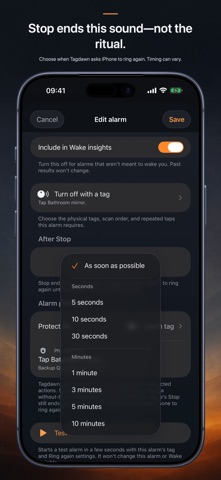
Tagdawn uses iPhone’s system alarm experience, including alerts through Silent mode and Focus. iPhone always provides Stop. Without a tag, Stop ends the alarm normally. With a tag setup, Stop ends the current alarm and Tagdawn asks iPhone for a fresh one after your chosen Ring again wait until the tag ritual is complete. Choose As soon as possible or clear seconds-and-minutes presets; exact timing can vary.
Build your wake-up setup:
• Choose one or more tags, their order, and the number of taps per tag.
• Keep an optional private backup QR code for an eligible alarm.
• Run an isolated test alarm with the same tag and Ring again setup.
• Protect alarm changes with Face ID, Touch ID, a passcode, or the physical tag.
• Choose a Tagdawn tone, the iPhone alarm sound, or a compatible imported sound.
Keep the rest of your day together:
• Track check-offs, counts, amounts, limits, and habits with no daily goal.
• Add several planned times with a normal reminder or loud alarm.
• Use deliberate tag shortcuts for habit entries while Tagdawn is open.
• Log earlier entries with their real date and time.
• Review separate Wake and Habit charts.
• Use timers, a stopwatch, widgets, and eligible Lock Screen or Dynamic Island activities.
Tag scans begin only while Tagdawn is open after you choose Scan. Tagdawn works alongside Clock; it does not replace it.
Your alarm, tag, Wake, Habit, timer, and stopwatch records stay on your devices. No account, subscription, ads, or tracking.
Place a compatible NFC sticker across the room and scan it to complete your alarm in Tagdawn. Bring your own tag: common NFC stickers are inexpensive, and no Tagdawn-branded accessory is required.
Tagdawn uses iPhone’s system alarm experience, including alerts through Silent mode and Focus. iPhone always provides Stop. Without a tag, Stop ends the alarm normally. With a tag setup, Stop ends the current alarm and Tagdawn asks iPhone for a fresh one after your chosen Ring again wait until the tag ritual is complete. Choose As soon as possible or clear seconds-and-minutes presets; exact timing can vary.
Build your wake-up setup:
• Choose one or more tags, their order, and the number of taps per tag.
• Keep an optional private backup QR code for an eligible alarm.
• Run an isolated test alarm with the same tag and Ring again setup.
• Protect alarm changes with Face ID, Touch ID, a passcode, or the physical tag.
• Choose a Tagdawn tone, the iPhone alarm sound, or a compatible imported sound.
Keep the rest of your day together:
• Track check-offs, counts, amounts, limits, and habits with no daily goal.
• Add several planned times with a normal reminder or loud alarm.
• Use deliberate tag shortcuts for habit entries while Tagdawn is open.
• Log earlier entries with their real date and time.
• Review separate Wake and Habit charts.
• Use timers, a stopwatch, widgets, and eligible Lock Screen or Dynamic Island activities.
Tag scans begin only while Tagdawn is open after you choose Scan. Tagdawn works alongside Clock; it does not replace it.
Your alarm, tag, Wake, Habit, timer, and stopwatch records stay on your devices. No account, subscription, ads, or tracking.
详情
| 开发者 | Ali Bakhshoude |
|---|---|
| 类别 | 生产力 |
| 价格 | £7.99 |
| 年龄评级 | 4+ |
| 版本 | 1.1.2 |
| 大小 | 16.0 MB |
| 最低 iOS | 26.0 |
| 包 ID | app.tagdawn |
| 发布 | 2026-07-28 |
| 最后更新 | 2026-08-10 |
| 语言 | 1 语言 |
此页面回答的问题
- Tagdawn: NFC Alarm & Habits 应用评论
- Tagdawn: NFC Alarm & Habits 应用评级
- Tagdawn: NFC Alarm & Habits 下载
- Tagdawn: NFC Alarm & Habits 应用商店排名
- Tagdawn: NFC Alarm & Habits 评论
- Tagdawn: NFC Alarm & Habits 评论和评分
- Tagdawn: NFC Alarm & Habits 是否合法
- Tagdawn: NFC Alarm & Habits 是否是骗局
- Tagdawn: NFC Alarm & Habits 真实用户评论
- Tagdawn: NFC Alarm & Habits 评分
- Tagdawn: NFC Alarm & Habits 投诉
- 人们对 Tagdawn: NFC Alarm & Habits 的看法
- Tagdawn: NFC Alarm & Habits 应用 评论
- Tagdawn: NFC Alarm & Habits 优缺点
- Tagdawn: NFC Alarm & Habits 经验
- 我应该信任 Tagdawn: NFC Alarm & Habits 吗
- Tagdawn: NFC Alarm & Habits 反馈
- Tagdawn: NFC Alarm & Habits 评论 2026
- Tagdawn: NFC Alarm & Habits 检查
- Tagdawn: NFC Alarm & Habits 安全检查
