
图表历史
3 天由我们记录
商店
今天在1中绘制图表
评分
尚无
价格
在我们的窗口中更改了2次
安装和收入
苹果没有发布 — 我们不猜测
当前上榜
历史
基于 Astrina 自己的每日快照构建 — 每天一个数据点。
图表位置 — 🇺🇸 付费榜单
14.09 15.09 23.09
显示数字
| 天 | 位置 |
|---|---|
| 14.09 | #14 |
| 15.09 | #53 |
| 23.09 | #47 |
评分数量
14.09 15.09 23.09
显示数字
| 天 | 评分 |
|---|---|
| 14.09 | 0 |
| 15.09 | 0 |
| 23.09 | 0 |
截图



关于此应用
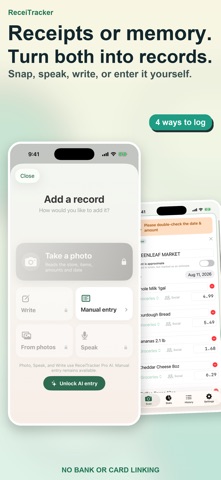
ReceiTracker is a no-bank-link expense tracker designed to make daily recording feel manageable.
Your app purchase includes a three-day preview of AI entry, complete history, past calendar and chart navigation, and CSV export. It never enrolls you in a subscription and there is no automatic charge.
After those three days, manual entry remains unlimited. Charts for the current period, history for your current accounting month, streaks, and the rabbit companion also stay available. There is no ReceiTracker account. Your expense records stay on this device.
■ Start with one manual entry
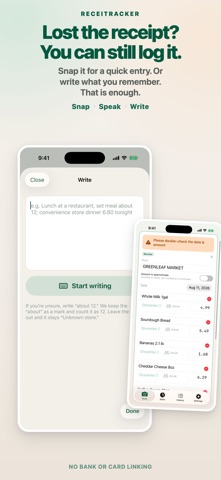
Choose a store, amount, and category. Record an expense even when the receipt is gone. You can also mark a no-spending day, so the habit does not depend on buying something.
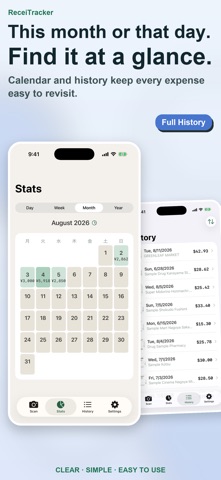
■ See the current picture
Switch between day, week, month, and year views for the current period. Browse entries from the current accounting month. You can set the month's starting day to match your payday or billing cycle.
■ Build a habit
Recording once a day adds another day to your progress. Earlier entries earn a little more progress for the rabbit companion. It is about showing up, not spending more.
■ Browse the past — one-time purchase ("Full History")
A non-consumable In-App Purchase unlocks complete history and past navigation in calendars and charts. It is not a subscription. AI entry and CSV export are not included.
■ Snap, speak, or write — ReceiTracker Pro
The auto-renewing ReceiTracker Pro subscription unlocks three AI entry methods:
· Snap: read the store, items, amounts, and date from a receipt photo, then sort categories
· Speak: turn a sentence such as "lunch out, about 1000 yen" into an expense entry
· Write: turn what you remember in plain text into structured entries
ReceiTracker Pro also includes complete history, past calendar and chart navigation, and CSV export. Available plans, duration, and pricing are shown on the in-app plan screen.
■ Privacy
There is no bank or card linking, ReceiTracker account, or cloud storage of your expense history. When you use AI entry, the image or text you provide is sent to Google Gemini for processing. Speech is converted to text with Apple's speech recognition; the audio itself is neither transmitted nor stored.
Terms of Use (EULA): https://www.apple.com/legal/internet-services/itunes/dev/stdeula/
Privacy Policy: https://bokchoyworks-stack.github.io/receitracker-legal/
Your app purchase includes a three-day preview of AI entry, complete history, past calendar and chart navigation, and CSV export. It never enrolls you in a subscription and there is no automatic charge.
After those three days, manual entry remains unlimited. Charts for the current period, history for your current accounting month, streaks, and the rabbit companion also stay available. There is no ReceiTracker account. Your expense records stay on this device.
■ Start with one manual entry
Choose a store, amount, and category. Record an expense even when the receipt is gone. You can also mark a no-spending day, so the habit does not depend on buying something.
■ See the current picture
Switch between day, week, month, and year views for the current period. Browse entries from the current accounting month. You can set the month's starting day to match your payday or billing cycle.
■ Build a habit
Recording once a day adds another day to your progress. Earlier entries earn a little more progress for the rabbit companion. It is about showing up, not spending more.
■ Browse the past — one-time purchase ("Full History")
A non-consumable In-App Purchase unlocks complete history and past navigation in calendars and charts. It is not a subscription. AI entry and CSV export are not included.
■ Snap, speak, or write — ReceiTracker Pro
The auto-renewing ReceiTracker Pro subscription unlocks three AI entry methods:
· Snap: read the store, items, amounts, and date from a receipt photo, then sort categories
· Speak: turn a sentence such as "lunch out, about 1000 yen" into an expense entry
· Write: turn what you remember in plain text into structured entries
ReceiTracker Pro also includes complete history, past calendar and chart navigation, and CSV export. Available plans, duration, and pricing are shown on the in-app plan screen.
■ Privacy
There is no bank or card linking, ReceiTracker account, or cloud storage of your expense history. When you use AI entry, the image or text you provide is sent to Google Gemini for processing. Speech is converted to text with Apple's speech recognition; the audio itself is neither transmitted nor stored.
Terms of Use (EULA): https://www.apple.com/legal/internet-services/itunes/dev/stdeula/
Privacy Policy: https://bokchoyworks-stack.github.io/receitracker-legal/
详情
| 开发者 | HIROKI MURAI |
|---|---|
| 类别 | 金融 |
| 价格 | $2.99 |
| 年龄评级 | 4+ |
| 版本 | 7 |
| 大小 | 9.2 MB |
| 最低 iOS | 18.6 |
| 包 ID | com.himur.recietracker-gemini-ver1-0 |
| 发布 | 2026-07-08 |
| 最后更新 | 2026-09-22 |
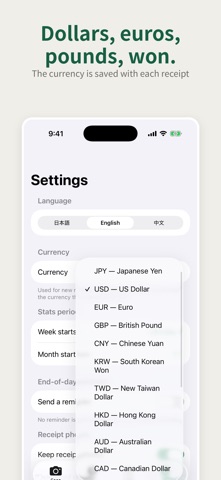
| 语言 | 3 语言 |
此页面回答的问题
- ReceiTracker: Receipt Scanner 应用评论
- ReceiTracker: Receipt Scanner 应用评级
- ReceiTracker: Receipt Scanner 下载
- ReceiTracker: Receipt Scanner 应用商店排名
- ReceiTracker: Receipt Scanner 评论
- ReceiTracker: Receipt Scanner 评论和评分
- ReceiTracker: Receipt Scanner 是否合法
- ReceiTracker: Receipt Scanner 是否是骗局
- ReceiTracker: Receipt Scanner 真实用户评论
- ReceiTracker: Receipt Scanner 评分
- ReceiTracker: Receipt Scanner 投诉
- 人们对 ReceiTracker: Receipt Scanner 的看法
- ReceiTracker: Receipt Scanner 应用 评论
- ReceiTracker: Receipt Scanner 优缺点
- ReceiTracker: Receipt Scanner 经验
- 我应该信任 ReceiTracker: Receipt Scanner 吗
- ReceiTracker: Receipt Scanner 反馈
- ReceiTracker: Receipt Scanner 评论 2026
- ReceiTracker: Receipt Scanner 检查
- ReceiTracker: Receipt Scanner 安全检查
