
当前最佳位置
#31
跨越3个商店
峰值
#19跟踪天数
16评分
1 图表历史
16 天由我们记录
商店
今天在3中绘制图表
评分
1 在App Store上
价格
在我们的窗口中更改了7次
安装和收入
苹果没有发布 — 我们不猜测
历史
基于 Astrina 自己的每日快照构建 — 每天一个数据点。
图表位置 — 🇬🇧 付费榜单
23.07 11.09 24.09
显示数字
| 天 | 位置 |
|---|---|
| 23.07 | #44 |
| 24.07 | #57 |
| 18.08 | #50 |
| 23.08 | #32 |
| 09.09 | #47 |
| 11.09 | #19 |
| 12.09 | #45 |
| 19.09 | #32 |
| 20.09 | #58 |
| 21.09 | #26 |
| 24.09 | #31 |
评分数量
23.07 18.08 23.08
显示数字
| 天 | 评分 |
|---|---|
| 23.07 | 0 |
| 24.07 | 0 |
| 10.08 | 0 |
| 18.08 | 0 |
| 19.08 | 0 |
| 20.08 | 0 |
| 21.08 | 0 |
| 23.08 | 0 |
截图


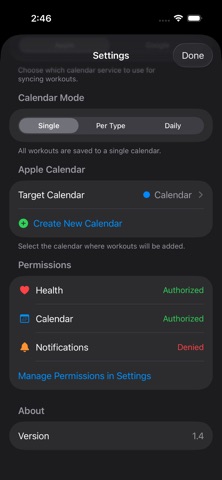
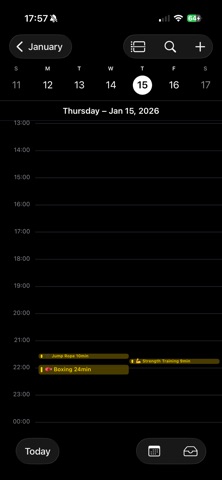
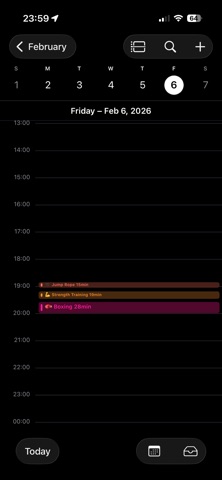
关于此应用
Every workout day shows up on your calendar. Your Apple Health activity is added as a calendar event, so a filled calendar keeps you moving — blank days don't.
#1 Paid Health & Fitness app in Korea · Top 21 overall (Feb 2026)
Apple doesn't officially connect your workouts to the Calendar app. FitToCal fills that gap.
------------------------------
Features
------------------------------
- Background sync
Yesterday's workout is already on today's calendar — no need to open the app.
- Full Apple Watch support
Runs, swims, and indoor workouts tracked on your Watch are all recognized.
- Apple Calendar & Google Calendar
Both are supported. Configure it per workout type.
- Separate calendars per workout type
Running, strength, swimming — each on its own color-coded calendar. See your pattern at a glance.
- Filter by workout type
Tap a chip at the top of the list to see just the workouts you want.
- Daily summary mode
Collapse a day's workouts into one clean calendar entry.
- Import past workouts
Fill your calendar with anywhere from 1 week to 1 year of past workouts.
------------------------------
FAQ
------------------------------
Q. Does it work with apps other than Apple Health?
A. Apps connected to Health (Nike Run Club, Strava, Hevy, and more) sync automatically through Health.
Q. How do I get workouts added automatically?
A. Grant Apple Health and Calendar access after installing — then it records every day.
Q. Both Google and iPhone Calendar at once?
A. Yes. You can configure it per workout type.
Q. Can I import past workouts?
A. Yes — up to a full year at once.
------------------------------
Who it's for
------------------------------
- Anyone who wants to manage workouts on their calendar
- Anyone who wants to look back on months or a year of activity
- Apple Watch users who log a variety of workouts
- Productivity fans who use time blocking / time tracking
------------------------------
Privacy
------------------------------
Your workout data is never sent to an external server. FitToCal connects Health and your calendar directly on your device.
------------------------------
You already did the workout. Now make sure it counts.
#1 Paid Health & Fitness app in Korea · Top 21 overall (Feb 2026)
Apple doesn't officially connect your workouts to the Calendar app. FitToCal fills that gap.
------------------------------
Features
------------------------------
- Background sync
Yesterday's workout is already on today's calendar — no need to open the app.
- Full Apple Watch support
Runs, swims, and indoor workouts tracked on your Watch are all recognized.
- Apple Calendar & Google Calendar
Both are supported. Configure it per workout type.
- Separate calendars per workout type
Running, strength, swimming — each on its own color-coded calendar. See your pattern at a glance.
- Filter by workout type
Tap a chip at the top of the list to see just the workouts you want.
- Daily summary mode
Collapse a day's workouts into one clean calendar entry.
- Import past workouts
Fill your calendar with anywhere from 1 week to 1 year of past workouts.
------------------------------
FAQ
------------------------------
Q. Does it work with apps other than Apple Health?
A. Apps connected to Health (Nike Run Club, Strava, Hevy, and more) sync automatically through Health.
Q. How do I get workouts added automatically?
A. Grant Apple Health and Calendar access after installing — then it records every day.
Q. Both Google and iPhone Calendar at once?
A. Yes. You can configure it per workout type.
Q. Can I import past workouts?
A. Yes — up to a full year at once.
------------------------------
Who it's for
------------------------------
- Anyone who wants to manage workouts on their calendar
- Anyone who wants to look back on months or a year of activity
- Apple Watch users who log a variety of workouts
- Productivity fans who use time blocking / time tracking
------------------------------
Privacy
------------------------------
Your workout data is never sent to an external server. FitToCal connects Health and your calendar directly on your device.
------------------------------
You already did the workout. Now make sure it counts.
详情
| 开发者 | Jungwoon Park |
|---|---|
| 类别 | 健康与健身 |
| 价格 | £1.99 |
| 年龄评级 | 12+ |
| 版本 | 1.11 |
| 大小 | 9.2 MB |
| 最低 iOS | 17.0 |
| 包 ID | byjw.studio.FitSync |
| 发布 | 2026-01-30 |
| 最后更新 | 2026-09-20 |
| 语言 | 9 语言 |
此页面回答的问题
- FitToCal - Workout Calendar 应用评论
- FitToCal - Workout Calendar 应用评级
- FitToCal - Workout Calendar 下载
- FitToCal - Workout Calendar 应用商店排名
- FitToCal - Workout Calendar 评论
- FitToCal - Workout Calendar 评论和评分
- FitToCal - Workout Calendar 是否合法
- FitToCal - Workout Calendar 是否是骗局
- FitToCal - Workout Calendar 真实用户评论
- FitToCal - Workout Calendar 评分
- FitToCal - Workout Calendar 投诉
- 人们对 FitToCal - Workout Calendar 的看法
- FitToCal - Workout Calendar 应用 评论
- FitToCal - Workout Calendar 优缺点
- FitToCal - Workout Calendar 经验
- 我应该信任 FitToCal - Workout Calendar 吗
- FitToCal - Workout Calendar 反馈
- FitToCal - Workout Calendar 评论 2026
- FitToCal - Workout Calendar 检查
- FitToCal - Workout Calendar 安全检查
