
当前最佳位置
#25
跨越4个商店
峰值
#11跟踪天数
27评分
8 图表历史
27 天由我们记录
商店
今天在4中绘制图表
评分
8 在App Store上
价格
在我们的窗口中更改了8次
安装和收入
苹果没有发布 — 我们不猜测
历史
基于 Astrina 自己的每日快照构建 — 每天一个数据点。
图表位置 — 🇫🇷 付费榜单
26.08 10.09 20.09
显示数字
| 天 | 位置 |
|---|---|
| 26.08 | #14 |
| 27.08 | #26 |
| 28.08 | #34 |
| 09.09 | #13 |
| 10.09 | #22 |
| 11.09 | #34 |
| 18.09 | #11 |
| 19.09 | #21 |
| 20.09 | #25 |
评分数量
11.09 20.09 24.09
显示数字
| 天 | 评分 |
|---|---|
| 11.09 | 8 |
| 13.09 | 8 |
| 14.09 | 8 |
| 19.09 | 8 |
| 20.09 | 8 |
| 21.09 | 8 |
| 22.09 | 8 |
| 23.09 | 8 |
| 24.09 | 8 |
截图


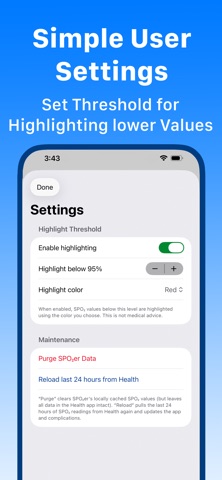

关于此应用
SPO2er gives you a clear, easy-to-understand view of your blood oxygen levels throughout the day. Using data already stored in the Health app, SPO2er displays your latest reading, 24-hour trends, high/low values, averages, and a complete history, both on your iPhone and Apple Watch.
There are no accounts, no ads, no servers, and no external data sharing. All information comes directly from HealthKit and stays securely on your device.
Features:
• Latest Blood Oxygen Reading
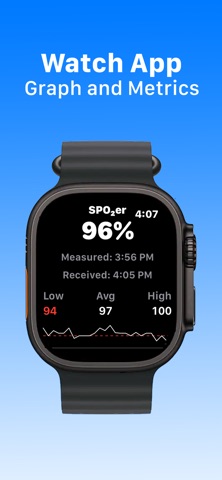
See your most recent SPO₂ measurement, formatted clearly with the exact time it was taken.
• 24-Hour Trend Graph
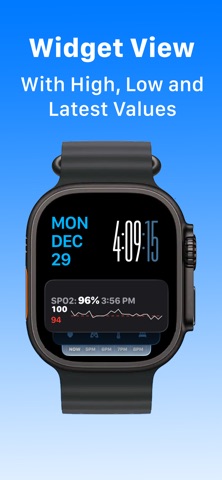
View an elegant sparkline showing how your SPO₂ changed over the past day, with high, low, and average values.
• Detailed History
Scroll through a timestamped list of SPO₂ samples from the last 24 hours.
• Apple Watch Complications
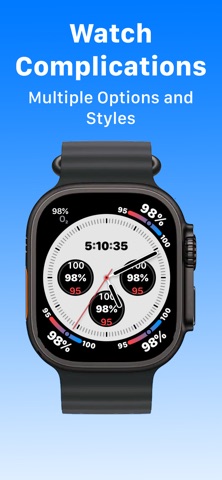
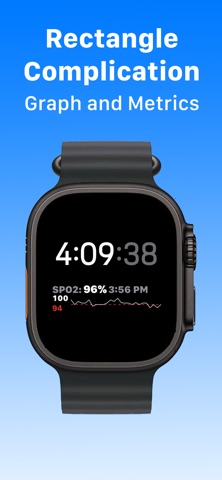
Choose from multiple complications that update automatically when new readings are available, so your most recent value is always just a glance away.
• Red Highlighting of User-Set Low Values
Set the lower threshold you want for highlighting SPO₂ values viewed on the Watch, Complication or SPO2er app on the iPhone.
• iPhone ↔ Watch Sync
Your iPhone reads SPO₂ data from the Health app and delivers it directly to the watch app and complications.
• No Sensors Accessed
SPO2er does not measure blood oxygen.
Instead, it reads the data you already have in the Health app, whether from Apple Watch, compatible third-party monitors, or other HealthKit-enabled devices.
Why SPO₂ Tracking Matters
Many wellness devices record blood oxygen throughout the day and night. SPO2er helps you keep an eye on overall trends, see how values vary, and stay more aware of changes, all using the health data you already collect.
Privacy-First Design
Your health information stays entirely on your device.
SPO2er does not collect, transmit, or store data on any server.
Permissions are used solely to read blood oxygen values from the Health app.
For Anyone Who Uses HealthKit
SPO2er works with:
• Apple Watch models that support blood oxygen
• Third-party SPO₂ monitors that write to HealthKit
• Wellness devices and apps that sync SPO₂ into the Health app
• Manually entered SPO₂ data in the Health app
If it’s in HealthKit, SPO2er can display it beautifully.
There are no accounts, no ads, no servers, and no external data sharing. All information comes directly from HealthKit and stays securely on your device.
Features:
• Latest Blood Oxygen Reading
See your most recent SPO₂ measurement, formatted clearly with the exact time it was taken.
• 24-Hour Trend Graph
View an elegant sparkline showing how your SPO₂ changed over the past day, with high, low, and average values.
• Detailed History
Scroll through a timestamped list of SPO₂ samples from the last 24 hours.
• Apple Watch Complications
Choose from multiple complications that update automatically when new readings are available, so your most recent value is always just a glance away.
• Red Highlighting of User-Set Low Values
Set the lower threshold you want for highlighting SPO₂ values viewed on the Watch, Complication or SPO2er app on the iPhone.
• iPhone ↔ Watch Sync
Your iPhone reads SPO₂ data from the Health app and delivers it directly to the watch app and complications.
• No Sensors Accessed
SPO2er does not measure blood oxygen.
Instead, it reads the data you already have in the Health app, whether from Apple Watch, compatible third-party monitors, or other HealthKit-enabled devices.
Why SPO₂ Tracking Matters
Many wellness devices record blood oxygen throughout the day and night. SPO2er helps you keep an eye on overall trends, see how values vary, and stay more aware of changes, all using the health data you already collect.
Privacy-First Design
Your health information stays entirely on your device.
SPO2er does not collect, transmit, or store data on any server.
Permissions are used solely to read blood oxygen values from the Health app.
For Anyone Who Uses HealthKit
SPO2er works with:
• Apple Watch models that support blood oxygen
• Third-party SPO₂ monitors that write to HealthKit
• Wellness devices and apps that sync SPO₂ into the Health app
• Manually entered SPO₂ data in the Health app
If it’s in HealthKit, SPO2er can display it beautifully.
详情
| 开发者 | Kevin Edwards |
|---|---|
| 类别 | 健康与健身 |
| 价格 | $0.99 |
| 年龄评级 | 4+ |
| 版本 | 1.2 |
| 大小 | 6.9 MB |
| 最低 iOS | 26.0 |
| 包 ID | com.xcitationsoftware.SPO2er |
| 发布 | 2025-12-01 |
| 最后更新 | 2026-01-04 |
| 语言 | 1 语言 |
此页面回答的问题
- SPO2er: Blood Oxygen on Watch 应用评论
- SPO2er: Blood Oxygen on Watch 应用评级
- SPO2er: Blood Oxygen on Watch 下载
- SPO2er: Blood Oxygen on Watch 应用商店排名
- SPO2er: Blood Oxygen on Watch 评论
- SPO2er: Blood Oxygen on Watch 评论和评分
- SPO2er: Blood Oxygen on Watch 是否合法
- SPO2er: Blood Oxygen on Watch 是否是骗局
- SPO2er: Blood Oxygen on Watch 真实用户评论
- SPO2er: Blood Oxygen on Watch 评分
- SPO2er: Blood Oxygen on Watch 投诉
- 人们对 SPO2er: Blood Oxygen on Watch 的看法
- SPO2er: Blood Oxygen on Watch 应用 评论
- SPO2er: Blood Oxygen on Watch 优缺点
- SPO2er: Blood Oxygen on Watch 经验
- 我应该信任 SPO2er: Blood Oxygen on Watch 吗
- SPO2er: Blood Oxygen on Watch 反馈
- SPO2er: Blood Oxygen on Watch 评论 2026
- SPO2er: Blood Oxygen on Watch 检查
- SPO2er: Blood Oxygen on Watch 安全检查
