
图表历史
16 天由我们记录
商店
今天在10中绘制图表
评分
尚无
价格
在我们的窗口中更改了13次
安装和收入
苹果没有发布 — 我们不猜测
当前上榜
历史
基于 Astrina 自己的每日快照构建 — 每天一个数据点。
图表位置 — 🇩🇪 付费榜单
09.09 15.09 23.09
显示数字
| 天 | 位置 |
|---|---|
| 09.09 | #11 |
| 10.09 | #8 |
| 11.09 | #5 |
| 12.09 | #7 |
| 13.09 | #10 |
| 14.09 | #8 |
| 15.09 | #6 |
| 16.09 | #8 |
| 17.09 | #18 |
| 18.09 | #13 |
| 19.09 | #3 |
| 20.09 | #10 |
| 21.09 | #18 |
| 23.09 | #44 |
评分数量
09.09 15.09 23.09
显示数字
| 天 | 评分 |
|---|---|
| 09.09 | 0 |
| 10.09 | 0 |
| 11.09 | 0 |
| 12.09 | 0 |
| 13.09 | 0 |
| 14.09 | 0 |
| 15.09 | 0 |
| 16.09 | 0 |
| 17.09 | 0 |
| 18.09 | 0 |
| 19.09 | 0 |
| 20.09 | 0 |
| 21.09 | 0 |
| 23.09 | 0 |
截图




关于此应用
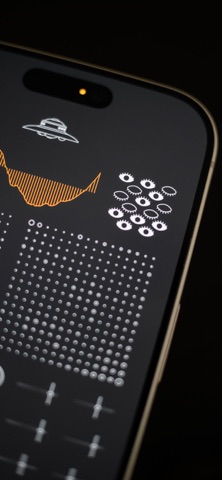
The controller with the eyes represents the neural network’s learning system. When the eyes are open, the system learns; when they are closed, learning is disabled. A long tap toggles learning on or off. Dragging vertically changes the learning rate, while dragging horizontally controls how strongly the winning neuron influences its neighbors. This influence is shown by the number of open eyes and the width of the pupils. While learning, the neural network visibly `swells`.
When a new sound is analyzed, the neuron that best matches it updates its internal representation and `swells` more than the others. Nearby neurons also update, but less strongly, forming a smooth sound space inside the network.
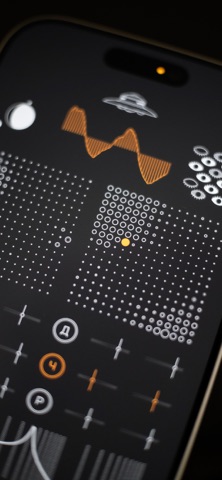
Two grids represent the two `hemispheres` of the neural network. Each cell corresponds to a neuron. Tapping a cell selects the neuron whose waveform will be used. An orange dot marks the selected neuron, and the curve above it shows the fragment of waveform stored by that neuron — the wavetable used to generate notes or modulate parameters.
The controller with the planets manages memories. Dragging it moves through time and lets you browse stored states. A double tap returns to the present moment. A long tap opens a menu with three actions marked by Russian letters: `С` for save from sohranit, `У` for delete from udalit, and `З` for close from zakryt.
The planet interface represents time symbolically. The crescent shadow shows the time of day, the moon’s position indicates the day of the month, and the satellite’s position represents the orbital period of an artificial body similar to the ISS.
Below the neural grids are six synthesis sections. The first is marked with the Russian letter `Г`, from generator, and selects the oscillator waveform. Two sliders control the fundamental frequency and volume.
The remaining sections provide modulation. Sliders control depth and rate, while letters indicate the destination parameter: `П` pitch from podstroika, `П` pan from panorama, `Д` drive from drive, `Ч` filter frequency from chastota, and `Р` resonance from rezonans.
The slider with stars controls the filter. Dragging horizontally selects the filter type, while dragging vertically adjusts drive. The area to the right controls filter frequency and resonance.
At the bottom of the interface is a keyboard of eight keys represented by Lissajous figures — curves created by combining two harmonic oscillations. Each figure corresponds to a note. Above the keys are two buttons: `У` hold from uderzhanie and `П` tuning from podstroika.
When a new sound is analyzed, the neuron that best matches it updates its internal representation and `swells` more than the others. Nearby neurons also update, but less strongly, forming a smooth sound space inside the network.
Two grids represent the two `hemispheres` of the neural network. Each cell corresponds to a neuron. Tapping a cell selects the neuron whose waveform will be used. An orange dot marks the selected neuron, and the curve above it shows the fragment of waveform stored by that neuron — the wavetable used to generate notes or modulate parameters.
The controller with the planets manages memories. Dragging it moves through time and lets you browse stored states. A double tap returns to the present moment. A long tap opens a menu with three actions marked by Russian letters: `С` for save from sohranit, `У` for delete from udalit, and `З` for close from zakryt.
The planet interface represents time symbolically. The crescent shadow shows the time of day, the moon’s position indicates the day of the month, and the satellite’s position represents the orbital period of an artificial body similar to the ISS.
Below the neural grids are six synthesis sections. The first is marked with the Russian letter `Г`, from generator, and selects the oscillator waveform. Two sliders control the fundamental frequency and volume.
The remaining sections provide modulation. Sliders control depth and rate, while letters indicate the destination parameter: `П` pitch from podstroika, `П` pan from panorama, `Д` drive from drive, `Ч` filter frequency from chastota, and `Р` resonance from rezonans.
The slider with stars controls the filter. Dragging horizontally selects the filter type, while dragging vertically adjusts drive. The area to the right controls filter frequency and resonance.
At the bottom of the interface is a keyboard of eight keys represented by Lissajous figures — curves created by combining two harmonic oscillations. Each figure corresponds to a note. Above the keys are two buttons: `У` hold from uderzhanie and `П` tuning from podstroika.
详情
| 开发者 | Valery Mironov |
|---|---|
| 类别 | 音乐 |
| 价格 | 5,99 € |
| 年龄评级 | 4+ |
| 版本 | 1.0 |
| 大小 | 164 MB |
| 最低 iOS | 15.0 |
| 包 ID | com.valerymironov.sentient |
| 发布 | 2026-09-08 |
| 最后更新 | 2026-09-08 |
此页面回答的问题
- Sentient Synthesizer 应用评论
- Sentient Synthesizer 应用评级
- Sentient Synthesizer 下载
- Sentient Synthesizer 应用商店排名
- Sentient Synthesizer 评论
- Sentient Synthesizer 评论和评分
- Sentient Synthesizer 是否合法
- Sentient Synthesizer 是否是骗局
- Sentient Synthesizer 真实用户评论
- Sentient Synthesizer 评分
- Sentient Synthesizer 投诉
- 人们对 Sentient Synthesizer 的看法
- Sentient Synthesizer 应用 评论
- Sentient Synthesizer 优缺点
- Sentient Synthesizer 经验
- 我应该信任 Sentient Synthesizer 吗
- Sentient Synthesizer 反馈
- Sentient Synthesizer 评论 2026
- Sentient Synthesizer 检查
- Sentient Synthesizer 安全检查
