
当前最佳位置
#31
跨越6个商店
峰值
#9跟踪天数
59评分
2,717 图表历史
59 天由我们记录
商店
今天在6中绘制图表
评分
2,717 在App Store上
价格
在我们的窗口中更改了33次
安装和收入
苹果没有发布 — 我们不猜测
当前上榜
历史
基于 Astrina 自己的每日快照构建 — 每天一个数据点。
图表位置 — 🇬🇧 免费榜单
23.07 26.08 24.09
显示数字
| 天 | 位置 |
|---|---|
| 23.07 | #17 |
| 24.07 | #20 |
| 25.07 | #22 |
| 31.07 | #23 |
| 01.08 | #29 |
| 02.08 | #31 |
| 03.08 | #26 |
| 04.08 | #27 |
| 05.08 | #28 |
| 06.08 | #25 |
| 07.08 | #25 |
| 08.08 | #18 |
| 09.08 | #15 |
| 10.08 | #22 |
| 11.08 | #30 |
| 12.08 | #29 |
| 13.08 | #12 |
| 14.08 | #20 |
| 15.08 | #23 |
| 16.08 | #28 |
| 17.08 | #33 |
| 18.08 | #34 |
| 19.08 | #30 |
| 20.08 | #25 |
| 21.08 | #28 |
| 22.08 | #25 |
| 23.08 | #28 |
| 24.08 | #30 |
| 25.08 | #28 |
| 26.08 | #28 |
| 27.08 | #26 |
| 28.08 | #29 |
| 29.08 | #31 |
| 30.08 | #32 |
| 31.08 | #31 |
| 01.09 | #35 |
| 02.09 | #29 |
| 03.09 | #33 |
| 04.09 | #36 |
| 05.09 | #32 |
| 06.09 | #34 |
| 07.09 | #35 |
| 08.09 | #33 |
| 09.09 | #27 |
| 10.09 | #32 |
| 11.09 | #30 |
| 12.09 | #33 |
| 13.09 | #40 |
| 14.09 | #37 |
| 15.09 | #30 |
| 16.09 | #27 |
| 17.09 | #23 |
| 18.09 | #23 |
| 19.09 | #25 |
| 20.09 | #26 |
| 21.09 | #30 |
| 22.09 | #32 |
| 23.09 | #31 |
| 24.09 | #31 |
评分数量
23.07 13.08 30.08
显示数字
| 天 | 评分 |
|---|---|
| 23.07 | 2,466 |
| 24.07 | 2,473 |
| 25.07 | 2,480 |
| 31.07 | 2,507 |
| 01.08 | 2,509 |
| 02.08 | 2,513 |
| 03.08 | 2,513 |
| 04.08 | 2,520 |
| 05.08 | 2,523 |
| 06.08 | 2,526 |
| 07.08 | 2,531 |
| 08.08 | 2,537 |
| 09.08 | 2,543 |
| 10.08 | 2,543 |
| 11.08 | 2,545 |
| 12.08 | 2,548 |
| 13.08 | 2,550 |
| 14.08 | 2,556 |
| 15.08 | 2,562 |
| 16.08 | 2,567 |
| 17.08 | 2,569 |
| 18.08 | 2,577 |
| 19.08 | 2,582 |
| 20.08 | 2,585 |
| 21.08 | 2,594 |
| 22.08 | 2,601 |
| 23.08 | 2,605 |
| 24.08 | 2,610 |
| 25.08 | 2,613 |
| 26.08 | 2,620 |
| 27.08 | 2,624 |
| 28.08 | 2,626 |
| 29.08 | 2,628 |
| 30.08 | 2,631 |
截图


关于此应用
Introducing Digital Film for iPhone and iPad!
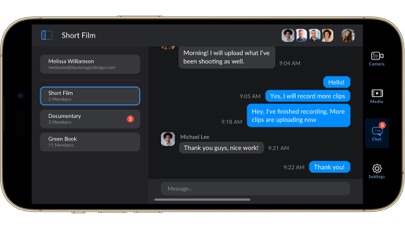
Blackmagic Camera unlocks the power of your iPhone and iPad by adding digital film camera controls and operating systems! Now you can create the same cinematic ‘look’ as Hollywood feature films. You get the same intuitive and user friendly interface as Blackmagic Design’s award winning cameras. So it’s just like using a professional digital film camera! This means you can adjust settings such as frame rate, shutter angle, white balance and ISO all in a single tap. Or record directly to Blackmagic Cloud in industry standard 10-bit Apple ProRes files up to 4K! Recording to Blackmagic Cloud Storage lets you collaborate on DaVinci Resolve projects with editors anywhere in the world, all at the same time!
Get the "Hollywood Look" with Digital Film!
Blackmagic Camera puts the professional features you need for feature film, television and documentaries in your pocket. Now you can create YouTube and TikTok content with a cinematic look, and broadcast quality ENG! Imagine having a run and gun camera on hand to capture breaking news whenever it happens! Or use Blackmagic Camera as a B Cam to capture angles that are difficult to reach with traditional cameras, while still retaining control of important settings. Best of all, recording to Blackmagic Cloud allows you to get your footage to the newsroom or post production studio in minutes.
Interactive Controls for Fast Setup
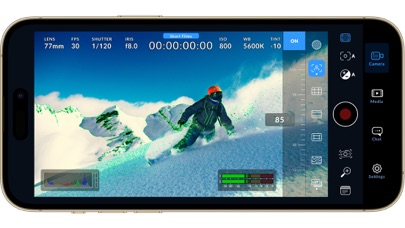
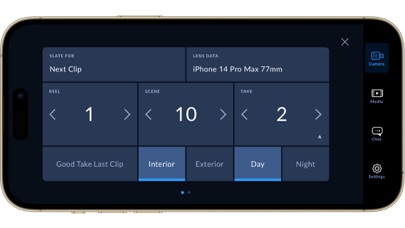
Blackmagic Camera has all the controls you need to quickly setup and start shooting! Everything is interactive, so you can tap any item and instantly change settings without searching through confusing menus! The HUD shows status and record parameters, histogram, focus peaking indicators, levels, frame guides and more. Show or hide the HUD by swiping up or down. You can auto focus by tapping the screen in the area you want to focus. You can shoot in 16:9 or vertical aspect ratios, plus you can shoot 16:9 while holding your phone vertically if you want to shoot unobtrusively.
On Screen Heads Up Display
The heads up display, or HUD, controls have the most important camera controls such as lens selection, frame rate, shutter angle, timecode, ISO, white balance, gain and audio levels. You can adjust settings such as exposure by touching the ISO indicator, or you can change the audio levels simply by touching the audio meters. Everything is interactive, so if you tap any item you can instantaneously change its settings without having to search through complex menus!
Camera Setup Menus
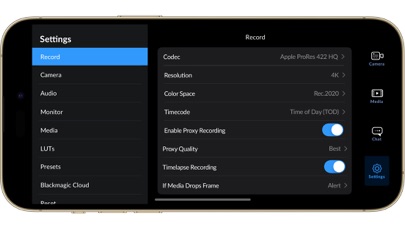
The settings tab unlocks the full power of your phone’s camera, with quick access to advanced settings such as monitoring, audio, camera setup, recording and more! The record tab gives you total control over video resolution and recording format including industry standard Apple ProRes or space efficient H.264 and H.265. Plus, you can set anamorphic de-squeeze and lens correction settings. Professional audio options include AAC and PCM format and VU or PPM audio metering. You can even add external microphones! Or add 3D LUTs to recreate film looks!
Media
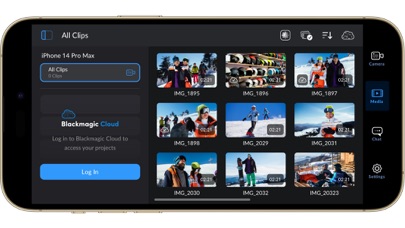
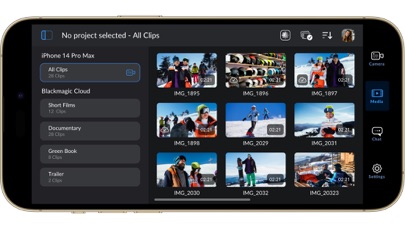
The Blackmagic Camera media tab has all the controls you need to browse or scrub clips for quick review, search and sort and view the upload status of your media. Access your media from Blackmagic Camera’s all clips folder by choosing the Media button to see the thumbnails for each clip you have stored. Plus, you can save to the files folder on the phone, send it to Blackmagic Cloud Storage via Blackmagic Cloud or manually choose which clips to upload to a project library. You can even sync media from Blackmagic Camera directly into the DaVinci Resolve project so you’re ready to edit!
Live Sync to Blackmagic Cloud Storage
When shooting with Blackmagic Camera, the video you capture can be instantly uploaded as a proxy file, followed by the camera originals, and saved to Blackmagic Cloud Storage. This means you can start editing quickly using your proxies, speeding up your workflow.
Blackmagic Camera unlocks the power of your iPhone and iPad by adding digital film camera controls and operating systems! Now you can create the same cinematic ‘look’ as Hollywood feature films. You get the same intuitive and user friendly interface as Blackmagic Design’s award winning cameras. So it’s just like using a professional digital film camera! This means you can adjust settings such as frame rate, shutter angle, white balance and ISO all in a single tap. Or record directly to Blackmagic Cloud in industry standard 10-bit Apple ProRes files up to 4K! Recording to Blackmagic Cloud Storage lets you collaborate on DaVinci Resolve projects with editors anywhere in the world, all at the same time!
Get the "Hollywood Look" with Digital Film!
Blackmagic Camera puts the professional features you need for feature film, television and documentaries in your pocket. Now you can create YouTube and TikTok content with a cinematic look, and broadcast quality ENG! Imagine having a run and gun camera on hand to capture breaking news whenever it happens! Or use Blackmagic Camera as a B Cam to capture angles that are difficult to reach with traditional cameras, while still retaining control of important settings. Best of all, recording to Blackmagic Cloud allows you to get your footage to the newsroom or post production studio in minutes.
Interactive Controls for Fast Setup
Blackmagic Camera has all the controls you need to quickly setup and start shooting! Everything is interactive, so you can tap any item and instantly change settings without searching through confusing menus! The HUD shows status and record parameters, histogram, focus peaking indicators, levels, frame guides and more. Show or hide the HUD by swiping up or down. You can auto focus by tapping the screen in the area you want to focus. You can shoot in 16:9 or vertical aspect ratios, plus you can shoot 16:9 while holding your phone vertically if you want to shoot unobtrusively.
On Screen Heads Up Display
The heads up display, or HUD, controls have the most important camera controls such as lens selection, frame rate, shutter angle, timecode, ISO, white balance, gain and audio levels. You can adjust settings such as exposure by touching the ISO indicator, or you can change the audio levels simply by touching the audio meters. Everything is interactive, so if you tap any item you can instantaneously change its settings without having to search through complex menus!
Camera Setup Menus
The settings tab unlocks the full power of your phone’s camera, with quick access to advanced settings such as monitoring, audio, camera setup, recording and more! The record tab gives you total control over video resolution and recording format including industry standard Apple ProRes or space efficient H.264 and H.265. Plus, you can set anamorphic de-squeeze and lens correction settings. Professional audio options include AAC and PCM format and VU or PPM audio metering. You can even add external microphones! Or add 3D LUTs to recreate film looks!
Media
The Blackmagic Camera media tab has all the controls you need to browse or scrub clips for quick review, search and sort and view the upload status of your media. Access your media from Blackmagic Camera’s all clips folder by choosing the Media button to see the thumbnails for each clip you have stored. Plus, you can save to the files folder on the phone, send it to Blackmagic Cloud Storage via Blackmagic Cloud or manually choose which clips to upload to a project library. You can even sync media from Blackmagic Camera directly into the DaVinci Resolve project so you’re ready to edit!
Live Sync to Blackmagic Cloud Storage
When shooting with Blackmagic Camera, the video you capture can be instantly uploaded as a proxy file, followed by the camera originals, and saved to Blackmagic Cloud Storage. This means you can start editing quickly using your proxies, speeding up your workflow.
详情
| 开发者 | Blackmagic Design Inc |
|---|---|
| 类别 | 照片与视频 |
| 价格 | 免费 |
| 年龄评级 | 4+ |
| 版本 | 3.5.1 |
| 大小 | 203 MB |
| 最低 iOS | 18.0 |
| 包 ID | com.blackmagic-design.DaVinciCamera |
| 发布 | 2023-09-18 |
| 最后更新 | 2026-09-23 |
| 语言 | 9 语言 |
此页面回答的问题
- Blackmagic Camera 应用评论
- Blackmagic Camera 应用评级
- Blackmagic Camera 下载
- Blackmagic Camera 应用商店排名
- Blackmagic Camera 评论
- Blackmagic Camera 评论和评分
- Blackmagic Camera 是否合法
- Blackmagic Camera 是否是骗局
- Blackmagic Camera 真实用户评论
- Blackmagic Camera 评分
- Blackmagic Camera 投诉
- 人们对 Blackmagic Camera 的看法
- Blackmagic Camera 应用 评论
- Blackmagic Camera 优缺点
- Blackmagic Camera 经验
- 我应该信任 Blackmagic Camera 吗
- Blackmagic Camera 反馈
- Blackmagic Camera 评论 2026
- Blackmagic Camera 检查
- Blackmagic Camera 安全检查
