
当前最佳位置
#2
跨越17个商店
峰值
#1跟踪天数
42评分
17 图表历史
42 天由我们记录
商店
今天在17中绘制图表
评分
17 在App Store上
价格
在我们的窗口中更改了24次
安装和收入
苹果没有发布 — 我们不猜测
当前上榜
历史
基于 Astrina 自己的每日快照构建 — 每天一个数据点。
图表位置 — 🇫🇷 付费榜单
16.08 04.09 24.09
显示数字
| 天 | 位置 |
|---|---|
| 16.08 | #4 |
| 17.08 | #1 |
| 18.08 | #1 |
| 19.08 | #1 |
| 20.08 | #1 |
| 21.08 | #2 |
| 22.08 | #1 |
| 23.08 | #4 |
| 24.08 | #15 |
| 25.08 | #16 |
| 26.08 | #2 |
| 27.08 | #9 |
| 28.08 | #12 |
| 29.08 | #1 |
| 30.08 | #2 |
| 31.08 | #1 |
| 01.09 | #1 |
| 02.09 | #6 |
| 03.09 | #3 |
| 04.09 | #8 |
| 05.09 | #35 |
| 06.09 | #2 |
| 07.09 | #5 |
| 08.09 | #11 |
| 09.09 | #4 |
| 10.09 | #35 |
| 11.09 | #1 |
| 12.09 | #1 |
| 13.09 | #2 |
| 14.09 | #6 |
| 15.09 | #3 |
| 16.09 | #4 |
| 17.09 | #13 |
| 18.09 | #4 |
| 19.09 | #1 |
| 20.09 | #5 |
| 21.09 | #4 |
| 22.09 | #3 |
| 23.09 | #1 |
| 24.09 | #2 |
评分数量
31.08 12.09 24.09
显示数字
| 天 | 评分 |
|---|---|
| 31.08 | 30 |
| 01.09 | 29 |
| 02.09 | 30 |
| 03.09 | 30 |
| 04.09 | 30 |
| 05.09 | 30 |
| 06.09 | 30 |
| 07.09 | 30 |
| 08.09 | 30 |
| 09.09 | 30 |
| 10.09 | 30 |
| 11.09 | 30 |
| 12.09 | 30 |
| 13.09 | 30 |
| 14.09 | 30 |
| 15.09 | 31 |
| 16.09 | 31 |
| 17.09 | 31 |
| 18.09 | 31 |
| 19.09 | 31 |
| 20.09 | 32 |
| 21.09 | 32 |
| 22.09 | 32 |
| 23.09 | 33 |
| 24.09 | 33 |
截图


关于此应用
One-time purchase. No subscription.
AstroShader is an astrophotography app for capturing, stacking and editing. All you need is a stand, tripod, telescope or rock (to lean your phone on).
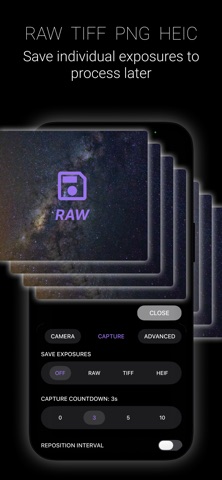
AstroShader lets you align and stack live during the image capture process. You can also align and stack images from you Photos library. No need to transfer images to a computer to align and stack them separately (but there is a built in intervalometer if you need it).
To take an image follow these steps:
• Use a stand, tripod, telescope mount (or lean your iPhone on a rock).
• Zoom in on stars and set focus manually, or use autofocus.
• Set the exposure time, ISO and white balance, or leave to auto-exposure.
• Set the number of exposures to be automatically aligned and stacked.
• Calibrate your images from the edit tools.
• After the capture is complete you can edit and save your image—including as 16bit TIFF.
• You can open images directly to use the edit tools in AstroShader - rather following a new image capture.
Image capture options include:
• Number of exposures to be aligned and stacked
• Exposure time
• ISO
• White balance
• Camera type
• Countdown timer
• Manual focus
• Pause the capture to reposition iPhone or telescope
Edit options include:
• Stretch image
• Background extraction
• Dynamic background extraction (DBE)
• x5 Histogram curves for fine tonal adjustment
• x3 sharpen layers each with radius and intensity with layer blending rather than chaining
• Brightness (low light enhancement)
• Saturation
• Black point
• Temperature
• Tint
• Save format options; HEIF, PNG, JPEG, TIFF
AstroShader is an astrophotography app for capturing, stacking and editing. All you need is a stand, tripod, telescope or rock (to lean your phone on).
AstroShader lets you align and stack live during the image capture process. You can also align and stack images from you Photos library. No need to transfer images to a computer to align and stack them separately (but there is a built in intervalometer if you need it).
To take an image follow these steps:
• Use a stand, tripod, telescope mount (or lean your iPhone on a rock).
• Zoom in on stars and set focus manually, or use autofocus.
• Set the exposure time, ISO and white balance, or leave to auto-exposure.
• Set the number of exposures to be automatically aligned and stacked.
• Calibrate your images from the edit tools.
• After the capture is complete you can edit and save your image—including as 16bit TIFF.
• You can open images directly to use the edit tools in AstroShader - rather following a new image capture.
Image capture options include:
• Number of exposures to be aligned and stacked
• Exposure time
• ISO
• White balance
• Camera type
• Countdown timer
• Manual focus
• Pause the capture to reposition iPhone or telescope
Edit options include:
• Stretch image
• Background extraction
• Dynamic background extraction (DBE)
• x5 Histogram curves for fine tonal adjustment
• x3 sharpen layers each with radius and intensity with layer blending rather than chaining
• Brightness (low light enhancement)
• Saturation
• Black point
• Temperature
• Tint
• Save format options; HEIF, PNG, JPEG, TIFF
详情
| 开发者 | AstroShader Limited |
|---|---|
| 类别 | 照片与视频 |
| 价格 | 1,99 € |
| 年龄评级 | 4+ |
| 版本 | 1.2.7 |
| 大小 | 8.6 MB |
| 最低 iOS | 18.0 |
| 包 ID | com.astroshader |
| 发布 | 2022-11-29 |
| 最后更新 | 2026-09-17 |
| 语言 | 1 语言 |
此页面回答的问题
- AstroShader 应用评论
- AstroShader 应用评级
- AstroShader 下载
- AstroShader 应用商店排名
- AstroShader 评论
- AstroShader 评论和评分
- AstroShader 是否合法
- AstroShader 是否是骗局
- AstroShader 真实用户评论
- AstroShader 评分
- AstroShader 投诉
- 人们对 AstroShader 的看法
- AstroShader 应用 评论
- AstroShader 优缺点
- AstroShader 经验
- 我应该信任 AstroShader 吗
- AstroShader 反馈
- AstroShader 评论 2026
- AstroShader 检查
- AstroShader 安全检查
