
当前最佳位置
#22
跨越5个商店
峰值
#7跟踪天数
59评分
29 图表历史
59 天由我们记录
商店
今天在5中绘制图表
评分
29 在App Store上
价格
在我们的窗口中更改了22次
安装和收入
苹果没有发布 — 我们不猜测
历史
基于 Astrina 自己的每日快照构建 — 每天一个数据点。
图表位置 — 🇩🇪 付费榜单
23.07 27.08 24.09
显示数字
| 天 | 位置 |
|---|---|
| 23.07 | #18 |
| 24.07 | #11 |
| 25.07 | #25 |
| 31.07 | #29 |
| 01.08 | #27 |
| 03.08 | #19 |
| 04.08 | #30 |
| 05.08 | #31 |
| 06.08 | #14 |
| 07.08 | #10 |
| 08.08 | #41 |
| 14.08 | #13 |
| 15.08 | #19 |
| 16.08 | #24 |
| 19.08 | #42 |
| 21.08 | #27 |
| 22.08 | #13 |
| 23.08 | #41 |
| 25.08 | #41 |
| 26.08 | #22 |
| 27.08 | #15 |
| 28.08 | #26 |
| 29.08 | #17 |
| 30.08 | #45 |
| 31.08 | #32 |
| 02.09 | #37 |
| 03.09 | #34 |
| 04.09 | #33 |
| 05.09 | #30 |
| 07.09 | #33 |
| 08.09 | #29 |
| 09.09 | #19 |
| 10.09 | #19 |
| 11.09 | #31 |
| 12.09 | #26 |
| 15.09 | #45 |
| 16.09 | #42 |
| 18.09 | #14 |
| 19.09 | #16 |
| 22.09 | #20 |
| 24.09 | #22 |
评分数量
31.08 12.09 24.09
显示数字
| 天 | 评分 |
|---|---|
| 31.08 | 85 |
| 01.09 | 85 |
| 02.09 | 85 |
| 03.09 | 85 |
| 04.09 | 85 |
| 05.09 | 85 |
| 06.09 | 85 |
| 08.09 | 85 |
| 09.09 | 85 |
| 10.09 | 85 |
| 11.09 | 85 |
| 12.09 | 85 |
| 13.09 | 85 |
| 15.09 | 85 |
| 16.09 | 85 |
| 17.09 | 85 |
| 18.09 | 85 |
| 19.09 | 85 |
| 20.09 | 85 |
| 21.09 | 85 |
| 22.09 | 85 |
| 23.09 | 86 |
| 24.09 | 86 |
截图



关于此应用
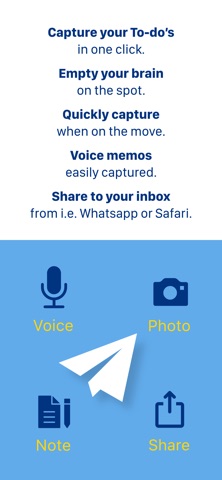
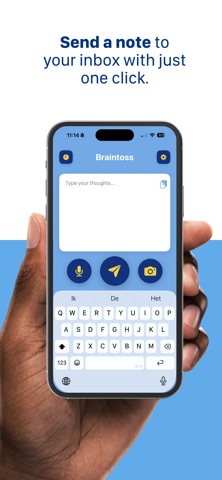
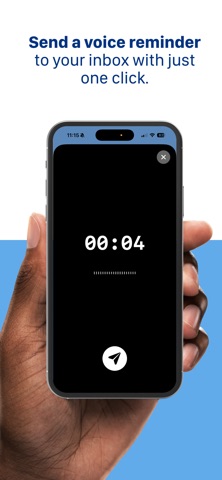
Braintoss captures a thought in seconds—type, speak, or photograph it—and sends it to your email or webhook destinations in one flow.
WHAT YOU USE IT FOR
• Voice notes transcribed and emailed
• Photos of whiteboards, receipts, documents, or business cards—sent with a useful subject
• Quick typed reminders and to-dos
• Share from Safari, Mail, Photos, and other apps into Braintoss, then send where you want
VERSION 10
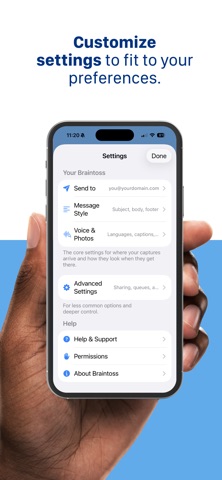
Braintoss 10 is rebuilt as a native iOS app with a modern capture screen, clearer Settings, and steadier delivery and retries. Long-press Send (or Edit in History) to choose destination, subject, and optional message body before sending. Share extension and Apple Watch work with Quick or Advanced modes. Dark mode on the main screen. Optional on-device speech and image analysis for captions; sending uses secure connections to Braintoss’s delivery service.
PRIVACY, LOCAL-FIRST
Your captures go to the destinations you configure. App Store builds ship with optional usage telemetry turned off by default. Optional Help & Support Debug Mode can add context to emails you choose to send to support; logs stay on your device unless you share them.
Learn more: braintoss.app/support — Privacy: braintoss.app/privacy
WHAT YOU USE IT FOR
• Voice notes transcribed and emailed
• Photos of whiteboards, receipts, documents, or business cards—sent with a useful subject
• Quick typed reminders and to-dos
• Share from Safari, Mail, Photos, and other apps into Braintoss, then send where you want
VERSION 10
Braintoss 10 is rebuilt as a native iOS app with a modern capture screen, clearer Settings, and steadier delivery and retries. Long-press Send (or Edit in History) to choose destination, subject, and optional message body before sending. Share extension and Apple Watch work with Quick or Advanced modes. Dark mode on the main screen. Optional on-device speech and image analysis for captions; sending uses secure connections to Braintoss’s delivery service.
PRIVACY, LOCAL-FIRST
Your captures go to the destinations you configure. App Store builds ship with optional usage telemetry turned off by default. Optional Help & Support Debug Mode can add context to emails you choose to send to support; logs stay on your device unless you share them.
Learn more: braintoss.app/support — Privacy: braintoss.app/privacy
详情
| 开发者 | Braintoss B.V. |
|---|---|
| 类别 | 生产力 |
| 价格 | 2,99 € |
| 年龄评级 | 4+ |
| 版本 | 10.0.3 |
| 大小 | 9.1 MB |
| 最低 iOS | 16.6 |
| 包 ID | com.braintoss.braintoss |
| 发布 | 2013-01-09 |
| 最后更新 | 2026-06-22 |
| 语言 | 1 语言 |
此页面回答的问题
- Braintoss 应用评论
- Braintoss 应用评级
- Braintoss 下载
- Braintoss 应用商店排名
- Braintoss 评论
- Braintoss 评论和评分
- Braintoss 是否合法
- Braintoss 是否是骗局
- Braintoss 真实用户评论
- Braintoss 评分
- Braintoss 投诉
- 人们对 Braintoss 的看法
- Braintoss 应用 评论
- Braintoss 优缺点
- Braintoss 经验
- 我应该信任 Braintoss 吗
- Braintoss 反馈
- Braintoss 评论 2026
- Braintoss 检查
- Braintoss 安全检查
