
当前最佳位置
#47
跨越4个商店
峰值
#10跟踪天数
30评分
978 图表历史
30 天由我们记录
商店
今天在4中绘制图表
评分
978 在App Store上
价格
在我们的窗口中更改了6次
安装和收入
苹果没有发布 — 我们不猜测
历史
基于 Astrina 自己的每日快照构建 — 每天一个数据点。
图表位置 — 🇺🇸 付费榜单
12.08 31.08 23.09
显示数字
| 天 | 位置 |
|---|---|
| 12.08 | #38 |
| 17.08 | #53 |
| 20.08 | #59 |
| 21.08 | #57 |
| 26.08 | #52 |
| 28.08 | #37 |
| 31.08 | #51 |
| 03.09 | #55 |
| 17.09 | #60 |
| 18.09 | #45 |
| 21.09 | #56 |
| 22.09 | #46 |
| 23.09 | #47 |
评分数量
31.08 18.09 23.09
显示数字
| 天 | 评分 |
|---|---|
| 31.08 | 968 |
| 03.09 | 970 |
| 17.09 | 974 |
| 18.09 | 975 |
| 21.09 | 978 |
| 22.09 | 978 |
| 23.09 | 978 |
截图
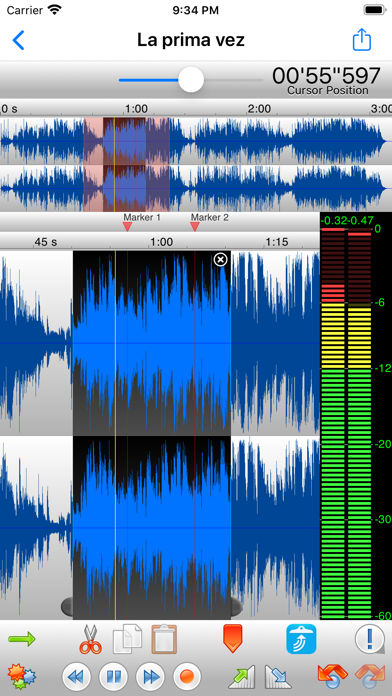
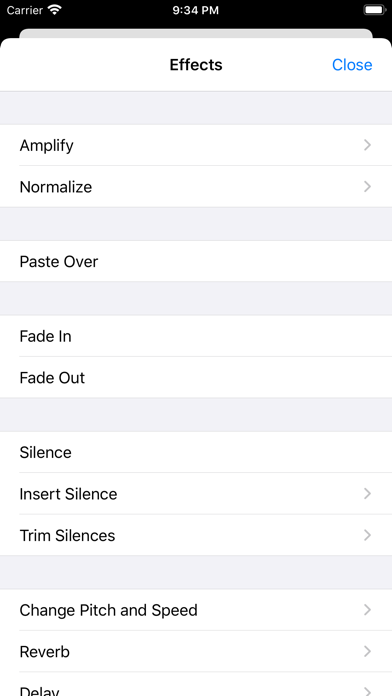
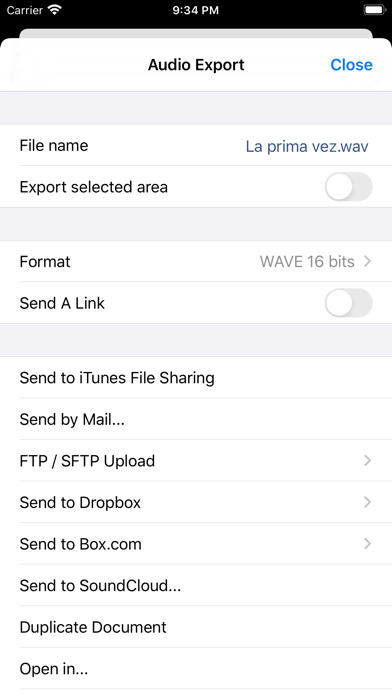
关于此应用
TwistedWave is a very fast and easy to use audio editor and recorder.
Even when working with huge files, it will remain very fast and fluid, and will never run out of memory.
UNIQUE TO TWISTEDWAVE
• Very fluid, even with very large files
• Unlimited undo / redo history, happens instantly
RECORD AUDIO
• No duration limit other than the available storage
• Up to 24 bit / 96 kHz audio if your audio interface supports it
• Record stereo audio with the built-in microphone (iPhone XS or more recent)
• Record studio quality audio with an external microphone
• Record audio from other music applications with Audiobus
APPLY EFFECTS
• Precision Time Stretching & Pitch Shifting technology licensed from ZTX
• All the AudioUnit extensions (AUv3) available on the App Store can be used with TwistedWave
• Cut, copy / paste audio around
• Fade in / out
• Reverb
• Delay / echo
• Distortion
• Equalizer (parametric, or iPod EQ)
• Dynamics processor, can be used as a compressor or a noise gate
• Peak limiter to amplify audio without causing distortion
• Amplify or normalize the audio to a given level
• Filters (low-pass, high-pass, band-pass, low-shelf, high-shelf)
• Convert the sampling rate (with SoX' very high quality resampler)
• Reverse. Play the file backwards, mostly for fun!
MANY FILE FORMATS SUPPORTED
• WAV
• M4A (AAC or Apple Lossless)
• MP3 (Encoded with the LAME MP3 encoder for the best quality)
• FLAC
• AIFF
• CAF
MANY IMPORT OPTIONS
• Import songs from the music library
• Import files from the Files app
• Import files from an SD card or USB drive, with the right adapter
• Open files sent from other apps
• Browser access, send a file to TwistedWave from a device on the same WiFi network
MANY EXPORT OPTIONS
• Send your files by
- Email
- iMessage
- SoundCloud
- Dropbox
- AudioCopy
- An FTP or SFTP account
- Any app that accepts audio files
• Export multiple files in a single ZIP file
• Browser access to allow downloading and uploading files from/to TwistedWave
• File too large? Just send a link. (30 days for free on TwistedWave's servers)
BROWSER ACCESS
Connect to the TwistedWave app from a web browser on another device or computer on the same WiFi network, and:
• Play and download the files directly from a browser
• Send files to TwistedWave by drag and dropping them in the browser
Even when working with huge files, it will remain very fast and fluid, and will never run out of memory.
UNIQUE TO TWISTEDWAVE
• Very fluid, even with very large files
• Unlimited undo / redo history, happens instantly
RECORD AUDIO
• No duration limit other than the available storage
• Up to 24 bit / 96 kHz audio if your audio interface supports it
• Record stereo audio with the built-in microphone (iPhone XS or more recent)
• Record studio quality audio with an external microphone
• Record audio from other music applications with Audiobus
APPLY EFFECTS
• Precision Time Stretching & Pitch Shifting technology licensed from ZTX
• All the AudioUnit extensions (AUv3) available on the App Store can be used with TwistedWave
• Cut, copy / paste audio around
• Fade in / out
• Reverb
• Delay / echo
• Distortion
• Equalizer (parametric, or iPod EQ)
• Dynamics processor, can be used as a compressor or a noise gate
• Peak limiter to amplify audio without causing distortion
• Amplify or normalize the audio to a given level
• Filters (low-pass, high-pass, band-pass, low-shelf, high-shelf)
• Convert the sampling rate (with SoX' very high quality resampler)
• Reverse. Play the file backwards, mostly for fun!
MANY FILE FORMATS SUPPORTED
• WAV
• M4A (AAC or Apple Lossless)
• MP3 (Encoded with the LAME MP3 encoder for the best quality)
• FLAC
• AIFF
• CAF
MANY IMPORT OPTIONS
• Import songs from the music library
• Import files from the Files app
• Import files from an SD card or USB drive, with the right adapter
• Open files sent from other apps
• Browser access, send a file to TwistedWave from a device on the same WiFi network
MANY EXPORT OPTIONS
• Send your files by
- iMessage
- SoundCloud
- Dropbox
- AudioCopy
- An FTP or SFTP account
- Any app that accepts audio files
• Export multiple files in a single ZIP file
• Browser access to allow downloading and uploading files from/to TwistedWave
• File too large? Just send a link. (30 days for free on TwistedWave's servers)
BROWSER ACCESS
Connect to the TwistedWave app from a web browser on another device or computer on the same WiFi network, and:
• Play and download the files directly from a browser
• Send files to TwistedWave by drag and dropping them in the browser
详情
| 开发者 | TwistedWave Software Ltd. |
|---|---|
| 类别 | 音乐 |
| 价格 | $9.99 |
| 年龄评级 | 4+ |
| 版本 | 1.106 |
| 大小 | 35.9 MB |
| 最低 iOS | 15.6 |
| 包 ID | com.twistedwave.TwistedWaveMob |
| 发布 | 2010-11-09 |
| 最后更新 | 2026-09-01 |
| 语言 | 2 语言 |
此页面回答的问题
- TwistedWave Audio Editor 应用评论
- TwistedWave Audio Editor 应用评级
- TwistedWave Audio Editor 下载
- TwistedWave Audio Editor 应用商店排名
- TwistedWave Audio Editor 评论
- TwistedWave Audio Editor 评论和评分
- TwistedWave Audio Editor 是否合法
- TwistedWave Audio Editor 是否是骗局
- TwistedWave Audio Editor 真实用户评论
- TwistedWave Audio Editor 评分
- TwistedWave Audio Editor 投诉
- 人们对 TwistedWave Audio Editor 的看法
- TwistedWave Audio Editor 应用 评论
- TwistedWave Audio Editor 优缺点
- TwistedWave Audio Editor 经验
- 我应该信任 TwistedWave Audio Editor 吗
- TwistedWave Audio Editor 反馈
- TwistedWave Audio Editor 评论 2026
- TwistedWave Audio Editor 检查
- TwistedWave Audio Editor 安全检查
