
当前最佳位置
#26
跨越1个商店
峰值
#9跟踪天数
43评分
170 图表历史
43 天由我们记录
商店
今天在1中绘制图表
评分
170 在App Store上
价格
在我们的窗口中更改了23次
安装和收入
苹果没有发布 — 我们不猜测
当前上榜
历史
基于 Astrina 自己的每日快照构建 — 每天一个数据点。
图表位置 — 🇬🇧 付费榜单
23.07 26.08 24.09
显示数字
| 天 | 位置 |
|---|---|
| 23.07 | #39 |
| 24.07 | #16 |
| 02.08 | #30 |
| 03.08 | #16 |
| 04.08 | #25 |
| 05.08 | #17 |
| 08.08 | #29 |
| 09.08 | #18 |
| 10.08 | #19 |
| 14.08 | #22 |
| 15.08 | #30 |
| 16.08 | #14 |
| 17.08 | #25 |
| 18.08 | #28 |
| 19.08 | #15 |
| 20.08 | #9 |
| 21.08 | #41 |
| 22.08 | #33 |
| 23.08 | #39 |
| 24.08 | #31 |
| 25.08 | #32 |
| 26.08 | #34 |
| 28.08 | #25 |
| 30.08 | #18 |
| 01.09 | #21 |
| 03.09 | #47 |
| 04.09 | #10 |
| 05.09 | #12 |
| 06.09 | #16 |
| 07.09 | #30 |
| 08.09 | #21 |
| 09.09 | #14 |
| 10.09 | #26 |
| 13.09 | #14 |
| 14.09 | #18 |
| 17.09 | #40 |
| 18.09 | #29 |
| 19.09 | #33 |
| 20.09 | #36 |
| 21.09 | #21 |
| 22.09 | #25 |
| 23.09 | #17 |
| 24.09 | #26 |
评分数量
23.07 16.08 30.08
显示数字
| 天 | 评分 |
|---|---|
| 23.07 | 170 |
| 24.07 | 170 |
| 02.08 | 170 |
| 03.08 | 170 |
| 04.08 | 170 |
| 05.08 | 170 |
| 08.08 | 169 |
| 09.08 | 170 |
| 10.08 | 170 |
| 14.08 | 170 |
| 15.08 | 170 |
| 16.08 | 170 |
| 17.08 | 170 |
| 18.08 | 170 |
| 19.08 | 170 |
| 20.08 | 170 |
| 21.08 | 170 |
| 22.08 | 170 |
| 23.08 | 170 |
| 24.08 | 170 |
| 25.08 | 170 |
| 26.08 | 170 |
| 28.08 | 170 |
| 30.08 | 170 |
截图
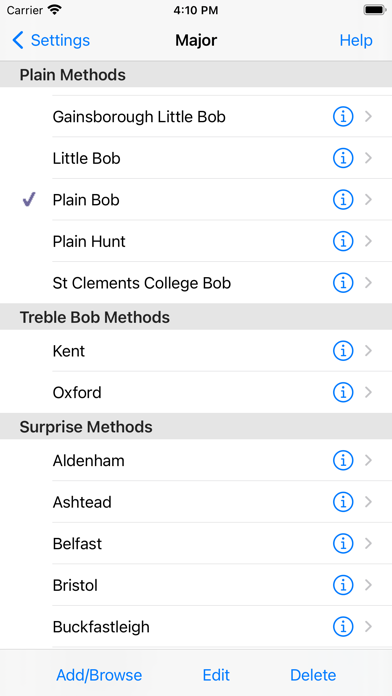
关于此应用
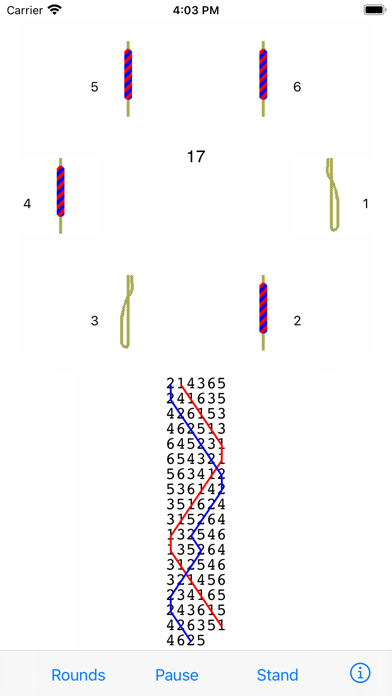
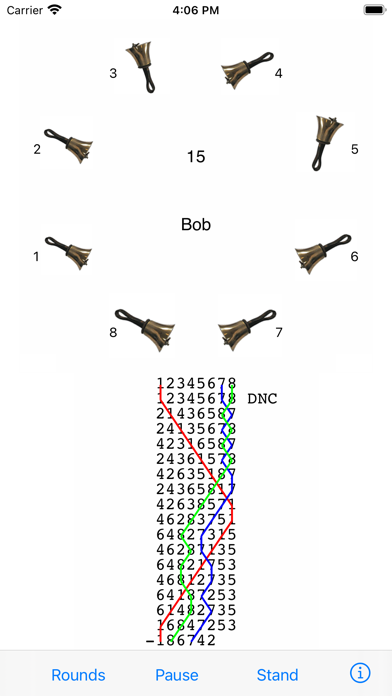
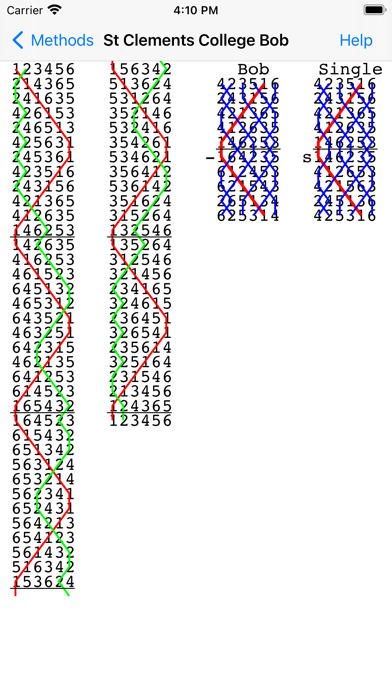
Mobel is a bell ringing simulator for church bell ringers and handbell change ringers. It runs on iPhone, iPad and Apple Mac. When ringers are at home, travelling or at towers, Mobel lets them practise any method they are going to ring. It also shows the blue line diagram for any method, including bobs and singles.
Practise any method on 4 to 16 bells.
Ring plain courses, or touches that Mobel creates (including spliced). Add your own touches (compositions).
Ring any bell; handbell ringers can ring any pair.
Mobel rings the other bells, and speaks any calls.
Conduct: put in bobs and/or singles yourself.
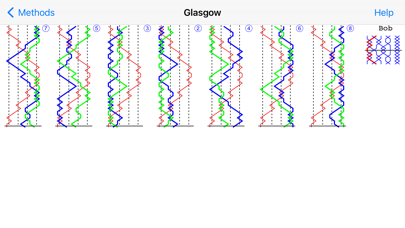
See the blue line diagram for any method or composition that you have added.
Line styles with or without the underlying bell numbers, or as a grid.
Lines for bobs and singles.
Pinch to zoom the diagram.
Select from 20,000 methods in the Central Council library.
Change the speed of the ringing.
Ring with or without a handstroke gap.
Have Mobel wait if you hesitate - or continue in perfect rhythm.
Edit methods and calls to create new methods or doubles variations.
Basic instructions for using Mobel on iPhone and iPad:
- Tap a bell to select it for ringing.
- Tap Start to start the bells ringing rounds.
- Then tap Go to ring the current composition and method.
- Tap the bottom of the screen to ring the bell you selected.
- For handbells, tap right and left to ring a pair.
- Conducting: tap the top of the screen for a bob or single.
- Tap Show to see the blue line for the current method.
- Then double tap to change line style, or pinch to zoom.
- Tap the info (i) button to view and change settings.
- Tap the Help buttons for further information.
From iOS 13.4 onward you can also ring using a keyboard on iPad/iPhone.
Mobel comes from AbelSim, producer of the world's best-selling change ringing simulators: Abel for Windows PCs and Mabel for Apple Mac (see www.abelsim.co.uk).
Mobel is not intended for handbell tune ringers: it rings changes, not tunes.
The latest version runs on iOS 12 and later. Earlier versions of Mobel are still available for previous versions of iOS.
Practise any method on 4 to 16 bells.
Ring plain courses, or touches that Mobel creates (including spliced). Add your own touches (compositions).
Ring any bell; handbell ringers can ring any pair.
Mobel rings the other bells, and speaks any calls.
Conduct: put in bobs and/or singles yourself.
See the blue line diagram for any method or composition that you have added.
Line styles with or without the underlying bell numbers, or as a grid.
Lines for bobs and singles.
Pinch to zoom the diagram.
Select from 20,000 methods in the Central Council library.
Change the speed of the ringing.
Ring with or without a handstroke gap.
Have Mobel wait if you hesitate - or continue in perfect rhythm.
Edit methods and calls to create new methods or doubles variations.
Basic instructions for using Mobel on iPhone and iPad:
- Tap a bell to select it for ringing.
- Tap Start to start the bells ringing rounds.
- Then tap Go to ring the current composition and method.
- Tap the bottom of the screen to ring the bell you selected.
- For handbells, tap right and left to ring a pair.
- Conducting: tap the top of the screen for a bob or single.
- Tap Show to see the blue line for the current method.
- Then double tap to change line style, or pinch to zoom.
- Tap the info (i) button to view and change settings.
- Tap the Help buttons for further information.
From iOS 13.4 onward you can also ring using a keyboard on iPad/iPhone.
Mobel comes from AbelSim, producer of the world's best-selling change ringing simulators: Abel for Windows PCs and Mabel for Apple Mac (see www.abelsim.co.uk).
Mobel is not intended for handbell tune ringers: it rings changes, not tunes.
The latest version runs on iOS 12 and later. Earlier versions of Mobel are still available for previous versions of iOS.
详情
| 开发者 | AbelSim |
|---|---|
| 类别 | 音乐 |
| 价格 | £5.99 |
| 年龄评级 | 4+ |
| 版本 | 2.4.4 |
| 大小 | 9.8 MB |
| 最低 iOS | 12.0 |
| 包 ID | com.abelsim.Mobel |
| 发布 | 2010-10-26 |
| 最后更新 | 2024-12-01 |
| 语言 | 1 语言 |
此页面回答的问题
- Mobel bell ringing simulator 应用评论
- Mobel bell ringing simulator 应用评级
- Mobel bell ringing simulator 下载
- Mobel bell ringing simulator 应用商店排名
- Mobel bell ringing simulator 评论
- Mobel bell ringing simulator 评论和评分
- Mobel bell ringing simulator 是否合法
- Mobel bell ringing simulator 是否是骗局
- Mobel bell ringing simulator 真实用户评论
- Mobel bell ringing simulator 评分
- Mobel bell ringing simulator 投诉
- 人们对 Mobel bell ringing simulator 的看法
- Mobel bell ringing simulator 应用 评论
- Mobel bell ringing simulator 优缺点
- Mobel bell ringing simulator 经验
- 我应该信任 Mobel bell ringing simulator 吗
- Mobel bell ringing simulator 反馈
- Mobel bell ringing simulator 评论 2026
- Mobel bell ringing simulator 检查
- Mobel bell ringing simulator 安全检查
