当前最佳位置
#19
跨越2个商店
峰值
#5跟踪天数
26评分
131 图表历史
26 天由我们记录
商店
今天在2中绘制图表
评分
131 在App Store上
价格
在我们的窗口中更改了11次
安装和收入
苹果没有发布 — 我们不猜测
历史
基于 Astrina 自己的每日快照构建 — 每天一个数据点。
图表位置 — 🇬🇧 付费榜单
01.09 02.09 03.09
显示数字
| 天 | 位置 |
|---|---|
| 01.09 | #5 |
| 02.09 | #13 |
| 03.09 | #19 |
评分数量
31.08 10.09 25.09
显示数字
| 天 | 评分 |
|---|---|
| 31.08 | 131 |
| 01.09 | 131 |
| 04.09 | 131 |
| 05.09 | 131 |
| 07.09 | 131 |
| 10.09 | 131 |
| 15.09 | 131 |
| 17.09 | 131 |
| 20.09 | 131 |
| 21.09 | 131 |
| 22.09 | 131 |
| 25.09 | 131 |
截图


关于此应用
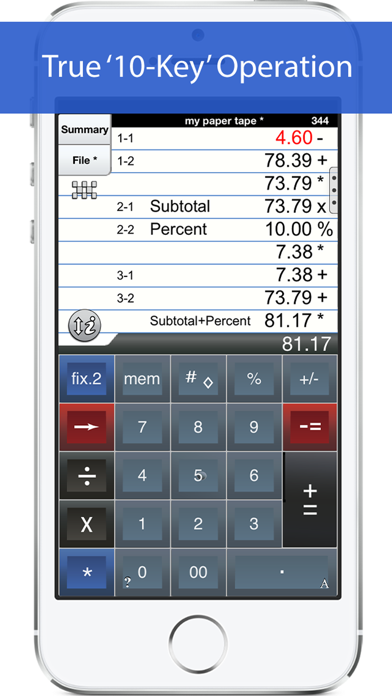
'Adding Machine 10Key for iPhone’ behaves like a true '10 Key' or 'adding machine' like those made by Monroe, Casio, Sharp and others. Press asterisk (*) for a total, operator entry is reversed, and calculate percentages by multiplying and adding to a stream of numbers. SEE THE 1ST FAQ BELOW.
The total (*) key can be on either the left or right side (Sharp or Canon style) and the keypad is expandable to show more or less paper tape history.
Also. Review & edit numbers, add or delete lines. Save & retrieve paper tape files. Export paper tape files to iBooks©, Dropbox©, or your favorite printing utility (see the FAQs).
==== Recent Press =====
Has been featured in iTunes "What's Hot" in the Finance Category.
Strategic Finance (Tools of the Trade): "If you're looking for a professional desk calculator that can give you full 10-key accounting functions with a tape you can name and save, edit, e-mail, or print, check out Interlocken's 10 Key for iPad."
=================
Specifications:
=================
. Behaves the same as a '10 Key' adding machine.
. Export a PDF file to iBooks©, DropBox©, Email, or your favorite printing utility.
. TypeTone - a major innovation to aid accurate key entry using audio feedback (iPad version only).
. Full size (1:1) keyboard (iPad version only).
. Select from a menu of keypad sounds.
. 400 lines of paper tape history (full version).
. 3 display formats: fixed, fix+, float
. Save paper tapes to disk for later use.
. Correct numbers, add comments, add/delete lines
. Two keypads offer the 'total' key on the left or right (Sharp or Canon style)
. Comprehensive set of help screens.
================
FAQ's
Q1. What is the difference between 'Adding Machine 10Key Univ', and 'Accountant Calc' in the App. Store.?
A1. Both calculators are single-column adding machines or calculators with full-size (1:1) keypads and are optimized for the iPad User Interface. '10 Key' behaves the same as a 10 Key Adding Machine with reversed operator entry while ‘Accountant Calc’ supports free chaining of +, -, x, /, %, √, 1/x. It is easier to use if you are not familiar with how a '10-key' works.
Q2. Can I touch-type?
A2. Only the iPad version includes ‘TypeTone’, a key will guide your finger back to the center of a key with an audio tone.
Q3. How can I edit an incorrect number or add & delete lines from the paper tape?
A3. Touch any line of the paper tape for edit mode. Touch the side controls: Add Line, Delete Line. You can also edit numbers, split Add/Sub or Mul/Div groups. Press Done to return to Calculator mode.
Q4. Tell me about Email, Printing, and Exporting a Paper Tape.
A4. Email includes a pdf attachment. Print requires an AirPrint capable printer. Open-In will cause a menu of 3rd party Apps to appear. Once exported, print directly to a network reachable printer (even if it is NOT AirPrint capable).
============================
TERMS AND CONDITIONS
Your use of this application is governed by Interlocken Technology's Terms of Use (http://s354819480.onlinehome.us/InterlockenPrivacyPolicy/Interlocken%20Technology%20Privacy%20Policy.pdf) and Privacy Policy (http://s354819480.onlinehome.us/InterlockenPrivacyPolicy/InterlockenTechnologyTermsOfUse.pdf)
The total (*) key can be on either the left or right side (Sharp or Canon style) and the keypad is expandable to show more or less paper tape history.
Also. Review & edit numbers, add or delete lines. Save & retrieve paper tape files. Export paper tape files to iBooks©, Dropbox©, or your favorite printing utility (see the FAQs).
==== Recent Press =====
Has been featured in iTunes "What's Hot" in the Finance Category.
Strategic Finance (Tools of the Trade): "If you're looking for a professional desk calculator that can give you full 10-key accounting functions with a tape you can name and save, edit, e-mail, or print, check out Interlocken's 10 Key for iPad."
=================
Specifications:
=================
. Behaves the same as a '10 Key' adding machine.
. Export a PDF file to iBooks©, DropBox©, Email, or your favorite printing utility.
. TypeTone - a major innovation to aid accurate key entry using audio feedback (iPad version only).
. Full size (1:1) keyboard (iPad version only).
. Select from a menu of keypad sounds.
. 400 lines of paper tape history (full version).
. 3 display formats: fixed, fix+, float
. Save paper tapes to disk for later use.
. Correct numbers, add comments, add/delete lines
. Two keypads offer the 'total' key on the left or right (Sharp or Canon style)
. Comprehensive set of help screens.
================
FAQ's
Q1. What is the difference between 'Adding Machine 10Key Univ', and 'Accountant Calc' in the App. Store.?
A1. Both calculators are single-column adding machines or calculators with full-size (1:1) keypads and are optimized for the iPad User Interface. '10 Key' behaves the same as a 10 Key Adding Machine with reversed operator entry while ‘Accountant Calc’ supports free chaining of +, -, x, /, %, √, 1/x. It is easier to use if you are not familiar with how a '10-key' works.
Q2. Can I touch-type?
A2. Only the iPad version includes ‘TypeTone’, a key will guide your finger back to the center of a key with an audio tone.
Q3. How can I edit an incorrect number or add & delete lines from the paper tape?
A3. Touch any line of the paper tape for edit mode. Touch the side controls: Add Line, Delete Line. You can also edit numbers, split Add/Sub or Mul/Div groups. Press Done to return to Calculator mode.
Q4. Tell me about Email, Printing, and Exporting a Paper Tape.
A4. Email includes a pdf attachment. Print requires an AirPrint capable printer. Open-In will cause a menu of 3rd party Apps to appear. Once exported, print directly to a network reachable printer (even if it is NOT AirPrint capable).
============================
TERMS AND CONDITIONS
Your use of this application is governed by Interlocken Technology's Terms of Use (http://s354819480.onlinehome.us/InterlockenPrivacyPolicy/Interlocken%20Technology%20Privacy%20Policy.pdf) and Privacy Policy (http://s354819480.onlinehome.us/InterlockenPrivacyPolicy/InterlockenTechnologyTermsOfUse.pdf)
详情
| 开发者 | Richard Silverman |
|---|---|
| 类别 | 金融 |
| 价格 | $2.99 |
| 年龄评级 | 4+ |
| 版本 | 7.10k |
| 大小 | 10.3 MB |
| 最低 iOS | 12.4 |
| 包 ID | com.papercalc-mobile.papercalc-10Key-suite |
| 发布 | 2010-09-23 |
| 最后更新 | 2023-12-27 |
| 语言 | 5 语言 |
此页面回答的问题
- Adding Machine 10Key iPhone 应用评论
- Adding Machine 10Key iPhone 应用评级
- Adding Machine 10Key iPhone 下载
- Adding Machine 10Key iPhone 应用商店排名
- Adding Machine 10Key iPhone 评论
- Adding Machine 10Key iPhone 评论和评分
- Adding Machine 10Key iPhone 是否合法
- Adding Machine 10Key iPhone 是否是骗局
- Adding Machine 10Key iPhone 真实用户评论
- Adding Machine 10Key iPhone 评分
- Adding Machine 10Key iPhone 投诉
- 人们对 Adding Machine 10Key iPhone 的看法
- Adding Machine 10Key iPhone 应用 评论
- Adding Machine 10Key iPhone 优缺点
- Adding Machine 10Key iPhone 经验
- 我应该信任 Adding Machine 10Key iPhone 吗
- Adding Machine 10Key iPhone 反馈
- Adding Machine 10Key iPhone 评论 2026
- Adding Machine 10Key iPhone 检查
- Adding Machine 10Key iPhone 安全检查
