
图表历史
35 天由我们记录
商店
今天在5中绘制图表
评分
25 在App Store上
价格
在我们的窗口中更改了5次
安装和收入
苹果没有发布 — 我们不猜测
历史
基于 Astrina 自己的每日快照构建 — 每天一个数据点。
图表位置 — 🇫🇷 付费榜单
31.07 01.08
显示数字
| 天 | 位置 |
|---|---|
| 31.07 | #25 |
| 01.08 | #33 |
评分数量
31.08 03.09 12.09
显示数字
| 天 | 评分 |
|---|---|
| 31.08 | 19 |
| 01.09 | 19 |
| 03.09 | 19 |
| 04.09 | 19 |
| 11.09 | 19 |
| 12.09 | 19 |
截图

关于此应用
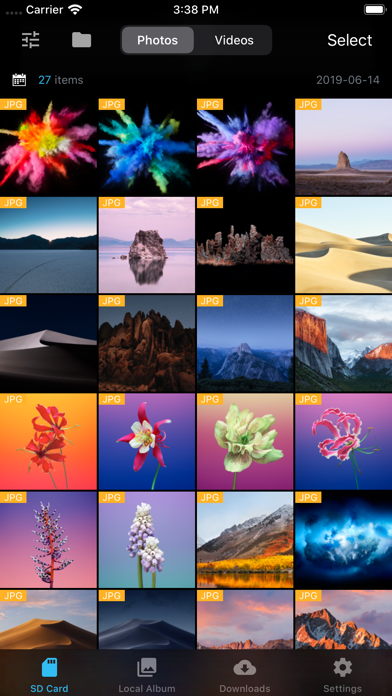
With Fair for Flashair, you can quickly browse and download all pictures and files on your wireless Flashair SD card.
Supported hardware Flashair W-02, w-03, W-04
The following is a list of main functions:
System
- Fully compatible with IOS 13
- Perfect for dark mode
Download
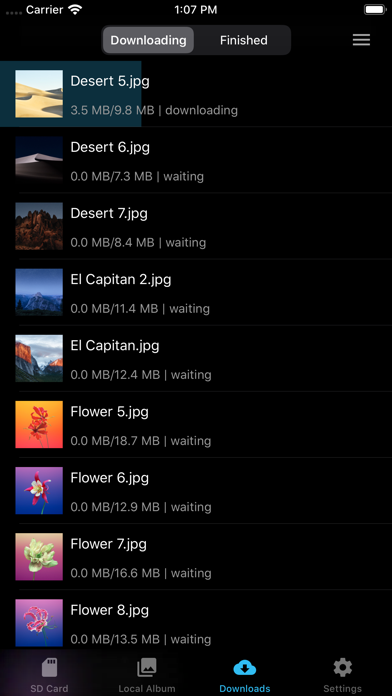
- Independent download process management, your download record will not be lost
- Batch download, display download speed, delete, edit download tasks and other functions
- It can be downloaded to the local folder of APP first, and then saved after further filtering.
- You can configure to save to a separate album and configure the album file name
- You can choose to generate HD thumbnails after downloading
- Keep the photo information completely, download the original image, which is exactly the same as the camera image.
- When selecting photos, you can select all, slide multiple, and select all by time group.
- Auto refresh
- Auto Download new photos/videos
- Automatic connection You can connect FlashAir Wi-Fi inside the app
- Config download order
Display
- Pictures on Flashair can be displayed in the default view or grouped by date
- Format filtering, you can select the file format you want to see, only display JPG, raw, etc.
- You can sort pictures in ascending or descending order
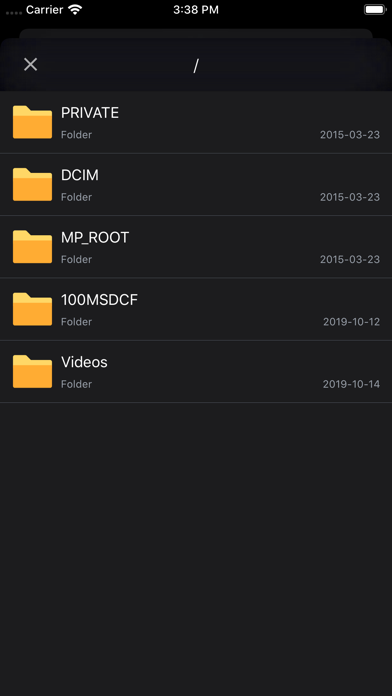
- You can choose to load only the pictures in DCIM or display all the pictures in the card.
- You can show or hide picture file names
- You can choose to display the no download flag
- You can configure the number of pictures displayed per line
- You can view the picture in thumbnail or full size
- Preview video smoothly
- You can view the complete EXIF information of the picture
- You can view the full file system of flashair and operate on files
- Raw preview can be displayed (using JPG preview with the same name)
Flashair settings
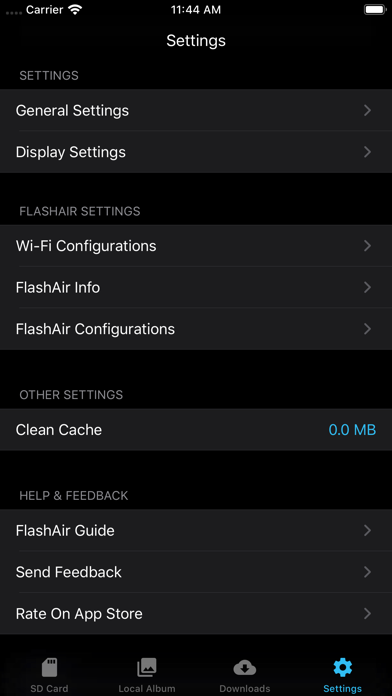
- Flashair SSID and Wi Fi password can be configured
- Flashair mastercode can be set and managed automatically
- You can view the complete information of flashair SSID, password, remaining space, MAC address, etc.
- Flashair and cellular network can be used together
Other
- You can open files in flashair through other apps
- Mastercode can be processed automatically
- Can be set to prevent locking during download
- Slide multiple pictures to improve efficiency
- Can clear the picture cache to prevent the app from taking up too much space
- Complete operation guide and problem feedback channel
Supported hardware Flashair W-02, w-03, W-04
The following is a list of main functions:
System
- Fully compatible with IOS 13
- Perfect for dark mode
Download
- Independent download process management, your download record will not be lost
- Batch download, display download speed, delete, edit download tasks and other functions
- It can be downloaded to the local folder of APP first, and then saved after further filtering.
- You can configure to save to a separate album and configure the album file name
- You can choose to generate HD thumbnails after downloading
- Keep the photo information completely, download the original image, which is exactly the same as the camera image.
- When selecting photos, you can select all, slide multiple, and select all by time group.
- Auto refresh
- Auto Download new photos/videos
- Automatic connection You can connect FlashAir Wi-Fi inside the app
- Config download order
Display
- Pictures on Flashair can be displayed in the default view or grouped by date
- Format filtering, you can select the file format you want to see, only display JPG, raw, etc.
- You can sort pictures in ascending or descending order
- You can choose to load only the pictures in DCIM or display all the pictures in the card.
- You can show or hide picture file names
- You can choose to display the no download flag
- You can configure the number of pictures displayed per line
- You can view the picture in thumbnail or full size
- Preview video smoothly
- You can view the complete EXIF information of the picture
- You can view the full file system of flashair and operate on files
- Raw preview can be displayed (using JPG preview with the same name)
Flashair settings
- Flashair SSID and Wi Fi password can be configured
- Flashair mastercode can be set and managed automatically
- You can view the complete information of flashair SSID, password, remaining space, MAC address, etc.
- Flashair and cellular network can be used together
Other
- You can open files in flashair through other apps
- Mastercode can be processed automatically
- Can be set to prevent locking during download
- Slide multiple pictures to improve efficiency
- Can clear the picture cache to prevent the app from taking up too much space
- Complete operation guide and problem feedback channel
详情
| 开发者 | 杨 李 |
|---|---|
| 类别 | 娱乐 |
| 价格 | £1.99 |
| 年龄评级 | 4+ |
| 版本 | 1.6.2 |
| 大小 | 11.5 MB |
| 最低 iOS | 13.0 |
| 包 ID | com.flashairpro.ios |
| 发布 | 2018-04-05 |
| 最后更新 | 2024-12-10 |
| 语言 | 3 语言 |
此页面回答的问题
- FAir for FlashAir 应用评论
- FAir for FlashAir 应用评级
- FAir for FlashAir 下载
- FAir for FlashAir 应用商店排名
- FAir for FlashAir 评论
- FAir for FlashAir 评论和评分
- FAir for FlashAir 是否合法
- FAir for FlashAir 是否是骗局
- FAir for FlashAir 真实用户评论
- FAir for FlashAir 评分
- FAir for FlashAir 投诉
- 人们对 FAir for FlashAir 的看法
- FAir for FlashAir 应用 评论
- FAir for FlashAir 优缺点
- FAir for FlashAir 经验
- 我应该信任 FAir for FlashAir 吗
- FAir for FlashAir 反馈
- FAir for FlashAir 评论 2026
- FAir for FlashAir 检查
- FAir for FlashAir 安全检查
