
अब सबसे अच्छा स्थान
#56
1 स्टोरफ्रंट में
पीक
#26ट्रैक किए गए दिन
3रेटिंग
3 चार्ट इतिहास
3 दिन हमारे द्वारा रिकॉर्ड किए गए
स्टोरफ्रंट
आज 1 में चार्टिंग
रेटिंग
3 ऐप स्टोर पर
कीमत
हमारे विंडो में 2 बार बदला गया
इंस्टॉल और राजस्व
Apple कुछ भी प्रकाशित नहीं करता — हम अनुमान नहीं लगाते
वर्तमान में चार्टिंग
इतिहास
Astrina के अपने दैनिक स्नैपशॉट से निर्मित — प्रति दिन एक बिंदु।
चार्ट स्थिति — 🇫🇷 शीर्ष भुगतान
22.09 23.09 24.09
संख्याएँ दिखाएँ
| दिन | स्थिति |
|---|---|
| 22.09 | #26 |
| 23.09 | #41 |
| 24.09 | #56 |
रेटिंग की संख्या
22.09 23.09 24.09
संख्याएँ दिखाएँ
| दिन | रेटिंग |
|---|---|
| 22.09 | 3 |
| 23.09 | 3 |
| 24.09 | 3 |
स्क्रीनशॉट



इस ऐप के बारे में
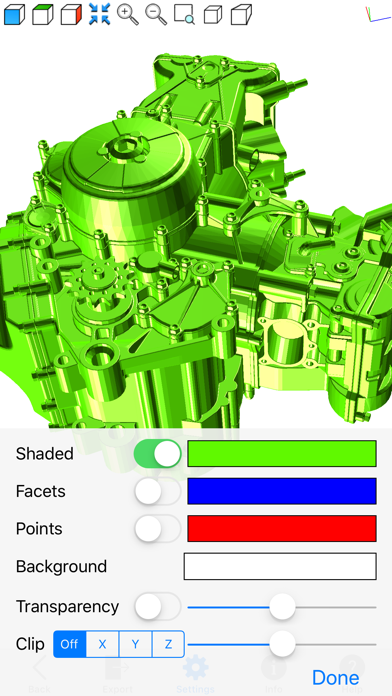
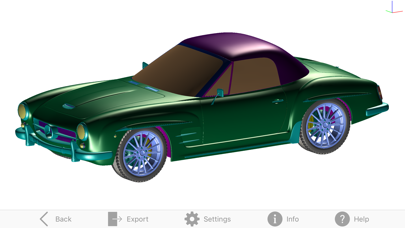
Meshman 3D Viewer is a great app to view and convert 3D model files: STL, OBJ, DXF, 3MF, USD, DAE, 3DS, DWG, FBX, PLY, OFF.
Features:
- Open & Export files from formats:
* STL (Stereolithography, supports ASCII & Binary)
* OBJ (Wavefront format)
* DXF (AutoCAD format, supports ASCII & Binary)
* 3MF (3D Manufacturing format)
* USD (Universal Scene Description)
* DAE (COLLADA file format)
* 3DS (3D Studio format)
* PLY (Polygon file format, supports ASCII & Binary)
* OFF (Object file format)
- Open (only) files from:
* DWG (AutoCAD format)
* FBX (Autodesk Filmbox format)
- Load from a ZIP or RAR file one of the files the app can open.
- Measure distance between points within your model.
- Graphic operations for Rotating, panning, zooming.
- View your model in Orthogonal or Perspective mode.
- Obtain info on the model: triangle count, bounding box, area, volume.
- Set up rendering options: faces, edges, points, transparency.
- Render using a clipping plane (useful for viewing interiors).
Please contact us for support, questions, feature request or any other inquiry.
[email protected]
Features:
- Open & Export files from formats:
* STL (Stereolithography, supports ASCII & Binary)
* OBJ (Wavefront format)
* DXF (AutoCAD format, supports ASCII & Binary)
* 3MF (3D Manufacturing format)
* USD (Universal Scene Description)
* DAE (COLLADA file format)
* 3DS (3D Studio format)
* PLY (Polygon file format, supports ASCII & Binary)
* OFF (Object file format)
- Open (only) files from:
* DWG (AutoCAD format)
* FBX (Autodesk Filmbox format)
- Load from a ZIP or RAR file one of the files the app can open.
- Measure distance between points within your model.
- Graphic operations for Rotating, panning, zooming.
- View your model in Orthogonal or Perspective mode.
- Obtain info on the model: triangle count, bounding box, area, volume.
- Set up rendering options: faces, edges, points, transparency.
- Render using a clipping plane (useful for viewing interiors).
Please contact us for support, questions, feature request or any other inquiry.
[email protected]
विवरण
| डेवलपर | Victor Bovio |
|---|---|
| श्रेणी | उत्पादकता |
| कीमत | 7,99 € |
| आयु रेटिंग | 4+ |
| संस्करण | 2.0 |
| आकार | 8.5 MB |
| न्यूनतम iOS | 16.6 |
| बंडल आईडी | com.boviosoft.Meshman3DiOS |
| रिलीज़ किया गया | 2019-12-08 |
| अंतिम अपडेट | 2026-07-06 |
| भाषाएँ | 1 भाषाएँ |
यह पृष्ठ किसका उत्तर देता है
- Meshman 3D Viewer ऐप समीक्षाएँ
- Meshman 3D Viewer ऐप रेटिंग
- Meshman 3D Viewer डाउनलोड
- Meshman 3D Viewer ऐप स्टोर रैंक
- Meshman 3D Viewer समीक्षाएँ
- Meshman 3D Viewer समीक्षाएँ और रेटिंग्स
- क्या Meshman 3D Viewer वैध है
- क्या Meshman 3D Viewer एक धोखा है
- Meshman 3D Viewer असली उपयोगकर्ता समीक्षाएँ
- Meshman 3D Viewer रेटिंग
- Meshman 3D Viewer शिकायतें
- लोगों का क्या कहना है Meshman 3D Viewer के बारे में
- Meshman 3D Viewer के फायदे और नुकसान
- Meshman 3D Viewer अनुभव
- क्या मुझे Meshman 3D Viewer पर भरोसा करना चाहिए
- Meshman 3D Viewer फीडबैक
- Meshman 3D Viewer समीक्षा 2026
- Meshman 3D Viewer जांच
- Meshman 3D Viewer सुरक्षा जांच
- Meshman 3D Viewer के बारे में समीक्षाएँ
