
WorkOutDoors
CCS Ltd Salud y Bienestar 4+ 9,99 €
4.60 · 816 calificaciones
Mejor posición ahora
#1
a través de 15 tiendas
Pico
#1Días rastreados
59Calificaciones
816 Historial de gráficos
59 días registrados por nosotros
Tiendas
gráficos en 15 hoy
Calificaciones
816 en la App Store
Precio
cambiado 33 vez(es) en nuestra ventana
Instalaciones e ingresos
Apple no publica ninguno — no adivinamos
Actualmente en la lista
#1 🇬🇧 Top Pagado · Salud y Bienestar #1 🇫🇷 Top Pagado · Salud y Bienestar #4 🇺🇸 Top Pagado · Salud y Bienestar #6 🇩🇪 Top Pagado · Salud y Bienestar #16 🇫🇷 Top Pagado #28 🇳🇱 Top Pagado #29 🇪🇸 Top Pagado #30 🇮🇹 Top Pagado #44 🇬🇧 Top Pagado #62 🇩🇪 Top Pagado #68 🇦🇺 Top Pagado #78 🇮🇳 Top Pagado #84 🇨🇦 Top Pagado #89 🇧🇷 Top Pagado #96 🇺🇸 Top Pagado
Historia
Construido a partir de las propias instantáneas diarias de Astrina — un punto por día.
Posición en la lista — 🇬🇧 Top Pagado
23.07 26.08 24.09
Mostrar los números
| Día | Posición |
|---|---|
| 23.07 | #2 |
| 24.07 | #1 |
| 25.07 | #2 |
| 31.07 | #2 |
| 01.08 | #3 |
| 02.08 | #1 |
| 03.08 | #1 |
| 04.08 | #2 |
| 05.08 | #2 |
| 06.08 | #2 |
| 07.08 | #2 |
| 08.08 | #1 |
| 09.08 | #1 |
| 10.08 | #4 |
| 11.08 | #2 |
| 12.08 | #1 |
| 13.08 | #2 |
| 14.08 | #3 |
| 15.08 | #3 |
| 16.08 | #4 |
| 17.08 | #2 |
| 18.08 | #2 |
| 19.08 | #4 |
| 20.08 | #5 |
| 21.08 | #4 |
| 22.08 | #3 |
| 23.08 | #3 |
| 24.08 | #4 |
| 25.08 | #2 |
| 26.08 | #2 |
| 27.08 | #2 |
| 28.08 | #1 |
| 29.08 | #2 |
| 30.08 | #3 |
| 31.08 | #2 |
| 01.09 | #2 |
| 02.09 | #2 |
| 03.09 | #3 |
| 04.09 | #3 |
| 05.09 | #1 |
| 06.09 | #1 |
| 07.09 | #2 |
| 08.09 | #4 |
| 09.09 | #2 |
| 10.09 | #1 |
| 11.09 | #2 |
| 12.09 | #2 |
| 13.09 | #2 |
| 14.09 | #2 |
| 15.09 | #2 |
| 16.09 | #3 |
| 17.09 | #2 |
| 18.09 | #3 |
| 19.09 | #1 |
| 20.09 | #1 |
| 21.09 | #3 |
| 22.09 | #1 |
| 23.09 | #1 |
| 24.09 | #1 |
Número de valoraciones
23.07 13.08 30.08
Mostrar los números
| Día | Calificaciones |
|---|---|
| 23.07 | 797 |
| 24.07 | 797 |
| 25.07 | 797 |
| 31.07 | 798 |
| 01.08 | 799 |
| 02.08 | 798 |
| 03.08 | 799 |
| 04.08 | 799 |
| 05.08 | 799 |
| 06.08 | 801 |
| 07.08 | 801 |
| 08.08 | 801 |
| 09.08 | 801 |
| 10.08 | 801 |
| 11.08 | 801 |
| 12.08 | 802 |
| 13.08 | 802 |
| 14.08 | 802 |
| 15.08 | 802 |
| 16.08 | 802 |
| 17.08 | 802 |
| 18.08 | 802 |
| 19.08 | 804 |
| 20.08 | 805 |
| 21.08 | 805 |
| 22.08 | 805 |
| 23.08 | 806 |
| 24.08 | 806 |
| 25.08 | 806 |
| 26.08 | 806 |
| 27.08 | 807 |
| 28.08 | 807 |
| 29.08 | 807 |
| 30.08 | 807 |
Capturas de pantalla


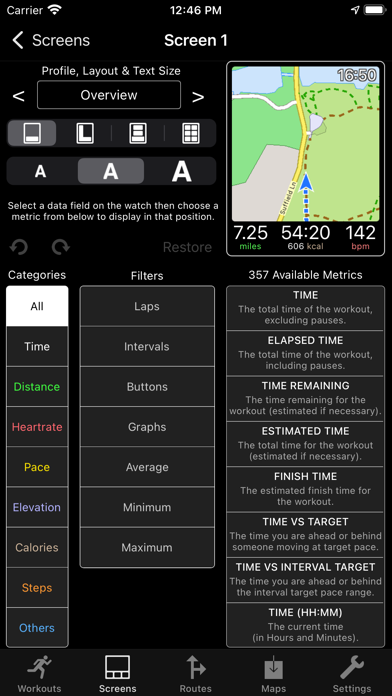

Acerca de esta aplicación
WorkOutDoors is the most advanced and most configurable workout app for the Apple Watch. It's perfect for running, cycling, hiking and any other indoor or outdoor activity.
Note: WorkOutDoors requires an Apple Watch Series 4 or later. It is not necessary to have your iPhone with you during a workout.
The app uses Apple’s workout system, so all workouts are saved to the Health system. However it also provides many extra features over Apple's app, such as:
- a super-smooth vector map that can be shown during a workout;
- multiple configurable screens with metrics and graphs from a pool of 800+ data fields;
- route files can be imported and used for navigation (including turn by turn directions);
- dozens of configurable alerts (e.g. every mile; high heart rate; low pace; off-route etc);
- interval schedules can be created using the larger screen of the phone app;
- climbs and descents are supported with notifications and on-screen data and graphs;
- waypoints can be created, navigated to, and exported;
- use shortcuts to associate operations with gestures (e.g. double tap to hear configurable metrics);
- compare pace against a target or a previous workout (using metrics and a dot on the map);
- show zones for pace and power as well as heart rate (with optional coloured backgrounds);
- auto-pause is available for all outdoor activities;
- shows GPS and heart rate before starting a workout, so that you can wait for good signals;
- configure distance and pace for running / walking to come from Apple’s pedometer or from GPS;
- workouts can be exported in FIT / TCX / GPX files, or automatically sent to Strava;
- workouts created by the app can be analysed in great depth in the iPhone app.
The app also has many more features. The map is a particular highlight. It uses OpenStreetMap, which provides worldwide coverage and includes the trails necessary for outdoor workouts. It also has several features that help you navigate during a workout:
- maps can be smoothly panned and zoomed, and can rotate according to the compass;
- a breadcrumb trail of your whole route is displayed on the map during the workout;
- topographic data can be shown, with configurable contour colours and hill shading;
- map-only mode is provided for when you don't want to start a workout and just need a map;
- a circular scale is shown when you zoom, making it easy to see the distance to features;
- maps can be stored on the watch for use when offline (they are downloaded as required if online);
- a red compass points north and a green compass points to the start;
- choose a waypoint to see a compass and distance to it in the corner of the map;
- you can also navigate to waypoints on the map, such as hospitals, sights, cafes etc.
If you load a route from a GPX / TCX / FIT file then navigation is even easier:
- your position is shown on an elevation profile of the route;
- the remaining distance, time and ascent can also be displayed;
- you can get alerted when you go off-route;
- when off-route then a compass is shown which points to the nearest part of the route;
- if the route contains turn by turn directions then these can be used like a sat nav;
- if there are no directions then the app can use “bend detection” to generate them;
- the next direction is shown as an icon and distance in the corner of the map;
- the map can automatically zoom in when you are approaching a turn;
- you can use shake gestures to hear the distance to the next turn or the end of the route;
- routes are coloured by gradient: from red for steep uphill to blue for steep downhill;
- you can configure what information is displayed during a climb or descent.
All this is included for a single one-off payment. No extra in-app purchases or subscriptions are required (although there is a completely optional in-app tip jar which was requested by long-term users).
If you own an Apple Watch and do any form of exercise, then WorkOutDoors is the app for you. Give it a go!
Note: WorkOutDoors requires an Apple Watch Series 4 or later. It is not necessary to have your iPhone with you during a workout.
The app uses Apple’s workout system, so all workouts are saved to the Health system. However it also provides many extra features over Apple's app, such as:
- a super-smooth vector map that can be shown during a workout;
- multiple configurable screens with metrics and graphs from a pool of 800+ data fields;
- route files can be imported and used for navigation (including turn by turn directions);
- dozens of configurable alerts (e.g. every mile; high heart rate; low pace; off-route etc);
- interval schedules can be created using the larger screen of the phone app;
- climbs and descents are supported with notifications and on-screen data and graphs;
- waypoints can be created, navigated to, and exported;
- use shortcuts to associate operations with gestures (e.g. double tap to hear configurable metrics);
- compare pace against a target or a previous workout (using metrics and a dot on the map);
- show zones for pace and power as well as heart rate (with optional coloured backgrounds);
- auto-pause is available for all outdoor activities;
- shows GPS and heart rate before starting a workout, so that you can wait for good signals;
- configure distance and pace for running / walking to come from Apple’s pedometer or from GPS;
- workouts can be exported in FIT / TCX / GPX files, or automatically sent to Strava;
- workouts created by the app can be analysed in great depth in the iPhone app.
The app also has many more features. The map is a particular highlight. It uses OpenStreetMap, which provides worldwide coverage and includes the trails necessary for outdoor workouts. It also has several features that help you navigate during a workout:
- maps can be smoothly panned and zoomed, and can rotate according to the compass;
- a breadcrumb trail of your whole route is displayed on the map during the workout;
- topographic data can be shown, with configurable contour colours and hill shading;
- map-only mode is provided for when you don't want to start a workout and just need a map;
- a circular scale is shown when you zoom, making it easy to see the distance to features;
- maps can be stored on the watch for use when offline (they are downloaded as required if online);
- a red compass points north and a green compass points to the start;
- choose a waypoint to see a compass and distance to it in the corner of the map;
- you can also navigate to waypoints on the map, such as hospitals, sights, cafes etc.
If you load a route from a GPX / TCX / FIT file then navigation is even easier:
- your position is shown on an elevation profile of the route;
- the remaining distance, time and ascent can also be displayed;
- you can get alerted when you go off-route;
- when off-route then a compass is shown which points to the nearest part of the route;
- if the route contains turn by turn directions then these can be used like a sat nav;
- if there are no directions then the app can use “bend detection” to generate them;
- the next direction is shown as an icon and distance in the corner of the map;
- the map can automatically zoom in when you are approaching a turn;
- you can use shake gestures to hear the distance to the next turn or the end of the route;
- routes are coloured by gradient: from red for steep uphill to blue for steep downhill;
- you can configure what information is displayed during a climb or descent.
All this is included for a single one-off payment. No extra in-app purchases or subscriptions are required (although there is a completely optional in-app tip jar which was requested by long-term users).
If you own an Apple Watch and do any form of exercise, then WorkOutDoors is the app for you. Give it a go!
Detalles
| Desarrollador | CCS Ltd |
|---|---|
| Categoría | Salud y Bienestar |
| Precio | 9,99 € |
| Clasificación por edad | 4+ |
| Versión | 6.4 |
| Tamaño | 38.7 MB |
| iOS mínimo | 12.0 |
| ID del paquete | net.workoutdoors.workoutdoors |
| Lanzado | 2017-07-13 |
| Última actualización | 2026-06-26 |
| Idiomas | 1 idiomas |
Lo que esta página responde
- WorkOutDoors reseñas de aplicaciones
- WorkOutDoors calificación de la aplicación
- WorkOutDoors descarga
- WorkOutDoors rango en la tienda de aplicaciones
- reseñas de WorkOutDoors
- reseñas y calificaciones de WorkOutDoors
- es WorkOutDoors legítimo
- es WorkOutDoors una estafa
- reseñas de usuarios reales de WorkOutDoors
- calificación de WorkOutDoors
- quejas de WorkOutDoors
- lo que la gente dice sobre WorkOutDoors
- reseñas de WorkOutDoors aplicación
- pros y contras de WorkOutDoors
- experiencia de WorkOutDoors
- debería confiar en WorkOutDoors
- comentarios de WorkOutDoors
- reseña de WorkOutDoors 2026
- verificación de WorkOutDoors
- verificación de seguridad de WorkOutDoors
