
Najlepsza pozycja teraz
#1
w 15 sklepach
Szczyt
#1Dni śledzone
59Oceny
816 Historia wykresu
59 dni zarejestrowanych przez nas
Sklepy
wykres w 15 dzisiaj
Oceny
816 w App Store
Cena
zmieniono 33 raz(y) w naszym oknie
Instalacje i przychody
Apple nie publikuje żadnych — nie zgadujemy
Obecnie na wykresie
#1 🇬🇧 Najlepsze płatne · Zdrowie i fitness #1 🇫🇷 Najlepsze płatne · Zdrowie i fitness #4 🇺🇸 Najlepsze płatne · Zdrowie i fitness #6 🇩🇪 Najlepsze płatne · Zdrowie i fitness #16 🇫🇷 Najlepsze płatne #28 🇳🇱 Najlepsze płatne #29 🇪🇸 Najlepsze płatne #30 🇮🇹 Najlepsze płatne #44 🇬🇧 Najlepsze płatne #62 🇩🇪 Najlepsze płatne #68 🇦🇺 Najlepsze płatne #78 🇮🇳 Najlepsze płatne #84 🇨🇦 Najlepsze płatne #89 🇧🇷 Najlepsze płatne #96 🇺🇸 Najlepsze płatne
Historia
Zbudowane na podstawie codziennych zrzutów Astriny — jeden punkt dziennie.
Pozycja na wykresie — 🇬🇧 Najlepsze płatne
23.07 26.08 24.09
Pokaż liczby
| Dzień | Pozycja |
|---|---|
| 23.07 | #2 |
| 24.07 | #1 |
| 25.07 | #2 |
| 31.07 | #2 |
| 01.08 | #3 |
| 02.08 | #1 |
| 03.08 | #1 |
| 04.08 | #2 |
| 05.08 | #2 |
| 06.08 | #2 |
| 07.08 | #2 |
| 08.08 | #1 |
| 09.08 | #1 |
| 10.08 | #4 |
| 11.08 | #2 |
| 12.08 | #1 |
| 13.08 | #2 |
| 14.08 | #3 |
| 15.08 | #3 |
| 16.08 | #4 |
| 17.08 | #2 |
| 18.08 | #2 |
| 19.08 | #4 |
| 20.08 | #5 |
| 21.08 | #4 |
| 22.08 | #3 |
| 23.08 | #3 |
| 24.08 | #4 |
| 25.08 | #2 |
| 26.08 | #2 |
| 27.08 | #2 |
| 28.08 | #1 |
| 29.08 | #2 |
| 30.08 | #3 |
| 31.08 | #2 |
| 01.09 | #2 |
| 02.09 | #2 |
| 03.09 | #3 |
| 04.09 | #3 |
| 05.09 | #1 |
| 06.09 | #1 |
| 07.09 | #2 |
| 08.09 | #4 |
| 09.09 | #2 |
| 10.09 | #1 |
| 11.09 | #2 |
| 12.09 | #2 |
| 13.09 | #2 |
| 14.09 | #2 |
| 15.09 | #2 |
| 16.09 | #3 |
| 17.09 | #2 |
| 18.09 | #3 |
| 19.09 | #1 |
| 20.09 | #1 |
| 21.09 | #3 |
| 22.09 | #1 |
| 23.09 | #1 |
| 24.09 | #1 |
Liczba ocen
23.07 13.08 30.08
Pokaż liczby
| Dzień | Oceny |
|---|---|
| 23.07 | 797 |
| 24.07 | 797 |
| 25.07 | 797 |
| 31.07 | 798 |
| 01.08 | 799 |
| 02.08 | 798 |
| 03.08 | 799 |
| 04.08 | 799 |
| 05.08 | 799 |
| 06.08 | 801 |
| 07.08 | 801 |
| 08.08 | 801 |
| 09.08 | 801 |
| 10.08 | 801 |
| 11.08 | 801 |
| 12.08 | 802 |
| 13.08 | 802 |
| 14.08 | 802 |
| 15.08 | 802 |
| 16.08 | 802 |
| 17.08 | 802 |
| 18.08 | 802 |
| 19.08 | 804 |
| 20.08 | 805 |
| 21.08 | 805 |
| 22.08 | 805 |
| 23.08 | 806 |
| 24.08 | 806 |
| 25.08 | 806 |
| 26.08 | 806 |
| 27.08 | 807 |
| 28.08 | 807 |
| 29.08 | 807 |
| 30.08 | 807 |
Zrzuty ekranu


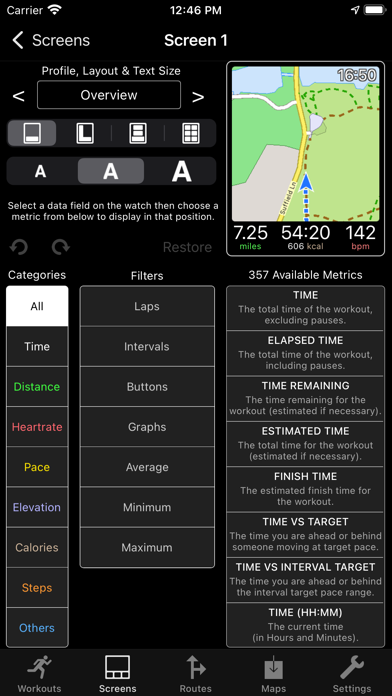

O tej aplikacji
WorkOutDoors is the most advanced and most configurable workout app for the Apple Watch. It's perfect for running, cycling, hiking and any other indoor or outdoor activity.
Note: WorkOutDoors requires an Apple Watch Series 4 or later. It is not necessary to have your iPhone with you during a workout.
The app uses Apple’s workout system, so all workouts are saved to the Health system. However it also provides many extra features over Apple's app, such as:
- a super-smooth vector map that can be shown during a workout;
- multiple configurable screens with metrics and graphs from a pool of 800+ data fields;
- route files can be imported and used for navigation (including turn by turn directions);
- dozens of configurable alerts (e.g. every mile; high heart rate; low pace; off-route etc);
- interval schedules can be created using the larger screen of the phone app;
- climbs and descents are supported with notifications and on-screen data and graphs;
- waypoints can be created, navigated to, and exported;
- use shortcuts to associate operations with gestures (e.g. double tap to hear configurable metrics);
- compare pace against a target or a previous workout (using metrics and a dot on the map);
- show zones for pace and power as well as heart rate (with optional coloured backgrounds);
- auto-pause is available for all outdoor activities;
- shows GPS and heart rate before starting a workout, so that you can wait for good signals;
- configure distance and pace for running / walking to come from Apple’s pedometer or from GPS;
- workouts can be exported in FIT / TCX / GPX files, or automatically sent to Strava;
- workouts created by the app can be analysed in great depth in the iPhone app.
The app also has many more features. The map is a particular highlight. It uses OpenStreetMap, which provides worldwide coverage and includes the trails necessary for outdoor workouts. It also has several features that help you navigate during a workout:
- maps can be smoothly panned and zoomed, and can rotate according to the compass;
- a breadcrumb trail of your whole route is displayed on the map during the workout;
- topographic data can be shown, with configurable contour colours and hill shading;
- map-only mode is provided for when you don't want to start a workout and just need a map;
- a circular scale is shown when you zoom, making it easy to see the distance to features;
- maps can be stored on the watch for use when offline (they are downloaded as required if online);
- a red compass points north and a green compass points to the start;
- choose a waypoint to see a compass and distance to it in the corner of the map;
- you can also navigate to waypoints on the map, such as hospitals, sights, cafes etc.
If you load a route from a GPX / TCX / FIT file then navigation is even easier:
- your position is shown on an elevation profile of the route;
- the remaining distance, time and ascent can also be displayed;
- you can get alerted when you go off-route;
- when off-route then a compass is shown which points to the nearest part of the route;
- if the route contains turn by turn directions then these can be used like a sat nav;
- if there are no directions then the app can use “bend detection” to generate them;
- the next direction is shown as an icon and distance in the corner of the map;
- the map can automatically zoom in when you are approaching a turn;
- you can use shake gestures to hear the distance to the next turn or the end of the route;
- routes are coloured by gradient: from red for steep uphill to blue for steep downhill;
- you can configure what information is displayed during a climb or descent.
All this is included for a single one-off payment. No extra in-app purchases or subscriptions are required (although there is a completely optional in-app tip jar which was requested by long-term users).
If you own an Apple Watch and do any form of exercise, then WorkOutDoors is the app for you. Give it a go!
Note: WorkOutDoors requires an Apple Watch Series 4 or later. It is not necessary to have your iPhone with you during a workout.
The app uses Apple’s workout system, so all workouts are saved to the Health system. However it also provides many extra features over Apple's app, such as:
- a super-smooth vector map that can be shown during a workout;
- multiple configurable screens with metrics and graphs from a pool of 800+ data fields;
- route files can be imported and used for navigation (including turn by turn directions);
- dozens of configurable alerts (e.g. every mile; high heart rate; low pace; off-route etc);
- interval schedules can be created using the larger screen of the phone app;
- climbs and descents are supported with notifications and on-screen data and graphs;
- waypoints can be created, navigated to, and exported;
- use shortcuts to associate operations with gestures (e.g. double tap to hear configurable metrics);
- compare pace against a target or a previous workout (using metrics and a dot on the map);
- show zones for pace and power as well as heart rate (with optional coloured backgrounds);
- auto-pause is available for all outdoor activities;
- shows GPS and heart rate before starting a workout, so that you can wait for good signals;
- configure distance and pace for running / walking to come from Apple’s pedometer or from GPS;
- workouts can be exported in FIT / TCX / GPX files, or automatically sent to Strava;
- workouts created by the app can be analysed in great depth in the iPhone app.
The app also has many more features. The map is a particular highlight. It uses OpenStreetMap, which provides worldwide coverage and includes the trails necessary for outdoor workouts. It also has several features that help you navigate during a workout:
- maps can be smoothly panned and zoomed, and can rotate according to the compass;
- a breadcrumb trail of your whole route is displayed on the map during the workout;
- topographic data can be shown, with configurable contour colours and hill shading;
- map-only mode is provided for when you don't want to start a workout and just need a map;
- a circular scale is shown when you zoom, making it easy to see the distance to features;
- maps can be stored on the watch for use when offline (they are downloaded as required if online);
- a red compass points north and a green compass points to the start;
- choose a waypoint to see a compass and distance to it in the corner of the map;
- you can also navigate to waypoints on the map, such as hospitals, sights, cafes etc.
If you load a route from a GPX / TCX / FIT file then navigation is even easier:
- your position is shown on an elevation profile of the route;
- the remaining distance, time and ascent can also be displayed;
- you can get alerted when you go off-route;
- when off-route then a compass is shown which points to the nearest part of the route;
- if the route contains turn by turn directions then these can be used like a sat nav;
- if there are no directions then the app can use “bend detection” to generate them;
- the next direction is shown as an icon and distance in the corner of the map;
- the map can automatically zoom in when you are approaching a turn;
- you can use shake gestures to hear the distance to the next turn or the end of the route;
- routes are coloured by gradient: from red for steep uphill to blue for steep downhill;
- you can configure what information is displayed during a climb or descent.
All this is included for a single one-off payment. No extra in-app purchases or subscriptions are required (although there is a completely optional in-app tip jar which was requested by long-term users).
If you own an Apple Watch and do any form of exercise, then WorkOutDoors is the app for you. Give it a go!
Szczegóły
| Deweloper | CCS Ltd |
|---|---|
| Kategoria | Zdrowie i fitness |
| Cena | 9,99 € |
| Ocena wiekowa | 4+ |
| Wersja | 6.4 |
| Rozmiar | 38.7 MB |
| Minimalny iOS | 12.0 |
| ID pakietu | net.workoutdoors.workoutdoors |
| Wydano | 2017-07-13 |
| Ostatnia aktualizacja | 2026-06-26 |
| Języki | 1 języki |
Na co odpowiada ta strona
- WorkOutDoors recenzje aplikacji
- WorkOutDoors ocena aplikacji
- WorkOutDoors pobranie
- WorkOutDoors pozycja w sklepie z aplikacjami
- recenzje WorkOutDoors
- recenzje i oceny WorkOutDoors
- czy WorkOutDoors jest legalny
- czy WorkOutDoors to oszustwo
- prawdziwe recenzje użytkowników WorkOutDoors
- ocena WorkOutDoors
- skargi na WorkOutDoors
- co ludzie mówią o WorkOutDoors
- recenzje WorkOutDoors aplikacja
- zalety i wady WorkOutDoors
- doświadczenie WorkOutDoors
- czy powinienem zaufać WorkOutDoors
- opinie o WorkOutDoors
- recenzja WorkOutDoors 2026
- sprawdzenie WorkOutDoors
- sprawdzenie bezpieczeństwa WorkOutDoors
