
SoundFonts
Brad Howes Entretenimiento 4+ $7.99
4.36 · 146 calificaciones
Mejor posición ahora
#33
a través de 3 tiendas
Pico
#31Días rastreados
4Calificaciones
146 Historial de gráficos
4 días registrados por nosotros
Tiendas
gráficos en 3 hoy
Calificaciones
146 en la App Store
Precio
cambiado 2 vez(es) en nuestra ventana
Instalaciones e ingresos
Apple no publica ninguno — no adivinamos
Actualmente en la lista
Historia
Construido a partir de las propias instantáneas diarias de Astrina — un punto por día.
Número de valoraciones
09.08 25.08 26.08
Mostrar los números
| Día | Calificaciones |
|---|---|
| 09.08 | 4 |
| 25.08 | 11 |
| 26.08 | 11 |
Capturas de pantalla



Acerca de esta aplicación
This is a straightforward yet powerful app that acts as a polyphonic audio synthesizer with a virtually unlimited collection of sounds. Under the hood, It uses an AVAudioUnitSampler to generate the audio output when you touch one or more keys. The sounds that are available come from soundfont (SF2) files, such as those available online for free (and of variable quality).
The app also exists as an AUv3 plug-in (included) so you can use it in your favorite music generation application such as GarageBand, Logic, or AUM. It also includes two AUv3 effects units – reverb and delay - which you can use separately as well..
The app supports MIDI input -- just connect a MIDI keyboard/controller to your iOS device and you should be good to go! There is also support for MIDI over Bluetooth. You can also control some app settings using MIDI controls, including the active favorite preset and the audio effects.
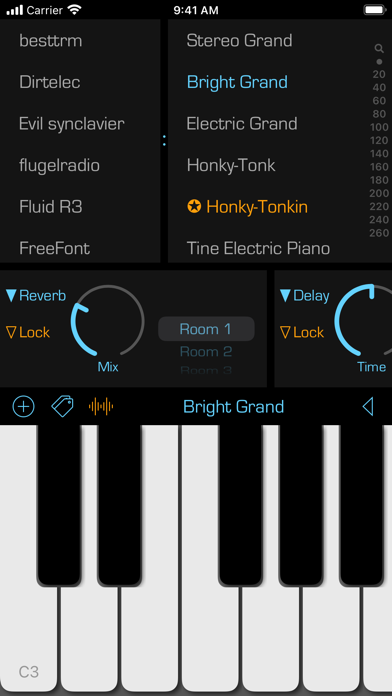
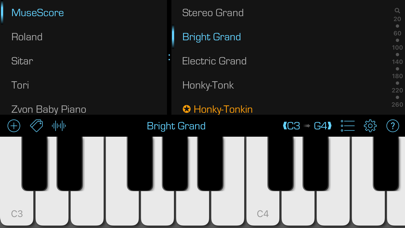
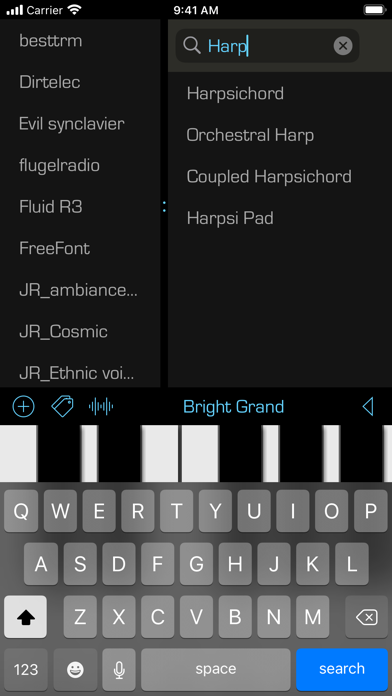
To use, simply select a SoundFont name in the left list, then a patch name on the right and start playing. Some additional hints to get going:
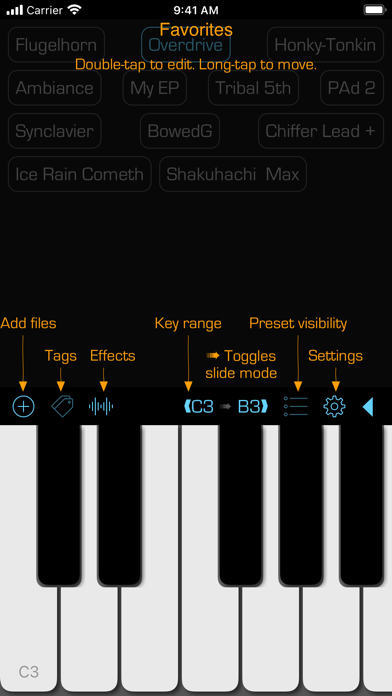
• Add a SoundFont (SF2) file that you have downloaded onto your iCloud Drive. Press the "+" button and then locate the file to add. You can always change the display name of the SoundFont by swiping right. And you can remove a SoundFont that you no longer want by swiping left on its name.
• Bring up reverb and delay effects by touching the wavy "signal" button.
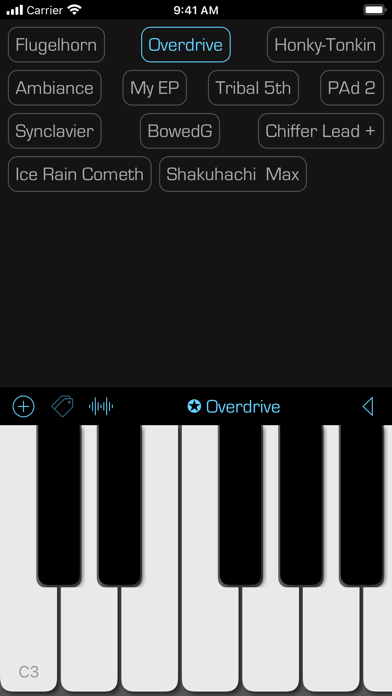
• Swipe right on a patch name to make it a favorite. Favorited patches have a star next to their name. You can edit the name of the favorite by again swiping right and selecting the edit action. You can remove a favorite by swiping left and selecting the remove action.
• Touch the labels at either end of the black bar to change the range of the keyboard. You can go as low as "C0" and as high as "C9". You can also change the range by swiping left/right on the black bar. Note that this ability does not exist in the AUv3 extension -- use the native application keyboard controls to achieve the same results. You can also toggle the keyboard sliding feature by touching the small arrow between the note labels.
• Switch between the soundfont patches listing and the favorites view by double-tapping on the patch name in the black bar above the keyboard. You can also swipe left/right with two fingers in the patches and favorites views to switch to the other view.
• In the view of favorites, you can edit a favorite button by double-tapping on it. You can rearrange the favorite buttons with a tap-and-hold gesture.
Finally, you can check out the source code! Go to the Support URL to find out more.
The app also exists as an AUv3 plug-in (included) so you can use it in your favorite music generation application such as GarageBand, Logic, or AUM. It also includes two AUv3 effects units – reverb and delay - which you can use separately as well..
The app supports MIDI input -- just connect a MIDI keyboard/controller to your iOS device and you should be good to go! There is also support for MIDI over Bluetooth. You can also control some app settings using MIDI controls, including the active favorite preset and the audio effects.
To use, simply select a SoundFont name in the left list, then a patch name on the right and start playing. Some additional hints to get going:
• Add a SoundFont (SF2) file that you have downloaded onto your iCloud Drive. Press the "+" button and then locate the file to add. You can always change the display name of the SoundFont by swiping right. And you can remove a SoundFont that you no longer want by swiping left on its name.
• Bring up reverb and delay effects by touching the wavy "signal" button.
• Swipe right on a patch name to make it a favorite. Favorited patches have a star next to their name. You can edit the name of the favorite by again swiping right and selecting the edit action. You can remove a favorite by swiping left and selecting the remove action.
• Touch the labels at either end of the black bar to change the range of the keyboard. You can go as low as "C0" and as high as "C9". You can also change the range by swiping left/right on the black bar. Note that this ability does not exist in the AUv3 extension -- use the native application keyboard controls to achieve the same results. You can also toggle the keyboard sliding feature by touching the small arrow between the note labels.
• Switch between the soundfont patches listing and the favorites view by double-tapping on the patch name in the black bar above the keyboard. You can also swipe left/right with two fingers in the patches and favorites views to switch to the other view.
• In the view of favorites, you can edit a favorite button by double-tapping on it. You can rearrange the favorite buttons with a tap-and-hold gesture.
Finally, you can check out the source code! Go to the Support URL to find out more.
Detalles
| Desarrollador | Brad Howes |
|---|---|
| Categoría | Entretenimiento |
| Precio | $7.99 |
| Clasificación por edad | 4+ |
| Versión | 2.32.5 |
| Tamaño | 187 MB |
| iOS mínimo | 14.0 |
| ID del paquete | com.braysoftware.SoundFonts |
| Lanzado | 2019-02-19 |
| Última actualización | 2026-06-16 |
| Idiomas | 1 idiomas |
Lo que esta página responde
- SoundFonts reseñas de aplicaciones
- SoundFonts calificación de la aplicación
- SoundFonts descarga
- SoundFonts rango en la tienda de aplicaciones
- reseñas de SoundFonts
- reseñas y calificaciones de SoundFonts
- es SoundFonts legítimo
- es SoundFonts una estafa
- reseñas de usuarios reales de SoundFonts
- calificación de SoundFonts
- quejas de SoundFonts
- lo que la gente dice sobre SoundFonts
- reseñas de SoundFonts aplicación
- pros y contras de SoundFonts
- experiencia de SoundFonts
- debería confiar en SoundFonts
- comentarios de SoundFonts
- reseña de SoundFonts 2026
- verificación de SoundFonts
- verificación de seguridad de SoundFonts
