
Melhor posição agora
#33
em 3 lojas
Pico
#31Dias rastreados
4Avaliações
146 Histórico de gráficos
4 dias registrados por nós
Lojas
gráficos em 3 hoje
Avaliações
146 na App Store
Preço
mudou 2 vez(es) em nossa janela
Instalações e receita
A Apple não publica nenhum — não fazemos suposições
Atualmente em gráfico
Histórico
Construído a partir das próprias capturas diárias da Astrina — um ponto por dia.
Número de avaliações
09.08 25.08 26.08
Mostrar os números
| Dia | Avaliações |
|---|---|
| 09.08 | 4 |
| 25.08 | 11 |
| 26.08 | 11 |
Capturas de tela



Sobre este app
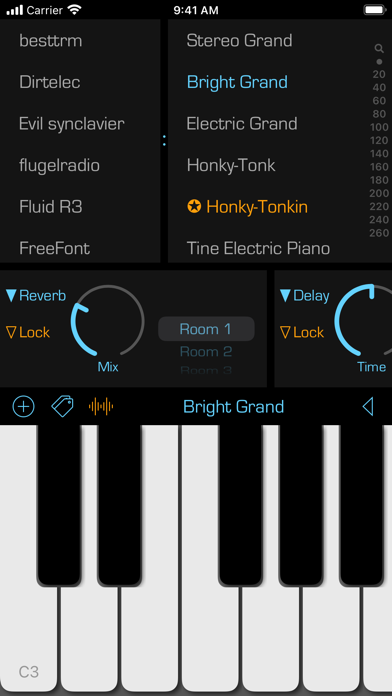
This is a straightforward yet powerful app that acts as a polyphonic audio synthesizer with a virtually unlimited collection of sounds. Under the hood, It uses an AVAudioUnitSampler to generate the audio output when you touch one or more keys. The sounds that are available come from soundfont (SF2) files, such as those available online for free (and of variable quality).
The app also exists as an AUv3 plug-in (included) so you can use it in your favorite music generation application such as GarageBand, Logic, or AUM. It also includes two AUv3 effects units – reverb and delay - which you can use separately as well..
The app supports MIDI input -- just connect a MIDI keyboard/controller to your iOS device and you should be good to go! There is also support for MIDI over Bluetooth. You can also control some app settings using MIDI controls, including the active favorite preset and the audio effects.
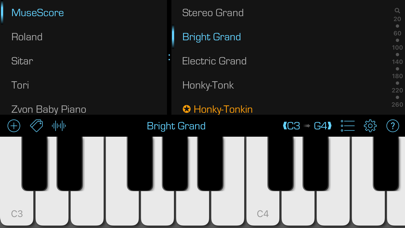
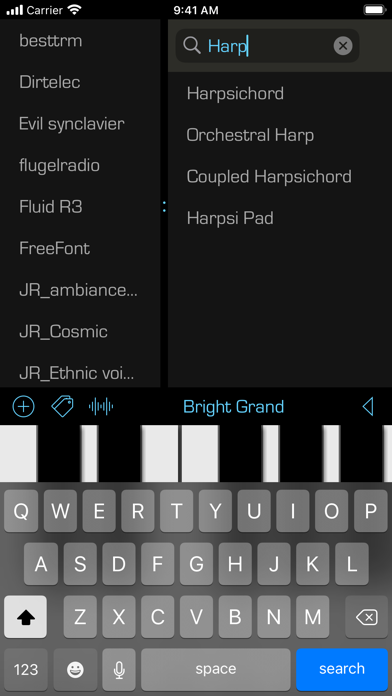
To use, simply select a SoundFont name in the left list, then a patch name on the right and start playing. Some additional hints to get going:
• Add a SoundFont (SF2) file that you have downloaded onto your iCloud Drive. Press the "+" button and then locate the file to add. You can always change the display name of the SoundFont by swiping right. And you can remove a SoundFont that you no longer want by swiping left on its name.
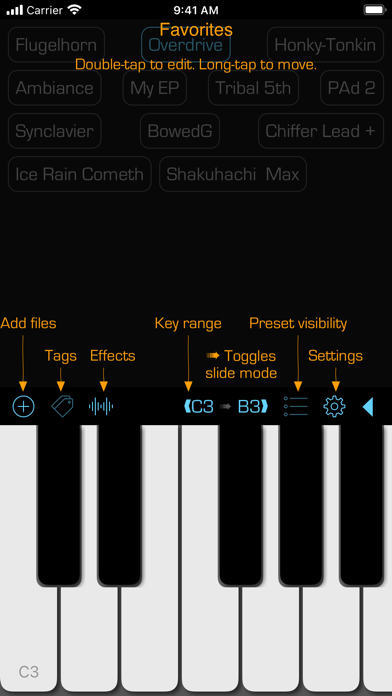
• Bring up reverb and delay effects by touching the wavy "signal" button.
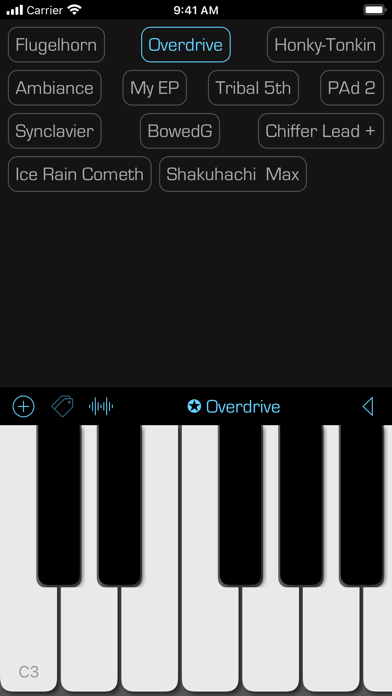
• Swipe right on a patch name to make it a favorite. Favorited patches have a star next to their name. You can edit the name of the favorite by again swiping right and selecting the edit action. You can remove a favorite by swiping left and selecting the remove action.
• Touch the labels at either end of the black bar to change the range of the keyboard. You can go as low as "C0" and as high as "C9". You can also change the range by swiping left/right on the black bar. Note that this ability does not exist in the AUv3 extension -- use the native application keyboard controls to achieve the same results. You can also toggle the keyboard sliding feature by touching the small arrow between the note labels.
• Switch between the soundfont patches listing and the favorites view by double-tapping on the patch name in the black bar above the keyboard. You can also swipe left/right with two fingers in the patches and favorites views to switch to the other view.
• In the view of favorites, you can edit a favorite button by double-tapping on it. You can rearrange the favorite buttons with a tap-and-hold gesture.
Finally, you can check out the source code! Go to the Support URL to find out more.
The app also exists as an AUv3 plug-in (included) so you can use it in your favorite music generation application such as GarageBand, Logic, or AUM. It also includes two AUv3 effects units – reverb and delay - which you can use separately as well..
The app supports MIDI input -- just connect a MIDI keyboard/controller to your iOS device and you should be good to go! There is also support for MIDI over Bluetooth. You can also control some app settings using MIDI controls, including the active favorite preset and the audio effects.
To use, simply select a SoundFont name in the left list, then a patch name on the right and start playing. Some additional hints to get going:
• Add a SoundFont (SF2) file that you have downloaded onto your iCloud Drive. Press the "+" button and then locate the file to add. You can always change the display name of the SoundFont by swiping right. And you can remove a SoundFont that you no longer want by swiping left on its name.
• Bring up reverb and delay effects by touching the wavy "signal" button.
• Swipe right on a patch name to make it a favorite. Favorited patches have a star next to their name. You can edit the name of the favorite by again swiping right and selecting the edit action. You can remove a favorite by swiping left and selecting the remove action.
• Touch the labels at either end of the black bar to change the range of the keyboard. You can go as low as "C0" and as high as "C9". You can also change the range by swiping left/right on the black bar. Note that this ability does not exist in the AUv3 extension -- use the native application keyboard controls to achieve the same results. You can also toggle the keyboard sliding feature by touching the small arrow between the note labels.
• Switch between the soundfont patches listing and the favorites view by double-tapping on the patch name in the black bar above the keyboard. You can also swipe left/right with two fingers in the patches and favorites views to switch to the other view.
• In the view of favorites, you can edit a favorite button by double-tapping on it. You can rearrange the favorite buttons with a tap-and-hold gesture.
Finally, you can check out the source code! Go to the Support URL to find out more.
Detalhes
| Desenvolvedor | Brad Howes |
|---|---|
| Categoria | Entretenimento |
| Preço | $7.99 |
| Classificação etária | 4+ |
| Versão | 2.32.5 |
| Tamanho | 187 MB |
| iOS mínimo | 14.0 |
| ID do pacote | com.braysoftware.SoundFonts |
| Lançado | 2019-02-19 |
| Última atualização | 2026-06-16 |
| Idiomas | 1 idiomas |
O que esta página responde
- SoundFonts avaliações de aplicativos
- SoundFonts avaliação de aplicativo
- SoundFonts download
- SoundFonts classificação na loja de aplicativos
- avaliações de SoundFonts
- avaliações e classificações de SoundFonts
- é SoundFonts legítimo
- é SoundFonts uma fraude
- avaliações de usuários reais de SoundFonts
- classificação de SoundFonts
- reclamações de SoundFonts
- o que as pessoas dizem sobre SoundFonts
- avaliações de SoundFonts aplicativo
- prós e contras de SoundFonts
- experiência de SoundFonts
- devo confiar em SoundFonts
- feedback de SoundFonts
- avaliação de SoundFonts 2026
- verificação de SoundFonts
- verificação de segurança de SoundFonts
