
Google Photos: Backup & Edit
Google Photo et Vidéo 4+ Gratuit
4.83 · 1,578,606 évaluations
Meilleure position maintenant
#7
à travers 26 vitrines
Pic
#4Jours suivis
59Évaluations
1,578,606 Historique des graphiques
59 jours enregistrés par nous
Vitrines
graphique en 26 aujourd'hui
Évaluations
1,578,606 sur l'App Store
Prix
changé 33 fois dans notre fenêtre
Installations et revenus
Apple ne publie rien — nous ne devinons pas
Actuellement dans le classement
#7 🇫🇷 Meilleurs gratuits · Photo et Vidéo #8 🇧🇷 Meilleurs revenus #8 🇩🇪 Meilleurs gratuits · Photo et Vidéo #9 🇺🇸 Meilleurs gratuits · Photo et Vidéo #10 🇬🇧 Meilleurs gratuits · Photo et Vidéo #11 🇪🇸 Meilleurs revenus #17 🇮🇳 Meilleurs revenus #26 🇯🇵 Meilleurs revenus #26 🇮🇹 Meilleurs revenus #31 🇺🇸 Meilleurs revenus #34 🇳🇱 Meilleurs revenus #36 🇨🇦 Meilleurs revenus #40 🇬🇧 Meilleurs revenus #40 🇫🇷 Meilleurs revenus #51 🇧🇷 Meilleurs gratuits #53 🇮🇳 Meilleurs gratuits #55 🇦🇺 Meilleurs revenus #72 🇪🇸 Meilleurs gratuits #79 🇩🇪 Meilleurs revenus #82 🇯🇵 Meilleurs gratuits #87 🇫🇷 Meilleurs gratuits #89 🇮🇹 Meilleurs gratuits #89 🇩🇪 Meilleurs gratuits #91 🇺🇸 Meilleurs gratuits #93 🇨🇦 Meilleurs gratuits #97 🇳🇱 Meilleurs gratuits
Historique
Construit à partir des propres instantanés quotidiens d'Astrina — un point par jour.
Position dans le graphique — 🇫🇷 Meilleurs gratuits
23.07 25.08 23.09
Afficher les chiffres
| Jour | Position |
|---|---|
| 23.07 | #5 |
| 24.07 | #6 |
| 25.07 | #6 |
| 31.07 | #6 |
| 01.08 | #6 |
| 02.08 | #5 |
| 03.08 | #5 |
| 04.08 | #6 |
| 05.08 | #6 |
| 06.08 | #6 |
| 07.08 | #6 |
| 08.08 | #6 |
| 09.08 | #5 |
| 10.08 | #5 |
| 11.08 | #5 |
| 12.08 | #5 |
| 13.08 | #5 |
| 14.08 | #6 |
| 15.08 | #5 |
| 16.08 | #5 |
| 17.08 | #5 |
| 18.08 | #6 |
| 19.08 | #5 |
| 20.08 | #6 |
| 21.08 | #6 |
| 22.08 | #6 |
| 23.08 | #4 |
| 24.08 | #5 |
| 25.08 | #5 |
| 26.08 | #6 |
| 27.08 | #6 |
| 28.08 | #6 |
| 29.08 | #7 |
| 30.08 | #6 |
| 31.08 | #6 |
| 01.09 | #6 |
| 02.09 | #7 |
| 03.09 | #7 |
| 04.09 | #7 |
| 05.09 | #7 |
| 06.09 | #7 |
| 07.09 | #6 |
| 08.09 | #6 |
| 09.09 | #7 |
| 10.09 | #7 |
| 11.09 | #7 |
| 12.09 | #7 |
| 13.09 | #8 |
| 14.09 | #5 |
| 15.09 | #4 |
| 16.09 | #4 |
| 17.09 | #6 |
| 18.09 | #6 |
| 19.09 | #6 |
| 20.09 | #6 |
| 21.09 | #6 |
| 22.09 | #6 |
| 23.09 | #7 |
Nombre d'évaluations
23.07 13.08 30.08
Afficher les chiffres
| Jour | Évaluations |
|---|---|
| 23.07 | 83,993 |
| 24.07 | 84,063 |
| 25.07 | 84,160 |
| 31.07 | 84,841 |
| 01.08 | 84,906 |
| 02.08 | 85,066 |
| 03.08 | 85,208 |
| 04.08 | 85,336 |
| 05.08 | 85,452 |
| 06.08 | 85,580 |
| 07.08 | 85,683 |
| 08.08 | 85,801 |
| 09.08 | 85,916 |
| 10.08 | 86,019 |
| 11.08 | 86,161 |
| 12.08 | 86,286 |
| 13.08 | 86,389 |
| 14.08 | 86,487 |
| 15.08 | 86,588 |
| 16.08 | 86,725 |
| 17.08 | 86,853 |
| 18.08 | 86,989 |
| 19.08 | 87,099 |
| 20.08 | 87,236 |
| 21.08 | 87,309 |
| 22.08 | 87,455 |
| 23.08 | 87,549 |
| 24.08 | 87,702 |
| 25.08 | 87,812 |
| 26.08 | 87,921 |
| 27.08 | 88,031 |
| 28.08 | 88,123 |
| 29.08 | 88,225 |
| 30.08 | 88,333 |
Captures d'écran


À propos de cette application
Google Photos is the home for all your photos and videos. Easily store, edit, organize, and search your memories with the help of Google AI.
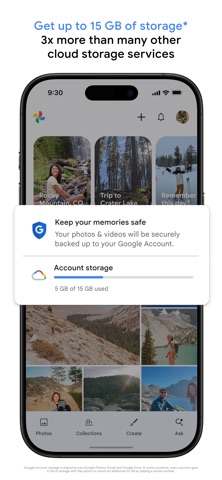
• 15 GB OF CLOUD STORAGE: Every Google account gets up to 15 GB of storage*, 3X more than many other cloud storage services. So you can back up and keep your memories safe automatically on all of your devices.
• AI-POWERED EDITING TOOLS: Make complex edits in just a few taps. Remove unwanted distractions with Magic Eraser. Improve out-of-focus blurry photos with Unblur. Enhance lighting and brightness with Portrait Light.
• SEARCH MADE SIMPLE: Your photos are easily searchable in a natural, descriptive way, like “Alice and me laughing,” “Kayaking on a lake surrounded by mountains” or “Emma painting in the backyard.”
• EASY ORGANIZATION: Google Photos helps declutter your gallery by automatically organizing duplicates and similar photos into photo stacks. It also offers smart, intuitive folders for screenshots, documents, custom albums and daily camera roll organization, making your gallery feel orderly and personalized. You can even save sensitive photos and videos to a locked folder protected by your device screen lock.
• RELIVE AND SHARE YOUR FAVORITE MEMORIES: Stroll down memory lane right in Google Photos. Share photos, videos, and albums with any of your contacts — even if they don't use Google Photos.
• YOUR MEMORIES ARE SAFE: Your photos and videos are safe and secure from the instant you store them, protected by our advanced security infrastructure while in storage or when you share them.
• ALL YOUR MEMORIES IN ONE PLACE: With backup on, you can easily transfer your photos from other apps, galleries and devices, so all of your content is in one place.
• FREE UP SPACE: Never worry about running out of space on your phone again. Photos that are backed up in Google Photos can be removed from your device’s storage in just a tap.
• PRINT YOUR FAVORITE MOMENTS:
From your phone, to your home. Turn your favorite memories into photo books, photo prints, canvas wall art and more. Price varies by product. Printing services available in the US, EU, UK, and CA only.
• GOOGLE LENS: Search what you see. This preview enables you to identify text and objects in your photos to learn more and take action.
Google Privacy Policy: https://google.com/intl/en_US/policies/privacy
* Google Account storage is shared across Google Photos, Gmail, and Google Drive. In some countries, every account gets 5 GB of storage with the option to unlock an additional 10 GB by adding a phone number.
• 15 GB OF CLOUD STORAGE: Every Google account gets up to 15 GB of storage*, 3X more than many other cloud storage services. So you can back up and keep your memories safe automatically on all of your devices.
• AI-POWERED EDITING TOOLS: Make complex edits in just a few taps. Remove unwanted distractions with Magic Eraser. Improve out-of-focus blurry photos with Unblur. Enhance lighting and brightness with Portrait Light.
• SEARCH MADE SIMPLE: Your photos are easily searchable in a natural, descriptive way, like “Alice and me laughing,” “Kayaking on a lake surrounded by mountains” or “Emma painting in the backyard.”
• EASY ORGANIZATION: Google Photos helps declutter your gallery by automatically organizing duplicates and similar photos into photo stacks. It also offers smart, intuitive folders for screenshots, documents, custom albums and daily camera roll organization, making your gallery feel orderly and personalized. You can even save sensitive photos and videos to a locked folder protected by your device screen lock.
• RELIVE AND SHARE YOUR FAVORITE MEMORIES: Stroll down memory lane right in Google Photos. Share photos, videos, and albums with any of your contacts — even if they don't use Google Photos.
• YOUR MEMORIES ARE SAFE: Your photos and videos are safe and secure from the instant you store them, protected by our advanced security infrastructure while in storage or when you share them.
• ALL YOUR MEMORIES IN ONE PLACE: With backup on, you can easily transfer your photos from other apps, galleries and devices, so all of your content is in one place.
• FREE UP SPACE: Never worry about running out of space on your phone again. Photos that are backed up in Google Photos can be removed from your device’s storage in just a tap.
• PRINT YOUR FAVORITE MOMENTS:
From your phone, to your home. Turn your favorite memories into photo books, photo prints, canvas wall art and more. Price varies by product. Printing services available in the US, EU, UK, and CA only.
• GOOGLE LENS: Search what you see. This preview enables you to identify text and objects in your photos to learn more and take action.
Google Privacy Policy: https://google.com/intl/en_US/policies/privacy
* Google Account storage is shared across Google Photos, Gmail, and Google Drive. In some countries, every account gets 5 GB of storage with the option to unlock an additional 10 GB by adding a phone number.
Détails
| Développeur | |
|---|---|
| Catégorie | Photo et Vidéo |
| Prix | Gratuit |
| Classification par âge | 4+ |
| Version | 7.93.0 |
| Taille | 422 MB |
| iOS minimum | 18.0 |
| ID de bundle | com.google.photos |
| Publié | 2015-05-28 |
| Dernière mise à jour | 2026-09-17 |
| Langues | 30 langues |
Ce que cette page répond
- Google Photos: Backup & Edit critiques d'application
- Google Photos: Backup & Edit évaluation d'application
- Google Photos: Backup & Edit téléchargement
- Google Photos: Backup & Edit classement de l'App Store
- avis sur Google Photos: Backup & Edit
- avis et évaluations de Google Photos: Backup & Edit
- est Google Photos: Backup & Edit légitime
- est Google Photos: Backup & Edit une arnaque
- avis d'utilisateurs réels de Google Photos: Backup & Edit
- évaluation de Google Photos: Backup & Edit
- plaintes concernant Google Photos: Backup & Edit
- ce que les gens disent de Google Photos: Backup & Edit
- avis Google Photos: Backup & Edit application
- avantages et inconvénients de Google Photos: Backup & Edit
- expérience de Google Photos: Backup & Edit
- devrais-je faire confiance à Google Photos: Backup & Edit
- retour d'expérience de Google Photos: Backup & Edit
- avis sur Google Photos: Backup & Edit 2026
- vérification de Google Photos: Backup & Edit
- vérification de sécurité de Google Photos: Backup & Edit
