
Zoom Workplace
Zoom Communications, Inc. Entreprise 4+ Gratuit
4.54 · 311,192 évaluations
Meilleure position maintenant
#43
à travers 11 vitrines
Pic
#34Jours suivis
58Évaluations
311,192 Historique des graphiques
58 jours enregistrés par nous
Vitrines
graphique en 11 aujourd'hui
Évaluations
311,192 sur l'App Store
Prix
changé 23 fois dans notre fenêtre
Installations et revenus
Apple ne publie rien — nous ne devinons pas
Actuellement dans le classement
Historique
Construit à partir des propres instantanés quotidiens d'Astrina — un point par jour.
Position dans le graphique — 🇨🇦 Meilleurs gratuits
23.07 27.08 23.09
Afficher les chiffres
| Jour | Position |
|---|---|
| 23.07 | #81 |
| 24.07 | #65 |
| 25.07 | #91 |
| 31.07 | #75 |
| 05.08 | #83 |
| 06.08 | #75 |
| 07.08 | #75 |
| 11.08 | #100 |
| 12.08 | #78 |
| 13.08 | #84 |
| 14.08 | #70 |
| 19.08 | #82 |
| 20.08 | #70 |
| 21.08 | #80 |
| 26.08 | #90 |
| 27.08 | #80 |
| 28.08 | #88 |
| 02.09 | #97 |
| 03.09 | #77 |
| 04.09 | #89 |
| 09.09 | #76 |
| 10.09 | #48 |
| 11.09 | #62 |
| 12.09 | #89 |
| 15.09 | #62 |
| 16.09 | #43 |
| 17.09 | #37 |
| 18.09 | #34 |
| 19.09 | #85 |
| 22.09 | #69 |
| 23.09 | #43 |
Nombre d'évaluations
31.08 11.09 23.09
Afficher les chiffres
| Jour | Évaluations |
|---|---|
| 31.08 | 309,306 |
| 01.09 | 309,381 |
| 02.09 | 309,460 |
| 03.09 | 309,545 |
| 04.09 | 309,619 |
| 05.09 | 309,710 |
| 06.09 | 309,768 |
| 07.09 | 309,859 |
| 08.09 | 309,944 |
| 09.09 | 310,024 |
| 10.09 | 310,104 |
| 11.09 | 310,198 |
| 12.09 | 310,295 |
| 13.09 | 310,397 |
| 14.09 | 310,496 |
| 15.09 | 310,570 |
| 16.09 | 310,639 |
| 17.09 | 310,710 |
| 18.09 | 310,796 |
| 19.09 | 310,890 |
| 20.09 | 310,963 |
| 21.09 | 311,043 |
| 22.09 | 311,110 |
| 23.09 | 311,192 |
Captures d'écran




À propos de cette application
Zoom Workplace helps you streamline your day and collaborate effortlessly with the power of AI.
Zoom Workplace brings video meetings, chat, phone, appointment scheduler, email, and collaborative documents together in a single app. With Zoom AI built in to help you take notes, summarize, write, and organize, you can get more done without the busy work.*
Power Your Work with AI
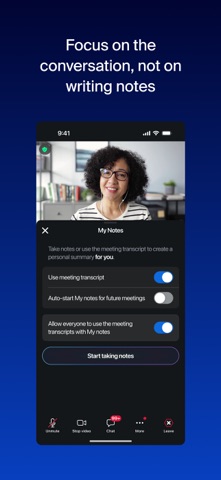
• Capture every conversation: Whether you're hosting or joining, My Notes can automatically take notes during your Zoom Meetings and in-person conversations, so you can stay focused instead of scribbling.
• Catch up instantly: Get automatic meeting summaries and next steps sent to you after the call, so you don’t have to take notes again.
• Ask questions live: Missed something? Ask AI Companion questions like "What did I miss?" or "Was my name mentioned?" during a meeting without interrupting.
• Draft in seconds: Let AI embedded in Zoom Workplace compose emails, chat responses, and whiteboard ideas for you with a simple prompt.
• Summarize threads: Instantly turn long chat threads or SMS conversations into a quick summary so you can get the gist fast.
Seamless Communication
• Connect with anyone: Host or join meetings with crystal-clear video and audio, and work like you're side-by-side with immersive views.
• Stay in sync: Use Zoom Chat to message individuals or groups, organize conversations with channels, and share files instantly.
• Make business calls: Handle calls with Zoom Phone, a robust VoIP solution.*
• Update asynchronously: Record and share Clips—short video messages and screen recordings—to provide updates that your team can watch on their own time.
Next-Gen Collaboration
• Create together: Draft, edit, and collaborate on Docs in real-time, right inside your meetings.
• Brainstorm freely: Use Whiteboard to map out ideas with sticky notes and shapes—or ask AI Companion to generate a mind map for you instantly.
• Share information: Co-edit files and wikis that live right next to your team’s video interface so you never lose context.
Productivity & Organization
• Manage your day: Bring your email and calendar into one unified view to schedule meetings and check messages without switching apps.
• Stop the scheduling ping-pong: Use Zoom Scheduler to share your availability and let others book time slots that work for everyone.*
• Use Zoom AI agentic skills to answer questions like “summarize today's meetings” to instantly connect the dots across your workflows.
Zoom Workplace Pro
Unlock the full experience with a paid subscription:
• Core AI features embedded across Zoom Workplace
• Host unlimited meetings up to 30 hours each.
• Cloud recording storage to save and share your meetings.
• Grant co-hosting and scheduling permissions to other users.
Subscription Information: Zoom Workplace offers free and paid plans. Your Zoom Workplace Pro subscription will automatically renew unless you cancel at least 24 hours before the end of the free trial or the plan billing period. After you start your subscription, you can manage it from either App Store settings or iOS settings. The amount charged to the payment method in your App Store account will vary by the plan you select and your country. The plan price will be displayed before you start your free trial or confirm your purchase.
Privacy & Terms: By installing the app, you agree to these terms and conditions:
https://www.zoom.com/en/trust/privacy/privacy-statement/
https://www.zoom.com/en/trust/terms/
* Some features may require an additional add-on or paid license for access or to remove usage limitations. Availability and functionality may vary based on your subscription or license type.
Zoom Workplace brings video meetings, chat, phone, appointment scheduler, email, and collaborative documents together in a single app. With Zoom AI built in to help you take notes, summarize, write, and organize, you can get more done without the busy work.*
Power Your Work with AI
• Capture every conversation: Whether you're hosting or joining, My Notes can automatically take notes during your Zoom Meetings and in-person conversations, so you can stay focused instead of scribbling.
• Catch up instantly: Get automatic meeting summaries and next steps sent to you after the call, so you don’t have to take notes again.
• Ask questions live: Missed something? Ask AI Companion questions like "What did I miss?" or "Was my name mentioned?" during a meeting without interrupting.
• Draft in seconds: Let AI embedded in Zoom Workplace compose emails, chat responses, and whiteboard ideas for you with a simple prompt.
• Summarize threads: Instantly turn long chat threads or SMS conversations into a quick summary so you can get the gist fast.
Seamless Communication
• Connect with anyone: Host or join meetings with crystal-clear video and audio, and work like you're side-by-side with immersive views.
• Stay in sync: Use Zoom Chat to message individuals or groups, organize conversations with channels, and share files instantly.
• Make business calls: Handle calls with Zoom Phone, a robust VoIP solution.*
• Update asynchronously: Record and share Clips—short video messages and screen recordings—to provide updates that your team can watch on their own time.
Next-Gen Collaboration
• Create together: Draft, edit, and collaborate on Docs in real-time, right inside your meetings.
• Brainstorm freely: Use Whiteboard to map out ideas with sticky notes and shapes—or ask AI Companion to generate a mind map for you instantly.
• Share information: Co-edit files and wikis that live right next to your team’s video interface so you never lose context.
Productivity & Organization
• Manage your day: Bring your email and calendar into one unified view to schedule meetings and check messages without switching apps.
• Stop the scheduling ping-pong: Use Zoom Scheduler to share your availability and let others book time slots that work for everyone.*
• Use Zoom AI agentic skills to answer questions like “summarize today's meetings” to instantly connect the dots across your workflows.
Zoom Workplace Pro
Unlock the full experience with a paid subscription:
• Core AI features embedded across Zoom Workplace
• Host unlimited meetings up to 30 hours each.
• Cloud recording storage to save and share your meetings.
• Grant co-hosting and scheduling permissions to other users.
Subscription Information: Zoom Workplace offers free and paid plans. Your Zoom Workplace Pro subscription will automatically renew unless you cancel at least 24 hours before the end of the free trial or the plan billing period. After you start your subscription, you can manage it from either App Store settings or iOS settings. The amount charged to the payment method in your App Store account will vary by the plan you select and your country. The plan price will be displayed before you start your free trial or confirm your purchase.
Privacy & Terms: By installing the app, you agree to these terms and conditions:
https://www.zoom.com/en/trust/privacy/privacy-statement/
https://www.zoom.com/en/trust/terms/
* Some features may require an additional add-on or paid license for access or to remove usage limitations. Availability and functionality may vary based on your subscription or license type.
Détails
| Développeur | Zoom Communications, Inc. |
|---|---|
| Catégorie | Entreprise |
| Prix | Gratuit |
| Classification par âge | 4+ |
| Version | 7.2.0 |
| Taille | 461 MB |
| iOS minimum | 15.0 |
| ID de bundle | us.zoom.videomeetings |
| Publié | 2012-08-15 |
| Dernière mise à jour | 2026-09-19 |
| Langues | 17 langues |
Ce que cette page répond
- Zoom Workplace critiques d'application
- Zoom Workplace évaluation d'application
- Zoom Workplace téléchargement
- Zoom Workplace classement de l'App Store
- avis sur Zoom Workplace
- avis et évaluations de Zoom Workplace
- est Zoom Workplace légitime
- est Zoom Workplace une arnaque
- avis d'utilisateurs réels de Zoom Workplace
- évaluation de Zoom Workplace
- plaintes concernant Zoom Workplace
- ce que les gens disent de Zoom Workplace
- avis Zoom Workplace application
- avantages et inconvénients de Zoom Workplace
- expérience de Zoom Workplace
- devrais-je faire confiance à Zoom Workplace
- retour d'expérience de Zoom Workplace
- avis sur Zoom Workplace 2026
- vérification de Zoom Workplace
- vérification de sécurité de Zoom Workplace
