
TuneLab Piano Tuner
Real-Time Specialties Musique 4+ 349,99 €
4.67 · 3 évaluations
Meilleure position maintenant
#31
à travers 2 vitrines
Pic
#31Jours suivis
2Évaluations
3 Historique des graphiques
2 jours enregistrés par nous
Vitrines
graphique en 2 aujourd'hui
Évaluations
3 sur l'App Store
Prix
inchangé dans notre fenêtre
Installations et revenus
Apple ne publie rien — nous ne devinons pas
Actuellement dans le classement
L'historique commence aujourd'hui. Revenez demain pour voir comment sa position dans le classement et ses évaluations évoluent — le travail quotidien enregistre un point par jour.
Captures d'écran




À propos de cette application
This app is for professional piano technicians. This is a professional tool that produces a custom piano tuning for any piano. It is part of the TuneLab line of piano tuning programs for smartphones, tablet computers and laptops that piano technicians have been using since 2001.
Notable features:
* Measures and uses inharmonicity of the piano to construct a custom tuning.
* Provides an over-pull mode for more accurate pitch-raises.
* Can store hundreds of tuning files for individual pianos.
* Tuning files can be stored locally and in the Cloud on Dropbox.
* Provides many historical temperaments for period music.
* Switches notes automatically when you play the next note.
* Provides a strobe-like Phase Display for fine-tuning.
* Provides a versatile frequency spectrum display.
TuneLab lets you customize a tuning by sampling the inharmonicity for a few notes of the particular piano. You can choose the kind of tuning stretch you want by specifying different intervals for the bass, the treble, and the mid-range of the scale. These intervals can be octaves, 12ths, double octaves, etc. Good defaults are in place if you are not sure which settings you prefer.
After a custom tuning has been created from inharmonicity measurements you can store this tuning by name. The next time you need to tune that piano, or one very much like it, you simply load that same tuning file and start tuning. There is essentially no limit to the number of tuning files that you can store. TuneLab comes with some sample tuning files and an "Average" tuning file so you can start tuning right away without bothering to measure inharmonicity.
TuneLab covers the normal piano range from A0 to C8 (88 notes). The automatic note-switching feature makes it possible to enjoy hands-free operation. There is also easy one-touch manual note switching.
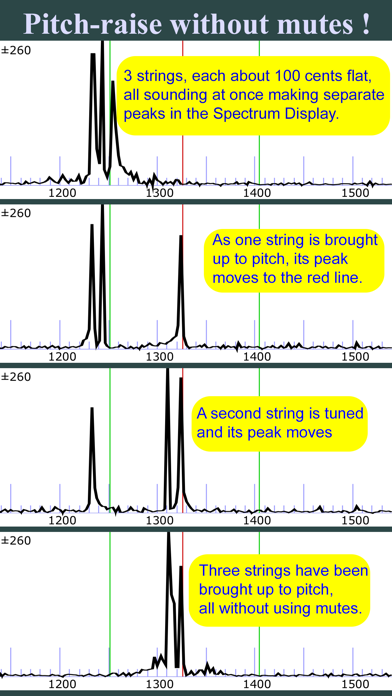
TuneLab has two different displays that are visible at the same time. One is the strobe-like Phase Display. This is a band where black squares move left or right depending on whether the note is sharp or flat. Tune the note to make the pattern stop moving. The other is the Spectrum Display. This is a graph of the frequency spectrum around the desired note that shows a peak in the audio frequency spectrum for every pitch present in the sound. The object in using this display is to tune the note until the peak in the graph is positioned at a central red line. The Spectrum Display makes it possible to do a rough pitch-raise without mutes since each string of a unison produces its own peak in the graph. Having both the Phase Display and the Spectrum Display visible at the same time gives you a more complete picture of the tuning than any single spinner-type or needle-type display. The Phase Display displays a selected partial at each note, but it can optionally display the tuning of up to four different partials at once in multi-partial mode.
Notable features:
* Measures and uses inharmonicity of the piano to construct a custom tuning.
* Provides an over-pull mode for more accurate pitch-raises.
* Can store hundreds of tuning files for individual pianos.
* Tuning files can be stored locally and in the Cloud on Dropbox.
* Provides many historical temperaments for period music.
* Switches notes automatically when you play the next note.
* Provides a strobe-like Phase Display for fine-tuning.
* Provides a versatile frequency spectrum display.
TuneLab lets you customize a tuning by sampling the inharmonicity for a few notes of the particular piano. You can choose the kind of tuning stretch you want by specifying different intervals for the bass, the treble, and the mid-range of the scale. These intervals can be octaves, 12ths, double octaves, etc. Good defaults are in place if you are not sure which settings you prefer.
After a custom tuning has been created from inharmonicity measurements you can store this tuning by name. The next time you need to tune that piano, or one very much like it, you simply load that same tuning file and start tuning. There is essentially no limit to the number of tuning files that you can store. TuneLab comes with some sample tuning files and an "Average" tuning file so you can start tuning right away without bothering to measure inharmonicity.
TuneLab covers the normal piano range from A0 to C8 (88 notes). The automatic note-switching feature makes it possible to enjoy hands-free operation. There is also easy one-touch manual note switching.
TuneLab has two different displays that are visible at the same time. One is the strobe-like Phase Display. This is a band where black squares move left or right depending on whether the note is sharp or flat. Tune the note to make the pattern stop moving. The other is the Spectrum Display. This is a graph of the frequency spectrum around the desired note that shows a peak in the audio frequency spectrum for every pitch present in the sound. The object in using this display is to tune the note until the peak in the graph is positioned at a central red line. The Spectrum Display makes it possible to do a rough pitch-raise without mutes since each string of a unison produces its own peak in the graph. Having both the Phase Display and the Spectrum Display visible at the same time gives you a more complete picture of the tuning than any single spinner-type or needle-type display. The Phase Display displays a selected partial at each note, but it can optionally display the tuning of up to four different partials at once in multi-partial mode.
Détails
| Développeur | Real-Time Specialties |
|---|---|
| Catégorie | Musique |
| Prix | 349,99 € |
| Classification par âge | 4+ |
| Version | 4.8.1 |
| Taille | 13.0 MB |
| iOS minimum | 13.0 |
| ID de bundle | com.realtimespecialties.tunelab |
| Publié | 2009-12-03 |
| Dernière mise à jour | 2026-09-03 |
| Langues | 1 langues |
Ce que cette page répond
- TuneLab Piano Tuner critiques d'application
- TuneLab Piano Tuner évaluation d'application
- TuneLab Piano Tuner téléchargement
- TuneLab Piano Tuner classement de l'App Store
- avis sur TuneLab Piano Tuner
- avis et évaluations de TuneLab Piano Tuner
- est TuneLab Piano Tuner légitime
- est TuneLab Piano Tuner une arnaque
- avis d'utilisateurs réels de TuneLab Piano Tuner
- évaluation de TuneLab Piano Tuner
- plaintes concernant TuneLab Piano Tuner
- ce que les gens disent de TuneLab Piano Tuner
- avis TuneLab Piano Tuner application
- avantages et inconvénients de TuneLab Piano Tuner
- expérience de TuneLab Piano Tuner
- devrais-je faire confiance à TuneLab Piano Tuner
- retour d'expérience de TuneLab Piano Tuner
- avis sur TuneLab Piano Tuner 2026
- vérification de TuneLab Piano Tuner
- vérification de sécurité de TuneLab Piano Tuner
