
Meilleure position maintenant
#18
à travers 4 vitrines
Pic
#13Jours suivis
20 Historique des graphiques
20 jours enregistrés par nous
Vitrines
graphique en 4 aujourd'hui
Évaluations
aucun pour l'instant
Prix
changé 11 fois dans notre fenêtre
Installations et revenus
Apple ne publie rien — nous ne devinons pas
Actuellement dans le classement
Historique
Construit à partir des propres instantanés quotidiens d'Astrina — un point par jour.
Position dans le graphique — 🇩🇪 Meilleurs payants
07.08 28.08 24.09
Afficher les chiffres
| Jour | Position |
|---|---|
| 07.08 | #35 |
| 19.08 | #27 |
| 20.08 | #46 |
| 21.08 | #57 |
| 22.08 | #13 |
| 23.08 | #48 |
| 28.08 | #25 |
| 29.08 | #50 |
| 16.09 | #23 |
| 17.09 | #49 |
| 21.09 | #31 |
| 22.09 | #48 |
| 24.09 | #18 |
Nombre d'évaluations
01.08 19.08 29.08
Afficher les chiffres
| Jour | Évaluations |
|---|---|
| 01.08 | 0 |
| 07.08 | 0 |
| 08.08 | 0 |
| 17.08 | 0 |
| 18.08 | 0 |
| 19.08 | 0 |
| 20.08 | 0 |
| 21.08 | 0 |
| 22.08 | 0 |
| 23.08 | 0 |
| 28.08 | 0 |
| 29.08 | 0 |
Captures d'écran
À propos de cette application
Summon a thunderstorm light show using your Philips Hue lights. Watch your lights pulse and flash to the sounds of a storm.*
*Hue Bridge or Hue Bridge Pro required
THUNDERSTORMS
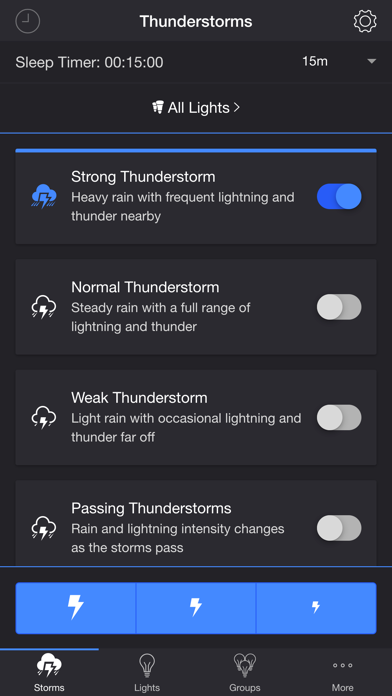
• Strong Thunderstorm — Heavy rain with frequent lightning and thunder nearby
Lights pulse quickly to the sound of heavy rain. Booming sounds of thunder accompany bright flashes of light.
• Normal Thunderstorm — Steady rain with a full range of lightning and thunder
Lights pulse to the sound of rain. The sound of thunder can be heard from various distances. The closer the lightning, the louder the sound, and the brighter the flashes of light!
• Weak Thunderstorm — Light rain with occasional lightning and thunder far off
Lights pulse slowly to the sound of light rain. Dim flashes of light are followed by soft sounds of thunder.
• Passing Thunderstorms — Rain and lightning intensity changes as the storms pass
Lights pulse and flash at different rates to correspond with the current strength of the storm.
SETTINGS
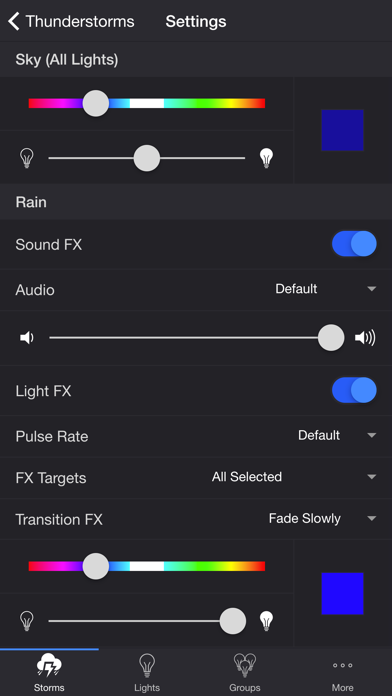
Sky
• Change the base color and brightness of your lights
Rain
• Toggle rain sound effects
• Change rain audio: Default, Heavy, Steady, Light, On Tin Roof
• Change rain volume
• Toggle rain light effects
• Change rain pulse rate: Default, Slow, Medium, Fast
• Target lights for rain light effects
• Change rain transition effects: Pulse, Fade Quickly, Fade Slowly
• Change color and brightness of rain light effects
Lightning/Thunder
• Toggle thunder sound effects
• Change thunder volume
• Change delay lightning (Wireless audio delay offset)
• Toggle delay thunder
• Toggle lightning light effects
• Target lights for lightning light effects
• Change lightning transition effects: Random, Flicker, Flash, Pulse, Fade Quickly, Fade Slowly
• Change lightning/thunder occurrence: Default, Never, Occasional, Normal, Frequent, Unreal
• Change color and max brightness of lightning light effects
Passing Thunderstorms
• Change starting storm for Passing Thunderstorms: Weak, Normal, Strong
• Change cycle time for Passing Thunderstorms: 15m, 30m, 60m
Background Sounds
• Toggle background sounds: Birds, Cicadas, Crickets, Frogs
• Change background sounds volume
General
• Change default end state: On, Off, Revert
• Change sleep end state: On, Off, Revert
• Select mode to automatically start when app opens
• Choose time to automatically stop selected mode
• Choose time to automatically restart selected mode when sleep timer ends, enabling recurring cycle
LIGHTS / GROUPS
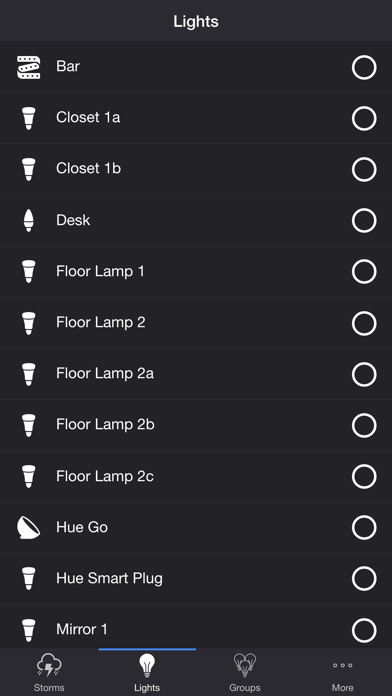
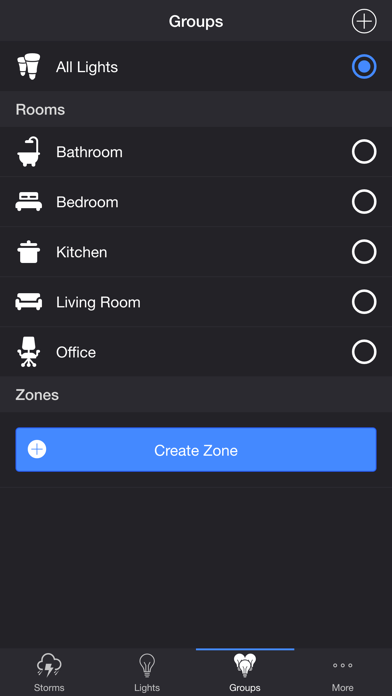
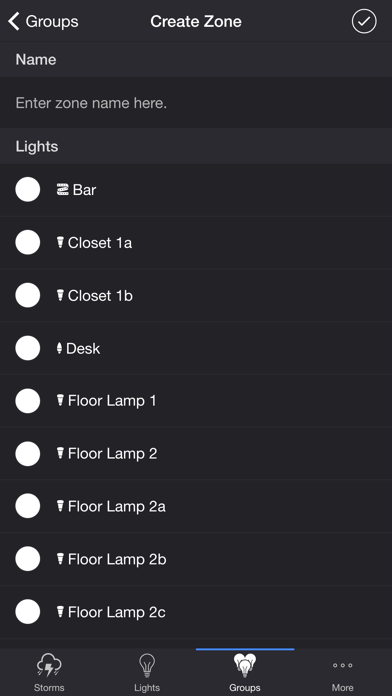
Select one or more lights for your thunderstorm light show on the Lights/Groups tab. Choose a group that you set up using the Philips Hue app, or create a new zone in the Thunderstorm for Hue app. To edit a zone in the list, swipe the item to the left and tap the pencil icon. When you add, remove, or change lights, pull down the list to refresh.
ADDITIONAL FEATURES
• Lightning on Demand — Start a storm and utilize the lightning buttons at the bottom of the screen for manual control.
• Sleep Timer — Set a timer complemented with an audio fade-out feature. Choose the state of your lights after the timer ends with the Sleep End State setting.
• Bluetooth and AirPlay Support — Connect to Bluetooth speakers directly, or connect to speakers with AirPlay using the Control Center. Adjust the Delay Light FX setting to offset any wireless audio delay.
Please contact me at [email protected] if you experience any issues. I'd love to hear your thoughts and appreciate you taking the time to rate and review the app. I want to continue to improve Thunderstorm for Hue and create a great experience for you and future users. Thank you! —Scott
*Hue Bridge or Hue Bridge Pro required
THUNDERSTORMS
• Strong Thunderstorm — Heavy rain with frequent lightning and thunder nearby
Lights pulse quickly to the sound of heavy rain. Booming sounds of thunder accompany bright flashes of light.
• Normal Thunderstorm — Steady rain with a full range of lightning and thunder
Lights pulse to the sound of rain. The sound of thunder can be heard from various distances. The closer the lightning, the louder the sound, and the brighter the flashes of light!
• Weak Thunderstorm — Light rain with occasional lightning and thunder far off
Lights pulse slowly to the sound of light rain. Dim flashes of light are followed by soft sounds of thunder.
• Passing Thunderstorms — Rain and lightning intensity changes as the storms pass
Lights pulse and flash at different rates to correspond with the current strength of the storm.
SETTINGS
Sky
• Change the base color and brightness of your lights
Rain
• Toggle rain sound effects
• Change rain audio: Default, Heavy, Steady, Light, On Tin Roof
• Change rain volume
• Toggle rain light effects
• Change rain pulse rate: Default, Slow, Medium, Fast
• Target lights for rain light effects
• Change rain transition effects: Pulse, Fade Quickly, Fade Slowly
• Change color and brightness of rain light effects
Lightning/Thunder
• Toggle thunder sound effects
• Change thunder volume
• Change delay lightning (Wireless audio delay offset)
• Toggle delay thunder
• Toggle lightning light effects
• Target lights for lightning light effects
• Change lightning transition effects: Random, Flicker, Flash, Pulse, Fade Quickly, Fade Slowly
• Change lightning/thunder occurrence: Default, Never, Occasional, Normal, Frequent, Unreal
• Change color and max brightness of lightning light effects
Passing Thunderstorms
• Change starting storm for Passing Thunderstorms: Weak, Normal, Strong
• Change cycle time for Passing Thunderstorms: 15m, 30m, 60m
Background Sounds
• Toggle background sounds: Birds, Cicadas, Crickets, Frogs
• Change background sounds volume
General
• Change default end state: On, Off, Revert
• Change sleep end state: On, Off, Revert
• Select mode to automatically start when app opens
• Choose time to automatically stop selected mode
• Choose time to automatically restart selected mode when sleep timer ends, enabling recurring cycle
LIGHTS / GROUPS
Select one or more lights for your thunderstorm light show on the Lights/Groups tab. Choose a group that you set up using the Philips Hue app, or create a new zone in the Thunderstorm for Hue app. To edit a zone in the list, swipe the item to the left and tap the pencil icon. When you add, remove, or change lights, pull down the list to refresh.
ADDITIONAL FEATURES
• Lightning on Demand — Start a storm and utilize the lightning buttons at the bottom of the screen for manual control.
• Sleep Timer — Set a timer complemented with an audio fade-out feature. Choose the state of your lights after the timer ends with the Sleep End State setting.
• Bluetooth and AirPlay Support — Connect to Bluetooth speakers directly, or connect to speakers with AirPlay using the Control Center. Adjust the Delay Light FX setting to offset any wireless audio delay.
Please contact me at [email protected] if you experience any issues. I'd love to hear your thoughts and appreciate you taking the time to rate and review the app. I want to continue to improve Thunderstorm for Hue and create a great experience for you and future users. Thank you! —Scott
Détails
| Développeur | Scott Dodson |
|---|---|
| Catégorie | Divertissement |
| Prix | 2,99 € |
| Classification par âge | 12+ |
| Version | 6.3.2 |
| Taille | 73.8 MB |
| iOS minimum | 13.0.0 |
| ID de bundle | io.scottdodson.thunderstorm.hue |
| Publié | 2016-06-22 |
| Dernière mise à jour | 2026-05-12 |
| Langues | 1 langues |
Ce que cette page répond
- Thunderstorm for Hue critiques d'application
- Thunderstorm for Hue évaluation d'application
- Thunderstorm for Hue téléchargement
- Thunderstorm for Hue classement de l'App Store
- avis sur Thunderstorm for Hue
- avis et évaluations de Thunderstorm for Hue
- est Thunderstorm for Hue légitime
- est Thunderstorm for Hue une arnaque
- avis d'utilisateurs réels de Thunderstorm for Hue
- évaluation de Thunderstorm for Hue
- plaintes concernant Thunderstorm for Hue
- ce que les gens disent de Thunderstorm for Hue
- avis Thunderstorm for Hue application
- avantages et inconvénients de Thunderstorm for Hue
- expérience de Thunderstorm for Hue
- devrais-je faire confiance à Thunderstorm for Hue
- retour d'expérience de Thunderstorm for Hue
- avis sur Thunderstorm for Hue 2026
- vérification de Thunderstorm for Hue
- vérification de sécurité de Thunderstorm for Hue
