
Network Analyzer Pro: IP Tools
Techet Utilidades 4+ € 3,99
4.59 · 1,081 calificaciones
Mejor posición ahora
#66
a través de 6 tiendas
Pico
#40Días rastreados
34Calificaciones
1,081 Historial de gráficos
34 días registrados por nosotros
Tiendas
gráficos en 6 hoy
Calificaciones
1,081 en la App Store
Precio
cambiado 9 vez(es) en nuestra ventana
Instalaciones e ingresos
Apple no publica ninguno — no adivinamos
Actualmente en la lista
Historia
Construido a partir de las propias instantáneas diarias de Astrina — un punto por día.
Posición en la lista — 🇧🇷 Top Pagado
14.09 15.09 18.09
Mostrar los números
| Día | Posición |
|---|---|
| 14.09 | #98 |
| 15.09 | #90 |
| 18.09 | #66 |
Número de valoraciones
10.09 15.09 24.09
Mostrar los números
| Día | Calificaciones |
|---|---|
| 10.09 | 1,076 |
| 11.09 | 1,075 |
| 12.09 | 1,076 |
| 13.09 | 1,075 |
| 15.09 | 1,076 |
| 16.09 | 1,077 |
| 18.09 | 1,079 |
| 21.09 | 1,080 |
| 23.09 | 1,081 |
| 24.09 | 1,081 |
Capturas de pantalla



Acerca de esta aplicación
Network Analyzer Pro is a complete network toolkit that turns your iPhone or iPad into a powerful diagnostic instrument. Whether you are troubleshooting a slow connection, tracking down unknown devices, or exploring how the internet routes your traffic, it puts professional-grade tools right in your pocket - no desktop or extra hardware required.
Discover every device on your LAN, watch your traceroute unfold on a world map, measure your real download and upload speeds, work out any subnet with the IP calculator, and diagnose any host with ping, traceroute, port scanning, DNS lookup, and whois. From home users to IT professionals, Network Analyzer Pro delivers everything you need in one polished app.
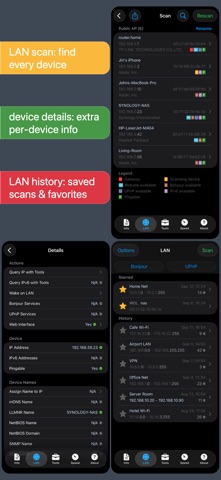
LAN scanner:
- Fast and reliable detection of all devices on Wi-Fi, VPN, and personal hotspot networks
- IP addresses, MAC addresses, and vendors of all discovered devices
- NetBIOS, mDNS (Bonjour), LLMNR, DNS, SNMP, and WS-Discovery names
- Reachability (ping) test, IPv6 availability, and IPv6 addresses
- Custom device names and vendors, scan history, and favorites
- Quick actions: open the web interface, browse Bonjour and UPnP services, or wake the device
- Wake on LAN (WOL) including remote WOL
- Scan of custom IP ranges, filtering, and search in the device list
Ping & traceroute:
- Round-trip delay, IP address, and hostname for every node
- Selectable ICMP, UDP, and TCP ping and ICMP/UDP traceroute probes
- Configurable probe delay, payload size, TCP port, and don't-fragment flag
- Audible ping
- Geolocation (latitude, longitude, country, city, time zone), AS number, and network name
- Complete traceroute visualization on the map
- Real-time graphical ping statistics
Port scanner:
- Scan common ports, custom ranges, or the complete port range
- Detection of closed, firewalled, and open ports
- Descriptions of known port services
- Editable common port list and adjustable scan rate
Whois:
- Look up domains, IP addresses, and AS numbers
- Classic whois and the modern RDAP protocol, with custom servers
DNS lookup:
- Functionality similar to nslookup or dig
- Query all record types at once or a single type
- A, AAAA, CAA, CNAME, HINFO, LOC, MX, NAPTR, NS, PTR, SOA, SPF, SRV, SSHFP, and TXT records
- DNSSEC records: DNSKEY, CDNSKEY, RRSIG, NSEC3PARAM, NSEC, NSEC3, DS, CDS, TLSA
- Custom DNS server and port, no-recursion option, all response sections
Internet speed:
- Download, upload, and server latency measurement
- Graphical speed test view
- History with full results including graphs, custom names, and notes
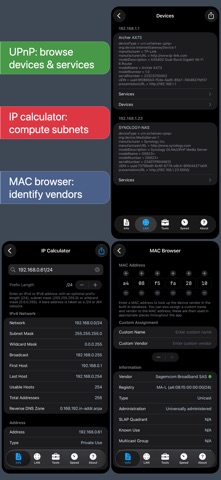
IP calculator:
- Details about any IPv4 or IPv6 address, range, or subnet
- Network, broadcast, masks, address count, type, class, IANA block, reverse DNS, supernet, subnet splitting, membership test
- Binary, decimal, hex, and IPv6 forms (expanded, 6to4, NAT64, Teredo, EUI-64)
MAC address browser:
- Vendor lookup (IEEE MA-L, MA-M, MA-S), address type, administration, SLAP quadrant, and known use
- Custom name and vendor assignment used throughout the app
Network information:
- Default gateway, DNS server, HTTP proxy, external IP (v4 and v6) with hostname, AS number, and AS name
- Wi-Fi details: SSID, BSSID, router vendor, security type, IP address, and subnet mask
- VPN, USB Ethernet, and personal hotspot connection details
- Cell network type, with dual SIM support
- Wi-Fi, cell, and VPN data usage since the last boot
Local service discovery:
- Bonjour and UPnP/DLNA browsers
Siri, Shortcuts, and controls:
- Siri, Spotlight, and Shortcuts app support for every tool
- Control Center, Lock Screen, and Action button controls
- Share extension: query any website from Safari
- Home screen quick actions
More:
- No ads
- Light and dark theme
- Full IPv6 support everywhere, with selectable IPv4/IPv6
- History of all performed tasks, with favorites
- Export by email, AirPrint, and AirDrop
- Copy/paste support
- Detailed help
- Regular updates
Discover every device on your LAN, watch your traceroute unfold on a world map, measure your real download and upload speeds, work out any subnet with the IP calculator, and diagnose any host with ping, traceroute, port scanning, DNS lookup, and whois. From home users to IT professionals, Network Analyzer Pro delivers everything you need in one polished app.
LAN scanner:
- Fast and reliable detection of all devices on Wi-Fi, VPN, and personal hotspot networks
- IP addresses, MAC addresses, and vendors of all discovered devices
- NetBIOS, mDNS (Bonjour), LLMNR, DNS, SNMP, and WS-Discovery names
- Reachability (ping) test, IPv6 availability, and IPv6 addresses
- Custom device names and vendors, scan history, and favorites
- Quick actions: open the web interface, browse Bonjour and UPnP services, or wake the device
- Wake on LAN (WOL) including remote WOL
- Scan of custom IP ranges, filtering, and search in the device list
Ping & traceroute:
- Round-trip delay, IP address, and hostname for every node
- Selectable ICMP, UDP, and TCP ping and ICMP/UDP traceroute probes
- Configurable probe delay, payload size, TCP port, and don't-fragment flag
- Audible ping
- Geolocation (latitude, longitude, country, city, time zone), AS number, and network name
- Complete traceroute visualization on the map
- Real-time graphical ping statistics
Port scanner:
- Scan common ports, custom ranges, or the complete port range
- Detection of closed, firewalled, and open ports
- Descriptions of known port services
- Editable common port list and adjustable scan rate
Whois:
- Look up domains, IP addresses, and AS numbers
- Classic whois and the modern RDAP protocol, with custom servers
DNS lookup:
- Functionality similar to nslookup or dig
- Query all record types at once or a single type
- A, AAAA, CAA, CNAME, HINFO, LOC, MX, NAPTR, NS, PTR, SOA, SPF, SRV, SSHFP, and TXT records
- DNSSEC records: DNSKEY, CDNSKEY, RRSIG, NSEC3PARAM, NSEC, NSEC3, DS, CDS, TLSA
- Custom DNS server and port, no-recursion option, all response sections
Internet speed:
- Download, upload, and server latency measurement
- Graphical speed test view
- History with full results including graphs, custom names, and notes
IP calculator:
- Details about any IPv4 or IPv6 address, range, or subnet
- Network, broadcast, masks, address count, type, class, IANA block, reverse DNS, supernet, subnet splitting, membership test
- Binary, decimal, hex, and IPv6 forms (expanded, 6to4, NAT64, Teredo, EUI-64)
MAC address browser:
- Vendor lookup (IEEE MA-L, MA-M, MA-S), address type, administration, SLAP quadrant, and known use
- Custom name and vendor assignment used throughout the app
Network information:
- Default gateway, DNS server, HTTP proxy, external IP (v4 and v6) with hostname, AS number, and AS name
- Wi-Fi details: SSID, BSSID, router vendor, security type, IP address, and subnet mask
- VPN, USB Ethernet, and personal hotspot connection details
- Cell network type, with dual SIM support
- Wi-Fi, cell, and VPN data usage since the last boot
Local service discovery:
- Bonjour and UPnP/DLNA browsers
Siri, Shortcuts, and controls:
- Siri, Spotlight, and Shortcuts app support for every tool
- Control Center, Lock Screen, and Action button controls
- Share extension: query any website from Safari
- Home screen quick actions
More:
- No ads
- Light and dark theme
- Full IPv6 support everywhere, with selectable IPv4/IPv6
- History of all performed tasks, with favorites
- Export by email, AirPrint, and AirDrop
- Copy/paste support
- Detailed help
- Regular updates
Detalles
| Desarrollador | Techet |
|---|---|
| Categoría | Utilidades |
| Precio | € 3,99 |
| Clasificación por edad | 4+ |
| Versión | 9.2 |
| Tamaño | 12.6 MB |
| iOS mínimo | 18.0 |
| ID del paquete | net.techet.netanalyzer |
| Lanzado | 2012-09-18 |
| Última actualización | 2026-09-13 |
| Idiomas | 1 idiomas |
Lo que esta página responde
- Network Analyzer Pro: IP Tools reseñas de aplicaciones
- Network Analyzer Pro: IP Tools calificación de la aplicación
- Network Analyzer Pro: IP Tools descarga
- Network Analyzer Pro: IP Tools rango en la tienda de aplicaciones
- reseñas de Network Analyzer Pro: IP Tools
- reseñas y calificaciones de Network Analyzer Pro: IP Tools
- es Network Analyzer Pro: IP Tools legítimo
- es Network Analyzer Pro: IP Tools una estafa
- reseñas de usuarios reales de Network Analyzer Pro: IP Tools
- calificación de Network Analyzer Pro: IP Tools
- quejas de Network Analyzer Pro: IP Tools
- lo que la gente dice sobre Network Analyzer Pro: IP Tools
- reseñas de Network Analyzer Pro: IP Tools aplicación
- pros y contras de Network Analyzer Pro: IP Tools
- experiencia de Network Analyzer Pro: IP Tools
- debería confiar en Network Analyzer Pro: IP Tools
- comentarios de Network Analyzer Pro: IP Tools
- reseña de Network Analyzer Pro: IP Tools 2026
- verificación de Network Analyzer Pro: IP Tools
- verificación de seguridad de Network Analyzer Pro: IP Tools
