CalenGoo Calendar
Dominique Andr Gunia Productividad 4+ 7,99 €
4.25 · 32 calificaciones
Mejor posición ahora
#27
a través de 4 tiendas
Pico
#9Días rastreados
58Calificaciones
32 Historial de gráficos
58 días registrados por nosotros
Tiendas
gráficos en 4 hoy
Calificaciones
32 en la App Store
Precio
cambiado 17 vez(es) en nuestra ventana
Instalaciones e ingresos
Apple no publica ninguno — no adivinamos
Actualmente en la lista
Historia
Construido a partir de las propias instantáneas diarias de Astrina — un punto por día.
Posición en la lista — 🇩🇪 Top Pagado
23.07 24.08 24.09
Mostrar los números
| Día | Posición |
|---|---|
| 23.07 | #47 |
| 25.07 | #39 |
| 01.08 | #20 |
| 02.08 | #21 |
| 04.08 | #40 |
| 05.08 | #34 |
| 06.08 | #9 |
| 07.08 | #20 |
| 09.08 | #28 |
| 10.08 | #30 |
| 11.08 | #21 |
| 12.08 | #29 |
| 13.08 | #30 |
| 14.08 | #27 |
| 15.08 | #16 |
| 16.08 | #15 |
| 18.08 | #37 |
| 19.08 | #29 |
| 20.08 | #29 |
| 23.08 | #35 |
| 24.08 | #17 |
| 28.08 | #25 |
| 29.08 | #20 |
| 30.08 | #30 |
| 31.08 | #28 |
| 02.09 | #22 |
| 04.09 | #23 |
| 05.09 | #25 |
| 07.09 | #32 |
| 08.09 | #28 |
| 10.09 | #44 |
| 11.09 | #23 |
| 12.09 | #32 |
| 16.09 | #27 |
| 17.09 | #32 |
| 18.09 | #12 |
| 19.09 | #25 |
| 20.09 | #27 |
| 21.09 | #18 |
| 22.09 | #25 |
| 23.09 | #19 |
| 24.09 | #27 |
Número de valoraciones
31.08 12.09 24.09
Mostrar los números
| Día | Calificaciones |
|---|---|
| 31.08 | 177 |
| 02.09 | 177 |
| 04.09 | 177 |
| 05.09 | 177 |
| 07.09 | 177 |
| 08.09 | 177 |
| 10.09 | 177 |
| 11.09 | 177 |
| 12.09 | 177 |
| 16.09 | 177 |
| 17.09 | 177 |
| 18.09 | 177 |
| 19.09 | 177 |
| 20.09 | 177 |
| 21.09 | 177 |
| 22.09 | 177 |
| 23.09 | 177 |
| 24.09 | 177 |
Capturas de pantalla
Acerca de esta aplicación
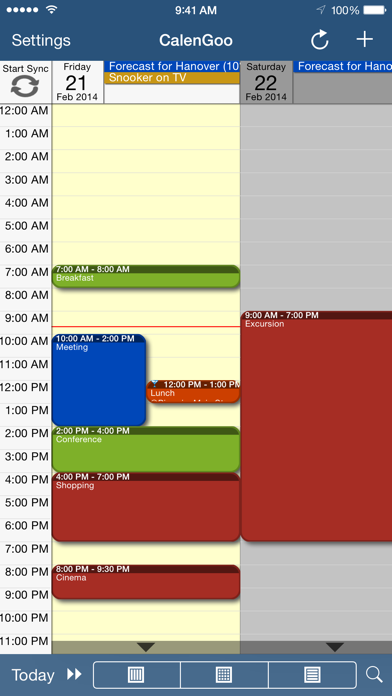
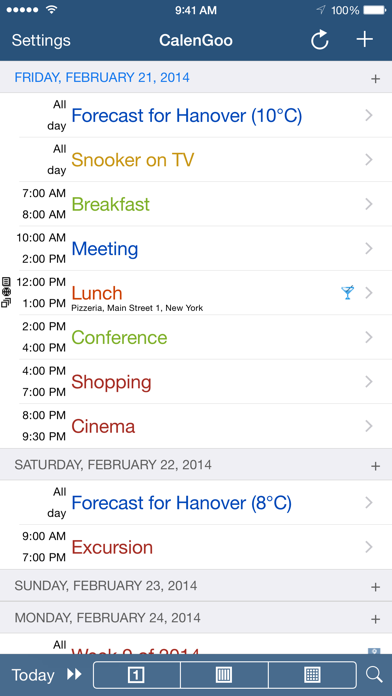
CalenGoo gives you a fast and easy way to access and modify your Google Calendar with your iPhone, iPod Touch or iPad. It can also be used when you have no Internet connection, using the cached data. Changes are saved and uploaded the next time you are connected.
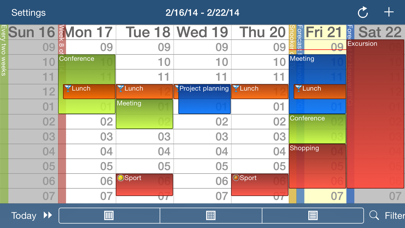
The calendar view is similar to the web view of Google Calendar. Events are displayed using the same calendar colors that you use in your Google Calendar, even Google's event colors are supported (please see http://www.calengoo.com/cc ). It also recognizes which calendars are visible and which are hidden. So the view should match the view of your Google Calendar as much as possible.
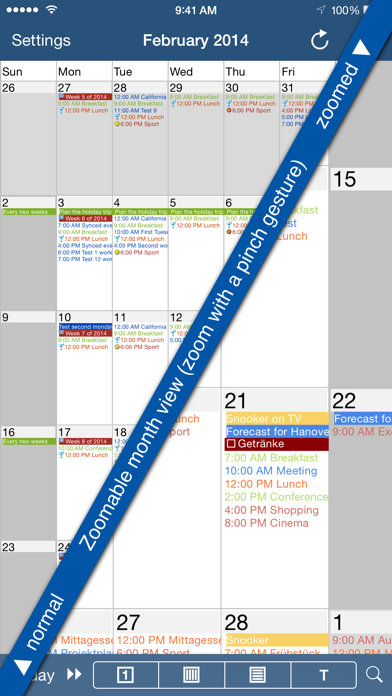
CalenGoo also has a month view similar to that of Google Calendar. It can be zoomed and panned to quickly get an overview over the events of a month. Zooming the month is done by using the two-finger-zoom gesture that you know from Safari and the photo application. A double tap opens the tapped day.
It also supports the same kinds of recurrence rules as Google Calendar and displays recurring events correctly even when you are offline or scroll far into the future.
You can also use Google Calendar's feature to invite people to events and see their status (accepted, declined, maybe, no answer). They will get an invitation email with links to e.g. accept or decline the invitation.
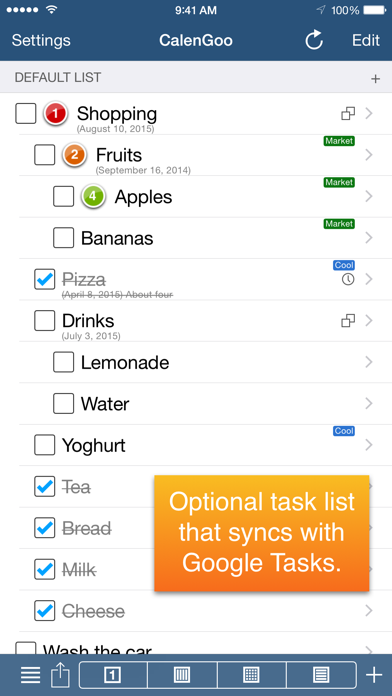
Google Calendar has an integrated task list, called Google Tasks. Tasks with a due date are displayed on the corresponding days of the calendar. CalenGoo can do the same, it can sync this list, display your tasks in the calendar views and in a list view and it even makes your tasks available offline. You can edit and add tasks and the changes will be synced with Google Tasks.
You either need a (free) Google Calendar account to use this app or you can use it with your iOS calendars. However using it with Google Calendar has a few advantages.
To get more information, screenshots and a tutorial, please go to http://www.calengoo.com
If you have any problems or suggestions, please send an email to [email protected] or take a look at CalenGoo's support website to get help.
If you think the font is too small and hard to read, you can increase the font size of all calendar views in the settings under "Settings", "Display and Use".
Features ( http://www.calengoo.com ):
- Drag&drop to quickly copy and move events
- Templates to quickly create similar events again. They can even be combined, e.g. one template for the location of an event and another for the attendees
- Print/PDF function to print the day, week, month or agenda view via AirPrint or to email it as a PDF file
- Supports the same recurrence rules as Google Calendar
- Supports Google Calendar's event colors when syncing via OAuth2
- Icons can be assigned to Google Calendar events
- Date/time can be entered using the iOS wheels or by using a keypad
- Fast search function
- Show/edit iOS calendars in addition to Google calendars (or instead of Google calendars)
- Sync with Google Tasks and iOS Reminders
- Reminders can be snoozed and they can be (optionally) repeated every minute
- Birthdays and anniversaries of your contacts can be displayed
- Zoomable month view, which can be configured to scroll horizontally (month by month) or vertically (week by week)
- Events can be linked to contacts
- Floating events and completable events
- Photos and PDF files can be created and attached to events (via Google Drive)
- Calendar selection bar to quickly show and hide single calendars
- The location of an event can be opened with Apple Maps, Google Maps, Navigon, TomTom, Skobbler, Sygic, iGo or Waze
- View/edit calendars that are shared with others via Google Calendar
- Many configuration options to change the way the app looks and works
The calendar view is similar to the web view of Google Calendar. Events are displayed using the same calendar colors that you use in your Google Calendar, even Google's event colors are supported (please see http://www.calengoo.com/cc ). It also recognizes which calendars are visible and which are hidden. So the view should match the view of your Google Calendar as much as possible.
CalenGoo also has a month view similar to that of Google Calendar. It can be zoomed and panned to quickly get an overview over the events of a month. Zooming the month is done by using the two-finger-zoom gesture that you know from Safari and the photo application. A double tap opens the tapped day.
It also supports the same kinds of recurrence rules as Google Calendar and displays recurring events correctly even when you are offline or scroll far into the future.
You can also use Google Calendar's feature to invite people to events and see their status (accepted, declined, maybe, no answer). They will get an invitation email with links to e.g. accept or decline the invitation.
Google Calendar has an integrated task list, called Google Tasks. Tasks with a due date are displayed on the corresponding days of the calendar. CalenGoo can do the same, it can sync this list, display your tasks in the calendar views and in a list view and it even makes your tasks available offline. You can edit and add tasks and the changes will be synced with Google Tasks.
You either need a (free) Google Calendar account to use this app or you can use it with your iOS calendars. However using it with Google Calendar has a few advantages.
To get more information, screenshots and a tutorial, please go to http://www.calengoo.com
If you have any problems or suggestions, please send an email to [email protected] or take a look at CalenGoo's support website to get help.
If you think the font is too small and hard to read, you can increase the font size of all calendar views in the settings under "Settings", "Display and Use".
Features ( http://www.calengoo.com ):
- Drag&drop to quickly copy and move events
- Templates to quickly create similar events again. They can even be combined, e.g. one template for the location of an event and another for the attendees
- Print/PDF function to print the day, week, month or agenda view via AirPrint or to email it as a PDF file
- Supports the same recurrence rules as Google Calendar
- Supports Google Calendar's event colors when syncing via OAuth2
- Icons can be assigned to Google Calendar events
- Date/time can be entered using the iOS wheels or by using a keypad
- Fast search function
- Show/edit iOS calendars in addition to Google calendars (or instead of Google calendars)
- Sync with Google Tasks and iOS Reminders
- Reminders can be snoozed and they can be (optionally) repeated every minute
- Birthdays and anniversaries of your contacts can be displayed
- Zoomable month view, which can be configured to scroll horizontally (month by month) or vertically (week by week)
- Events can be linked to contacts
- Floating events and completable events
- Photos and PDF files can be created and attached to events (via Google Drive)
- Calendar selection bar to quickly show and hide single calendars
- The location of an event can be opened with Apple Maps, Google Maps, Navigon, TomTom, Skobbler, Sygic, iGo or Waze
- View/edit calendars that are shared with others via Google Calendar
- Many configuration options to change the way the app looks and works
Detalles
| Desarrollador | Dominique Andr Gunia |
|---|---|
| Categoría | Productividad |
| Precio | 7,99 € |
| Clasificación por edad | 4+ |
| Versión | 1.5.105 |
| Tamaño | 30.0 MB |
| iOS mínimo | 13.0 |
| ID del paquete | de.dgunia.calengoo |
| Lanzado | 2009-01-16 |
| Última actualización | 2026-04-21 |
| Idiomas | 9 idiomas |
Lo que esta página responde
- CalenGoo Calendar reseñas de aplicaciones
- CalenGoo Calendar calificación de la aplicación
- CalenGoo Calendar descarga
- CalenGoo Calendar rango en la tienda de aplicaciones
- reseñas de CalenGoo Calendar
- reseñas y calificaciones de CalenGoo Calendar
- es CalenGoo Calendar legítimo
- es CalenGoo Calendar una estafa
- reseñas de usuarios reales de CalenGoo Calendar
- calificación de CalenGoo Calendar
- quejas de CalenGoo Calendar
- lo que la gente dice sobre CalenGoo Calendar
- reseñas de CalenGoo Calendar aplicación
- pros y contras de CalenGoo Calendar
- experiencia de CalenGoo Calendar
- debería confiar en CalenGoo Calendar
- comentarios de CalenGoo Calendar
- reseña de CalenGoo Calendar 2026
- verificación de CalenGoo Calendar
- verificación de seguridad de CalenGoo Calendar
