
TurboScan™: document scanner
Piksoft Inc. Negocios 4+ $14.99
4.91 · 102,400 calificaciones
Mejor posición ahora
#74
a través de 1 tiendas
Pico
#74Días rastreados
2Calificaciones
102,400 Historial de gráficos
2 días registrados por nosotros
Tiendas
gráficos en 1 hoy
Calificaciones
102,400 en la App Store
Precio
cambiado 1 vez(es) en nuestra ventana
Instalaciones e ingresos
Apple no publica ninguno — no adivinamos
Actualmente en la lista
Historia
Construido a partir de las propias instantáneas diarias de Astrina — un punto por día.
Posición en la lista — 🇺🇸 Top Pagado
22.09 23.09
Mostrar los números
| Día | Posición |
|---|---|
| 22.09 | #91 |
| 23.09 | #74 |
Número de valoraciones
22.09 23.09
Mostrar los números
| Día | Calificaciones |
|---|---|
| 22.09 | 102,362 |
| 23.09 | 102,400 |
Capturas de pantalla
Acerca de esta aplicación
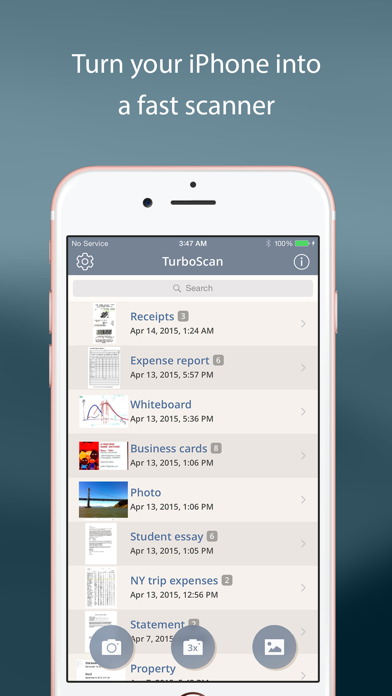
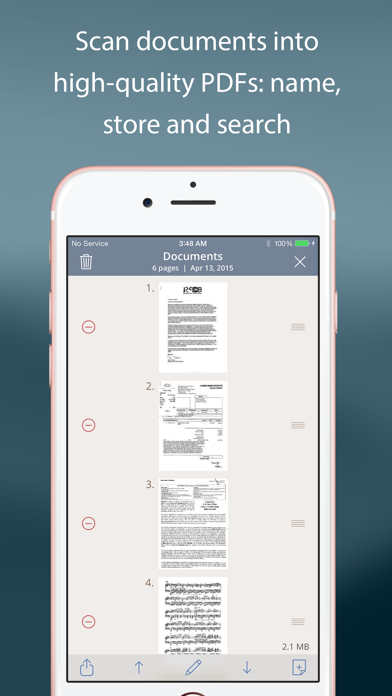
TurboScan turns your iPhone into a full-featured and powerful scanner for documents, receipts, books, photos, whiteboards, and more. You can quickly and accurately scan your multipage documents in high quality PDFs or JPEGs, name, organize and send them anywhere.
• Featured in The NY Times, CNN Money and The Telegraph.
• “Absolutely the best... I've tried other scanner apps and this one is the only way to go. Never going back to the other apps… TurboScan sets the standard for scanning apps.” - User review.
• “…Would recommend this flawless and incredibly useful and perfectly executed app” - User review.
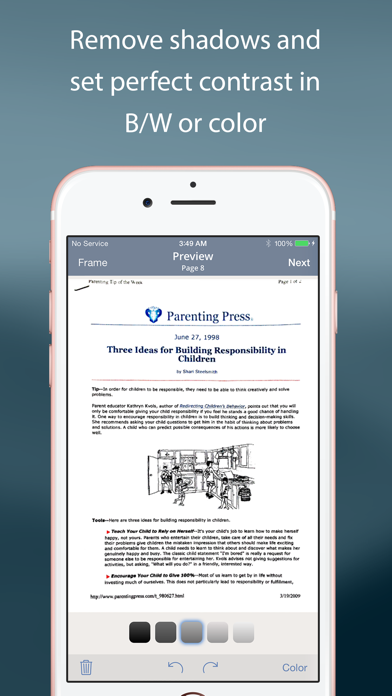
TurboScan uses advanced and fast algorithms to accurately detect document edges, straighten them (correct perspective), eliminate shadows and set a perfect contrast for black on white text. Color and photo modes are also available.
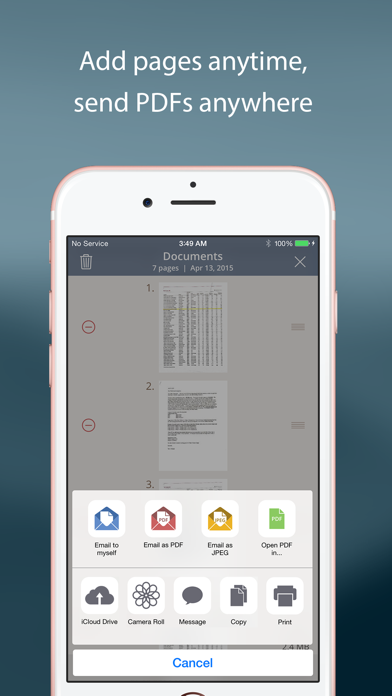
TurboScan boasts a powerful yet easy to use interface. Our handy "Email to myself" feature lets you quickly send documents with one tap.
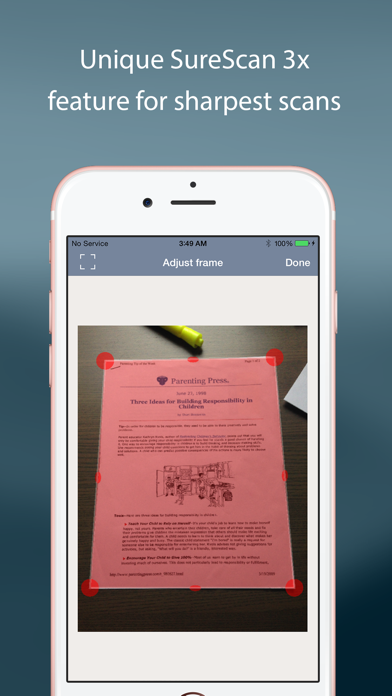
TurboScan also offers SureScan, our proprietary scanning mode for sharper scans (especially useful in low-light conditions.) SureScan automatically takes three pictures of the same document, giving you a guaranteed perfect result every time.
We do not collect any data from TurboScan and all scanning happens on your iPhone. The confidentiality of your data is never compromised.
TURBOSCAN FEATURES:
• Automatic document detection and capture with perspective correction
• Features SureScan for the sharpest scans
• Document naming, folder organization and smart search
• “Email to myself” feature for quick, regular emails
• Add and reorder pages at any time
• Arrange multiple receipts or cards on a single PDF page for printing, easy viewing, etc.
• Send faxes using our Turbo Fax app
• Easily email & message documents or separate pages as PDF & JPEG
• Save documents or pages to Photos
• Face/Touch ID & passcode lock for increased security
• Upload, auto-upload or backup documents to iCloud Drive
• Open PDFs or JPEGs in Google Drive and other PDF cloud apps
• Combine scans via Merge or copy & paste separate pages
• Conveniently AirDrop documents to your Mac and other devices
• Print documents via AirPrint
• Ultra-fast scanning (under 3 seconds per page)
• Features VoiceOver for visually impaired users
• We do not collect any user data in TurboScan
TIPS ON SCANNING
• Make sure your document is flat.
• Use flash in low light conditions, but avoid glare with glossy documents.
We support Ukraine.
We're constantly improving TurboScan, and we value our customers' opinions and feedback. Please email us at [email protected] with any questions or suggestions. Thank you!
• Featured in The NY Times, CNN Money and The Telegraph.
• “Absolutely the best... I've tried other scanner apps and this one is the only way to go. Never going back to the other apps… TurboScan sets the standard for scanning apps.” - User review.
• “…Would recommend this flawless and incredibly useful and perfectly executed app” - User review.
TurboScan uses advanced and fast algorithms to accurately detect document edges, straighten them (correct perspective), eliminate shadows and set a perfect contrast for black on white text. Color and photo modes are also available.
TurboScan boasts a powerful yet easy to use interface. Our handy "Email to myself" feature lets you quickly send documents with one tap.
TurboScan also offers SureScan, our proprietary scanning mode for sharper scans (especially useful in low-light conditions.) SureScan automatically takes three pictures of the same document, giving you a guaranteed perfect result every time.
We do not collect any data from TurboScan and all scanning happens on your iPhone. The confidentiality of your data is never compromised.
TURBOSCAN FEATURES:
• Automatic document detection and capture with perspective correction
• Features SureScan for the sharpest scans
• Document naming, folder organization and smart search
• “Email to myself” feature for quick, regular emails
• Add and reorder pages at any time
• Arrange multiple receipts or cards on a single PDF page for printing, easy viewing, etc.
• Send faxes using our Turbo Fax app
• Easily email & message documents or separate pages as PDF & JPEG
• Save documents or pages to Photos
• Face/Touch ID & passcode lock for increased security
• Upload, auto-upload or backup documents to iCloud Drive
• Open PDFs or JPEGs in Google Drive and other PDF cloud apps
• Combine scans via Merge or copy & paste separate pages
• Conveniently AirDrop documents to your Mac and other devices
• Print documents via AirPrint
• Ultra-fast scanning (under 3 seconds per page)
• Features VoiceOver for visually impaired users
• We do not collect any user data in TurboScan
TIPS ON SCANNING
• Make sure your document is flat.
• Use flash in low light conditions, but avoid glare with glossy documents.
We support Ukraine.
We're constantly improving TurboScan, and we value our customers' opinions and feedback. Please email us at [email protected] with any questions or suggestions. Thank you!
Detalles
| Desarrollador | Piksoft Inc. |
|---|---|
| Categoría | Negocios |
| Precio | $14.99 |
| Clasificación por edad | 4+ |
| Versión | 3.4.1 |
| Tamaño | 10.4 MB |
| iOS mínimo | 13.0 |
| ID del paquete | com.novosoft.TurboScanFree |
| Lanzado | 2015-07-23 |
| Última actualización | 2026-04-14 |
| Idiomas | 10 idiomas |
Lo que esta página responde
- TurboScan™: document scanner reseñas de aplicaciones
- TurboScan™: document scanner calificación de la aplicación
- TurboScan™: document scanner descarga
- TurboScan™: document scanner rango en la tienda de aplicaciones
- reseñas de TurboScan™: document scanner
- reseñas y calificaciones de TurboScan™: document scanner
- es TurboScan™: document scanner legítimo
- es TurboScan™: document scanner una estafa
- reseñas de usuarios reales de TurboScan™: document scanner
- calificación de TurboScan™: document scanner
- quejas de TurboScan™: document scanner
- lo que la gente dice sobre TurboScan™: document scanner
- reseñas de TurboScan™: document scanner aplicación
- pros y contras de TurboScan™: document scanner
- experiencia de TurboScan™: document scanner
- debería confiar en TurboScan™: document scanner
- comentarios de TurboScan™: document scanner
- reseña de TurboScan™: document scanner 2026
- verificación de TurboScan™: document scanner
- verificación de seguridad de TurboScan™: document scanner
