
EZVIZ
EZVIZ Inc. Foto & Video 4+ Kostenlos
4.66 · 21,602 Bewertungen
Beste Position jetzt
#42
über 1 Verkaufsstellen
Höhepunkt
#18Verfolgte Tage
59Bewertungen
21,602 Diagrammhistorie
59 Tage von uns aufgezeichnet
Läden
Diagramm in 1 heute
Bewertungen
21,602 im App Store
Preis
hat 33 Mal in unserem Fenster geändert
Installationen und Einnahmen
Apple veröffentlicht keine — wir raten nicht
Aktuell in den Charts
Verlauf
Basierend auf Astrinas eigenen täglichen Momentaufnahmen — ein Punkt pro Tag.
Chartposition — 🇫🇷 Top Kostenlos
23.07 26.08 24.09
Zeige die Zahlen
| Tag | Position |
|---|---|
| 23.07 | #26 |
| 24.07 | #23 |
| 25.07 | #23 |
| 31.07 | #21 |
| 01.08 | #19 |
| 02.08 | #19 |
| 03.08 | #20 |
| 04.08 | #23 |
| 05.08 | #21 |
| 06.08 | #24 |
| 07.08 | #23 |
| 08.08 | #23 |
| 09.08 | #18 |
| 10.08 | #28 |
| 11.08 | #23 |
| 12.08 | #31 |
| 13.08 | #32 |
| 14.08 | #26 |
| 15.08 | #27 |
| 16.08 | #26 |
| 17.08 | #32 |
| 18.08 | #33 |
| 19.08 | #32 |
| 20.08 | #29 |
| 21.08 | #31 |
| 22.08 | #29 |
| 23.08 | #29 |
| 24.08 | #30 |
| 25.08 | #30 |
| 26.08 | #28 |
| 27.08 | #32 |
| 28.08 | #31 |
| 29.08 | #26 |
| 30.08 | #26 |
| 31.08 | #30 |
| 01.09 | #28 |
| 02.09 | #26 |
| 03.09 | #25 |
| 04.09 | #23 |
| 05.09 | #23 |
| 06.09 | #25 |
| 07.09 | #27 |
| 08.09 | #28 |
| 09.09 | #30 |
| 10.09 | #28 |
| 11.09 | #30 |
| 12.09 | #30 |
| 13.09 | #27 |
| 14.09 | #30 |
| 15.09 | #30 |
| 16.09 | #33 |
| 17.09 | #29 |
| 18.09 | #30 |
| 19.09 | #29 |
| 20.09 | #26 |
| 21.09 | #36 |
| 22.09 | #35 |
| 23.09 | #38 |
| 24.09 | #42 |
Anzahl der Bewertungen
23.07 13.08 30.08
Zeige die Zahlen
| Tag | Bewertungen |
|---|---|
| 23.07 | 20,053 |
| 24.07 | 20,072 |
| 25.07 | 20,093 |
| 31.07 | 20,226 |
| 01.08 | 20,238 |
| 02.08 | 20,273 |
| 03.08 | 20,303 |
| 04.08 | 20,322 |
| 05.08 | 20,356 |
| 06.08 | 20,392 |
| 07.08 | 20,419 |
| 08.08 | 20,443 |
| 09.08 | 20,474 |
| 10.08 | 20,490 |
| 11.08 | 20,506 |
| 12.08 | 20,543 |
| 13.08 | 20,577 |
| 14.08 | 20,605 |
| 15.08 | 20,626 |
| 16.08 | 20,656 |
| 17.08 | 20,687 |
| 18.08 | 20,713 |
| 19.08 | 20,749 |
| 20.08 | 20,774 |
| 21.08 | 20,795 |
| 22.08 | 20,825 |
| 23.08 | 20,838 |
| 24.08 | 20,881 |
| 25.08 | 20,904 |
| 26.08 | 20,931 |
| 27.08 | 20,954 |
| 28.08 | 20,992 |
| 29.08 | 21,006 |
| 30.08 | 21,033 |
Screenshots


Über diese App
EZVIZ – Security Video For Smart Life
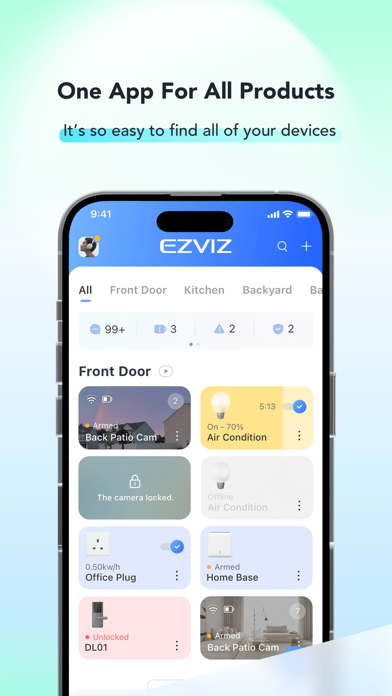
The EZVIZ app is designed to work with our series of Security Cameras and other Smart Home products. By using this app, it is so easy to manage your camera and other smart home devices remotely from across the globe any time.
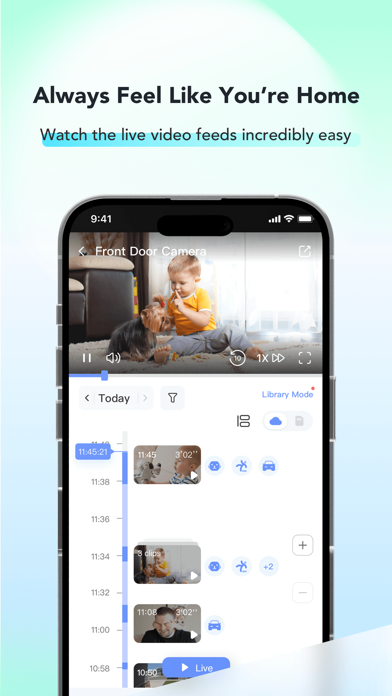
You can get full access and remote control of all devices functions at fingertips, and take necessary actions to ensure the safety of your homes, businesses and loved ones when receiving immediate motion detection alerts on your phone.
Key features:
- View high-definition live stream from anywhere
- See in the dark with IR light on
- Playback recorded videos with CloudPlay or an SD card
- Talk via Two-Way Audio
- Get instant alerts when motion is detected
- Customize detection zones and sensitivity
- Set schedules to record the moments that matter
- Share devices with friends and family
Permission Settings Description
The EZVIZ APP requires the following permissions. All requested permissions are “optional”. You can still use the service normally even if you decline.
- Nearby Devices
1. Scan and discover nearby Bluetooth devices for pairing when adding a device.
- Microphone
1. Enable real-time voice calls with devices
2. Use voice-changing and pet voice-changing features
3. Record custom voice clips as the device alert tone
4. Use speech-to-text for quick input
- Photos & Videos
1. Select QR code images from the album for recognition when adding devices
2. Save screenshots and video recordings of device live feeds locally
3. Upload a personal avatar for account display
4. Submit feedback and report issues with screenshots
- Notifications
1. Receive device alarms, motion detection alerts, and other message reminders
- Contacts
1. Add emergency contacts for the one-tap alarm feature
- Location
1. Obtain the current Wi-Fi name (SSID) to assist with device network setup
2. Automatically locate your city on the city selection page
* The location data is used locally on your device only and is never uploaded to the cloud.
- Camera
1. Scan QR codes to add devices
2. Take photos and upload them as personal avatars
Contact Us
Technical Support: [email protected]
General Enquiries: [email protected]
The EZVIZ app is designed to work with our series of Security Cameras and other Smart Home products. By using this app, it is so easy to manage your camera and other smart home devices remotely from across the globe any time.
You can get full access and remote control of all devices functions at fingertips, and take necessary actions to ensure the safety of your homes, businesses and loved ones when receiving immediate motion detection alerts on your phone.
Key features:
- View high-definition live stream from anywhere
- See in the dark with IR light on
- Playback recorded videos with CloudPlay or an SD card
- Talk via Two-Way Audio
- Get instant alerts when motion is detected
- Customize detection zones and sensitivity
- Set schedules to record the moments that matter
- Share devices with friends and family
Permission Settings Description
The EZVIZ APP requires the following permissions. All requested permissions are “optional”. You can still use the service normally even if you decline.
- Nearby Devices
1. Scan and discover nearby Bluetooth devices for pairing when adding a device.
- Microphone
1. Enable real-time voice calls with devices
2. Use voice-changing and pet voice-changing features
3. Record custom voice clips as the device alert tone
4. Use speech-to-text for quick input
- Photos & Videos
1. Select QR code images from the album for recognition when adding devices
2. Save screenshots and video recordings of device live feeds locally
3. Upload a personal avatar for account display
4. Submit feedback and report issues with screenshots
- Notifications
1. Receive device alarms, motion detection alerts, and other message reminders
- Contacts
1. Add emergency contacts for the one-tap alarm feature
- Location
1. Obtain the current Wi-Fi name (SSID) to assist with device network setup
2. Automatically locate your city on the city selection page
* The location data is used locally on your device only and is never uploaded to the cloud.
- Camera
1. Scan QR codes to add devices
2. Take photos and upload them as personal avatars
Contact Us
Technical Support: [email protected]
General Enquiries: [email protected]
Details
| Entwickler | EZVIZ Inc. |
|---|---|
| Kategorie | Foto & Video |
| Preis | Kostenlos |
| Altersfreigabe | 4+ |
| Version | 7.6.3 |
| Größe | 677 MB |
| Minimale iOS-Version | 15.1 |
| Bundle-ID | com.hikvision.ezviz |
| Veröffentlicht | 2014-06-15 |
| Zuletzt aktualisiert | 2026-09-09 |
| Sprachen | 30 Sprachen |
Was diese Seite beantwortet
- EZVIZ App-Bewertungen
- EZVIZ App-Bewertung
- EZVIZ Download
- EZVIZ App-Store-Rang
- EZVIZ Bewertungen
- EZVIZ Bewertungen und Bewertungen
- ist EZVIZ legitim
- ist EZVIZ ein Betrug
- EZVIZ echte Nutzerbewertungen
- EZVIZ Bewertung
- EZVIZ Beschwerden
- was die Leute über EZVIZ sagen
- EZVIZ app Bewertungen
- EZVIZ Vor- und Nachteile
- EZVIZ Erfahrung
- sollte ich EZVIZ vertrauen
- EZVIZ Feedback
- EZVIZ Bewertung 2026
- EZVIZ Überprüfung
- EZVIZ Sicherheitsüberprüfung
