
Melhor posição agora
#42
em 1 lojas
Pico
#18Dias rastreados
59Avaliações
21,602 Histórico de gráficos
59 dias registrados por nós
Lojas
gráficos em 1 hoje
Avaliações
21,602 na App Store
Preço
mudou 33 vez(es) em nossa janela
Instalações e receita
A Apple não publica nenhum — não fazemos suposições
Atualmente em gráfico
Histórico
Construído a partir das próprias capturas diárias da Astrina — um ponto por dia.
Posição no gráfico — 🇫🇷 Top Grátis
23.07 26.08 24.09
Mostrar os números
| Dia | Posição |
|---|---|
| 23.07 | #26 |
| 24.07 | #23 |
| 25.07 | #23 |
| 31.07 | #21 |
| 01.08 | #19 |
| 02.08 | #19 |
| 03.08 | #20 |
| 04.08 | #23 |
| 05.08 | #21 |
| 06.08 | #24 |
| 07.08 | #23 |
| 08.08 | #23 |
| 09.08 | #18 |
| 10.08 | #28 |
| 11.08 | #23 |
| 12.08 | #31 |
| 13.08 | #32 |
| 14.08 | #26 |
| 15.08 | #27 |
| 16.08 | #26 |
| 17.08 | #32 |
| 18.08 | #33 |
| 19.08 | #32 |
| 20.08 | #29 |
| 21.08 | #31 |
| 22.08 | #29 |
| 23.08 | #29 |
| 24.08 | #30 |
| 25.08 | #30 |
| 26.08 | #28 |
| 27.08 | #32 |
| 28.08 | #31 |
| 29.08 | #26 |
| 30.08 | #26 |
| 31.08 | #30 |
| 01.09 | #28 |
| 02.09 | #26 |
| 03.09 | #25 |
| 04.09 | #23 |
| 05.09 | #23 |
| 06.09 | #25 |
| 07.09 | #27 |
| 08.09 | #28 |
| 09.09 | #30 |
| 10.09 | #28 |
| 11.09 | #30 |
| 12.09 | #30 |
| 13.09 | #27 |
| 14.09 | #30 |
| 15.09 | #30 |
| 16.09 | #33 |
| 17.09 | #29 |
| 18.09 | #30 |
| 19.09 | #29 |
| 20.09 | #26 |
| 21.09 | #36 |
| 22.09 | #35 |
| 23.09 | #38 |
| 24.09 | #42 |
Número de avaliações
23.07 13.08 30.08
Mostrar os números
| Dia | Avaliações |
|---|---|
| 23.07 | 20,053 |
| 24.07 | 20,072 |
| 25.07 | 20,093 |
| 31.07 | 20,226 |
| 01.08 | 20,238 |
| 02.08 | 20,273 |
| 03.08 | 20,303 |
| 04.08 | 20,322 |
| 05.08 | 20,356 |
| 06.08 | 20,392 |
| 07.08 | 20,419 |
| 08.08 | 20,443 |
| 09.08 | 20,474 |
| 10.08 | 20,490 |
| 11.08 | 20,506 |
| 12.08 | 20,543 |
| 13.08 | 20,577 |
| 14.08 | 20,605 |
| 15.08 | 20,626 |
| 16.08 | 20,656 |
| 17.08 | 20,687 |
| 18.08 | 20,713 |
| 19.08 | 20,749 |
| 20.08 | 20,774 |
| 21.08 | 20,795 |
| 22.08 | 20,825 |
| 23.08 | 20,838 |
| 24.08 | 20,881 |
| 25.08 | 20,904 |
| 26.08 | 20,931 |
| 27.08 | 20,954 |
| 28.08 | 20,992 |
| 29.08 | 21,006 |
| 30.08 | 21,033 |
Capturas de tela


Sobre este app
EZVIZ – Security Video For Smart Life
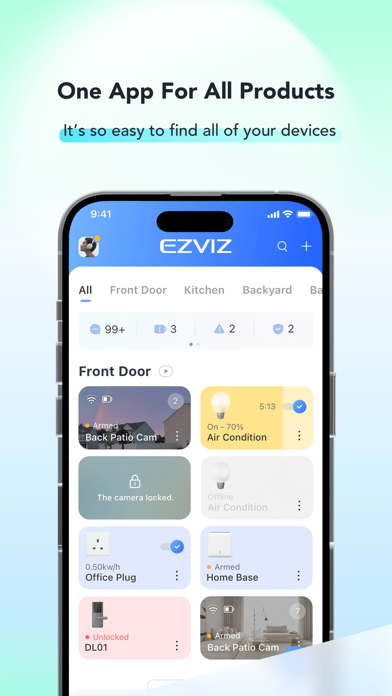
The EZVIZ app is designed to work with our series of Security Cameras and other Smart Home products. By using this app, it is so easy to manage your camera and other smart home devices remotely from across the globe any time.
You can get full access and remote control of all devices functions at fingertips, and take necessary actions to ensure the safety of your homes, businesses and loved ones when receiving immediate motion detection alerts on your phone.
Key features:
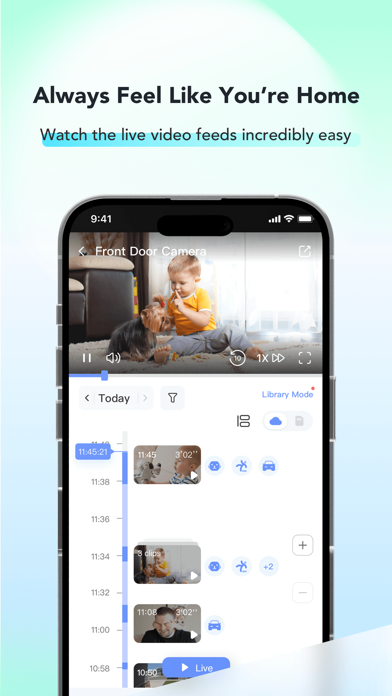
- View high-definition live stream from anywhere
- See in the dark with IR light on
- Playback recorded videos with CloudPlay or an SD card
- Talk via Two-Way Audio
- Get instant alerts when motion is detected
- Customize detection zones and sensitivity
- Set schedules to record the moments that matter
- Share devices with friends and family
Permission Settings Description
The EZVIZ APP requires the following permissions. All requested permissions are “optional”. You can still use the service normally even if you decline.
- Nearby Devices
1. Scan and discover nearby Bluetooth devices for pairing when adding a device.
- Microphone
1. Enable real-time voice calls with devices
2. Use voice-changing and pet voice-changing features
3. Record custom voice clips as the device alert tone
4. Use speech-to-text for quick input
- Photos & Videos
1. Select QR code images from the album for recognition when adding devices
2. Save screenshots and video recordings of device live feeds locally
3. Upload a personal avatar for account display
4. Submit feedback and report issues with screenshots
- Notifications
1. Receive device alarms, motion detection alerts, and other message reminders
- Contacts
1. Add emergency contacts for the one-tap alarm feature
- Location
1. Obtain the current Wi-Fi name (SSID) to assist with device network setup
2. Automatically locate your city on the city selection page
* The location data is used locally on your device only and is never uploaded to the cloud.
- Camera
1. Scan QR codes to add devices
2. Take photos and upload them as personal avatars
Contact Us
Technical Support: [email protected]
General Enquiries: [email protected]
The EZVIZ app is designed to work with our series of Security Cameras and other Smart Home products. By using this app, it is so easy to manage your camera and other smart home devices remotely from across the globe any time.
You can get full access and remote control of all devices functions at fingertips, and take necessary actions to ensure the safety of your homes, businesses and loved ones when receiving immediate motion detection alerts on your phone.
Key features:
- View high-definition live stream from anywhere
- See in the dark with IR light on
- Playback recorded videos with CloudPlay or an SD card
- Talk via Two-Way Audio
- Get instant alerts when motion is detected
- Customize detection zones and sensitivity
- Set schedules to record the moments that matter
- Share devices with friends and family
Permission Settings Description
The EZVIZ APP requires the following permissions. All requested permissions are “optional”. You can still use the service normally even if you decline.
- Nearby Devices
1. Scan and discover nearby Bluetooth devices for pairing when adding a device.
- Microphone
1. Enable real-time voice calls with devices
2. Use voice-changing and pet voice-changing features
3. Record custom voice clips as the device alert tone
4. Use speech-to-text for quick input
- Photos & Videos
1. Select QR code images from the album for recognition when adding devices
2. Save screenshots and video recordings of device live feeds locally
3. Upload a personal avatar for account display
4. Submit feedback and report issues with screenshots
- Notifications
1. Receive device alarms, motion detection alerts, and other message reminders
- Contacts
1. Add emergency contacts for the one-tap alarm feature
- Location
1. Obtain the current Wi-Fi name (SSID) to assist with device network setup
2. Automatically locate your city on the city selection page
* The location data is used locally on your device only and is never uploaded to the cloud.
- Camera
1. Scan QR codes to add devices
2. Take photos and upload them as personal avatars
Contact Us
Technical Support: [email protected]
General Enquiries: [email protected]
Detalhes
| Desenvolvedor | EZVIZ Inc. |
|---|---|
| Categoria | Foto e Vídeo |
| Preço | Gratuito |
| Classificação etária | 4+ |
| Versão | 7.6.3 |
| Tamanho | 677 MB |
| iOS mínimo | 15.1 |
| ID do pacote | com.hikvision.ezviz |
| Lançado | 2014-06-15 |
| Última atualização | 2026-09-09 |
| Idiomas | 30 idiomas |
O que esta página responde
- EZVIZ avaliações de aplicativos
- EZVIZ avaliação de aplicativo
- EZVIZ download
- EZVIZ classificação na loja de aplicativos
- avaliações de EZVIZ
- avaliações e classificações de EZVIZ
- é EZVIZ legítimo
- é EZVIZ uma fraude
- avaliações de usuários reais de EZVIZ
- classificação de EZVIZ
- reclamações de EZVIZ
- o que as pessoas dizem sobre EZVIZ
- avaliações de EZVIZ aplicativo
- prós e contras de EZVIZ
- experiência de EZVIZ
- devo confiar em EZVIZ
- feedback de EZVIZ
- avaliação de EZVIZ 2026
- verificação de EZVIZ
- verificação de segurança de EZVIZ
