
VRPlayer Pro : 2D 3D 360°Video
LEE DONG WON Entretenimento 17+ $1.99
3.53 · 58 avaliações
Melhor posição agora
#30
em 4 lojas
Pico
#11Dias rastreados
33Avaliações
58 Histórico de gráficos
33 dias registrados por nós
Lojas
gráficos em 4 hoje
Avaliações
58 na App Store
Preço
mudou 5 vez(es) em nossa janela
Instalações e receita
A Apple não publica nenhum — não fazemos suposições
Atualmente em gráfico
Histórico
Construído a partir das próprias capturas diárias da Astrina — um ponto por dia.
Posição no gráfico — 🇫🇷 Top Pago
21.08 07.09 23.09
Mostrar os números
| Dia | Posição |
|---|---|
| 21.08 | #20 |
| 22.08 | #12 |
| 23.08 | #26 |
| 24.08 | #40 |
| 25.08 | #51 |
| 07.09 | #12 |
| 08.09 | #22 |
| 09.09 | #34 |
| 21.09 | #11 |
| 22.09 | #19 |
| 23.09 | #30 |
Número de avaliações
01.09 11.09 17.09
Mostrar os números
| Dia | Avaliações |
|---|---|
| 01.09 | 11 |
| 02.09 | 11 |
| 11.09 | 11 |
| 12.09 | 11 |
| 16.09 | 11 |
| 17.09 | 11 |
Capturas de tela

Sobre este app
● VRPlayer can record screen/audio of your desktop and streaming it to VRPlayer via VRPlayer Helper.
- to use this feature "VRPlayer Helper" should be installed and executed on your desktop.
please select or add "VRPlayer Helper" item on vrplayer app and follow instruction first.
- this feature is experimental for now.
so there might be considerable amount of latency and unstability depends on network environment and system spec where helper is running
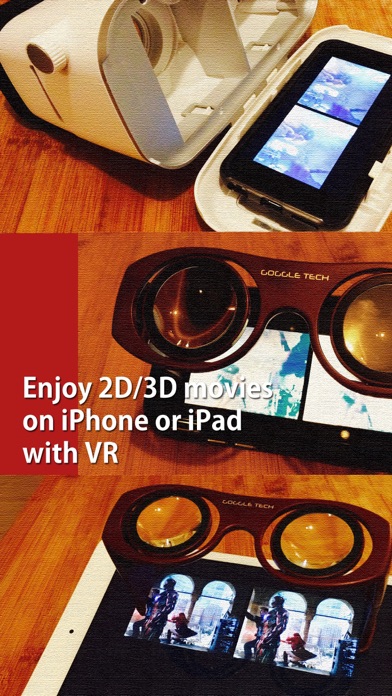
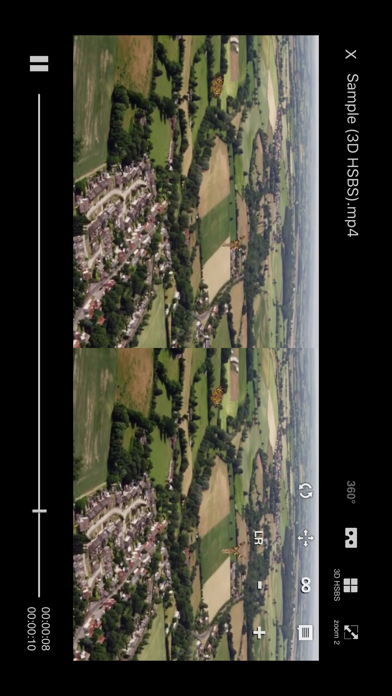
● VRPlayer can play not only general 2D movies but also 3D movies (half side by side or over and under) for VR (google cardboard)
● and support the following file formats.
- video : mp4, mov, DRM free m4v
- subtitle : smi, srt
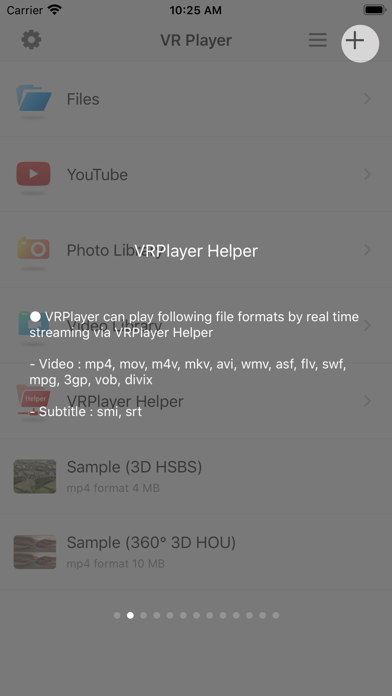
● VRPlayer can play following file formats by real time streaming via VRPlayer Helper
- Video : mp4, mov, m4v, mkv, avi, wmv, asf, flv, swf, mpg, 3gp, vob, divix
- Subtitle : smi, srt
※ this app can not play DRM protected videos purchased from iTunes store.
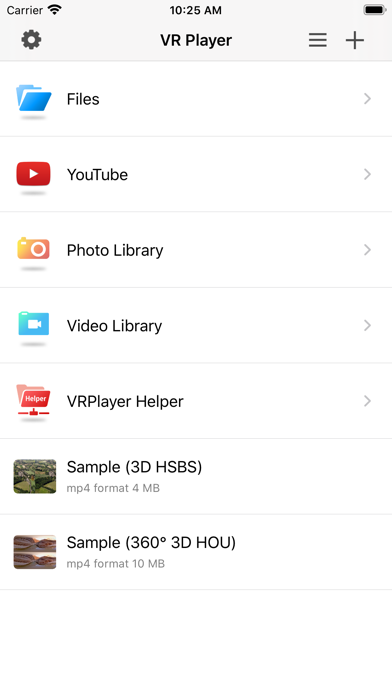
● You can add or access following items
- VRPlayer Helper (streaming server)
- Folder
- FTP Server
- GoogleDrive, Dropbox
- Video Library
※ VRPlayer Helper is embedded in your own VRPlayer app and the download URL provided by VRPlayer is your own iPhone's IP address itself not an external web server.
so iPhone and the server PC should be in the same wifi network to download Helper.
tap the "+"button at top right corner of VRPlayer and select VRPlayer Helper then you will see the URL from which you can download helper.
● You can control VRPlayer with keyboard
- Bluetooth Keyboard
- USB Keyboard (connected by camera kit)
- Keyboard of PC on which VRPlayer Helper is installed
※ while navigating
- up / down : move cursor by item
- up / down + shift : move cursor by page
- right / enter / space : select item
- left / esc : back to previous
※ while playing
- up / down : move cursor by button
- enter : select button & do action
- esc : stop & back to list
- space : play & pause
- right : move forward 5 seconds
- left : move backward 5 seconds
- right + shift : move forward 1 minute
- left + shift : move backward 1 minute
- up + shift : play previous video
- down + shift : play next video
- [ : slow down the playback rate
- ] : speed up the playback rate
- 1 : Toggle 360°/180° Video
- 2 : Toggle VR Mode
- 3 : Change 2D/3D Mode
- 4 : Zoom In/Out
- 5 : Back To Center / Motion Tracking
- 6 : Motion Tracking Constraint
- 7 : Loop
- 8 : Audio/Subtitle
● You can control VRPlayer with Game Controller
※ supported controller
- XBox controller
- Playstation Dualshock controller
- Other MFi certified game controller
※ while navigating
- up / down : move cursor by item
- up / down + RB : move cursor by page
- right / A : select item
- left / B : back to previous
※ while playing
- up / down : move cursor by button
- A : select button & do action
- B : stop & back to list
- X : play & pause
- right : move forward 5 seconds
- left : move backward 5 seconds
- right + RB : move forward 1 minute
- left + RB : move backward 1 minute
- up + RB : play previous video
- down + RB : play next video
● support panorama photo
- enjoy your own panorama photos in VR
● Use multiple gestures to control playing
- Tap the screen with two fingers to change 2D/3D screen mode.
- Double tap the screen to zoom in/out.
- Swipe right to skip forward 5 seconds.
- Swipe left to skip back 5 seconds.
- Swipe right with two fingers to speed up the playback rate.
- Swipe left with two fingers to slow down the playback rate.
- Long press with one finger to select audio or subtitle.
- Drag & drop subtitle to change position.
- Pinch in or out screen to change font size of subtitle.
- to use this feature "VRPlayer Helper" should be installed and executed on your desktop.
please select or add "VRPlayer Helper" item on vrplayer app and follow instruction first.
- this feature is experimental for now.
so there might be considerable amount of latency and unstability depends on network environment and system spec where helper is running
● VRPlayer can play not only general 2D movies but also 3D movies (half side by side or over and under) for VR (google cardboard)
● and support the following file formats.
- video : mp4, mov, DRM free m4v
- subtitle : smi, srt
● VRPlayer can play following file formats by real time streaming via VRPlayer Helper
- Video : mp4, mov, m4v, mkv, avi, wmv, asf, flv, swf, mpg, 3gp, vob, divix
- Subtitle : smi, srt
※ this app can not play DRM protected videos purchased from iTunes store.
● You can add or access following items
- VRPlayer Helper (streaming server)
- Folder
- FTP Server
- GoogleDrive, Dropbox
- Video Library
※ VRPlayer Helper is embedded in your own VRPlayer app and the download URL provided by VRPlayer is your own iPhone's IP address itself not an external web server.
so iPhone and the server PC should be in the same wifi network to download Helper.
tap the "+"button at top right corner of VRPlayer and select VRPlayer Helper then you will see the URL from which you can download helper.
● You can control VRPlayer with keyboard
- Bluetooth Keyboard
- USB Keyboard (connected by camera kit)
- Keyboard of PC on which VRPlayer Helper is installed
※ while navigating
- up / down : move cursor by item
- up / down + shift : move cursor by page
- right / enter / space : select item
- left / esc : back to previous
※ while playing
- up / down : move cursor by button
- enter : select button & do action
- esc : stop & back to list
- space : play & pause
- right : move forward 5 seconds
- left : move backward 5 seconds
- right + shift : move forward 1 minute
- left + shift : move backward 1 minute
- up + shift : play previous video
- down + shift : play next video
- [ : slow down the playback rate
- ] : speed up the playback rate
- 1 : Toggle 360°/180° Video
- 2 : Toggle VR Mode
- 3 : Change 2D/3D Mode
- 4 : Zoom In/Out
- 5 : Back To Center / Motion Tracking
- 6 : Motion Tracking Constraint
- 7 : Loop
- 8 : Audio/Subtitle
● You can control VRPlayer with Game Controller
※ supported controller
- XBox controller
- Playstation Dualshock controller
- Other MFi certified game controller
※ while navigating
- up / down : move cursor by item
- up / down + RB : move cursor by page
- right / A : select item
- left / B : back to previous
※ while playing
- up / down : move cursor by button
- A : select button & do action
- B : stop & back to list
- X : play & pause
- right : move forward 5 seconds
- left : move backward 5 seconds
- right + RB : move forward 1 minute
- left + RB : move backward 1 minute
- up + RB : play previous video
- down + RB : play next video
● support panorama photo
- enjoy your own panorama photos in VR
● Use multiple gestures to control playing
- Tap the screen with two fingers to change 2D/3D screen mode.
- Double tap the screen to zoom in/out.
- Swipe right to skip forward 5 seconds.
- Swipe left to skip back 5 seconds.
- Swipe right with two fingers to speed up the playback rate.
- Swipe left with two fingers to slow down the playback rate.
- Long press with one finger to select audio or subtitle.
- Drag & drop subtitle to change position.
- Pinch in or out screen to change font size of subtitle.
Detalhes
| Desenvolvedor | LEE DONG WON |
|---|---|
| Categoria | Entretenimento |
| Preço | $1.99 |
| Classificação etária | 17+ |
| Versão | 3.3.5 |
| Tamanho | 110 MB |
| iOS mínimo | 15.6 |
| ID do pacote | com.mobixn.vrplayerpro |
| Lançado | 2015-12-17 |
| Última atualização | 2025-06-03 |
| Idiomas | 8 idiomas |
O que esta página responde
- VRPlayer Pro : 2D 3D 360°Video avaliações de aplicativos
- VRPlayer Pro : 2D 3D 360°Video avaliação de aplicativo
- VRPlayer Pro : 2D 3D 360°Video download
- VRPlayer Pro : 2D 3D 360°Video classificação na loja de aplicativos
- avaliações de VRPlayer Pro : 2D 3D 360°Video
- avaliações e classificações de VRPlayer Pro : 2D 3D 360°Video
- é VRPlayer Pro : 2D 3D 360°Video legítimo
- é VRPlayer Pro : 2D 3D 360°Video uma fraude
- avaliações de usuários reais de VRPlayer Pro : 2D 3D 360°Video
- classificação de VRPlayer Pro : 2D 3D 360°Video
- reclamações de VRPlayer Pro : 2D 3D 360°Video
- o que as pessoas dizem sobre VRPlayer Pro : 2D 3D 360°Video
- avaliações de VRPlayer Pro : 2D 3D 360°Video aplicativo
- prós e contras de VRPlayer Pro : 2D 3D 360°Video
- experiência de VRPlayer Pro : 2D 3D 360°Video
- devo confiar em VRPlayer Pro : 2D 3D 360°Video
- feedback de VRPlayer Pro : 2D 3D 360°Video
- avaliação de VRPlayer Pro : 2D 3D 360°Video 2026
- verificação de VRPlayer Pro : 2D 3D 360°Video
- verificação de segurança de VRPlayer Pro : 2D 3D 360°Video
