
Gain Map HDR Converter
MARCELO PITZ ESPINDOLA Foto & Video 4+ 3,99 €
Beste Position jetzt
#51
über 2 Verkaufsstellen
Höhepunkt
#51Verfolgte Tage
2 Diagrammhistorie
2 Tage von uns aufgezeichnet
Läden
Diagramm in 2 heute
Bewertungen
noch keine
Preis
unverändert in unserem Fenster
Installationen und Einnahmen
Apple veröffentlicht keine — wir raten nicht
Aktuell in den Charts
Der Verlauf beginnt heute. Kommen Sie morgen zurück, um zu sehen, wie sich die Chartposition und Bewertungen entwickeln — die täglichen Aufzeichnungen erfassen einen Punkt pro Tag.
Screenshots




Über diese App
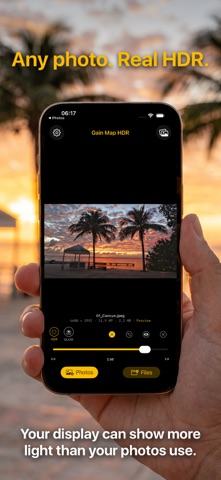
Your display can show far more light than your photos ever use. Gain Map HDR puts it to work.
Every photo on your iPhone was captured with a range of brightness that standard displays simply clip away. Gain Map HDR rebuilds that range and writes it as a true HDR gain map, so highlights glow on your iPhone, iPad and Mac — while the image still looks right everywhere else.
HOW IT WORKS
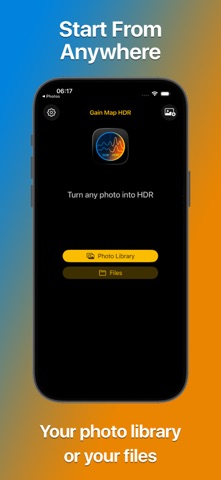
- Import from your photo library or from Files
- Choose HDR or GLOW and dial in the exact intensity
- Compare against the original at any time
- Save back to Photos or export to a folder
BUILT ON STANDARDS
- True ISO 21496-1 gain map — the open HDR standard, not a filter
- 10-bit HEIF output for smooth gradients with no banding
- Display P3 wide-gamut color
- Graceful fallback: on non-HDR screens your photo looks exactly as it should
MADE FOR PHOTOGRAPHERS
- Author, copyright, IPTC and GPS metadata preserved
- Batch processing for entire shoots
- 4:5 crop, ready for social
- Full-width editing in landscape, with every control in reach
PRIVATE BY DESIGN
Everything happens on your iPhone. No cloud processing, no account, no uploads. Your photos never leave your device.
Gain Map HDR doesn't invent detail or push saturation. It rebuilds the brightness range your camera already captured, and writes it in the format Apple devices are built to read.
Every photo on your iPhone was captured with a range of brightness that standard displays simply clip away. Gain Map HDR rebuilds that range and writes it as a true HDR gain map, so highlights glow on your iPhone, iPad and Mac — while the image still looks right everywhere else.
HOW IT WORKS
- Import from your photo library or from Files
- Choose HDR or GLOW and dial in the exact intensity
- Compare against the original at any time
- Save back to Photos or export to a folder
BUILT ON STANDARDS
- True ISO 21496-1 gain map — the open HDR standard, not a filter
- 10-bit HEIF output for smooth gradients with no banding
- Display P3 wide-gamut color
- Graceful fallback: on non-HDR screens your photo looks exactly as it should
MADE FOR PHOTOGRAPHERS
- Author, copyright, IPTC and GPS metadata preserved
- Batch processing for entire shoots
- 4:5 crop, ready for social
- Full-width editing in landscape, with every control in reach
PRIVATE BY DESIGN
Everything happens on your iPhone. No cloud processing, no account, no uploads. Your photos never leave your device.
Gain Map HDR doesn't invent detail or push saturation. It rebuilds the brightness range your camera already captured, and writes it in the format Apple devices are built to read.
Details
| Entwickler | MARCELO PITZ ESPINDOLA |
|---|---|
| Kategorie | Foto & Video |
| Preis | 3,99 € |
| Altersfreigabe | 4+ |
| Version | 1.2 |
| Größe | 6.6 MB |
| Minimale iOS-Version | 18.6 |
| Bundle-ID | com.marcpitz.GainMapHDR-iOS |
| Veröffentlicht | 2026-08-06 |
| Zuletzt aktualisiert | 2026-08-31 |
| Sprachen | 1 Sprachen |
Was diese Seite beantwortet
- Gain Map HDR Converter App-Bewertungen
- Gain Map HDR Converter App-Bewertung
- Gain Map HDR Converter Download
- Gain Map HDR Converter App-Store-Rang
- Gain Map HDR Converter Bewertungen
- Gain Map HDR Converter Bewertungen und Bewertungen
- ist Gain Map HDR Converter legitim
- ist Gain Map HDR Converter ein Betrug
- Gain Map HDR Converter echte Nutzerbewertungen
- Gain Map HDR Converter Bewertung
- Gain Map HDR Converter Beschwerden
- was die Leute über Gain Map HDR Converter sagen
- Gain Map HDR Converter app Bewertungen
- Gain Map HDR Converter Vor- und Nachteile
- Gain Map HDR Converter Erfahrung
- sollte ich Gain Map HDR Converter vertrauen
- Gain Map HDR Converter Feedback
- Gain Map HDR Converter Bewertung 2026
- Gain Map HDR Converter Überprüfung
- Gain Map HDR Converter Sicherheitsüberprüfung
