
Tagdawn: NFC Alarm & Habits
Ali Bakhshoude Produktivität 4+ £7.99
5.00 · 1 Bewertungen
Beste Position jetzt
#33
über 5 Verkaufsstellen
Höhepunkt
#7Verfolgte Tage
43Bewertungen
1 Diagrammhistorie
43 Tage von uns aufgezeichnet
Läden
Diagramm in 5 heute
Bewertungen
1 im App Store
Preis
hat 23 Mal in unserem Fenster geändert
Installationen und Einnahmen
Apple veröffentlicht keine — wir raten nicht
Aktuell in den Charts
Verlauf
Basierend auf Astrinas eigenen täglichen Momentaufnahmen — ein Punkt pro Tag.
Chartposition — 🇬🇧 Top Bezahlt
01.08 03.09 24.09
Zeige die Zahlen
| Tag | Position |
|---|---|
| 01.08 | #52 |
| 07.08 | #38 |
| 11.08 | #34 |
| 12.08 | #28 |
| 14.08 | #31 |
| 17.08 | #31 |
| 18.08 | #14 |
| 19.08 | #17 |
| 24.08 | #29 |
| 25.08 | #35 |
| 26.08 | #26 |
| 03.09 | #22 |
| 06.09 | #30 |
| 08.09 | #24 |
| 09.09 | #29 |
| 10.09 | #26 |
| 13.09 | #40 |
| 14.09 | #29 |
| 15.09 | #12 |
| 16.09 | #14 |
| 17.09 | #21 |
| 21.09 | #34 |
| 23.09 | #34 |
| 24.09 | #33 |
Anzahl der Bewertungen
01.08 16.08 29.08
Zeige die Zahlen
| Tag | Bewertungen |
|---|---|
| 01.08 | 0 |
| 02.08 | 0 |
| 03.08 | 0 |
| 04.08 | 0 |
| 05.08 | 0 |
| 06.08 | 0 |
| 07.08 | 0 |
| 11.08 | 0 |
| 12.08 | 0 |
| 13.08 | 0 |
| 14.08 | 0 |
| 16.08 | 0 |
| 17.08 | 0 |
| 18.08 | 0 |
| 19.08 | 0 |
| 20.08 | 0 |
| 21.08 | 0 |
| 22.08 | 0 |
| 24.08 | 1 |
| 25.08 | 1 |
| 26.08 | 0 |
| 27.08 | 0 |
| 28.08 | 0 |
| 29.08 | 0 |
Screenshots




Über diese App
Meet the alarm you finish on your feet.
Place a compatible NFC sticker across the room and scan it to complete your alarm in Tagdawn. Bring your own tag: common NFC stickers are inexpensive, and no Tagdawn-branded accessory is required.
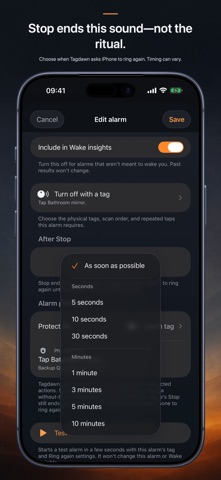
Tagdawn uses iPhone’s system alarm experience, including alerts through Silent mode and Focus. iPhone always provides Stop. Without a tag, Stop ends the alarm normally. With a tag setup, Stop ends the current alarm and Tagdawn asks iPhone for a fresh one after your chosen Ring again wait until the tag ritual is complete. Choose As soon as possible or clear seconds-and-minutes presets; exact timing can vary.
Build your wake-up setup:
• Choose one or more tags, their order, and the number of taps per tag.
• Keep an optional private backup QR code for an eligible alarm.
• Run an isolated test alarm with the same tag and Ring again setup.
• Protect alarm changes with Face ID, Touch ID, a passcode, or the physical tag.
• Choose a Tagdawn tone, the iPhone alarm sound, or a compatible imported sound.
Keep the rest of your day together:
• Track check-offs, counts, amounts, limits, and habits with no daily goal.
• Add several planned times with a normal reminder or loud alarm.
• Use deliberate tag shortcuts for habit entries while Tagdawn is open.
• Log earlier entries with their real date and time.
• Review separate Wake and Habit charts.
• Use timers, a stopwatch, widgets, and eligible Lock Screen or Dynamic Island activities.
Tag scans begin only while Tagdawn is open after you choose Scan. Tagdawn works alongside Clock; it does not replace it.
Your alarm, tag, Wake, Habit, timer, and stopwatch records stay on your devices. No account, subscription, ads, or tracking.
Place a compatible NFC sticker across the room and scan it to complete your alarm in Tagdawn. Bring your own tag: common NFC stickers are inexpensive, and no Tagdawn-branded accessory is required.
Tagdawn uses iPhone’s system alarm experience, including alerts through Silent mode and Focus. iPhone always provides Stop. Without a tag, Stop ends the alarm normally. With a tag setup, Stop ends the current alarm and Tagdawn asks iPhone for a fresh one after your chosen Ring again wait until the tag ritual is complete. Choose As soon as possible or clear seconds-and-minutes presets; exact timing can vary.
Build your wake-up setup:
• Choose one or more tags, their order, and the number of taps per tag.
• Keep an optional private backup QR code for an eligible alarm.
• Run an isolated test alarm with the same tag and Ring again setup.
• Protect alarm changes with Face ID, Touch ID, a passcode, or the physical tag.
• Choose a Tagdawn tone, the iPhone alarm sound, or a compatible imported sound.
Keep the rest of your day together:
• Track check-offs, counts, amounts, limits, and habits with no daily goal.
• Add several planned times with a normal reminder or loud alarm.
• Use deliberate tag shortcuts for habit entries while Tagdawn is open.
• Log earlier entries with their real date and time.
• Review separate Wake and Habit charts.
• Use timers, a stopwatch, widgets, and eligible Lock Screen or Dynamic Island activities.
Tag scans begin only while Tagdawn is open after you choose Scan. Tagdawn works alongside Clock; it does not replace it.
Your alarm, tag, Wake, Habit, timer, and stopwatch records stay on your devices. No account, subscription, ads, or tracking.
Details
| Entwickler | Ali Bakhshoude |
|---|---|
| Kategorie | Produktivität |
| Preis | £7.99 |
| Altersfreigabe | 4+ |
| Version | 1.1.2 |
| Größe | 16.0 MB |
| Minimale iOS-Version | 26.0 |
| Bundle-ID | app.tagdawn |
| Veröffentlicht | 2026-07-28 |
| Zuletzt aktualisiert | 2026-08-10 |
| Sprachen | 1 Sprachen |
Was diese Seite beantwortet
- Tagdawn: NFC Alarm & Habits App-Bewertungen
- Tagdawn: NFC Alarm & Habits App-Bewertung
- Tagdawn: NFC Alarm & Habits Download
- Tagdawn: NFC Alarm & Habits App-Store-Rang
- Tagdawn: NFC Alarm & Habits Bewertungen
- Tagdawn: NFC Alarm & Habits Bewertungen und Bewertungen
- ist Tagdawn: NFC Alarm & Habits legitim
- ist Tagdawn: NFC Alarm & Habits ein Betrug
- Tagdawn: NFC Alarm & Habits echte Nutzerbewertungen
- Tagdawn: NFC Alarm & Habits Bewertung
- Tagdawn: NFC Alarm & Habits Beschwerden
- was die Leute über Tagdawn: NFC Alarm & Habits sagen
- Tagdawn: NFC Alarm & Habits app Bewertungen
- Tagdawn: NFC Alarm & Habits Vor- und Nachteile
- Tagdawn: NFC Alarm & Habits Erfahrung
- sollte ich Tagdawn: NFC Alarm & Habits vertrauen
- Tagdawn: NFC Alarm & Habits Feedback
- Tagdawn: NFC Alarm & Habits Bewertung 2026
- Tagdawn: NFC Alarm & Habits Überprüfung
- Tagdawn: NFC Alarm & Habits Sicherheitsüberprüfung
