
Beste Position jetzt
#44
über 10 Verkaufsstellen
Höhepunkt
#3Verfolgte Tage
16 Diagrammhistorie
16 Tage von uns aufgezeichnet
Läden
Diagramm in 10 heute
Bewertungen
noch keine
Preis
hat 13 Mal in unserem Fenster geändert
Installationen und Einnahmen
Apple veröffentlicht keine — wir raten nicht
Aktuell in den Charts
Verlauf
Basierend auf Astrinas eigenen täglichen Momentaufnahmen — ein Punkt pro Tag.
Chartposition — 🇩🇪 Top Bezahlt
09.09 15.09 23.09
Zeige die Zahlen
| Tag | Position |
|---|---|
| 09.09 | #11 |
| 10.09 | #8 |
| 11.09 | #5 |
| 12.09 | #7 |
| 13.09 | #10 |
| 14.09 | #8 |
| 15.09 | #6 |
| 16.09 | #8 |
| 17.09 | #18 |
| 18.09 | #13 |
| 19.09 | #3 |
| 20.09 | #10 |
| 21.09 | #18 |
| 23.09 | #44 |
Anzahl der Bewertungen
09.09 15.09 23.09
Zeige die Zahlen
| Tag | Bewertungen |
|---|---|
| 09.09 | 0 |
| 10.09 | 0 |
| 11.09 | 0 |
| 12.09 | 0 |
| 13.09 | 0 |
| 14.09 | 0 |
| 15.09 | 0 |
| 16.09 | 0 |
| 17.09 | 0 |
| 18.09 | 0 |
| 19.09 | 0 |
| 20.09 | 0 |
| 21.09 | 0 |
| 23.09 | 0 |
Screenshots




Über diese App
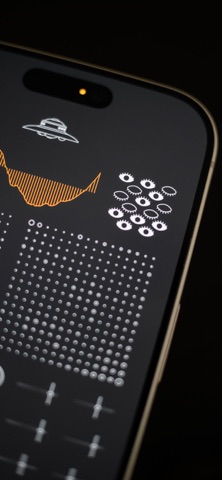
The controller with the eyes represents the neural network’s learning system. When the eyes are open, the system learns; when they are closed, learning is disabled. A long tap toggles learning on or off. Dragging vertically changes the learning rate, while dragging horizontally controls how strongly the winning neuron influences its neighbors. This influence is shown by the number of open eyes and the width of the pupils. While learning, the neural network visibly `swells`.
When a new sound is analyzed, the neuron that best matches it updates its internal representation and `swells` more than the others. Nearby neurons also update, but less strongly, forming a smooth sound space inside the network.
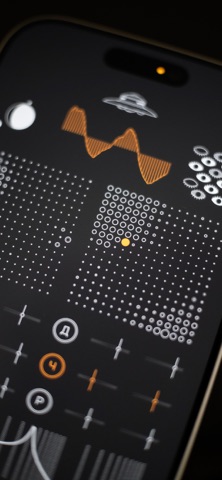
Two grids represent the two `hemispheres` of the neural network. Each cell corresponds to a neuron. Tapping a cell selects the neuron whose waveform will be used. An orange dot marks the selected neuron, and the curve above it shows the fragment of waveform stored by that neuron — the wavetable used to generate notes or modulate parameters.
The controller with the planets manages memories. Dragging it moves through time and lets you browse stored states. A double tap returns to the present moment. A long tap opens a menu with three actions marked by Russian letters: `С` for save from sohranit, `У` for delete from udalit, and `З` for close from zakryt.
The planet interface represents time symbolically. The crescent shadow shows the time of day, the moon’s position indicates the day of the month, and the satellite’s position represents the orbital period of an artificial body similar to the ISS.
Below the neural grids are six synthesis sections. The first is marked with the Russian letter `Г`, from generator, and selects the oscillator waveform. Two sliders control the fundamental frequency and volume.
The remaining sections provide modulation. Sliders control depth and rate, while letters indicate the destination parameter: `П` pitch from podstroika, `П` pan from panorama, `Д` drive from drive, `Ч` filter frequency from chastota, and `Р` resonance from rezonans.
The slider with stars controls the filter. Dragging horizontally selects the filter type, while dragging vertically adjusts drive. The area to the right controls filter frequency and resonance.
At the bottom of the interface is a keyboard of eight keys represented by Lissajous figures — curves created by combining two harmonic oscillations. Each figure corresponds to a note. Above the keys are two buttons: `У` hold from uderzhanie and `П` tuning from podstroika.
When a new sound is analyzed, the neuron that best matches it updates its internal representation and `swells` more than the others. Nearby neurons also update, but less strongly, forming a smooth sound space inside the network.
Two grids represent the two `hemispheres` of the neural network. Each cell corresponds to a neuron. Tapping a cell selects the neuron whose waveform will be used. An orange dot marks the selected neuron, and the curve above it shows the fragment of waveform stored by that neuron — the wavetable used to generate notes or modulate parameters.
The controller with the planets manages memories. Dragging it moves through time and lets you browse stored states. A double tap returns to the present moment. A long tap opens a menu with three actions marked by Russian letters: `С` for save from sohranit, `У` for delete from udalit, and `З` for close from zakryt.
The planet interface represents time symbolically. The crescent shadow shows the time of day, the moon’s position indicates the day of the month, and the satellite’s position represents the orbital period of an artificial body similar to the ISS.
Below the neural grids are six synthesis sections. The first is marked with the Russian letter `Г`, from generator, and selects the oscillator waveform. Two sliders control the fundamental frequency and volume.
The remaining sections provide modulation. Sliders control depth and rate, while letters indicate the destination parameter: `П` pitch from podstroika, `П` pan from panorama, `Д` drive from drive, `Ч` filter frequency from chastota, and `Р` resonance from rezonans.
The slider with stars controls the filter. Dragging horizontally selects the filter type, while dragging vertically adjusts drive. The area to the right controls filter frequency and resonance.
At the bottom of the interface is a keyboard of eight keys represented by Lissajous figures — curves created by combining two harmonic oscillations. Each figure corresponds to a note. Above the keys are two buttons: `У` hold from uderzhanie and `П` tuning from podstroika.
Details
| Entwickler | Valery Mironov |
|---|---|
| Kategorie | Musik |
| Preis | 5,99 € |
| Altersfreigabe | 4+ |
| Version | 1.0 |
| Größe | 164 MB |
| Minimale iOS-Version | 15.0 |
| Bundle-ID | com.valerymironov.sentient |
| Veröffentlicht | 2026-09-08 |
| Zuletzt aktualisiert | 2026-09-08 |
Was diese Seite beantwortet
- Sentient Synthesizer App-Bewertungen
- Sentient Synthesizer App-Bewertung
- Sentient Synthesizer Download
- Sentient Synthesizer App-Store-Rang
- Sentient Synthesizer Bewertungen
- Sentient Synthesizer Bewertungen und Bewertungen
- ist Sentient Synthesizer legitim
- ist Sentient Synthesizer ein Betrug
- Sentient Synthesizer echte Nutzerbewertungen
- Sentient Synthesizer Bewertung
- Sentient Synthesizer Beschwerden
- was die Leute über Sentient Synthesizer sagen
- Sentient Synthesizer app Bewertungen
- Sentient Synthesizer Vor- und Nachteile
- Sentient Synthesizer Erfahrung
- sollte ich Sentient Synthesizer vertrauen
- Sentient Synthesizer Feedback
- Sentient Synthesizer Bewertung 2026
- Sentient Synthesizer Überprüfung
- Sentient Synthesizer Sicherheitsüberprüfung
