
Accounts 2 Checkbook
SVT Software Finanzen 4+ 3,99 €
4.18 · 11 Bewertungen
Beste Position jetzt
#28
über 3 Verkaufsstellen
Höhepunkt
#1Verfolgte Tage
59Bewertungen
11 Diagrammhistorie
59 Tage von uns aufgezeichnet
Läden
Diagramm in 3 heute
Bewertungen
11 im App Store
Preis
hat 24 Mal in unserem Fenster geändert
Installationen und Einnahmen
Apple veröffentlicht keine — wir raten nicht
Aktuell in den Charts
Verlauf
Basierend auf Astrinas eigenen täglichen Momentaufnahmen — ein Punkt pro Tag.
Chartposition — 🇺🇸 Top Bezahlt
23.07 21.08 22.09
Zeige die Zahlen
| Tag | Position |
|---|---|
| 23.07 | #32 |
| 24.07 | #12 |
| 25.07 | #44 |
| 31.07 | #60 |
| 02.08 | #26 |
| 03.08 | #11 |
| 04.08 | #16 |
| 05.08 | #19 |
| 06.08 | #11 |
| 07.08 | #17 |
| 08.08 | #15 |
| 09.08 | #19 |
| 10.08 | #8 |
| 11.08 | #21 |
| 12.08 | #20 |
| 15.08 | #10 |
| 16.08 | #12 |
| 17.08 | #16 |
| 21.08 | #21 |
| 22.08 | #23 |
| 23.08 | #54 |
| 25.08 | #31 |
| 26.08 | #57 |
| 27.08 | #31 |
| 30.08 | #33 |
| 31.08 | #19 |
| 01.09 | #58 |
| 02.09 | #43 |
| 04.09 | #14 |
| 05.09 | #17 |
| 06.09 | #53 |
| 16.09 | #34 |
| 17.09 | #19 |
| 18.09 | #40 |
| 19.09 | #26 |
| 21.09 | #29 |
| 22.09 | #28 |
Anzahl der Bewertungen
31.08 12.09 24.09
Zeige die Zahlen
| Tag | Bewertungen |
|---|---|
| 31.08 | 217 |
| 01.09 | 217 |
| 02.09 | 217 |
| 03.09 | 217 |
| 04.09 | 217 |
| 05.09 | 217 |
| 06.09 | 217 |
| 07.09 | 217 |
| 08.09 | 217 |
| 09.09 | 217 |
| 10.09 | 217 |
| 11.09 | 217 |
| 12.09 | 217 |
| 13.09 | 217 |
| 14.09 | 217 |
| 15.09 | 217 |
| 16.09 | 217 |
| 17.09 | 217 |
| 18.09 | 217 |
| 19.09 | 217 |
| 20.09 | 217 |
| 21.09 | 217 |
| 22.09 | 217 |
| 23.09 | 217 |
| 24.09 | 218 |
Screenshots
Über diese App
*** For the latest features and enhancements, please check out our NEW Accounts 3 Checkbook app, now available for download from the App Store! ***
Featured by Apple in "What's Hot" List
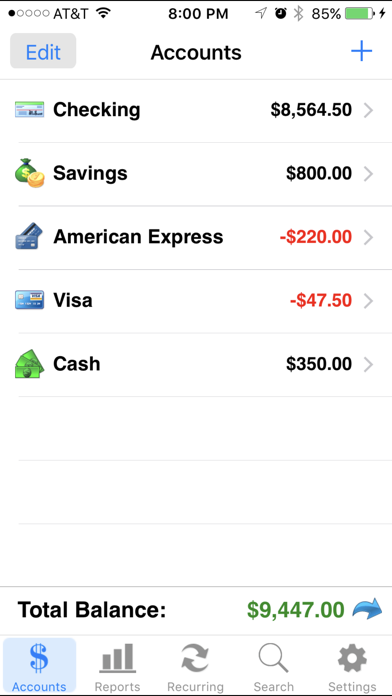
Accounts 2 is an easy to use application to replace your paper checkbook. With the Accounts 2 application, you will have a quicker and more convenient way to track your daily finances. You can schedule transactions, transfer funds, capture photo receipts, reconcile, view reports, export data, print, and much more. All features of the Accounts 2 app are designed to be quick, clean, intuitive, and easy to use.
FEATURES
* Touch and Face ID Support
Use Touch or Face ID to authenticate and launch the app quicker and more conveniently.
* Sync Data via iCloud
Sync your data across iPhone, iPad, and iPod Touch devices
* Universal Binary
Designed for iPhone, iPad, and iPod Touch devices. No need to buy separate apps for each device.
* Graphs and Reports
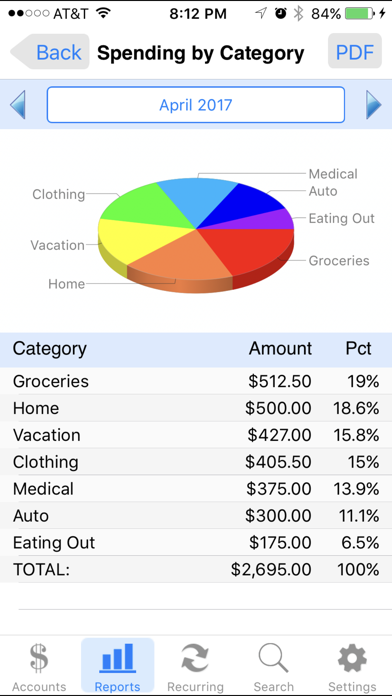
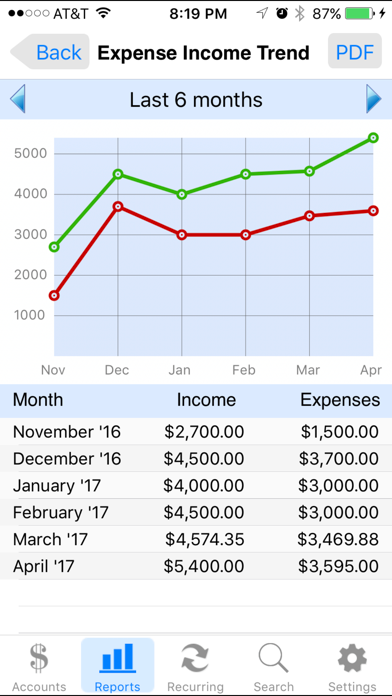
Review your monthly income vs. expense, spending by category, or income by category summaries with beautiful graphs and reports.
* Photo Receipts
Capture and store photo receipt as part of a transaction.
* AirPrint Support
Print reports directly from your iPhone or iPad to any AirPrint-enabled printer.
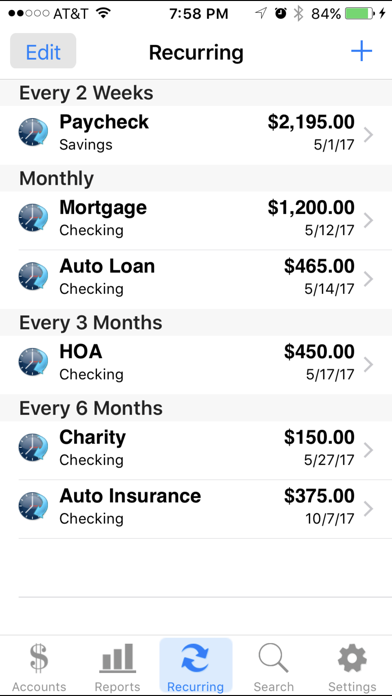
* Recurring Transactions
Schedule transactions to repeat weekly, biweekly, monthly, semimonthly, quarterly, biannually, or yearly on a start date that you choose.
* Split Transactions
Split a transaction among several categories for more precise tracking.
* Search
Quickly search for transactions and edit them from the same screen.
* Reconcile Transactions
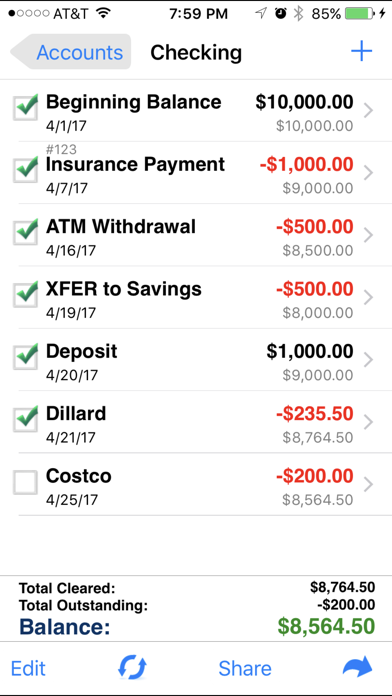
Reconcile by checking off cleared transactions and comparing the actual and outstanding balances against a bank statement.
* Smart Autocomplete
As you type, a list will show you your previously entered descriptions and corresponding category. Selecting an entry from the list will fill both fields of the transaction.
* Auto-increment Check # Field
Accounts 2 will suggest the next check number for you based on the previously entered number. If you replace your checkbook, just enter the new starting number and Accounts 2 will auto-increment from there.
* Transfers
Make a one-time transfer between accounts or set up recurring transfers to automatically repeat.
* Export in CSV, QIF & HTML Formats
Export transactions via email attachments for used with desktop applications such Numbers, Excel, or MS Money.
* Customization Settings & Themes
Configurable settings and themes to customize the Accounts 2 application based on your preferences.
* Transaction Sorting/Hiding
Sort transactions by date in either ascending or descending order. You can also hide reconciled transactions to keep your current list from being cluttered.
* Accounts Reordering
Reorder your accounts from the account list in any order you choose.
* Accounts Delete Lock
Prevents accidental deletion of all the transactions under an account.
* Backup / Restore
Backup your data for safekeeping via email, Dropbox, or iTunes file sharing interface. Then restore it to your device whenever you need to.
* Passcode Security
Keep your accounts information private.
* FREE Accounts 2 Lite version
Please download the Accounts 2 Lite version to try before you buy.
Featured by Apple in "What's Hot" List
Accounts 2 is an easy to use application to replace your paper checkbook. With the Accounts 2 application, you will have a quicker and more convenient way to track your daily finances. You can schedule transactions, transfer funds, capture photo receipts, reconcile, view reports, export data, print, and much more. All features of the Accounts 2 app are designed to be quick, clean, intuitive, and easy to use.
FEATURES
* Touch and Face ID Support
Use Touch or Face ID to authenticate and launch the app quicker and more conveniently.
* Sync Data via iCloud
Sync your data across iPhone, iPad, and iPod Touch devices
* Universal Binary
Designed for iPhone, iPad, and iPod Touch devices. No need to buy separate apps for each device.
* Graphs and Reports
Review your monthly income vs. expense, spending by category, or income by category summaries with beautiful graphs and reports.
* Photo Receipts
Capture and store photo receipt as part of a transaction.
* AirPrint Support
Print reports directly from your iPhone or iPad to any AirPrint-enabled printer.
* Recurring Transactions
Schedule transactions to repeat weekly, biweekly, monthly, semimonthly, quarterly, biannually, or yearly on a start date that you choose.
* Split Transactions
Split a transaction among several categories for more precise tracking.
* Search
Quickly search for transactions and edit them from the same screen.
* Reconcile Transactions
Reconcile by checking off cleared transactions and comparing the actual and outstanding balances against a bank statement.
* Smart Autocomplete
As you type, a list will show you your previously entered descriptions and corresponding category. Selecting an entry from the list will fill both fields of the transaction.
* Auto-increment Check # Field
Accounts 2 will suggest the next check number for you based on the previously entered number. If you replace your checkbook, just enter the new starting number and Accounts 2 will auto-increment from there.
* Transfers
Make a one-time transfer between accounts or set up recurring transfers to automatically repeat.
* Export in CSV, QIF & HTML Formats
Export transactions via email attachments for used with desktop applications such Numbers, Excel, or MS Money.
* Customization Settings & Themes
Configurable settings and themes to customize the Accounts 2 application based on your preferences.
* Transaction Sorting/Hiding
Sort transactions by date in either ascending or descending order. You can also hide reconciled transactions to keep your current list from being cluttered.
* Accounts Reordering
Reorder your accounts from the account list in any order you choose.
* Accounts Delete Lock
Prevents accidental deletion of all the transactions under an account.
* Backup / Restore
Backup your data for safekeeping via email, Dropbox, or iTunes file sharing interface. Then restore it to your device whenever you need to.
* Passcode Security
Keep your accounts information private.
* FREE Accounts 2 Lite version
Please download the Accounts 2 Lite version to try before you buy.
Details
| Entwickler | SVT Software |
|---|---|
| Kategorie | Finanzen |
| Preis | 3,99 € |
| Altersfreigabe | 4+ |
| Version | 9.9 |
| Größe | 13.2 MB |
| Minimale iOS-Version | 9.0 |
| Bundle-ID | com.SVTSoftware.Accounts2 |
| Veröffentlicht | 2012-01-27 |
| Zuletzt aktualisiert | 2025-02-06 |
| Sprachen | 6 Sprachen |
Was diese Seite beantwortet
- Accounts 2 Checkbook App-Bewertungen
- Accounts 2 Checkbook App-Bewertung
- Accounts 2 Checkbook Download
- Accounts 2 Checkbook App-Store-Rang
- Accounts 2 Checkbook Bewertungen
- Accounts 2 Checkbook Bewertungen und Bewertungen
- ist Accounts 2 Checkbook legitim
- ist Accounts 2 Checkbook ein Betrug
- Accounts 2 Checkbook echte Nutzerbewertungen
- Accounts 2 Checkbook Bewertung
- Accounts 2 Checkbook Beschwerden
- was die Leute über Accounts 2 Checkbook sagen
- Accounts 2 Checkbook app Bewertungen
- Accounts 2 Checkbook Vor- und Nachteile
- Accounts 2 Checkbook Erfahrung
- sollte ich Accounts 2 Checkbook vertrauen
- Accounts 2 Checkbook Feedback
- Accounts 2 Checkbook Bewertung 2026
- Accounts 2 Checkbook Überprüfung
- Accounts 2 Checkbook Sicherheitsüberprüfung
