
Cashflows Pro
Nicola Cavanagh Finanzen 4+ £2.99
5.00 · 1 Bewertungen
Beste Position jetzt
#21
über 3 Verkaufsstellen
Höhepunkt
#4Verfolgte Tage
15Bewertungen
1 Diagrammhistorie
15 Tage von uns aufgezeichnet
Läden
Diagramm in 3 heute
Bewertungen
1 im App Store
Preis
hat 5 Mal in unserem Fenster geändert
Installationen und Einnahmen
Apple veröffentlicht keine — wir raten nicht
Aktuell in den Charts
Verlauf
Basierend auf Astrinas eigenen täglichen Momentaufnahmen — ein Punkt pro Tag.
Chartposition — 🇬🇧 Top Bezahlt
19.08 03.09 24.09
Zeige die Zahlen
| Tag | Position |
|---|---|
| 19.08 | #8 |
| 20.08 | #16 |
| 21.08 | #24 |
| 02.09 | #8 |
| 03.09 | #14 |
| 04.09 | #18 |
| 22.09 | #4 |
| 23.09 | #14 |
| 24.09 | #21 |
Anzahl der Bewertungen
02.09 04.09 24.09
Zeige die Zahlen
| Tag | Bewertungen |
|---|---|
| 02.09 | 1 |
| 03.09 | 1 |
| 04.09 | 1 |
| 22.09 | 1 |
| 23.09 | 1 |
| 24.09 | 1 |
Screenshots




Über diese App
Follow us on Twitter at @CashflowsApp!
Cashflows Pro helps you forecast future balances of your bank accounts. It's simple to set up and requires minimal effort to maintain.
Tell it about your recurring transactions (including transfers between accounts) and future one-time transactions, and let it estimate your account balances months (or years) into the future.
It's not interested in the past, so there's no need to enter or maintain your transaction history.
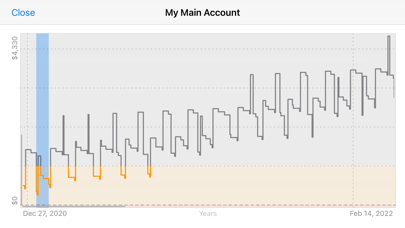
It shows your account transactions and balances over time and lets you override individual payment dates and amounts. Quickly toggle payments on and off to see how they impact your future balances. The graph updates immediately with any changes you make.
Update the starting balance occasionally, and it'll show you which transactions are still due. If any have already occurred (or are late) just tap & hold to toggle them on or off.
FEATURES:
- Multiple accounts: Add multiple accounts and set up recurring or manual transfers between them.
- Recurring transactions: Supports recurring transactions with start date, end date (optional) and many recurrence options.
- Warning balance: Set a warning balance for an account and see at a glance when your balance is below it.
- Interactive forecast graph: Shows your future balance over time, highlighting warning balance and negative regions; tap the graph for a closer look at the nearby transactions.
- File-based: Keep multiple scenarios in separate files. Open backup files from Cashflows or Total Cashflow.
MANY USES:
* Planning Future Purchases:
This is a great tool for forecasting payments for a future loan, mortgage or car lease. Create a recurring transaction for the payment amount, fill in the first and last payment dates and see how it affects your balance. Make adjustments to figure out what you can afford.
* Planning for Change:
You might have a recurring bill that increases annually (such as health insurance). Simply create another recurring transaction to represent the increased payment and set its start date appropriately, and adjust the end date of the original transaction. You'll immediately see how it affects your finances in the future.
* Planning for Uncertainty:
The forecasts are only as accurate as you need them to be. If you plan to pay a minimum amount per month onto your credit card, set that up as a recurring transaction. Once you decide how much you want to pay this month, just override the forecast amount. You can always edit or delete the override later.
* Getting Out of Debt:
This app can help you get out of debt, and figure out how long it will take. Enter a recurring transaction between your checking / current and loan / credit account for the minimum amount you intend to pay each month. Extend the forecast period (tap "More" at the bottom of the Forecast page) and then look at the Balance Graphs for your accounts. If you can afford to pay extra in a few months, override that month's payment (or create a one-time transaction for the additional amount). You'll instantly see the effect on your checking / current balance, loan balance and when the loan will be repaid.
Cashflows Pro helps you forecast future balances of your bank accounts. It's simple to set up and requires minimal effort to maintain.
Tell it about your recurring transactions (including transfers between accounts) and future one-time transactions, and let it estimate your account balances months (or years) into the future.
It's not interested in the past, so there's no need to enter or maintain your transaction history.
It shows your account transactions and balances over time and lets you override individual payment dates and amounts. Quickly toggle payments on and off to see how they impact your future balances. The graph updates immediately with any changes you make.
Update the starting balance occasionally, and it'll show you which transactions are still due. If any have already occurred (or are late) just tap & hold to toggle them on or off.
FEATURES:
- Multiple accounts: Add multiple accounts and set up recurring or manual transfers between them.
- Recurring transactions: Supports recurring transactions with start date, end date (optional) and many recurrence options.
- Warning balance: Set a warning balance for an account and see at a glance when your balance is below it.
- Interactive forecast graph: Shows your future balance over time, highlighting warning balance and negative regions; tap the graph for a closer look at the nearby transactions.
- File-based: Keep multiple scenarios in separate files. Open backup files from Cashflows or Total Cashflow.
MANY USES:
* Planning Future Purchases:
This is a great tool for forecasting payments for a future loan, mortgage or car lease. Create a recurring transaction for the payment amount, fill in the first and last payment dates and see how it affects your balance. Make adjustments to figure out what you can afford.
* Planning for Change:
You might have a recurring bill that increases annually (such as health insurance). Simply create another recurring transaction to represent the increased payment and set its start date appropriately, and adjust the end date of the original transaction. You'll immediately see how it affects your finances in the future.
* Planning for Uncertainty:
The forecasts are only as accurate as you need them to be. If you plan to pay a minimum amount per month onto your credit card, set that up as a recurring transaction. Once you decide how much you want to pay this month, just override the forecast amount. You can always edit or delete the override later.
* Getting Out of Debt:
This app can help you get out of debt, and figure out how long it will take. Enter a recurring transaction between your checking / current and loan / credit account for the minimum amount you intend to pay each month. Extend the forecast period (tap "More" at the bottom of the Forecast page) and then look at the Balance Graphs for your accounts. If you can afford to pay extra in a few months, override that month's payment (or create a one-time transaction for the additional amount). You'll instantly see the effect on your checking / current balance, loan balance and when the loan will be repaid.
Details
| Entwickler | Nicola Cavanagh |
|---|---|
| Kategorie | Finanzen |
| Preis | £2.99 |
| Altersfreigabe | 4+ |
| Version | 1.0.33 |
| Größe | 13.9 MB |
| Minimale iOS-Version | 26.0 |
| Bundle-ID | com.nicolacavanagh.CashflowsPro |
| Veröffentlicht | 2020-12-29 |
| Zuletzt aktualisiert | 2026-07-20 |
| Sprachen | 6 Sprachen |
Was diese Seite beantwortet
- Cashflows Pro App-Bewertungen
- Cashflows Pro App-Bewertung
- Cashflows Pro Download
- Cashflows Pro App-Store-Rang
- Cashflows Pro Bewertungen
- Cashflows Pro Bewertungen und Bewertungen
- ist Cashflows Pro legitim
- ist Cashflows Pro ein Betrug
- Cashflows Pro echte Nutzerbewertungen
- Cashflows Pro Bewertung
- Cashflows Pro Beschwerden
- was die Leute über Cashflows Pro sagen
- Cashflows Pro app Bewertungen
- Cashflows Pro Vor- und Nachteile
- Cashflows Pro Erfahrung
- sollte ich Cashflows Pro vertrauen
- Cashflows Pro Feedback
- Cashflows Pro Bewertung 2026
- Cashflows Pro Überprüfung
- Cashflows Pro Sicherheitsüberprüfung
