
Notebooks: Write and Organize
Alfons Schmid Produktivität 4+ £17.99
4.75 · 203 Bewertungen
Beste Position jetzt
#26
über 4 Verkaufsstellen
Höhepunkt
#21Verfolgte Tage
25Bewertungen
203 Diagrammhistorie
25 Tage von uns aufgezeichnet
Läden
Diagramm in 4 heute
Bewertungen
203 im App Store
Preis
hat 4 Mal in unserem Fenster geändert
Installationen und Einnahmen
Apple veröffentlicht keine — wir raten nicht
Aktuell in den Charts
Verlauf
Basierend auf Astrinas eigenen täglichen Momentaufnahmen — ein Punkt pro Tag.
Chartposition — 🇬🇧 Top Bezahlt
25.07 04.09 24.09
Zeige die Zahlen
| Tag | Position |
|---|---|
| 25.07 | #43 |
| 19.08 | #41 |
| 01.09 | #47 |
| 04.09 | #45 |
| 18.09 | #50 |
| 19.09 | #29 |
| 24.09 | #26 |
Anzahl der Bewertungen
01.09 18.09 24.09
Zeige die Zahlen
| Tag | Bewertungen |
|---|---|
| 01.09 | 202 |
| 04.09 | 202 |
| 18.09 | 203 |
| 19.09 | 203 |
| 24.09 | 203 |
Screenshots


Über diese App
Own your notes — forever. Notebooks is a writing and organization app with no subscription, no lock-in, and no worries. Your documents are stored as standard files you can always access, export, or move freely. Pay once. Use for life.
Use Notebooks as a personal wiki, Zettelkasten, document archive, task manager, or long-term writing space. Capture quick notes, turn them into actionable tasks, combine text fragments into chapters, organize research, or keep business documents separate from personal journals — without ever switching apps.
Designed to help you stay focused and work at your own pace, Notebooks grows with your needs and is always ready to support you.
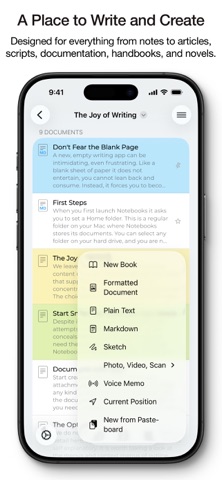
WRITE AND CREATE
Create beautifully formatted documents with styles, attachments, tables, checklists, and optional tables of contents. Choose from ready-made styles or design your own.
Write in different ways:
Formatted text (WYSIWYG)
Plain text, with smart handling of lists, automatic character pairing, and a focused writing view
Markdown, supporting MultiMarkdown and Discount, with syntax highlighting, dedicated keyboard keys, wiki-style links, and interactive checklists
Sketch ideas or annotate images and PDFs using Apple Pencil.
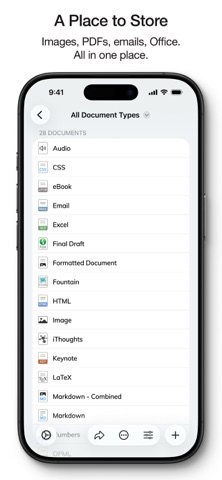
STORE AND ORGANIZE
Notebooks stores all documents as regular files in standard formats. You always remain in control — no lock-in, no export worries, fully compatible across devices and over time.
Organize your work in books and nested hierarchies without limits. Import PDFs, emails, web pages, MS Office and iWork documents, images, audio, video, and more. Use full-text search to find even the most deeply nested document.
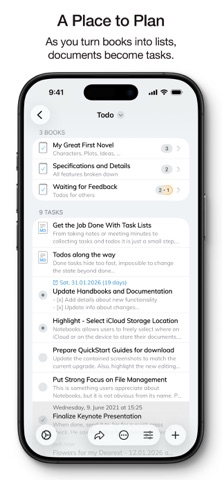
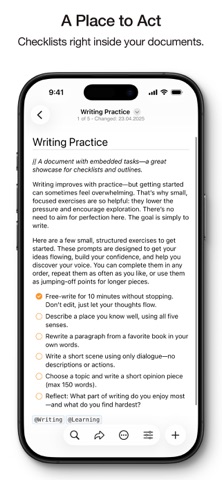
PLAN AND ACT
Turn books into project lists and documents into tasks. Assign due dates and alerts, create nested projects, and track progress naturally — right where your work lives.
Use simple checklists in formatted documents or Markdown for lightweight task tracking.
STAY FOCUSED
Link documents together to build knowledge over time. Use wiki-style links, backlinks, contexts, and smart books to keep everything connected and within reach. When you rename or move documents, links stay intact.
A PLACE YOU CAN RELY ON
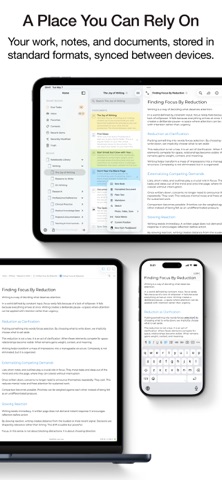
Sync your documents between iPhone, iPad, Mac, and PC. Work on documents stored in other apps, compile selections into PDFs or eBooks, scan documents and extract text using OCR, and trust that your data stays accessible — now and in the future.
With time, Notebooks often becomes the one place users rely on to keep everything that matters close at hand.
WHAT USERS SAY
“Notebooks is a wonderful app — sophisticated in an unassuming way. I feel more productive without spending time managing the app itself.”
“You are GTD in every way that makes it efficient — and makes me efficient.”
Use Notebooks as a personal wiki, Zettelkasten, document archive, task manager, or long-term writing space. Capture quick notes, turn them into actionable tasks, combine text fragments into chapters, organize research, or keep business documents separate from personal journals — without ever switching apps.
Designed to help you stay focused and work at your own pace, Notebooks grows with your needs and is always ready to support you.
WRITE AND CREATE
Create beautifully formatted documents with styles, attachments, tables, checklists, and optional tables of contents. Choose from ready-made styles or design your own.
Write in different ways:
Formatted text (WYSIWYG)
Plain text, with smart handling of lists, automatic character pairing, and a focused writing view
Markdown, supporting MultiMarkdown and Discount, with syntax highlighting, dedicated keyboard keys, wiki-style links, and interactive checklists
Sketch ideas or annotate images and PDFs using Apple Pencil.
STORE AND ORGANIZE
Notebooks stores all documents as regular files in standard formats. You always remain in control — no lock-in, no export worries, fully compatible across devices and over time.
Organize your work in books and nested hierarchies without limits. Import PDFs, emails, web pages, MS Office and iWork documents, images, audio, video, and more. Use full-text search to find even the most deeply nested document.
PLAN AND ACT
Turn books into project lists and documents into tasks. Assign due dates and alerts, create nested projects, and track progress naturally — right where your work lives.
Use simple checklists in formatted documents or Markdown for lightweight task tracking.
STAY FOCUSED
Link documents together to build knowledge over time. Use wiki-style links, backlinks, contexts, and smart books to keep everything connected and within reach. When you rename or move documents, links stay intact.
A PLACE YOU CAN RELY ON
Sync your documents between iPhone, iPad, Mac, and PC. Work on documents stored in other apps, compile selections into PDFs or eBooks, scan documents and extract text using OCR, and trust that your data stays accessible — now and in the future.
With time, Notebooks often becomes the one place users rely on to keep everything that matters close at hand.
WHAT USERS SAY
“Notebooks is a wonderful app — sophisticated in an unassuming way. I feel more productive without spending time managing the app itself.”
“You are GTD in every way that makes it efficient — and makes me efficient.”
Details
| Entwickler | Alfons Schmid |
|---|---|
| Kategorie | Produktivität |
| Preis | £17.99 |
| Altersfreigabe | 4+ |
| Version | 13.2.1 |
| Größe | 47.5 MB |
| Minimale iOS-Version | 16.6 |
| Bundle-ID | com.aschmid.notebooks10 |
| Veröffentlicht | 2020-01-20 |
| Zuletzt aktualisiert | 2026-07-28 |
| Sprachen | 4 Sprachen |
Was diese Seite beantwortet
- Notebooks: Write and Organize App-Bewertungen
- Notebooks: Write and Organize App-Bewertung
- Notebooks: Write and Organize Download
- Notebooks: Write and Organize App-Store-Rang
- Notebooks: Write and Organize Bewertungen
- Notebooks: Write and Organize Bewertungen und Bewertungen
- ist Notebooks: Write and Organize legitim
- ist Notebooks: Write and Organize ein Betrug
- Notebooks: Write and Organize echte Nutzerbewertungen
- Notebooks: Write and Organize Bewertung
- Notebooks: Write and Organize Beschwerden
- was die Leute über Notebooks: Write and Organize sagen
- Notebooks: Write and Organize app Bewertungen
- Notebooks: Write and Organize Vor- und Nachteile
- Notebooks: Write and Organize Erfahrung
- sollte ich Notebooks: Write and Organize vertrauen
- Notebooks: Write and Organize Feedback
- Notebooks: Write and Organize Bewertung 2026
- Notebooks: Write and Organize Überprüfung
- Notebooks: Write and Organize Sicherheitsüberprüfung
