
Beste Position jetzt
#33
über 3 Verkaufsstellen
Höhepunkt
#31Verfolgte Tage
4Bewertungen
146 Diagrammhistorie
4 Tage von uns aufgezeichnet
Läden
Diagramm in 3 heute
Bewertungen
146 im App Store
Preis
hat 2 Mal in unserem Fenster geändert
Installationen und Einnahmen
Apple veröffentlicht keine — wir raten nicht
Aktuell in den Charts
Verlauf
Basierend auf Astrinas eigenen täglichen Momentaufnahmen — ein Punkt pro Tag.
Anzahl der Bewertungen
09.08 25.08 26.08
Zeige die Zahlen
| Tag | Bewertungen |
|---|---|
| 09.08 | 4 |
| 25.08 | 11 |
| 26.08 | 11 |
Screenshots



Über diese App
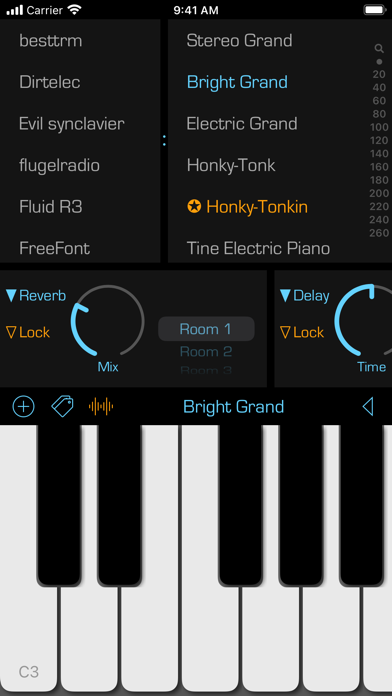
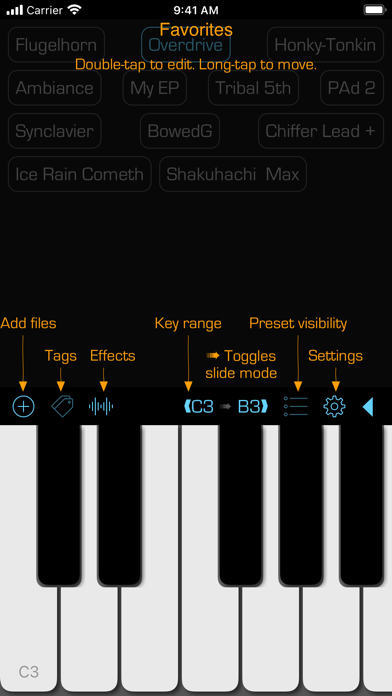
This is a straightforward yet powerful app that acts as a polyphonic audio synthesizer with a virtually unlimited collection of sounds. Under the hood, It uses an AVAudioUnitSampler to generate the audio output when you touch one or more keys. The sounds that are available come from soundfont (SF2) files, such as those available online for free (and of variable quality).
The app also exists as an AUv3 plug-in (included) so you can use it in your favorite music generation application such as GarageBand, Logic, or AUM. It also includes two AUv3 effects units – reverb and delay - which you can use separately as well..
The app supports MIDI input -- just connect a MIDI keyboard/controller to your iOS device and you should be good to go! There is also support for MIDI over Bluetooth. You can also control some app settings using MIDI controls, including the active favorite preset and the audio effects.
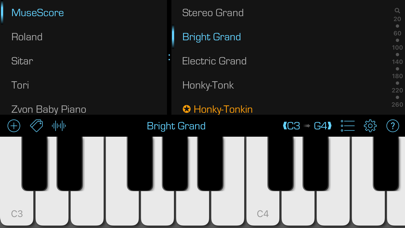
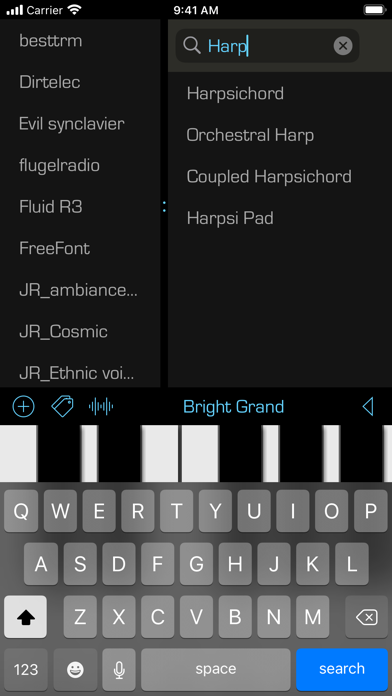
To use, simply select a SoundFont name in the left list, then a patch name on the right and start playing. Some additional hints to get going:
• Add a SoundFont (SF2) file that you have downloaded onto your iCloud Drive. Press the "+" button and then locate the file to add. You can always change the display name of the SoundFont by swiping right. And you can remove a SoundFont that you no longer want by swiping left on its name.
• Bring up reverb and delay effects by touching the wavy "signal" button.
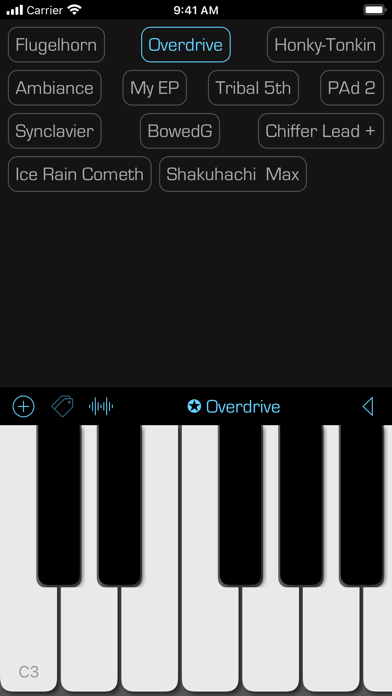
• Swipe right on a patch name to make it a favorite. Favorited patches have a star next to their name. You can edit the name of the favorite by again swiping right and selecting the edit action. You can remove a favorite by swiping left and selecting the remove action.
• Touch the labels at either end of the black bar to change the range of the keyboard. You can go as low as "C0" and as high as "C9". You can also change the range by swiping left/right on the black bar. Note that this ability does not exist in the AUv3 extension -- use the native application keyboard controls to achieve the same results. You can also toggle the keyboard sliding feature by touching the small arrow between the note labels.
• Switch between the soundfont patches listing and the favorites view by double-tapping on the patch name in the black bar above the keyboard. You can also swipe left/right with two fingers in the patches and favorites views to switch to the other view.
• In the view of favorites, you can edit a favorite button by double-tapping on it. You can rearrange the favorite buttons with a tap-and-hold gesture.
Finally, you can check out the source code! Go to the Support URL to find out more.
The app also exists as an AUv3 plug-in (included) so you can use it in your favorite music generation application such as GarageBand, Logic, or AUM. It also includes two AUv3 effects units – reverb and delay - which you can use separately as well..
The app supports MIDI input -- just connect a MIDI keyboard/controller to your iOS device and you should be good to go! There is also support for MIDI over Bluetooth. You can also control some app settings using MIDI controls, including the active favorite preset and the audio effects.
To use, simply select a SoundFont name in the left list, then a patch name on the right and start playing. Some additional hints to get going:
• Add a SoundFont (SF2) file that you have downloaded onto your iCloud Drive. Press the "+" button and then locate the file to add. You can always change the display name of the SoundFont by swiping right. And you can remove a SoundFont that you no longer want by swiping left on its name.
• Bring up reverb and delay effects by touching the wavy "signal" button.
• Swipe right on a patch name to make it a favorite. Favorited patches have a star next to their name. You can edit the name of the favorite by again swiping right and selecting the edit action. You can remove a favorite by swiping left and selecting the remove action.
• Touch the labels at either end of the black bar to change the range of the keyboard. You can go as low as "C0" and as high as "C9". You can also change the range by swiping left/right on the black bar. Note that this ability does not exist in the AUv3 extension -- use the native application keyboard controls to achieve the same results. You can also toggle the keyboard sliding feature by touching the small arrow between the note labels.
• Switch between the soundfont patches listing and the favorites view by double-tapping on the patch name in the black bar above the keyboard. You can also swipe left/right with two fingers in the patches and favorites views to switch to the other view.
• In the view of favorites, you can edit a favorite button by double-tapping on it. You can rearrange the favorite buttons with a tap-and-hold gesture.
Finally, you can check out the source code! Go to the Support URL to find out more.
Details
| Entwickler | Brad Howes |
|---|---|
| Kategorie | Unterhaltung |
| Preis | $7.99 |
| Altersfreigabe | 4+ |
| Version | 2.32.5 |
| Größe | 187 MB |
| Minimale iOS-Version | 14.0 |
| Bundle-ID | com.braysoftware.SoundFonts |
| Veröffentlicht | 2019-02-19 |
| Zuletzt aktualisiert | 2026-06-16 |
| Sprachen | 1 Sprachen |
Was diese Seite beantwortet
- SoundFonts App-Bewertungen
- SoundFonts App-Bewertung
- SoundFonts Download
- SoundFonts App-Store-Rang
- SoundFonts Bewertungen
- SoundFonts Bewertungen und Bewertungen
- ist SoundFonts legitim
- ist SoundFonts ein Betrug
- SoundFonts echte Nutzerbewertungen
- SoundFonts Bewertung
- SoundFonts Beschwerden
- was die Leute über SoundFonts sagen
- SoundFonts app Bewertungen
- SoundFonts Vor- und Nachteile
- SoundFonts Erfahrung
- sollte ich SoundFonts vertrauen
- SoundFonts Feedback
- SoundFonts Bewertung 2026
- SoundFonts Überprüfung
- SoundFonts Sicherheitsüberprüfung
