
Air Camera
Marc Castles Foto & Video 4+ 0,99 €
4.30 · 10 Bewertungen
Beste Position jetzt
#41
über 4 Verkaufsstellen
Höhepunkt
#23Verfolgte Tage
16Bewertungen
10 Diagrammhistorie
16 Tage von uns aufgezeichnet
Läden
Diagramm in 4 heute
Bewertungen
10 im App Store
Preis
hat 9 Mal in unserem Fenster geändert
Installationen und Einnahmen
Apple veröffentlicht keine — wir raten nicht
Aktuell in den Charts
Verlauf
Basierend auf Astrinas eigenen täglichen Momentaufnahmen — ein Punkt pro Tag.
Chartposition — 🇩🇪 Top Bezahlt
22.08 06.09 24.09
Zeige die Zahlen
| Tag | Position |
|---|---|
| 22.08 | #46 |
| 06.09 | #43 |
| 15.09 | #47 |
| 24.09 | #41 |
Anzahl der Bewertungen
10.08 21.08 29.08
Zeige die Zahlen
| Tag | Bewertungen |
|---|---|
| 10.08 | 5 |
| 18.08 | 3 |
| 19.08 | 3 |
| 20.08 | 3 |
| 21.08 | 3 |
| 22.08 | 3 |
| 23.08 | 5 |
| 27.08 | 3 |
| 28.08 | 3 |
| 29.08 | 3 |
Screenshots
Über diese App
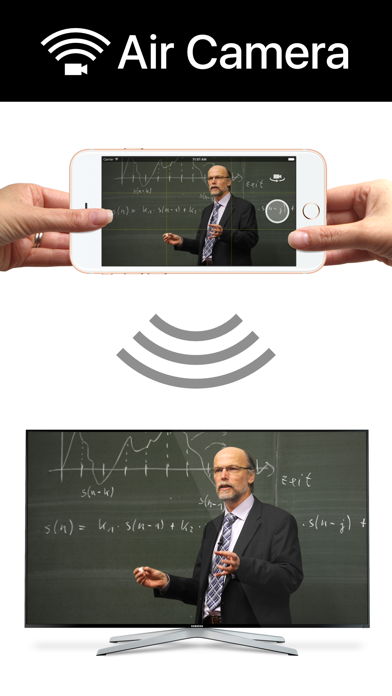
Air Camera is the best way to stream your camera to an airplay receiver. eg. Apple TV, AirParrot or AirServer. Perfect for live events when you need a simple video feed to an external display. The external display only shows the video so elements like notifications, battery status and time don't distract your audience.
Features:
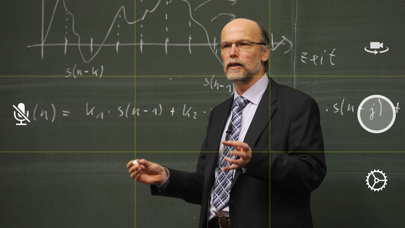
• Rule of Thirds overlay shows on device.
• Double Tap to goggle Rule of Thirds overlay.
• Press and hold to lock focus & exposure on supported devices
• Smooth focus is enabled on supported devices.
• Left & Right Landscape orientation supported.
• Universal App (iPhone & iPad)
• Also supports Apple AV adapter.
• Take full resolution photos (with 3 second preview) during capture. High quality photos are saved to the camera roll.
• Swap between Front, Back, Telephoto and Wide Angle cameras.
• Pinch to zoom in and out
• Video Stabilisation - Standard or Cinematic
• Choose Video Quality - 720p, 1080p or 4k
• Toggle Audio on or off
Instructions for Use:
1. Open Control Center (swipe up from bottom of screen)
2. Tap AirPlay
3. Select the target screen and enable mirroring
4. Close Control Center
Features:
• Rule of Thirds overlay shows on device.
• Double Tap to goggle Rule of Thirds overlay.
• Press and hold to lock focus & exposure on supported devices
• Smooth focus is enabled on supported devices.
• Left & Right Landscape orientation supported.
• Universal App (iPhone & iPad)
• Also supports Apple AV adapter.
• Take full resolution photos (with 3 second preview) during capture. High quality photos are saved to the camera roll.
• Swap between Front, Back, Telephoto and Wide Angle cameras.
• Pinch to zoom in and out
• Video Stabilisation - Standard or Cinematic
• Choose Video Quality - 720p, 1080p or 4k
• Toggle Audio on or off
Instructions for Use:
1. Open Control Center (swipe up from bottom of screen)
2. Tap AirPlay
3. Select the target screen and enable mirroring
4. Close Control Center
Details
| Entwickler | Marc Castles |
|---|---|
| Kategorie | Foto & Video |
| Preis | 0,99 € |
| Altersfreigabe | 4+ |
| Version | 1.8 |
| Größe | 15.3 MB |
| Minimale iOS-Version | 9.3 |
| Bundle-ID | au.com.launchinteractive.aircamera |
| Veröffentlicht | 2016-02-29 |
| Zuletzt aktualisiert | 2021-02-08 |
| Sprachen | 1 Sprachen |
Was diese Seite beantwortet
- Air Camera App-Bewertungen
- Air Camera App-Bewertung
- Air Camera Download
- Air Camera App-Store-Rang
- Air Camera Bewertungen
- Air Camera Bewertungen und Bewertungen
- ist Air Camera legitim
- ist Air Camera ein Betrug
- Air Camera echte Nutzerbewertungen
- Air Camera Bewertung
- Air Camera Beschwerden
- was die Leute über Air Camera sagen
- Air Camera app Bewertungen
- Air Camera Vor- und Nachteile
- Air Camera Erfahrung
- sollte ich Air Camera vertrauen
- Air Camera Feedback
- Air Camera Bewertung 2026
- Air Camera Überprüfung
- Air Camera Sicherheitsüberprüfung
