
Melhor posição agora
#17
em 1 lojas
Pico
#12Dias rastreados
28Avaliações
4,037 Histórico de gráficos
28 dias registrados por nós
Lojas
gráficos em 1 hoje
Avaliações
4,037 na App Store
Preço
mudou 20 vez(es) em nossa janela
Instalações e receita
A Apple não publica nenhum — não fazemos suposições
Atualmente em gráfico
Histórico
Construído a partir das próprias capturas diárias da Astrina — um ponto por dia.
Posição no gráfico — 🇺🇸 Top Pago
21.08 07.09 24.09
Mostrar os números
| Dia | Posição |
|---|---|
| 21.08 | #55 |
| 25.08 | #14 |
| 26.08 | #12 |
| 27.08 | #12 |
| 28.08 | #19 |
| 29.08 | #24 |
| 30.08 | #48 |
| 01.09 | #20 |
| 02.09 | #27 |
| 03.09 | #45 |
| 04.09 | #32 |
| 05.09 | #31 |
| 06.09 | #39 |
| 07.09 | #47 |
| 08.09 | #52 |
| 09.09 | #24 |
| 10.09 | #25 |
| 11.09 | #31 |
| 12.09 | #34 |
| 13.09 | #56 |
| 15.09 | #37 |
| 16.09 | #48 |
| 17.09 | #26 |
| 18.09 | #19 |
| 19.09 | #36 |
| 22.09 | #49 |
| 23.09 | #28 |
| 24.09 | #17 |
Número de avaliações
01.09 11.09 24.09
Mostrar os números
| Dia | Avaliações |
|---|---|
| 01.09 | 4,035 |
| 02.09 | 4,035 |
| 03.09 | 4,035 |
| 04.09 | 4,035 |
| 05.09 | 4,035 |
| 06.09 | 4,035 |
| 07.09 | 4,035 |
| 08.09 | 4,035 |
| 09.09 | 4,035 |
| 10.09 | 4,036 |
| 11.09 | 4,036 |
| 12.09 | 4,036 |
| 13.09 | 4,037 |
| 15.09 | 4,037 |
| 16.09 | 4,037 |
| 17.09 | 4,037 |
| 18.09 | 4,037 |
| 19.09 | 4,037 |
| 22.09 | 4,037 |
| 23.09 | 4,037 |
| 24.09 | 4,037 |
Capturas de tela
Sobre este app
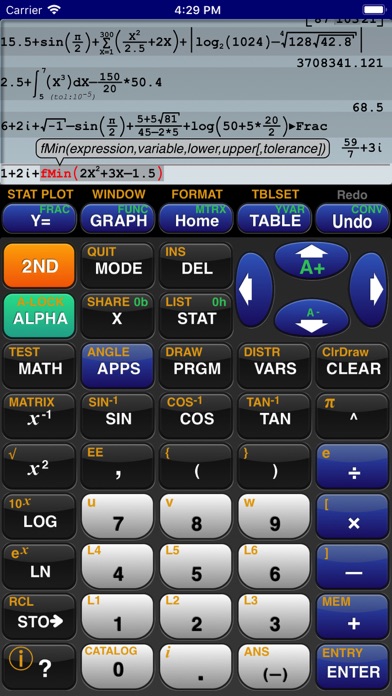
GraphNCalc83 uses touch, color and blazing speed to handle your math problems. The familiar calculator keyboard, arrow keys and functions are enhanced with full touch input for all graphs, editors and menus. Enter calculations in natural textbook format. Enter fractions and view result as fractions. Trace graphs with your finger. Zoom in and out with a pinch. Explore regressions with a tap on the screen. Scroll through the list, matrix and calculation history with a swipe. Tap the ? key for help. Written using the latest 64 bit math libraries, GraphNCalc83 harnesses the amazing computing resources of the iPhone and iPad to provide a colorful, fast and fluid experience. Graphs scroll, glide and zoom smoothly. Matrix, statistics and BASIC programs run 500x times faster than traditional calculators.
GraphNCalc83 includes:
Algebraic entry: Enter problems using full algebraic textbook notation. The command line editor includes interactive parenthesis matching and high lighting, undo and redo, bubble function help and a 200 level calculation history and recall stack. Generate a PDF report of calculations for mailing or printing using the SEND function.
Math functions: Trigonometry, logarithms, function minimum, maximum, numeric integration and derivatives, general solver, real and imaginary numbers, combination, permutation, random number generation, normal, T, chi squared, Fisher, poisson and geometric distributions, binary shift and rotate, test and logic operations, list operations including sort, std. deviation, sum, sequence, matrix determinant, transpose, sum, ref, rref, addition, multiplication.
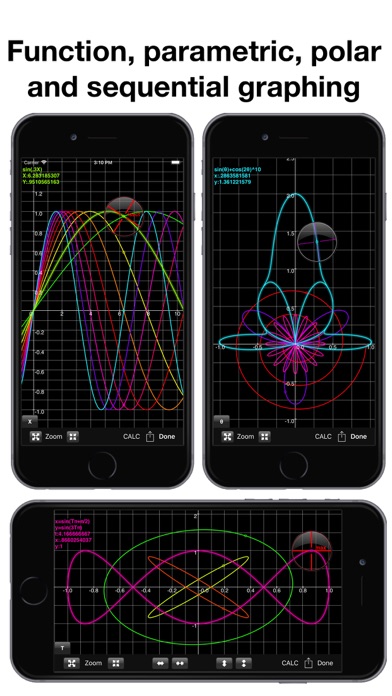
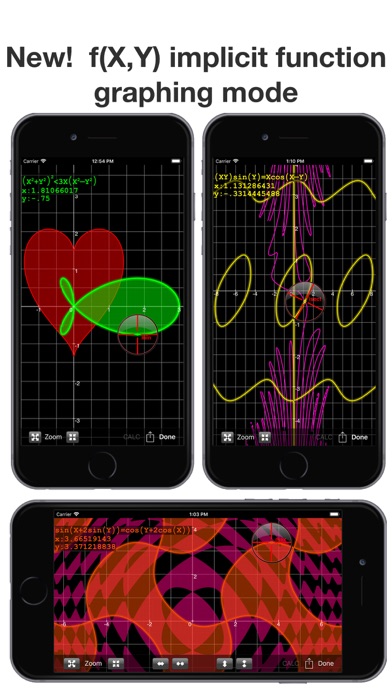
Graph functions, parametric, f(x,y) and polar equations and statistics plots: Full color graphs with touch to trace, pinch zoom, function minimum, maximum, intersections, asymptotes and numeric integration. Output graphs in high resolution PDF format for mailing or printing. Interactively explore function behavior using variables tied to slider bars.
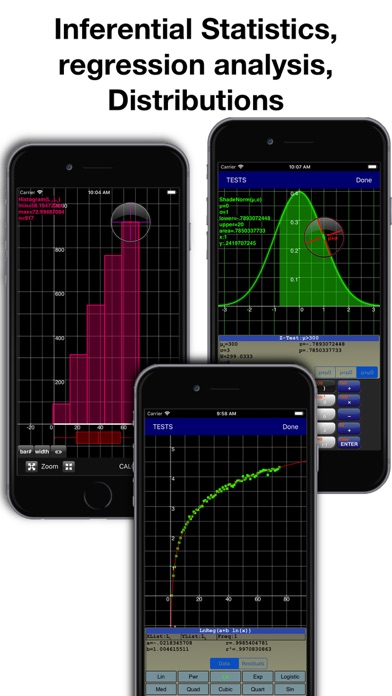
Statistics, Inferential Statistics and Distributions: A set of inferential statistics worksheets and graphs of distributions are included. The regression analysis screen allows you to quickly compute, view and analyze a data set using a variety of curve fitting methods.
Table: Analyze functions using the table viewer. Use the split screen mode to simultaneously view a graph and table.
Matrix and Lists: Matrix and list editors and a full set of matrix and list operations are built in.
Unit Converter and Constants: Convert between a wide variety of scientific, engineering and common units. A large set of physical constants are also included.
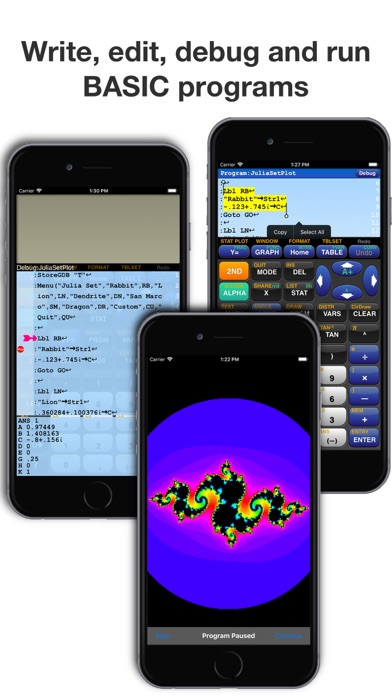
BASIC programming: Create, edit, debug and run BASIC programs. Programs run more than 500 times faster than traditional calculators. Import and execute .83p and .8xp files.
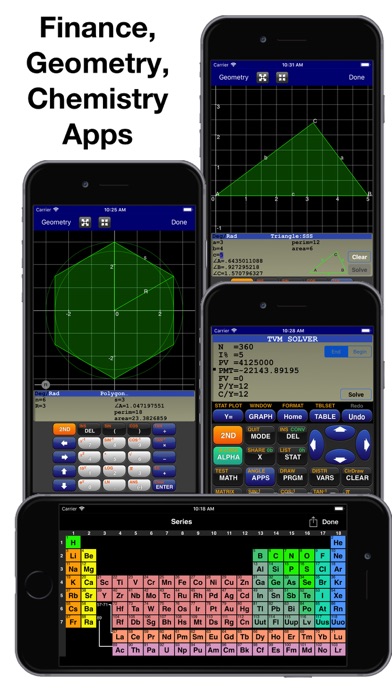
Chemistry: The calculator includes a full featured periodic table, a mass calculator and a data base of element properties. The touch interface allows you to view and interact with the periodic table to view by series, state, melting point, boiling point, electronegativity, electron affinity, valence, ionization, radius, hardness, modulus, density, conductivity, heat and year discovered.
Geometry: The geometry application computes perimeter and area for a variety of 2d geometric figures including squares, rectangles, parallelograms, triangles, polygons, circles, arcs and ellipses. A full triangle solver and interactive unit circle grapher are built in. Solve line intersections, project a point to a line and find a circle given 3 points.
Finance: Compute time value of money problems including annuities, lump sums and uneven cash flow analysis with IRR and NPV
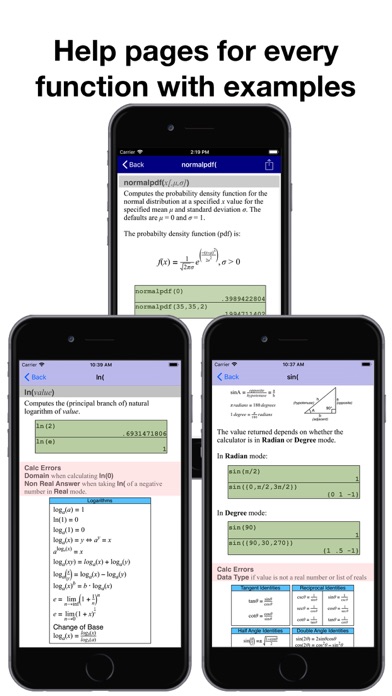
Built-in user guide: A user guide is included and is a touch away using the ? key or ⓘ on any menu. All functions have a full manual page with description of arguments and examples of use. Pop up bubble help displays function arguments during problem entry and program editing.
GraphNCalc83 includes:
Algebraic entry: Enter problems using full algebraic textbook notation. The command line editor includes interactive parenthesis matching and high lighting, undo and redo, bubble function help and a 200 level calculation history and recall stack. Generate a PDF report of calculations for mailing or printing using the SEND function.
Math functions: Trigonometry, logarithms, function minimum, maximum, numeric integration and derivatives, general solver, real and imaginary numbers, combination, permutation, random number generation, normal, T, chi squared, Fisher, poisson and geometric distributions, binary shift and rotate, test and logic operations, list operations including sort, std. deviation, sum, sequence, matrix determinant, transpose, sum, ref, rref, addition, multiplication.
Graph functions, parametric, f(x,y) and polar equations and statistics plots: Full color graphs with touch to trace, pinch zoom, function minimum, maximum, intersections, asymptotes and numeric integration. Output graphs in high resolution PDF format for mailing or printing. Interactively explore function behavior using variables tied to slider bars.
Statistics, Inferential Statistics and Distributions: A set of inferential statistics worksheets and graphs of distributions are included. The regression analysis screen allows you to quickly compute, view and analyze a data set using a variety of curve fitting methods.
Table: Analyze functions using the table viewer. Use the split screen mode to simultaneously view a graph and table.
Matrix and Lists: Matrix and list editors and a full set of matrix and list operations are built in.
Unit Converter and Constants: Convert between a wide variety of scientific, engineering and common units. A large set of physical constants are also included.
BASIC programming: Create, edit, debug and run BASIC programs. Programs run more than 500 times faster than traditional calculators. Import and execute .83p and .8xp files.
Chemistry: The calculator includes a full featured periodic table, a mass calculator and a data base of element properties. The touch interface allows you to view and interact with the periodic table to view by series, state, melting point, boiling point, electronegativity, electron affinity, valence, ionization, radius, hardness, modulus, density, conductivity, heat and year discovered.
Geometry: The geometry application computes perimeter and area for a variety of 2d geometric figures including squares, rectangles, parallelograms, triangles, polygons, circles, arcs and ellipses. A full triangle solver and interactive unit circle grapher are built in. Solve line intersections, project a point to a line and find a circle given 3 points.
Finance: Compute time value of money problems including annuities, lump sums and uneven cash flow analysis with IRR and NPV
Built-in user guide: A user guide is included and is a touch away using the ? key or ⓘ on any menu. All functions have a full manual page with description of arguments and examples of use. Pop up bubble help displays function arguments during problem entry and program editing.
Detalhes
| Desenvolvedor | Ernest Brock |
|---|---|
| Categoria | Educação |
| Preço | $12.99 |
| Classificação etária | 4+ |
| Versão | 3.4 |
| Tamanho | 9.7 MB |
| iOS mínimo | 15.6 |
| ID do pacote | com.ErnestBrock.GrafNCalc83 |
| Lançado | 2014-05-18 |
| Última atualização | 2025-11-22 |
| Idiomas | 2 idiomas |
O que esta página responde
- GraphNCalc83 avaliações de aplicativos
- GraphNCalc83 avaliação de aplicativo
- GraphNCalc83 download
- GraphNCalc83 classificação na loja de aplicativos
- avaliações de GraphNCalc83
- avaliações e classificações de GraphNCalc83
- é GraphNCalc83 legítimo
- é GraphNCalc83 uma fraude
- avaliações de usuários reais de GraphNCalc83
- classificação de GraphNCalc83
- reclamações de GraphNCalc83
- o que as pessoas dizem sobre GraphNCalc83
- avaliações de GraphNCalc83 aplicativo
- prós e contras de GraphNCalc83
- experiência de GraphNCalc83
- devo confiar em GraphNCalc83
- feedback de GraphNCalc83
- avaliação de GraphNCalc83 2026
- verificação de GraphNCalc83
- verificação de segurança de GraphNCalc83
