
Melhor posição agora
#39
em 1 lojas
Pico
#39Dias rastreados
1 Histórico de gráficos
1 dias registrados por nós
Lojas
gráficos em 1 hoje
Avaliações
nenhum ainda
Preço
inalterado em nossa janela
Instalações e receita
A Apple não publica nenhum — não fazemos suposições
Atualmente em gráfico
O histórico começa hoje. Volte amanhã para ver como sua posição no gráfico e avaliações mudam — o trabalho diário registra um ponto por dia.
Capturas de tela


Sobre este app
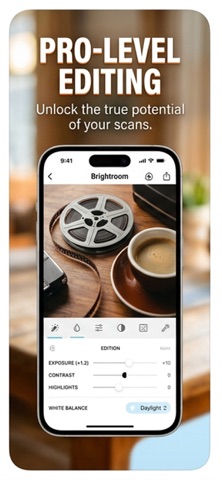
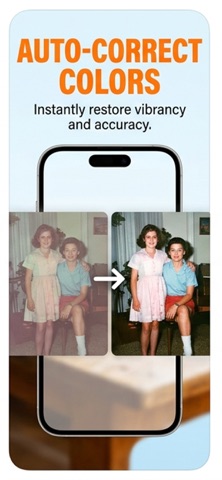
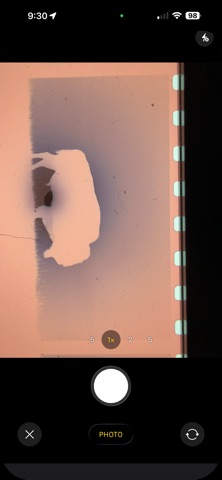
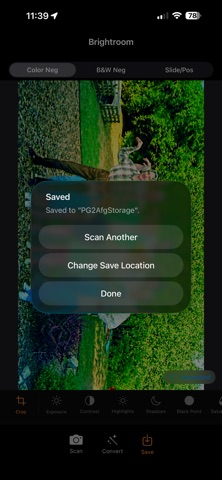
Brightroom turns your iPhone into a precision film scanner. Photograph color negatives, black-and-white negatives, or color slides — on a lightbox, iPad screen, or bright window — and Brightroom instantly converts them into sharp, accurate digital photos you can crop, adjust, caption, and save.
FILM CONVERSION
• Color Negative (C-41) — removes the orange film base cast with per-channel auto-levels and white balance correction, plus an S-curve for shadow richness and highlight pop
• Black & White Negative — desaturates before inversion with a classic film contrast curve
• Slide / Positive (E-6) — gentle levels correction preserving the film's inherent color balance
ADJUSTMENTS
• 10 live controls in a scrollable toolbar: Crop, Exposure, Contrast, Highlights, Shadows, Black Point, Saturation, Vibrance, Warmth, Sharpen, Vignette
• Every slider updates the image instantly as you drag — no tap to apply
• Changed controls highlighted in orange; one-tap reset per control
IMAGE QUALITY
• Supports DNG and Apple ProRAW imports alongside JPEG and HEIC
• Single-pass Core Image pipeline — no intermediate resampling steps, maximum sharpness at full sensor resolution
• Captures full pixel density from both 1x and 2x lenses
CROP & SAVE
• Manual crop with corner handles and rule-of-thirds grid
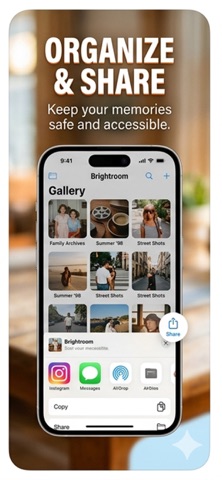
• Save to Photos Library or directly to any Files location — iCloud Drive, network shares, NAS, cloud services
• Save location remembered: pick a folder once, Brightroom saves there automatically
• Save with optional 90° rotation — corrects sideways negatives at save time
CAPTION
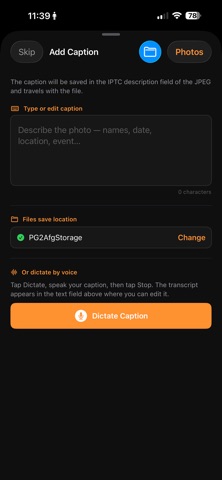
• Type or dictate an IPTC caption before saving — embedded permanently in the JPEG, readable in Lightroom, Photos, and any IPTC-aware app
• Voice dictation uses on-device speech recognition — nothing leaves your iPhone
WORKFLOW
• Scan → camera direct; Convert → camera or library (supports DNG/RAW)
• After saving, immediately prompts for the next negative — no extra navigation between frames
• Before/after toggle: tap Converted badge to compare with the original capture
• Full-resolution JPEG output with EXIF orientation and IPTC metadata embedded
FILM CONVERSION
• Color Negative (C-41) — removes the orange film base cast with per-channel auto-levels and white balance correction, plus an S-curve for shadow richness and highlight pop
• Black & White Negative — desaturates before inversion with a classic film contrast curve
• Slide / Positive (E-6) — gentle levels correction preserving the film's inherent color balance
ADJUSTMENTS
• 10 live controls in a scrollable toolbar: Crop, Exposure, Contrast, Highlights, Shadows, Black Point, Saturation, Vibrance, Warmth, Sharpen, Vignette
• Every slider updates the image instantly as you drag — no tap to apply
• Changed controls highlighted in orange; one-tap reset per control
IMAGE QUALITY
• Supports DNG and Apple ProRAW imports alongside JPEG and HEIC
• Single-pass Core Image pipeline — no intermediate resampling steps, maximum sharpness at full sensor resolution
• Captures full pixel density from both 1x and 2x lenses
CROP & SAVE
• Manual crop with corner handles and rule-of-thirds grid
• Save to Photos Library or directly to any Files location — iCloud Drive, network shares, NAS, cloud services
• Save location remembered: pick a folder once, Brightroom saves there automatically
• Save with optional 90° rotation — corrects sideways negatives at save time
CAPTION
• Type or dictate an IPTC caption before saving — embedded permanently in the JPEG, readable in Lightroom, Photos, and any IPTC-aware app
• Voice dictation uses on-device speech recognition — nothing leaves your iPhone
WORKFLOW
• Scan → camera direct; Convert → camera or library (supports DNG/RAW)
• After saving, immediately prompts for the next negative — no extra navigation between frames
• Before/after toggle: tap Converted badge to compare with the original capture
• Full-resolution JPEG output with EXIF orientation and IPTC metadata embedded
Detalhes
| Desenvolvedor | Greg Anderson |
|---|---|
| Categoria | Foto e Vídeo |
| Preço | 0,99 € |
| Classificação etária | 4+ |
| Versão | 1.4.1 |
| Tamanho | 3.2 MB |
| iOS mínimo | 16.0 |
| ID do pacote | com.ganderson.brightroom |
| Lançado | 2026-04-02 |
| Última atualização | 2026-08-07 |
| Idiomas | 1 idiomas |
O que esta página responde
- Brightroom avaliações de aplicativos
- Brightroom avaliação de aplicativo
- Brightroom download
- Brightroom classificação na loja de aplicativos
- avaliações de Brightroom
- avaliações e classificações de Brightroom
- é Brightroom legítimo
- é Brightroom uma fraude
- avaliações de usuários reais de Brightroom
- classificação de Brightroom
- reclamações de Brightroom
- o que as pessoas dizem sobre Brightroom
- avaliações de Brightroom aplicativo
- prós e contras de Brightroom
- experiência de Brightroom
- devo confiar em Brightroom
- feedback de Brightroom
- avaliação de Brightroom 2026
- verificação de Brightroom
- verificação de segurança de Brightroom
