
PanicVault - Password Manager
Pierre Stanislas Produtividade 4+ 5,99 €
5.00 · 1 avaliações
Melhor posição agora
#42
em 2 lojas
Pico
#30Dias rastreados
9Avaliações
1 Histórico de gráficos
9 dias registrados por nós
Lojas
gráficos em 2 hoje
Avaliações
1 na App Store
Preço
mudou 6 vez(es) em nossa janela
Instalações e receita
A Apple não publica nenhum — não fazemos suposições
Atualmente em gráfico
Histórico
Construído a partir das próprias capturas diárias da Astrina — um ponto por dia.
Posição no gráfico — 🇩🇪 Top Pago
25.08 09.09 24.09
Mostrar os números
| Dia | Posição |
|---|---|
| 25.08 | #60 |
| 04.09 | #43 |
| 06.09 | #30 |
| 09.09 | #39 |
| 12.09 | #45 |
| 13.09 | #30 |
| 22.09 | #60 |
| 24.09 | #42 |
Número de avaliações
04.09 12.09 24.09
Mostrar os números
| Dia | Avaliações |
|---|---|
| 04.09 | 0 |
| 06.09 | 0 |
| 09.09 | 0 |
| 12.09 | 0 |
| 13.09 | 0 |
| 22.09 | 0 |
| 24.09 | 1 |
Capturas de tela




Sobre este app
PanicVault is a secure, offline-first password manager that reads and writes the open KeePass (.kdbx) format. Store your vault on your device, on iCloud Drive, or on Google Drive -- you choose. Your data stays in a standard, portable file that works with KeePass, KeePassXC, Strongbox, and every other compatible app.
WHY PANICVAULT?
PanicVault gives you real ownership of your credentials. There is no proprietary cloud, no account to create, and no subscription fee. Your vault is a single encrypted file you can back up, move, or open in any KeePass-compatible app on any platform.
KEY FEATURES:
- KeePass (.kdbx 4) Compatibility
Open and save vaults created by KeePass, KeePassXC, KeePassDX, Strongbox, and more. Entry history, custom fields, attachments, group hierarchy, custom icons, and recycle bin are fully supported.
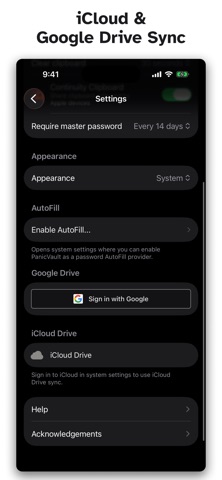
- iCloud Drive & Google Drive Sync
Sync your vault across iPhone, iPad, and Mac through iCloud Drive or Google Drive. Smart entry-level merging preserves changes from every device. Conflicts are shown side by side so you pick the version you want. Sign in to multiple Google accounts and sync different vaults with different accounts.
- Passkeys (WebAuthn)
Store and manage passkeys alongside your passwords. Compatible with the KeePassXC passkey format for full cross-platform interoperability.
- AutoFill Integration
Fill usernames and passwords in Safari and apps with the system AutoFill credential provider. Override URLs let you match entries to sites with different login domains.
- Built-in Authenticator (TOTP)
Generate two-factor authentication codes right alongside your passwords. Scan a QR code or enter the secret manually. Compatible with all standard TOTP formats.
- Password & Passphrase Generator
Create strong random passwords or memorable passphrases from the EFF wordlist. A live strength meter shows you exactly how secure each password is.
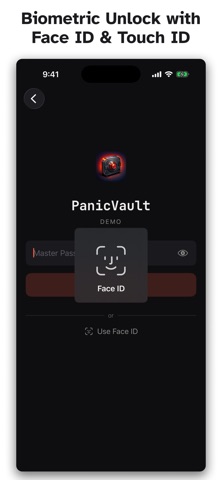
- Biometric Unlock
Unlock with Face ID or Touch ID. Your master password is stored in the Secure Enclave keychain -- never transmitted anywhere.
- Yubikey unlock
You can protect a vault with a physical YubiKey: YubiKey challenge-response over NFC on iPhone, and over USB on Mac.
- Offline First
Every feature works without an internet connection. Cloud sync is optional and happens only when you choose to enable it.
- Bulk Operations & Drag and Drop
Select multiple entries at once to move or delete them in bulk. On Mac, drag entries between groups and drag groups to reorganize your hierarchy.
- Organize with Groups and Tags
Create nested folders to sort your entries. Reorder and customize groups with notes and custom icons. Add tags for cross-cutting categories. Search across titles, usernames, URLs, and notes instantly.
- Favicon Auto-Fetch
Tap a button to automatically download a website's icon and set it as the entry's custom icon -- the quickest way to make entries recognizable at a glance.
- Default Vault & Keyboard Shortcuts
Set a default vault that opens automatically on launch. On Mac, use full keyboard shortcuts for search, new entries, password generation, locking, and more.
- Entry History & Attachments
Every password change is saved automatically. Attach files like recovery codes, certificates, or documents to any entry.
- Custom Colors and Icons
Personalize entries with text color, background color, and 69 built-in KeePass icons or your own custom images.
SECURITY:
PanicVault uses AES-256 or ChaCha20 encryption with Argon2d/Argon2id key derivation. Clipboard auto-clear, configurable lock timeout, and periodic master password re-entry keep your data safe even if your device is left unattended.
PLATFORM:
Available on iPhone, iPad, and Mac with a single universal purchase. No subscription, no account, no tracking.
WHY PANICVAULT?
PanicVault gives you real ownership of your credentials. There is no proprietary cloud, no account to create, and no subscription fee. Your vault is a single encrypted file you can back up, move, or open in any KeePass-compatible app on any platform.
KEY FEATURES:
- KeePass (.kdbx 4) Compatibility
Open and save vaults created by KeePass, KeePassXC, KeePassDX, Strongbox, and more. Entry history, custom fields, attachments, group hierarchy, custom icons, and recycle bin are fully supported.
- iCloud Drive & Google Drive Sync
Sync your vault across iPhone, iPad, and Mac through iCloud Drive or Google Drive. Smart entry-level merging preserves changes from every device. Conflicts are shown side by side so you pick the version you want. Sign in to multiple Google accounts and sync different vaults with different accounts.
- Passkeys (WebAuthn)
Store and manage passkeys alongside your passwords. Compatible with the KeePassXC passkey format for full cross-platform interoperability.
- AutoFill Integration
Fill usernames and passwords in Safari and apps with the system AutoFill credential provider. Override URLs let you match entries to sites with different login domains.
- Built-in Authenticator (TOTP)
Generate two-factor authentication codes right alongside your passwords. Scan a QR code or enter the secret manually. Compatible with all standard TOTP formats.
- Password & Passphrase Generator
Create strong random passwords or memorable passphrases from the EFF wordlist. A live strength meter shows you exactly how secure each password is.
- Biometric Unlock
Unlock with Face ID or Touch ID. Your master password is stored in the Secure Enclave keychain -- never transmitted anywhere.
- Yubikey unlock
You can protect a vault with a physical YubiKey: YubiKey challenge-response over NFC on iPhone, and over USB on Mac.
- Offline First
Every feature works without an internet connection. Cloud sync is optional and happens only when you choose to enable it.
- Bulk Operations & Drag and Drop
Select multiple entries at once to move or delete them in bulk. On Mac, drag entries between groups and drag groups to reorganize your hierarchy.
- Organize with Groups and Tags
Create nested folders to sort your entries. Reorder and customize groups with notes and custom icons. Add tags for cross-cutting categories. Search across titles, usernames, URLs, and notes instantly.
- Favicon Auto-Fetch
Tap a button to automatically download a website's icon and set it as the entry's custom icon -- the quickest way to make entries recognizable at a glance.
- Default Vault & Keyboard Shortcuts
Set a default vault that opens automatically on launch. On Mac, use full keyboard shortcuts for search, new entries, password generation, locking, and more.
- Entry History & Attachments
Every password change is saved automatically. Attach files like recovery codes, certificates, or documents to any entry.
- Custom Colors and Icons
Personalize entries with text color, background color, and 69 built-in KeePass icons or your own custom images.
SECURITY:
PanicVault uses AES-256 or ChaCha20 encryption with Argon2d/Argon2id key derivation. Clipboard auto-clear, configurable lock timeout, and periodic master password re-entry keep your data safe even if your device is left unattended.
PLATFORM:
Available on iPhone, iPad, and Mac with a single universal purchase. No subscription, no account, no tracking.
Detalhes
| Desenvolvedor | Pierre Stanislas |
|---|---|
| Categoria | Produtividade |
| Preço | 5,99 € |
| Classificação etária | 4+ |
| Versão | 1.1.2 |
| Tamanho | 36.1 MB |
| iOS mínimo | 17.6 |
| ID do pacote | com.pms.PanicVault |
| Lançado | 2026-02-19 |
| Última atualização | 2026-09-13 |
| Idiomas | 1 idiomas |
O que esta página responde
- PanicVault - Password Manager avaliações de aplicativos
- PanicVault - Password Manager avaliação de aplicativo
- PanicVault - Password Manager download
- PanicVault - Password Manager classificação na loja de aplicativos
- avaliações de PanicVault - Password Manager
- avaliações e classificações de PanicVault - Password Manager
- é PanicVault - Password Manager legítimo
- é PanicVault - Password Manager uma fraude
- avaliações de usuários reais de PanicVault - Password Manager
- classificação de PanicVault - Password Manager
- reclamações de PanicVault - Password Manager
- o que as pessoas dizem sobre PanicVault - Password Manager
- avaliações de PanicVault - Password Manager aplicativo
- prós e contras de PanicVault - Password Manager
- experiência de PanicVault - Password Manager
- devo confiar em PanicVault - Password Manager
- feedback de PanicVault - Password Manager
- avaliação de PanicVault - Password Manager 2026
- verificação de PanicVault - Password Manager
- verificação de segurança de PanicVault - Password Manager
