
Notebooks: Write and Organize
Alfons Schmid Produtividade 4+ £17.99
4.75 · 203 avaliações
Melhor posição agora
#26
em 4 lojas
Pico
#21Dias rastreados
25Avaliações
203 Histórico de gráficos
25 dias registrados por nós
Lojas
gráficos em 4 hoje
Avaliações
203 na App Store
Preço
mudou 4 vez(es) em nossa janela
Instalações e receita
A Apple não publica nenhum — não fazemos suposições
Atualmente em gráfico
Histórico
Construído a partir das próprias capturas diárias da Astrina — um ponto por dia.
Posição no gráfico — 🇬🇧 Top Pago
25.07 04.09 24.09
Mostrar os números
| Dia | Posição |
|---|---|
| 25.07 | #43 |
| 19.08 | #41 |
| 01.09 | #47 |
| 04.09 | #45 |
| 18.09 | #50 |
| 19.09 | #29 |
| 24.09 | #26 |
Número de avaliações
01.09 18.09 24.09
Mostrar os números
| Dia | Avaliações |
|---|---|
| 01.09 | 202 |
| 04.09 | 202 |
| 18.09 | 203 |
| 19.09 | 203 |
| 24.09 | 203 |
Capturas de tela


Sobre este app
Own your notes — forever. Notebooks is a writing and organization app with no subscription, no lock-in, and no worries. Your documents are stored as standard files you can always access, export, or move freely. Pay once. Use for life.
Use Notebooks as a personal wiki, Zettelkasten, document archive, task manager, or long-term writing space. Capture quick notes, turn them into actionable tasks, combine text fragments into chapters, organize research, or keep business documents separate from personal journals — without ever switching apps.
Designed to help you stay focused and work at your own pace, Notebooks grows with your needs and is always ready to support you.
WRITE AND CREATE
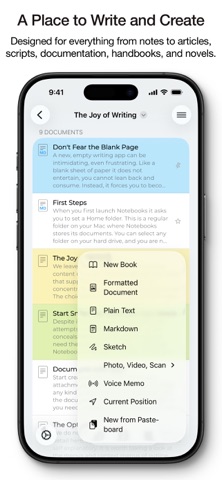
Create beautifully formatted documents with styles, attachments, tables, checklists, and optional tables of contents. Choose from ready-made styles or design your own.
Write in different ways:
Formatted text (WYSIWYG)
Plain text, with smart handling of lists, automatic character pairing, and a focused writing view
Markdown, supporting MultiMarkdown and Discount, with syntax highlighting, dedicated keyboard keys, wiki-style links, and interactive checklists
Sketch ideas or annotate images and PDFs using Apple Pencil.
STORE AND ORGANIZE
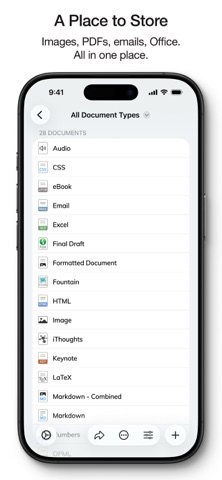
Notebooks stores all documents as regular files in standard formats. You always remain in control — no lock-in, no export worries, fully compatible across devices and over time.
Organize your work in books and nested hierarchies without limits. Import PDFs, emails, web pages, MS Office and iWork documents, images, audio, video, and more. Use full-text search to find even the most deeply nested document.
PLAN AND ACT
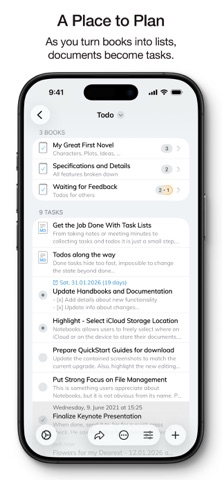
Turn books into project lists and documents into tasks. Assign due dates and alerts, create nested projects, and track progress naturally — right where your work lives.
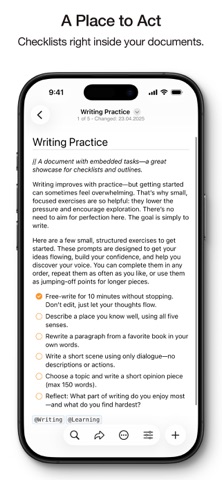
Use simple checklists in formatted documents or Markdown for lightweight task tracking.
STAY FOCUSED
Link documents together to build knowledge over time. Use wiki-style links, backlinks, contexts, and smart books to keep everything connected and within reach. When you rename or move documents, links stay intact.
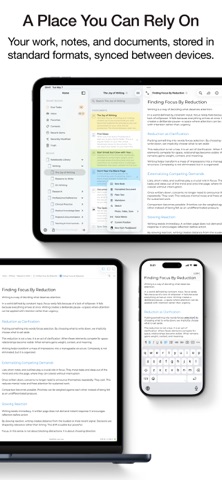
A PLACE YOU CAN RELY ON
Sync your documents between iPhone, iPad, Mac, and PC. Work on documents stored in other apps, compile selections into PDFs or eBooks, scan documents and extract text using OCR, and trust that your data stays accessible — now and in the future.
With time, Notebooks often becomes the one place users rely on to keep everything that matters close at hand.
WHAT USERS SAY
“Notebooks is a wonderful app — sophisticated in an unassuming way. I feel more productive without spending time managing the app itself.”
“You are GTD in every way that makes it efficient — and makes me efficient.”
Use Notebooks as a personal wiki, Zettelkasten, document archive, task manager, or long-term writing space. Capture quick notes, turn them into actionable tasks, combine text fragments into chapters, organize research, or keep business documents separate from personal journals — without ever switching apps.
Designed to help you stay focused and work at your own pace, Notebooks grows with your needs and is always ready to support you.
WRITE AND CREATE
Create beautifully formatted documents with styles, attachments, tables, checklists, and optional tables of contents. Choose from ready-made styles or design your own.
Write in different ways:
Formatted text (WYSIWYG)
Plain text, with smart handling of lists, automatic character pairing, and a focused writing view
Markdown, supporting MultiMarkdown and Discount, with syntax highlighting, dedicated keyboard keys, wiki-style links, and interactive checklists
Sketch ideas or annotate images and PDFs using Apple Pencil.
STORE AND ORGANIZE
Notebooks stores all documents as regular files in standard formats. You always remain in control — no lock-in, no export worries, fully compatible across devices and over time.
Organize your work in books and nested hierarchies without limits. Import PDFs, emails, web pages, MS Office and iWork documents, images, audio, video, and more. Use full-text search to find even the most deeply nested document.
PLAN AND ACT
Turn books into project lists and documents into tasks. Assign due dates and alerts, create nested projects, and track progress naturally — right where your work lives.
Use simple checklists in formatted documents or Markdown for lightweight task tracking.
STAY FOCUSED
Link documents together to build knowledge over time. Use wiki-style links, backlinks, contexts, and smart books to keep everything connected and within reach. When you rename or move documents, links stay intact.
A PLACE YOU CAN RELY ON
Sync your documents between iPhone, iPad, Mac, and PC. Work on documents stored in other apps, compile selections into PDFs or eBooks, scan documents and extract text using OCR, and trust that your data stays accessible — now and in the future.
With time, Notebooks often becomes the one place users rely on to keep everything that matters close at hand.
WHAT USERS SAY
“Notebooks is a wonderful app — sophisticated in an unassuming way. I feel more productive without spending time managing the app itself.”
“You are GTD in every way that makes it efficient — and makes me efficient.”
Detalhes
| Desenvolvedor | Alfons Schmid |
|---|---|
| Categoria | Produtividade |
| Preço | £17.99 |
| Classificação etária | 4+ |
| Versão | 13.2.1 |
| Tamanho | 47.5 MB |
| iOS mínimo | 16.6 |
| ID do pacote | com.aschmid.notebooks10 |
| Lançado | 2020-01-20 |
| Última atualização | 2026-07-28 |
| Idiomas | 4 idiomas |
O que esta página responde
- Notebooks: Write and Organize avaliações de aplicativos
- Notebooks: Write and Organize avaliação de aplicativo
- Notebooks: Write and Organize download
- Notebooks: Write and Organize classificação na loja de aplicativos
- avaliações de Notebooks: Write and Organize
- avaliações e classificações de Notebooks: Write and Organize
- é Notebooks: Write and Organize legítimo
- é Notebooks: Write and Organize uma fraude
- avaliações de usuários reais de Notebooks: Write and Organize
- classificação de Notebooks: Write and Organize
- reclamações de Notebooks: Write and Organize
- o que as pessoas dizem sobre Notebooks: Write and Organize
- avaliações de Notebooks: Write and Organize aplicativo
- prós e contras de Notebooks: Write and Organize
- experiência de Notebooks: Write and Organize
- devo confiar em Notebooks: Write and Organize
- feedback de Notebooks: Write and Organize
- avaliação de Notebooks: Write and Organize 2026
- verificação de Notebooks: Write and Organize
- verificação de segurança de Notebooks: Write and Organize
