
Bluetooth+ for Blackmagic
We Are Empire PTY LTD Foto e Vídeo 4+ £5.99
4.60 · 147 avaliações
Melhor posição agora
#18
em 4 lojas
Pico
#16Dias rastreados
46Avaliações
147 Histórico de gráficos
46 dias registrados por nós
Lojas
gráficos em 4 hoje
Avaliações
147 na App Store
Preço
mudou 12 vez(es) em nossa janela
Instalações e receita
A Apple não publica nenhum — não fazemos suposições
Atualmente em gráfico
Histórico
Construído a partir das próprias capturas diárias da Astrina — um ponto por dia.
Posição no gráfico — 🇩🇪 Top Pago
23.07 27.08 20.09
Mostrar os números
| Dia | Posição |
|---|---|
| 23.07 | #27 |
| 25.07 | #35 |
| 04.08 | #27 |
| 21.08 | #55 |
| 23.08 | #40 |
| 27.08 | #55 |
| 02.09 | #44 |
| 06.09 | #51 |
| 14.09 | #32 |
| 18.09 | #39 |
| 19.09 | #19 |
| 20.09 | #18 |
Número de avaliações
02.09 14.09 23.09
Mostrar os números
| Dia | Avaliações |
|---|---|
| 02.09 | 1,160 |
| 04.09 | 1,160 |
| 05.09 | 1,160 |
| 06.09 | 1,160 |
| 07.09 | 1,159 |
| 13.09 | 1,159 |
| 14.09 | 1,160 |
| 15.09 | 1,160 |
| 16.09 | 1,160 |
| 17.09 | 1,161 |
| 18.09 | 1,161 |
| 19.09 | 1,162 |
| 23.09 | 1,163 |
Capturas de tela


Sobre este app
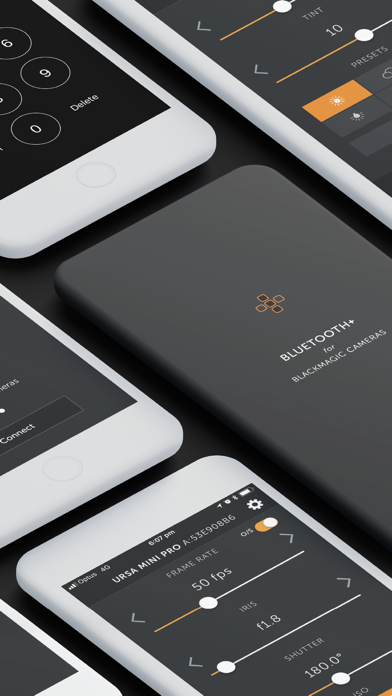
-- NEW External Controllers --
Connect Tilta Nucleus Nano & Nucleus-M to control Focus, Iris and Zoom, as well as Start & Stop Recording.
Zoom and Focus control supported on Pocket 4K only.
This is part of the new Pro feature set, which also includes Multi-Cam mode.
-- MULTI-CAM MODE --
Multi-Cam Mode is now part of the Pro feature set, and includes these fantastic features:
• Control up to 12 Blackmagic cameras at once
• Create up to 3 distinct Control Groups, to give you fine-grain control over different settings for different cameras
• You can choose to have changes made on one camera automatically update all the other cameras in its Control Group, or control everything straight from Bluetooth+
• Give your cameras Nicknames to quick, easy control
Multi-Cam gives you control over the following features synced across an entire Group:
• Start/Stop Recording
• White Balance + Tint
• Project frame rate (off-speed frame rates not supported)
• Shutter Angle/Speed
• ISO
• Overlays
• Slate
• Trigger Auto-focus
You can still control all other settings on a camera-by-camera basis, including:
• Trigger stills capture
• Iris control
• Focus + Zoom (on supported lenses)
• Codec + Resolution
• Playback control
• You can also set ISO specifically, rather than by camera group
And of course, everyone has access to all of these amazing features:
• Follow Focus (limited support for EF Mount cameras). See below for more info
• Zoom Control on supported lenses
• Trigger Stills capture
• Record Start/Stop
• White Balance + Tint, including 5 helpful presets and Auto White Balance
• Audio Controls
• Trigger Autofocus (for supported electronic lenses with autofocus enabled on lens)
• Off-speed frame rates
• Aperture (for supported electronic lenses)
• Shutter Angle
• ISO
• Auto-Exposure Control
• Active Card
• Power On/Off
• Monitor Overlays
• Codec & Resolution
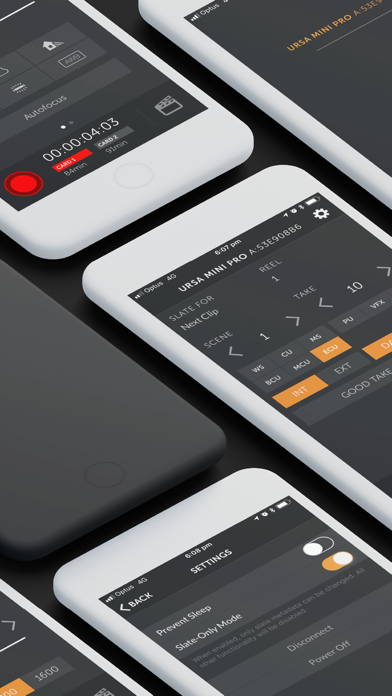
• Enter metadata in the Digital Slate (including location data from your iPhone or iPad if you give permission)
• Control Lock - locks critical controls while recording, preventing accidental settings changes during takes
-- Follow Focus --
You can now pull focus wirelessly right from your iPhone or iPad. There are some limitations outlined below.
• Currently only fully supports Pocket 4K, but as of v1.4 we now have limited support for EF mount cameras - Pocket 6K, Ursa Mini Pro G1 & G2
• The camera does not supply the app with any information on the lenses current focus distance, so the app will not update in real time if you pull focus manually on the lens
• Due to the nature of bluetooth, focus pulls may not be 100% smooth. It works well for nice slow pulls, but fast pulls my not feel entirely natural and organic. Unfortunately this is a limitation of the available technology.
• On EF mount cameras, we can only offset focus from its current position, with no broader knowledge of where the lens is in its focus range. This means that focus marks are not possible. In addition, focus pulls on EF mount cameras can be quite jerky depending on the lens in use.
-- Playback Control --
With Bluetooth+ you can control the playback of clips right from your iOS device. There are some notable limitations at this point. Currently you can:
• Start playing a clip, either forwards or backwards
• Navigate between clips, either forwards or backwards
For now, you will not be able to:
• Pause a clip that is already playing
• Change the speed of a clip that is already playing
• Control clip looping
-- Zoom Control --
Control the zoom level on supported lenses. For the most part, this will only work on MFT lenses with electronic zoom. We are currently unaware of EF lenses that support this feature
-- Slate-Only Mode --
As the name suggests, this feature locks the app into Slate-Only mode, without the ability to change critical camera settings or start/stop recording. This means you can let an assistant keep metadata up to date without the fear of interfering with important camera settings.
Connect Tilta Nucleus Nano & Nucleus-M to control Focus, Iris and Zoom, as well as Start & Stop Recording.
Zoom and Focus control supported on Pocket 4K only.
This is part of the new Pro feature set, which also includes Multi-Cam mode.
-- MULTI-CAM MODE --
Multi-Cam Mode is now part of the Pro feature set, and includes these fantastic features:
• Control up to 12 Blackmagic cameras at once
• Create up to 3 distinct Control Groups, to give you fine-grain control over different settings for different cameras
• You can choose to have changes made on one camera automatically update all the other cameras in its Control Group, or control everything straight from Bluetooth+
• Give your cameras Nicknames to quick, easy control
Multi-Cam gives you control over the following features synced across an entire Group:
• Start/Stop Recording
• White Balance + Tint
• Project frame rate (off-speed frame rates not supported)
• Shutter Angle/Speed
• ISO
• Overlays
• Slate
• Trigger Auto-focus
You can still control all other settings on a camera-by-camera basis, including:
• Trigger stills capture
• Iris control
• Focus + Zoom (on supported lenses)
• Codec + Resolution
• Playback control
• You can also set ISO specifically, rather than by camera group
And of course, everyone has access to all of these amazing features:
• Follow Focus (limited support for EF Mount cameras). See below for more info
• Zoom Control on supported lenses
• Trigger Stills capture
• Record Start/Stop
• White Balance + Tint, including 5 helpful presets and Auto White Balance
• Audio Controls
• Trigger Autofocus (for supported electronic lenses with autofocus enabled on lens)
• Off-speed frame rates
• Aperture (for supported electronic lenses)
• Shutter Angle
• ISO
• Auto-Exposure Control
• Active Card
• Power On/Off
• Monitor Overlays
• Codec & Resolution
• Enter metadata in the Digital Slate (including location data from your iPhone or iPad if you give permission)
• Control Lock - locks critical controls while recording, preventing accidental settings changes during takes
-- Follow Focus --
You can now pull focus wirelessly right from your iPhone or iPad. There are some limitations outlined below.
• Currently only fully supports Pocket 4K, but as of v1.4 we now have limited support for EF mount cameras - Pocket 6K, Ursa Mini Pro G1 & G2
• The camera does not supply the app with any information on the lenses current focus distance, so the app will not update in real time if you pull focus manually on the lens
• Due to the nature of bluetooth, focus pulls may not be 100% smooth. It works well for nice slow pulls, but fast pulls my not feel entirely natural and organic. Unfortunately this is a limitation of the available technology.
• On EF mount cameras, we can only offset focus from its current position, with no broader knowledge of where the lens is in its focus range. This means that focus marks are not possible. In addition, focus pulls on EF mount cameras can be quite jerky depending on the lens in use.
-- Playback Control --
With Bluetooth+ you can control the playback of clips right from your iOS device. There are some notable limitations at this point. Currently you can:
• Start playing a clip, either forwards or backwards
• Navigate between clips, either forwards or backwards
For now, you will not be able to:
• Pause a clip that is already playing
• Change the speed of a clip that is already playing
• Control clip looping
-- Zoom Control --
Control the zoom level on supported lenses. For the most part, this will only work on MFT lenses with electronic zoom. We are currently unaware of EF lenses that support this feature
-- Slate-Only Mode --
As the name suggests, this feature locks the app into Slate-Only mode, without the ability to change critical camera settings or start/stop recording. This means you can let an assistant keep metadata up to date without the fear of interfering with important camera settings.
Detalhes
| Desenvolvedor | We Are Empire PTY LTD |
|---|---|
| Categoria | Foto e Vídeo |
| Preço | £5.99 |
| Classificação etária | 4+ |
| Versão | 2.3.4 |
| Tamanho | 16.7 MB |
| iOS mínimo | 13.0 |
| ID do pacote | com.weareempire.BMDBluetoothControl |
| Lançado | 2018-05-09 |
| Última atualização | 2024-06-13 |
| Idiomas | 1 idiomas |
O que esta página responde
- Bluetooth+ for Blackmagic avaliações de aplicativos
- Bluetooth+ for Blackmagic avaliação de aplicativo
- Bluetooth+ for Blackmagic download
- Bluetooth+ for Blackmagic classificação na loja de aplicativos
- avaliações de Bluetooth+ for Blackmagic
- avaliações e classificações de Bluetooth+ for Blackmagic
- é Bluetooth+ for Blackmagic legítimo
- é Bluetooth+ for Blackmagic uma fraude
- avaliações de usuários reais de Bluetooth+ for Blackmagic
- classificação de Bluetooth+ for Blackmagic
- reclamações de Bluetooth+ for Blackmagic
- o que as pessoas dizem sobre Bluetooth+ for Blackmagic
- avaliações de Bluetooth+ for Blackmagic aplicativo
- prós e contras de Bluetooth+ for Blackmagic
- experiência de Bluetooth+ for Blackmagic
- devo confiar em Bluetooth+ for Blackmagic
- feedback de Bluetooth+ for Blackmagic
- avaliação de Bluetooth+ for Blackmagic 2026
- verificação de Bluetooth+ for Blackmagic
- verificação de segurança de Bluetooth+ for Blackmagic
