
Gain Map HDR Converter
MARCELO PITZ ESPINDOLA Zdjęcia i wideo 4+ 3,99 €
Najlepsza pozycja teraz
#51
w 2 sklepach
Szczyt
#51Dni śledzone
2 Historia wykresu
2 dni zarejestrowanych przez nas
Sklepy
wykres w 2 dzisiaj
Oceny
jeszcze żadnych
Cena
niezmienione w naszym oknie
Instalacje i przychody
Apple nie publikuje żadnych — nie zgadujemy
Obecnie na wykresie
Historia zaczyna się dzisiaj. Wróć jutro, aby zobaczyć, jak zmieniają się jego pozycja na wykresie i oceny — codzienna praca rejestruje jeden punkt dziennie.
Zrzuty ekranu




O tej aplikacji
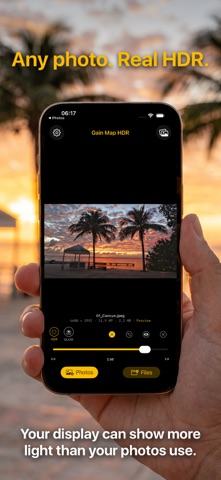
Your display can show far more light than your photos ever use. Gain Map HDR puts it to work.
Every photo on your iPhone was captured with a range of brightness that standard displays simply clip away. Gain Map HDR rebuilds that range and writes it as a true HDR gain map, so highlights glow on your iPhone, iPad and Mac — while the image still looks right everywhere else.
HOW IT WORKS
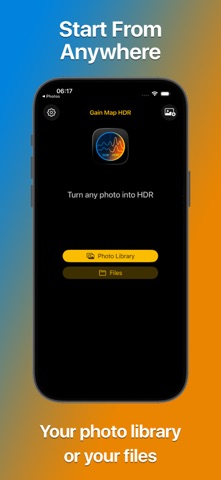
- Import from your photo library or from Files
- Choose HDR or GLOW and dial in the exact intensity
- Compare against the original at any time
- Save back to Photos or export to a folder
BUILT ON STANDARDS
- True ISO 21496-1 gain map — the open HDR standard, not a filter
- 10-bit HEIF output for smooth gradients with no banding
- Display P3 wide-gamut color
- Graceful fallback: on non-HDR screens your photo looks exactly as it should
MADE FOR PHOTOGRAPHERS
- Author, copyright, IPTC and GPS metadata preserved
- Batch processing for entire shoots
- 4:5 crop, ready for social
- Full-width editing in landscape, with every control in reach
PRIVATE BY DESIGN
Everything happens on your iPhone. No cloud processing, no account, no uploads. Your photos never leave your device.
Gain Map HDR doesn't invent detail or push saturation. It rebuilds the brightness range your camera already captured, and writes it in the format Apple devices are built to read.
Every photo on your iPhone was captured with a range of brightness that standard displays simply clip away. Gain Map HDR rebuilds that range and writes it as a true HDR gain map, so highlights glow on your iPhone, iPad and Mac — while the image still looks right everywhere else.
HOW IT WORKS
- Import from your photo library or from Files
- Choose HDR or GLOW and dial in the exact intensity
- Compare against the original at any time
- Save back to Photos or export to a folder
BUILT ON STANDARDS
- True ISO 21496-1 gain map — the open HDR standard, not a filter
- 10-bit HEIF output for smooth gradients with no banding
- Display P3 wide-gamut color
- Graceful fallback: on non-HDR screens your photo looks exactly as it should
MADE FOR PHOTOGRAPHERS
- Author, copyright, IPTC and GPS metadata preserved
- Batch processing for entire shoots
- 4:5 crop, ready for social
- Full-width editing in landscape, with every control in reach
PRIVATE BY DESIGN
Everything happens on your iPhone. No cloud processing, no account, no uploads. Your photos never leave your device.
Gain Map HDR doesn't invent detail or push saturation. It rebuilds the brightness range your camera already captured, and writes it in the format Apple devices are built to read.
Szczegóły
| Deweloper | MARCELO PITZ ESPINDOLA |
|---|---|
| Kategoria | Zdjęcia i wideo |
| Cena | 3,99 € |
| Ocena wiekowa | 4+ |
| Wersja | 1.2 |
| Rozmiar | 6.6 MB |
| Minimalny iOS | 18.6 |
| ID pakietu | com.marcpitz.GainMapHDR-iOS |
| Wydano | 2026-08-06 |
| Ostatnia aktualizacja | 2026-08-31 |
| Języki | 1 języki |
Na co odpowiada ta strona
- Gain Map HDR Converter recenzje aplikacji
- Gain Map HDR Converter ocena aplikacji
- Gain Map HDR Converter pobranie
- Gain Map HDR Converter pozycja w sklepie z aplikacjami
- recenzje Gain Map HDR Converter
- recenzje i oceny Gain Map HDR Converter
- czy Gain Map HDR Converter jest legalny
- czy Gain Map HDR Converter to oszustwo
- prawdziwe recenzje użytkowników Gain Map HDR Converter
- ocena Gain Map HDR Converter
- skargi na Gain Map HDR Converter
- co ludzie mówią o Gain Map HDR Converter
- recenzje Gain Map HDR Converter aplikacja
- zalety i wady Gain Map HDR Converter
- doświadczenie Gain Map HDR Converter
- czy powinienem zaufać Gain Map HDR Converter
- opinie o Gain Map HDR Converter
- recenzja Gain Map HDR Converter 2026
- sprawdzenie Gain Map HDR Converter
- sprawdzenie bezpieczeństwa Gain Map HDR Converter
